







The best product analytics tools for startups, compared

Contents
A tale as old as time: a founding team ships their MVP, installs Google Analytics, watches pageview numbers go up, and feels good about themselves.
Three months later they realize they have no idea why users churn, what "activated" means, or which features actually matter, so they start duct-taping together a bunch of different tools to try to figure it out.
If you're early stage, that's months of valuable context you just missed by not setting yourself up with the right solution from the start – context that could've gotten you to product market fit faster.
Don't make the same mistake. This guide compares the best product analytics tools for startups, taking into consideration what actually matters at each stage of growth.
Before getting started, let's brush up on the basics:
What is product analytics (and how is it different from Google Analytics)?
Product analytics is event-based tracking that measures how users interact with your product, not just whether they visit your website. Every button click, feature used, form submitted, and page navigated becomes a data point you can query, filter, and act on.
Google Analytics tells you "10,000 people visited your site this week, 40% bounced, average session was 3 minutes." Useful for marketing, less useful for product decisions.
Product analytics tells you "User 4521 signed up Tuesday, completed onboarding in 3 minutes, used the core feature twice, then never came back."
What to look in product analytics tools at as a startup:
- Funnels – where do users drop off between signup and activation?
- Retention cohorts – of users who signed, how many came back?
- Segmentation – do users coming from X behave differently than those from Y?
- Feature adoption – you shipped a new feature. Is anyone using it? Are those users retaining better?
For a deeper dive, check out our AARRR pirate metrics framework guide.
Building a mobile app? See our comparison of the best mobile app analytics tools. If open source matters to you, we've also rounded up the best open source analytics tools.
What is product-market fit (PMF)?
Product-market fit means you've built something people actually want – and keep coming back to. It's the point where retention curves flatten instead of declining to zero, users start recommending your product without being asked, and growth feels like it's pulling you forward rather than being pushed.
The problem is that PMF isn't binary – it's a spectrum. Most startups think they have it before they actually do.
For a deeper framework on how to think about this, read our founder's take on the product-market fit game – it breaks PMF into five levels you need to clear, from finding a real problem to onboarding your first reference customers.
We also have a full guide on how to measure product-market fit using a combination of surveys, retention data, and word-of-mouth signals.
What to measure when you're pre-PMF
Your situation: You have an MVP with a few hundred users. You don't know if they're getting value. Retention is a mystery. The product might look completely different in six weeks.
The metrics that matter: focus on building a key metrics dashboard and finding your activation metrics, aka the actions correlated with long-term retention. Correlated is key – you're not guessing, you're testing which actions predict whether someone comes back.
You should also be looking at onboarding completion rate (funnel from signup → first meaningful action).
Pair your analytics tool with:
- Session replay – numbers say 40% drop off at step 3, but replay will show you they couldn't find the "Next" button.
- Surveys – run a PMF survey ("How disappointed would you be if you could no longer use this product?"). Add exit intent and onboarding feedback surveys.
- Cohort comparisons by acquisition source.
Not sure which tools to use?
We've compared the best session replay tools, best open source session replay tools, and best in-app survey tools for developers and startups.
What to measure when you're post-PMF
Your situation: Users are returning. Revenue is growing. You have a small team. The question shifts from "does this work?" to "how do we grow efficiently?"
The metrics that matter:
- Cohort retention curves – retention by signup week. Is the curve flattening (good) or declining to zero (you don't actually have PMF)?
- Engagement depth – DAU/MAU ratio, session frequency, feature breadth per user
- Feature adoption – what % of activated users tried the new feature? Use lifecycle analysis to see if they retain better
- Conversion to paid – funnel from trial → paid → retained subscription
Pair your analytics tool with:
- Feature flags – gradual rollouts (1% → 10% → 100%), kill switches, targeting for beta access
- A/B testing – test onboarding flows, pricing pages, feature gates against retention or conversion goals.
- Error tracking – correlate bugs with churn ("Users who hit the checkout error in v2.3.1 churned at 3x the normal rate").
- LLM observability – if you're shipping AI features, track cost, latency, and output quality per model
Not sure which tools to use?
We've compared the best feature flag tools, open source A/B testing tools, error tracking tools, and open source LLM observability tools for developers and startups.
What to measure as a scale-up
Your situation: You have a larger organization, perhaps including a data team. Reliability matters as much as growth. Enterprise customers ask about SLAs and data residency.
The metrics that matter:
- Reliability – crash-free sessions, error rates, p95/p99 latency
- Data quality – event schema compliance, missing properties, taxonomy consistency
- Cost-to-serve – COGS per user, analytics costs as a line item
- Net revenue retention – expansion vs churn at the account level using group analytics
Pair your analytics tool with:
- Data warehouse – create a single source of truth and query data from across product analytics, sales, finances, ops, and more.
- Group analytics – track funnels, retention, and feature adoption at the account level, not just individual users
- Logs – debug issues across your backend alongside user behavior and error data
- SQL access – write custom queries when the UI doesn't cover your edge case, build views for your data team
What if I don't have a data team?
You don't need one to get started. A lot of product analytics tools are designed so a single engineer or technical founder can set up tracking, build funnels, and run experiments without dedicated data infrastructure.
Most modern analytics platforms also feature AI-powered tools that let anyone on the team ask questions in plain language instead of writing queries from scratch.
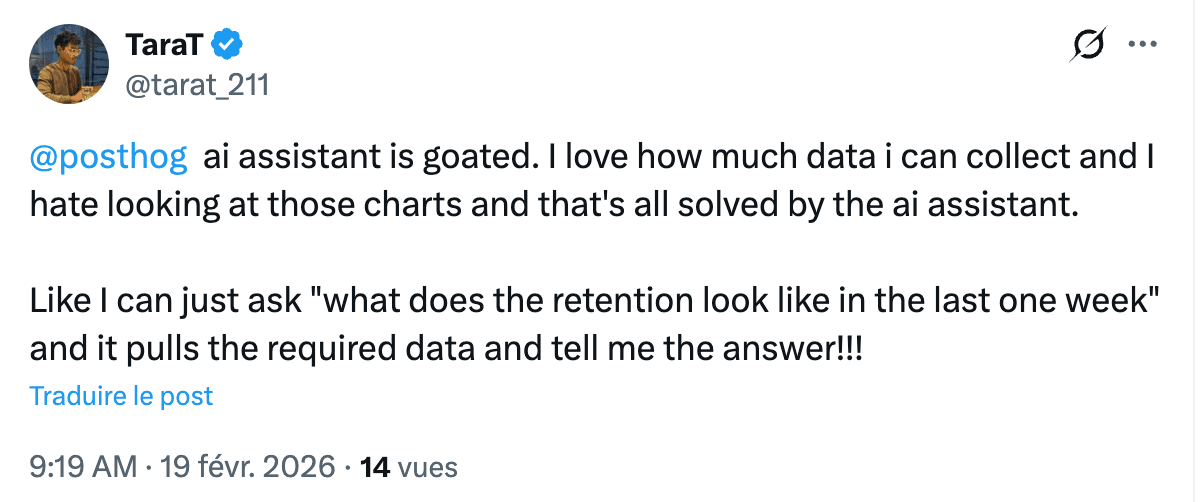
For example, PostHog AI can generate SQL queries, build funnels and retention charts, create insights and dashboards, summarize session replays, draft surveys, and help debug why a metric looks off – all from a natural language prompt. It won't replace a data team at scale, but it means you're not blocked while you're still small.
Now that you have a rough idea of what to measure, here's what to measure it with:
1. PostHog

What is PostHog and why should startups consider it?
PostHog is an all-in-one developer platform that bundles product analytics with web analytics, session replay, feature flags, A/B testing, surveys, error tracking, logs, LLM observability, workflows, and more. It's open source at its core, with cloud hosting in both the US and EU.
PostHog ships fast, so the platform keeps getting better; check the changelog to see what's new.
Every product has its own generous free tier, so you pay nothing until you have real traction. Over 90% of companies on PostHog pay $0! If you're an early-stage startup (less than 2 years old, under $5M raised), you may also qualify for the PostHog for Startups program – $50,000 in credits for a year, plus partner benefits and merch.
Billing limits per product mean no surprise bills, and you don't need a credit card to get started. Features that other tools gate normally behind enterprise pricing, like reverse proxy, can be accessed in the free tier.
Key features
- AI-powered analytics with natural language queries, SQL generation, session replay summaries, an MCP server and CLI for AI workflows
- Funnels, retention, paths, cohorts, lifecycle analysis – all included in free tier
- Session replay with console logs, network requests, and performance data
- Experimentation with statistical significance built on feature flags
- Surveys with PMF templates, NPS, and targeting by user behavior
- Error tracking with stack traces alongside user behavior context
- LLM observability to monitor and optimize AI features
- Data warehouse and CDP for cross-product queries, external source connections, and syncing data between tools
Getting started
There is no need to jump on a "quick sales call" or to request a demo (unless you want to talk to a human), PostHog is fully self-serve.
Create a free account at posthog.com, pick US or EU hosting, and you're in. No credit card needed.
Getting started takes minutes; our docs walk you through instrumentation step by step, or you can just paste a snippet in your <head> tag and autocapture starts collecting data immediately.
Want to skip the manual setup entirely? You can try out the PostHog wizard, which detects your framework, installs the right SDK, and configures everything for you.


Install PostHog with one command
Paste this into your terminal and make AI do all the work.

Pricing
| Product | Free tier (monthly) | After free tier |
|---|---|---|
| Product analytics + web analytics | 1M events | $0.00005/event |
| Session replay | 5K recordings | ~$0.005/recording |
| Feature flags + experiments | 1M requests | $0.0001/request |
| Surveys | 1,500 responses | $0.10/response |
| Error tracking | 100K exceptions | $0.00037/exception |
| Data warehouse | 1M synced rows | $0.000015/row |
| LLM observability | 100K events | $0.00006/event |
| Logs | 10GB ingested | $0.25/GB |
| Workflows | 10K messages/channel | $0.003000/email |
| PostHog AI | 500 credits | $1 per 100 credits |
Every product is billed independently – you only pay for what you use beyond the free tier, and there are bulk discounts for higher usage. No per-seat fees, you get unlimited team members on every plan.
Use the pricing calculator to estimate costs based on your actual volume.
PostHog is for you if...
- You just launched your MVP and wants to get analytics up and running quickly
- You're a technical founder or product engineer who'd rather install one tool than manage five
- You want AI-powered analytics with natural language queries, and an MCP server and CLI to integrate your analytics data into your AI workflows
- You need EU hosting for privacy and compliance
- You want to hit the ground running, start free, and only start paying when you have momentum
PostHog is not for you if...
- Your team is entirely non-technical – PMs who need point-and-click everything may find the learning curve steep
- You only need in-app guides and onboarding flows
- You want a warehouse-native analytics tool that sits on top of your existing BigQuery, Snowflake, or Databricks setup – PostHog has its own data warehouse and can sync data in and out, but it's not designed to be a query layer for an external warehouse you already own
- You want a dedicated mobile analytics platform – PostHog has mobile SDKs and mobile replay, but you might be bettter served by a tool with deeper mobile-specific features
2. Mixpanel
What is Mixpanel and why should startups consider it?
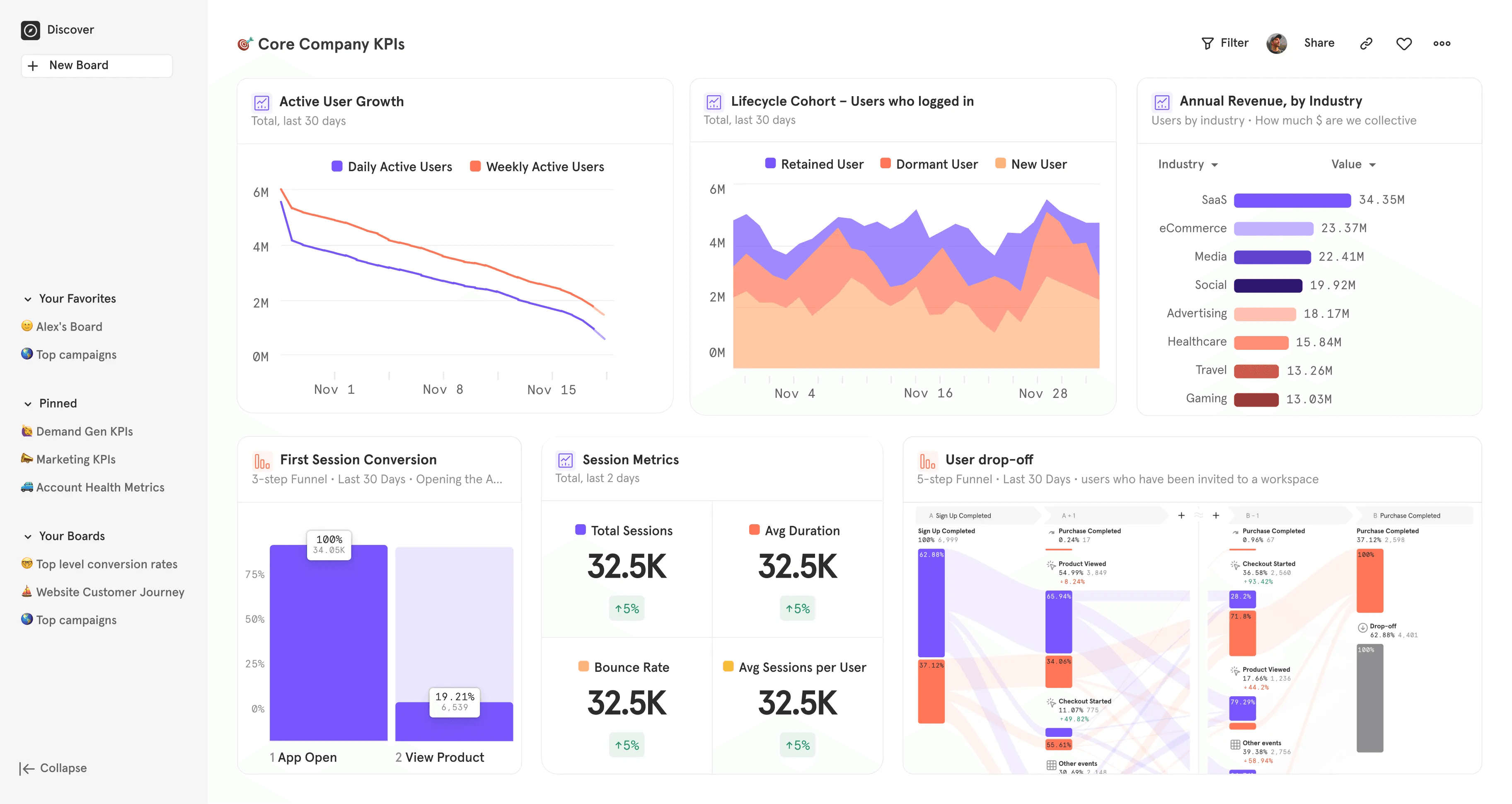
Mixpanel is a product analytics platform focused on funnels, retention, and cohort analysis – with session replay, feature flags, and A/B testing now built in. If analytics depth is your primary requirement, Mixpanel's query interface is fast and polished. The Spark AI builder helps non-technical team members explore data without learning the event model.
Mixpanel's experiments and feature flags launched in late 2025, so the platform is moving toward a more integrated workflow – though it still doesn't cover surveys or error tracking. Session replay is also relatively new, so it's less mature than dedicated replay tools.
The startup program is the headline for eligible teams: companies under 5 years old with ≤$8M raised get the first year free – up to 1B events, 500K replays, and advanced features.
Key features
- Spark AI query builder for non-technical users
- Heatmaps and session replay with automatic capture of rage clicks and dead clicks
- Feature flags with cohort targeting, percentage rollouts, and sticky variants (enterprise add-on)
- A/B testing with primary, secondary, and guardrail metrics (enterprise add-on)
- Metric Trees for mapping how experiments ladder up to business goals (enterprise add-on)
- Warehouse connectors for Snowflake, BigQuery, Databricks, Redshift
Getting started
Self-serve signup – no credit card required. Paste a JavaScript snippet before your closing </head> tag, or install an SDK. You can also connect an existing data source via Segment, RudderStack, or warehouse connectors.
Autocapture is available for web. For mobile and server-side, you'll need to instrument events manually.
The startup program requires an application – eligibility is verified, and data must be flowing within 90 days of acceptance or you lose access.
Pricing
| Plan | Price | Includes |
|---|---|---|
| Free | $0 forever | 1M events/mo, 10K replays, 5 saved reports |
| Startup | Free first year | Up to 1B annual events, 500K replays (if eligible) |
| Growth | From $0 | $0.28/1K events after 1M free |
| Enterprise | Contact sales | Unlimited events, governance |
The free plan covers core analytics but excludes several features startups often need as they grow: behavioral cohorts, custom properties, formulas, and saved metrics are limited.
Account-level analytics, experiment reporting, and feature flags are paid add-ons. Monitoring is capped at 5 alerts per project, and there's no anomaly detection, root cause analysis, or Metric Trees.
If you're pre-PMF and just need funnels and retention, the free tier works. Once you're running experiments or tracking B2B accounts, you'll hit the upgrade wall quickly.
Mixpanel is for you if...
- You want strong standalone funnel and cohort analysis
- You qualify for the startup program and want a free first year
- You have a data warehouse and want strong warehouse connectors
- Your team includes non-technical PMs who need a polished, visual query builder
Mixpanel is not for you if...
- You need surveys, error tracking, or LLM observability in the same platform – Mixpanel doesn't offer any of these
- You want mature, battle-tested replay and experimentation – Mixpanel's are newer additions (late 2025)
- You rely heavily on autocapture – Mixpanel added web autocapture recently, but it's less mature than PostHog's or Heap's, and mobile still requires manual instrumentation
3. Amplitude
What is Amplitude and why should startups consider it?
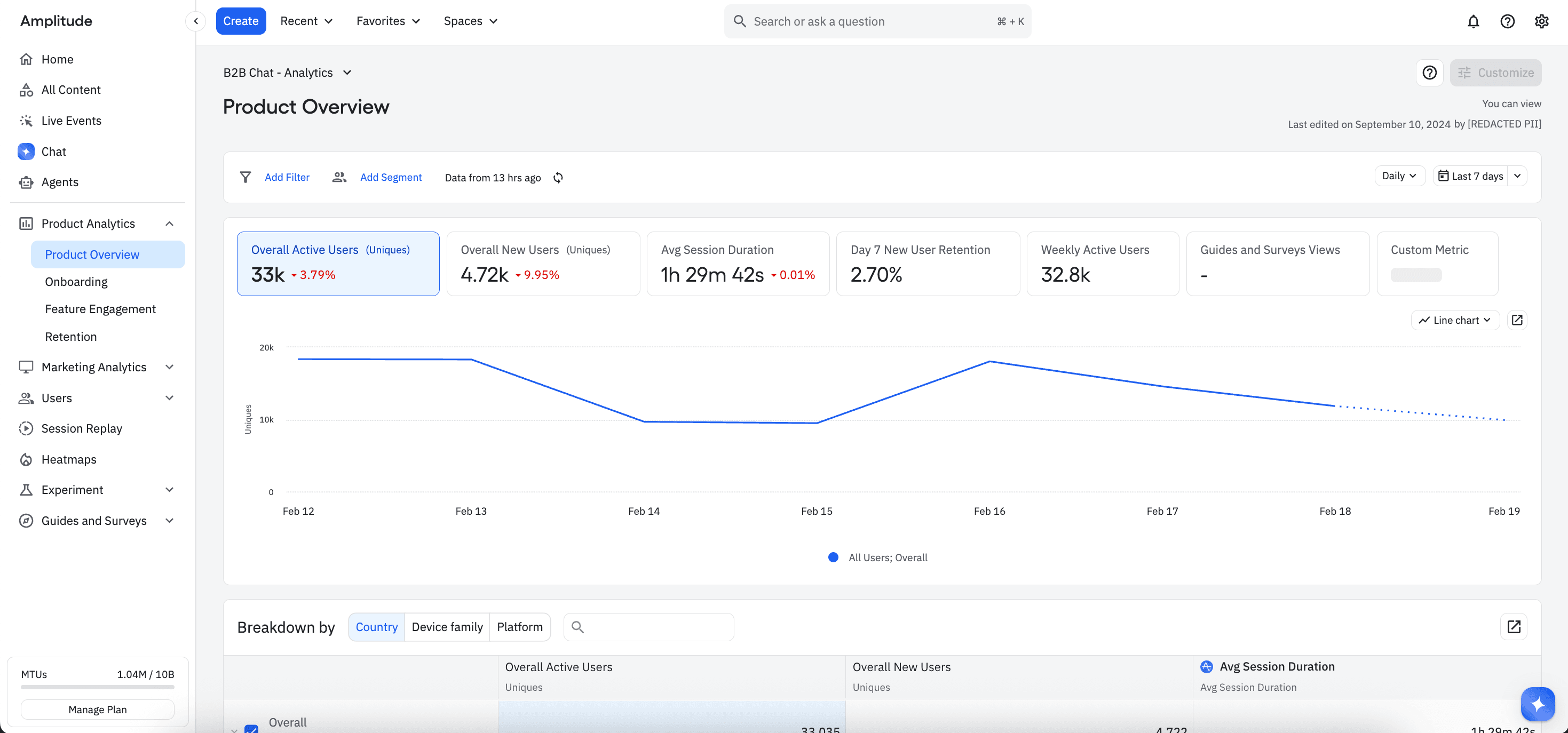
Amplitude is a retention-focused analytics platform known for the deepest cohort math in the category – N-day, unbounded, and bracket retention with cohort comparison overlays. If understanding why users come back (or don't) is your primary workflow, Amplitude's retention tooling is best-in-class.
The platform has expanded well beyond analytics. It now includes session replay, feature flags, A/B testing (Amplitude Experiment), and Guides & Surveys. A Unified Browser SDK lets you initialize analytics, replay, experiments, and guides in a single call.
Amplitude bills on event volume, with 2 million events per month included free. That puts it on the same footing as PostHog and Mixpanel, so the comparison comes down to what's bundled. Amplitude gates advanced analytics behind plan tiers and add-ons, and only publishes pricing for events on its Plus plan.
Key features
- Cohort comparison overlays for segment-by-segment retention visualization
- Feature flags with percentage rollouts – unlimited on all plans including free
- Guides & Surveys for in-app tooltips, banners, checklists, and NPS with annoyance monitoring to throttle pop-ups
- Ask Amplitude AI for natural language data exploration
- Ampli CLI for type-safe, code-generated tracking based on your tracking plan
- Warehouse connectors for Snowflake, BigQuery, Redshift, and real-time streaming via Kinesis and Pub/Sub
Getting started
Self-serve signup for the Starter (free) and Plus plans. Install an SDK or use the Unified Browser SDK to initialize analytics, replay, experiments, and guides in one call. You can also paste a <script> snippet in your <head> tag for a no-build setup.
For data already in a warehouse, connect Snowflake, BigQuery, or Redshift directly.
Pricing
| Plan | Price | Includes |
|---|---|---|
| Free | Free | 2M events and 10K session replays per month, unlimited flags, AI chat |
| Plus | Usage-based, first 2M events free | Custom events and formulas, 20 behavioral cohorts, alerts, heatmaps, web experiments |
| Growth | Contact sales | Causal insights, predictive audiences, feature experimentation, SSO |
| Enterprise | Contact sales | Cross-product analytics, multi-armed bandits, warehouse-native, EU residency |
Guides & Surveys, extra session replay volume, and additional automated syncs are available as add-ons on Plus plans.
Amplitude is for you if...
- Retention curves and cohort comparisons are your primary analytical workflow
- You want the largest free event allowance to start with (2M/month)
- You want experiment exposure events excluded from your analytics bill
- You need governance and taxonomy tools as your data team grows
Amplitude is not for you if...
- You want simple, transparent pricing – only the Plus plan has published rates, and Growth/Enterprise/Add-ons require sales conversations
- You need error tracking or logs – Amplitude doesn't offer either
- You're pre-PMF and just need basic funnels and retention – the depth of tooling can be more than you need right now
4. Heap

What is Heap and why should startups consider it?
Heap is an analytics platform that records every user interaction automatically, then lets you define events retroactively using a visual point-and-click editor in a Chrome extension.
Famous for their autocapture capabilities, Heap is particularly appealing for non-technical founders and early-stage teams who don't want to commit to a tracking plan before they understand what matters. The free plan includes 10K sessions/mo, 6 months of data history, and SSO.
Worth noting: Heap was acquired by Contentsquare, and the tools are merging into one platform. For feature flags, surveys, and error tracking, you'll need separate tools.
Key features
- Autocapture records every interaction – retroactive queries for events you define later
- Visual labeling: point-and-click event definition in a Chrome extension, no code needed
- Account > user > session > event hierarchy for B2B products
- Effort analysis to identify high-friction workflows
Getting started
Paste the Heap snippet on your site and autocapture starts recording every interaction immediately.
Use the Chrome extension for visual labeling to define named events on top of the autocaptured data – point and click on any UI element to create a named event retroactively. For mobile, install the iOS or Android SDK, though autocapture is web-only and mobile requires manual event instrumentation.
If you already have data flowing through Segment or a warehouse, Heap supports those as import sources too.
Pricing
| Plan | Price | Includes |
|---|---|---|
| Free | $0 | 10K sessions/mo, core charts, 6 month data retention |
| Growth | Install snippet for estimate | Session-based pricing |
| Pro/Enterprise | Contact sales | Advanced features, longer retention |
Heap is for you if...
- You don't yet know what to track and want to avoid premature tracking plan decisions
- You want to define events by clicking on UI elements – no code needed
- You're a non-technical founder who wants retroactive analysis without engineering help
- You want to start collecting data immediately and figure out what matters later
Heap is not for you if...
- You need clean, well-governed data from day one – autocapture creates noise without governance
- You're building a cross-platform product (web + mobile) – session definitions differ between platforms
- You want upfront pricing – Growth/Pro requires installing the snippet for an estimate
- You want long data retention on the free plan – you're capped at 6 months of history, which isn't enough to measure annual retention or seasonal patterns
- You need SQL access or API depth for custom analysis – Heap is more visual and less technical than PostHog, Mixpanel, or Amplitude
5. Fullstory

What is Fullstory and why should startups consider it?
Fullstory is a session replay-first platform with product analytics layered on top. It flips the typical analytics workflow: instead of starting with dashboards and drilling into data, you start with session replays and layer quantitative analytics on top.
The "tagless" autocapture engine records user interactions without manual instrumentation, and AI-generated session summaries cut review time (you can read a summary instead of watching a 15-minute session).
The trade-off is depth: Fullstory's funnels and retention are lighter than its competitors, and all pricing tiers require contacting sales. Mobile analytics is a separate paid add-on. For feature flags, surveys, and error tracking, you'll need separate vendors.
Key features
- Click-from-metric-to-replay workflow across product analytics and session replay
- AI session summaries to surface key moments and reduce replay review time
- "Tagless" autocapture for interaction recording without manual instrumentation
- Configurable privacy controls: capture what you need, mask what you don't
- Frustration signals: rage clicks, dead clicks, error clicks surfaced automatically
Getting started
Contact sales for all tiers. No public self-serve signup for full functionality.
Pricing
All tiers (Business, Advanced, Enterprise) require contacting sales. Mobile analytics is a separate add-on. No public pricing available.
Fullstory is for you if...
- Your primary workflow is "watch what users do, then quantify it"
- You need a tight replay-to-analytics loop
- You care about frustration detection (rage clicks, dead clicks) as a primary signal
Fullstory is not for you if...
- You need deep quantitative analytics as your primary tool
- You want transparent, self-serve pricing – all tiers require contacting sales
- You're building mobile-first – mobile analytics is a paid add-on, not included
- You want AI features beyond session summaries – Fullstory's AI is focused on replay summarization, not query generation, survey drafting, or broader analytics assistance
- You're a startup that needs to know costs upfront before committing
- You need feature flags, A/B testing, surveys, or error tracking – Fullstory doesn't offer any of these, so you're adding more vendors on top
6. Pendo
What is Pendo and why should startups consider it?
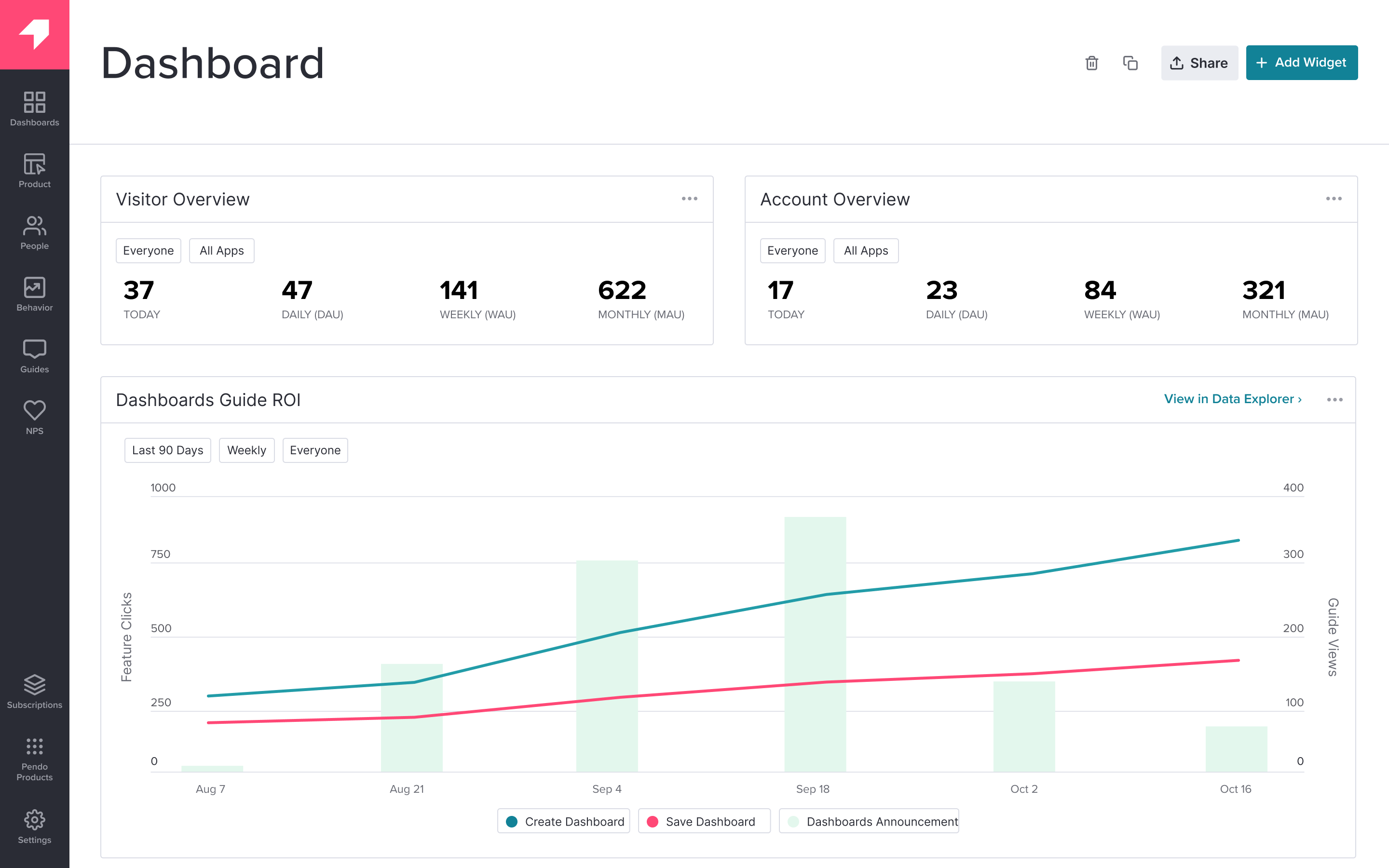
Pendo pairs product analytics with in-app guides, tooltips, walkthroughs, and NPS surveys. Its strength is the insight-to-action loop: see that 60% of users never discover your highest-retention feature, then build an in-app guide pointing them to it.
The free plan includes 500 MAUs with retroactive analytics, in-app guides, NPS, and roadmap tools. If your primary need is onboarding users and measuring their behavior in the same tool, Pendo's integration between analytics and guides is solid.
The trade-off: Pendo excludes anonymous users from retention analysis entirely, so if you have a large unidentified user base you'll get an incomplete picture. For session replay, feature flags, and error tracking, you'll need separate vendors.
Key features
- Free plan: 500 MAUs with analytics, in-app guides, NPS, and roadmaps
- Funnels and paths for drop-off and next-action analysis
- In-app guide builder for tooltips, walkthroughs, and feature announcements – no code needed
- MAU-based pricing – predictable if your user count is stable
- Roadmap and feedback tools for product planning
Getting started
Free plan available (500 MAUs). Self-serve for the free tier. Paid plans require contacting sales for MAU-based pricing.
Pricing
| Plan | Price | Includes |
|---|---|---|
| Free | $0 | 500 MAUs, analytics + guides + NPS |
| Growth | Contact sales | MAU-based pricing, more guides |
| Enterprise | Contact sales | Governance, SSO, advanced analytics |
Pendo is for you if...
- You want to identify where users struggle and deploy an in-app fix from the same tool
- You're a PM who wants to build onboarding flows and feature announcements without engineering help
- Your user base is small and identified (the free plan is capped at 500 MAUs)
- You want analytics and in-app messaging in one platform without custom integrations
Pendo is not for you if...
- You have lots of anonymous or unidentified users – retention analysis excludes them entirely
- You want SQL access or deep API integrations – Pendo is less technical than PostHog or Mixpanel
- You only need analytics, not in-app guides – you're paying for capability you won't use
- You need session replay, feature flags, or error tracking – Pendo doesn't include any of these
Which product analytics tool should you choose for your startup?
Step 1: Know your stage
Pre-PMF: Speed over depth. Get data flowing in an afternoon and focus on three questions: are users signing up, are they reaching core value, are they coming back? See if your product has legs.
Post-PMF: You've validated the product. Now you need to understand why it works and how to grow efficiently. The tool you chose at the MVP stage either scales with you or becomes technical debt.
Scale-up: Reliability, data quality, and cost control matter as much as insights. You need warehouse integrations, group analytics for B2B accounts, and compliance features like EU residency and SSO.
Step 2: Decide what you need in one platform vs. separate tools
The bundled approach means less setup, shared context across products, and one bill.
The unbundled approach gives you flexibility to swap individual tools, but every additional vendor means another data model, another integration, and another place where user context gets lost.
Step 3: Match the pricing model to your product
The wrong pricing model can cost you significantly more depending on your product's usage pattern.
- Event-based: You pay per action tracked. Best for products with moderate events per user. Watch out for high-frequency events that inflate volume.
- MTU-based: You pay per unique user. Best for high-engagement products where each user triggers hundreds of events. Watch out for anonymous traffic – unidentified visitors count as separate MTUs until merged.
- Session-based: You pay per session. Best for products with short, focused sessions. Watch out for products where users return multiple times per day.
- MAU-based: You pay per monthly active user. Most predictable if your user count is stable. Watch out for rapid growth – costs scale linearly with users regardless of data volume.
Step 4: Check what's actually free
"Free tier" means very different things across tools.
Some tools give you the full product at low volume. Others gate core features behind paid plans and call the rest "free." Before committing, check: how many events/sessions/users are included? Which features are restricted? Do you need a credit card? How long is data retained?
| Tool | Free tier | Pricing model | Self-serve? | Best for | You'll also need... |
|---|---|---|---|---|---|
| PostHog | 1M events/mo | Events (per product) | Yes | All-in-one platform | Nothing – it's bundled |
| Mixpanel | 1M events/mo | Events | Yes | Pure funnel/cohort analysis | Replay, flags, surveys, errors |
| Amplitude | 2M events/mo | Events | Partial | Retention depth | Error tracking, logs |
| Heap | 10K sessions/mo | Sessions | Yes | Retroactive autocapture | Flags, surveys, errors |
| Fullstory | 10K sessions/mo | Contact sales | No | Replay-first analysis | Flags, surveys, errors |
| Pendo | 500 MAUs | MAUs | Free tier | Analytics + in-app guides | Replay, flags, errors |
Recommendations by team type
For pre-PMF startups and solo founders
- PostHog if you want analytics, replay, surveys, flags, and more in one quick install with a generous free tier
- Mixpanel if you qualify for the startup program and want a free first year with up to 1B events
- Heap if you don't know what to track yet and want retroactive analysis without a tracking plan
For post-PMF and scaling teams
- PostHog if you want connected workflows – funnel drop-off → replay → experiment → deploy – without switching tools
- Amplitude if retention math and cohort comparisons are your primary analytical workflow
- Mixpanel if your team includes non-technical PMs who need a polished, visual query builder
For engineering-heavy teams
- PostHog if you want SQL access, an MCP server and CLI, open source, and everything in one data model
- Amplitude if you need type-safe tracking (Ampli CLI) and governance tooling as your data team grows
- Mixpanel if you have a data warehouse and want strong warehouse connectors with experiments built in
For product managers and less technical teams
- Pendo if you need analytics and in-app guides in one tool without engineering help
- Amplitude if you want Guides & Surveys alongside deep analytics and AI-powered exploration
- Fullstory if your primary workflow is watching sessions and quantifying what you see
For teams building AI-powered products
- PostHog if you want LLM observability (cost, latency, token usage, output quality) alongside product analytics, replay, and experiments in one platform
- Amplitude if you're already using Amplitude for analytics and want to layer experiments on top of AI features
- Mixpanel if you need to track AI feature adoption and conversion funnels but handle observability separately with a dedicated tool
Install PostHog with one command
Paste this into your terminal and make AI do all the work.
FAQs
PostHog says it makes your product "self-driving" – what does that mean?
It means PostHog digs through your product data, finds what's worth fixing, and has agents do the work.
It starts with context. A full suite of developer tools – AI Observability, Product Analytics, Session Replay, Feature Flags, Experiments, Error Tracking, Logs, and more – captures everything happening in your product, and a Context Warehouse unifies it into one source agents can read across.
From there, Scouts read across all of it and sort what's worth knowing from what's just noise. What clears the bar becomes a report in your inbox: an agent picks it up, roots out the cause, and opens a PR. You review and merge.
You can steer it from Slack, the web app, the desktop app, or your own editor via the MCP or CLI.
How do I track analytics for my MVP with PostHog?
Start minimal. Install PostHog's autocapture snippet (or run our AI setup wizard). You'll start collecting data right away.
Define your activation hypothesis, build one funnel, watch 5-10 session replays a week. You need to answer three questions: are users signing up, are they reaching core value, are they coming back? The rest can wait.
What is a tracking plan and when do I need one?
A tracking plan is a document that defines every event you track, its properties, and its naming conventions. You don't need one on day one – autocapture gets you started immediately. But once you have multiple people instrumenting events or your product has grown beyond a few core flows, a tracking plan prevents duplicate events, inconsistent naming, and data you can't trust.
How do I choose the right analytics tool for my startup?
Match tool to stage: activation metrics pre-PMF, retention cohorts post-PMF.
Compare pricing models against your product's usage pattern: events (PostHog, Mixpanel, Amplitude), sessions (Heap), MAUs (Pendo).
Check whether you need adjacent tools (replay, flags, experiments, surveys, error tracking...) in the same platform or are fine managing separate vendors.
And check mobile SDK support if building native apps.
Can I use product analytics for my mobile app?
Yes. PostHog has SDKs for iOS, Android, React Native, and Flutter. Mixpanel and Amplitude also have broad mobile support. Heap is primarily web. Fullstory's mobile is a paid add-on.
Mobile apps generate more events per session than web, so factor that into cost estimates on event-based pricing.
See our comparison of the best mobile app analytics tools.
What is event-based analytics?
Instead of tracking pageviews, event-based analytics records specific user actions – button clicks, feature usage, form submissions, purchases, API calls – as discrete data points with properties attached.
This lets you build funnels across any sequence of actions, segment users by behavior, and answer questions like "what did users who retained do differently in their first session?"
What's the difference between autocapture and manual event tracking?
Autocapture automatically records every user interaction (clicks, page views, form submissions) without you writing code for each one. You get data immediately but may need to filter noise.
Manual tracking requires you to define and instrument each event explicitly – more setup time, but cleaner data from day one.
PostHog, Amplitude, and Heap support autocapture. Mixpanel added web autocapture recently.
Should I switch from Google Analytics to product analytics?
You probably don't need to switch – you need to add.
GA4 is fine for marketing attribution and traffic analysis. Product analytics covers everything after signup: funnel drop-off, retention cohorts, feature adoption, behavioral segmentation. Most teams keep a web analytics tool for marketing and add a product analytics tool for in-product behavior.
Read our GA4 comparison for a deeper breakdown.
How does product analytics relate to business intelligence?
Product analytics = user-level event streams for real-time product decisions. BI = aggregated reporting for finance and ops.
Post-PMF startups export product events to a data warehouse (Snowflake, BigQuery) for unified reporting that combines product behavior with revenue data. Product analytics feeds the warehouse; BI tools visualize the combined data.
Can I use multiple analytics tools at the same time?
Yes, and many teams do.
The risk is data fragmentation: if your funnel data is in one tool and your retention data is in another, you lose the ability to connect them.
Tools like PostHog that bundle analytics, replay, and experiments in one data model avoid this problem. If you do use multiple tools, you can route data through a single source (like Segment or a warehouse) to keep things consistent.
What is cohort analysis and why does it matter?
A cohort is a group of users who share a characteristic – usually signup date.
Cohort analysis compares how different groups behave over time: did users who signed up in January retain better than those who signed up in March? This tells you whether your product is actually getting better, not just growing.
It's an important analysis for understanding product-market fit.
How do product analytics tools handle user privacy and GDPR?
Most tools offer EU hosting, data residency options, and consent management.
PostHog offers both US and EU cloud hosting; Amplitude has EU data residency on enterprise plans; Mixpanel provides EU data residency and supports data deletion requests. If GDPR compliance is critical, check whether the tool processes data in the EU, supports consent-based tracking, and offers data deletion APIs.
Read our guide on the best GDPR compliant analytics tools for more details.
PostHog is your product's context layer. With a full suite of developer tools – AI observability, product analytics, session replay, feature flags, experiments, error tracking, logs, and more – PostHog ingests and stores all the data agents need to diagnose problems, uncover opportunities, and ship fixes. A data warehouse and CDP tie it all together, unifying that context into one source agents can read across. You can steer it all from Slack, the web app, the desktop (PostHog Desktop), or your own editor via the MCP.