







Quota and limits
Contents
Replay Vision usage is metered per organization in credits, on a monthly billing cycle. This page covers how observations are priced, what sets the budget, how to cap a single scanner, what counts against it, and what to do when you're approaching it.
How usage is priced
One credit is $0.01. Every successful observation costs a fixed number of credits that depends on the model the scanner uses – newer models tend to produce higher-quality observations but cost more per observation. The model picker in the scanner editor shows each option's price, and the current lineup is:
| Model | Credits per observation |
|---|---|
| Gemini 3.5 Flash Lite | 2 |
| Gemini 3 Flash (default) | 5 |
| Gemini 3.8 Flash | 15 |
The price is per observation. It doesn't depend on how long the recording is or how much the model writes. Prices are frozen when the observation runs: editing a scanner's model later doesn't change what past observations cost, and each $recording_observed event carries a credits property with its price.
The monthly budget
Every organization gets a monthly allowance of free credits (see pricing for the current amount). Beyond that, credits are billed, and the budget is the Replay Vision spending limit you set on your organization's billing page:
- On the free plan, the budget is the free credits. Once they're used up, scanning stops until the next period unless you add billing.
- With billing and a spending limit, the budget is the free credits plus whatever the limit pays for.
- With billing and no spending limit, spend is uncapped. Replay Vision shows your projected monthly spend and a reminder to set a limit.
The budget is shared by every project in the organization, and it resets with your billing period (or at the start of each calendar month if billing hasn't synced). Organizations in the startup program have Replay Vision spend capped at $3,000 a month, because startup credits are shared across all PostHog products.
The Scanners tab on the Replay Vision home shows a Spend this billing period card with credits used, a meter projected to the end of the period, and a link to the Usage tab.
You can also fetch the budget programmatically – the vision-quota-get MCP tool returns credit_limit (null when uncapped), credits_used, remaining, exhausted, projected_monthly_credits, and the current period's start and end. vision-quota-spend-series-get returns spend per day for the period.
Per-scanner limits
The organization budget is shared, so one broad scanner can spend the whole month's credits and leave nothing for the others. To prevent this, give a scanner its own limit: the maximum credits it can spend per billing period. Turn on Credit limit in the scanner editor, or set the credit_limit field on the vision-scanners-create and vision-scanners-update MCP tools. The editor suggests a starting value from the scanner's estimated monthly spend, and warns you when the limit is below that estimate or too low to pay for a single scan. For example, hold one scanner to 10,000 credits per month ($100) and another to 5,000 ($50).
Scanners have no limit by default (credit_limit is null), and the minimum limit is 1 credit.
A scanner stops when the credits it has left cannot pay for one more observation. It stays enabled, but it does not scan the sessions it skipped this period, even after you raise the limit – there is no backfill when the period resets, the same as for a scanner you re-enable. A running backfill on that scanner is put on hold. Scanning starts again at the next period reset.
A scanner-level limit is a cap on one scanner, not a reserved share of the organization budget. The organization budget still applies on top of it, so a scanner below its own limit stops when the organization budget is exhausted.
What counts against the budget
| Observation outcome | Counts against budget? |
|---|---|
| Succeeded | Yes – charged the scanner's credits per observation |
| Pending | Reserved while in flight |
| Running | Reserved while in flight |
| Failed | No |
| Ineligible | No |
Pending and running observations reserve budget so a burst of concurrent on-demand triggers can't blow past the cap before any of them complete. Once an observation reaches a terminal failed or ineligible state, its reservation is released.
Every observation costs the same, whatever started it: the scanner's automatic sweeps, a scan you start from the player or a scanner, a one-off scan of a few sessions, a retry of a failed or ineligible observation, or a backfill over past recordings. A retry deletes the old observation and scans the recording again, so a retry that succeeds is charged like a new scan.
Alerts, ratings, searching observations, and scouts reading them don't spend Replay Vision credits. Scout runs are billed as part of self-driving.
Nothing is scanned or charged while your organization hasn't accepted AI data processing: scheduled scans are skipped without creating an observation, and on-demand scans are refused.
What happens when the budget is reached
The same check applies however a scan starts:
- Background sweeps – new observations queued by the automatic schedule are silently skipped. The scanner stays enabled, the sweep keeps running, but no work gets queued until budget frees up. The spend card on the Scanners tab says Spend limit reached (or Free credits used up on the free plan) with a link to raise the limit, and the Usage tab says scanning is paused.
- On-demand triggers – scanning from the player and on-demand MCP tools such as
vision-scanners-scan-sessionreturn a402 Payment Requiredresponse. - Backfills – a running backfill pauses when the budget runs out, and can be resumed once there's room again.
Before you get there, Replay Vision warns you when enabled scanners are on track to hit the limit before the period ends, with the date it expects them to.
A scanner that reaches its own limit stops the same way, but only that scanner stops – the other scanners continue until the organization budget is reached.
A scanner that's been paused by either budget resumes producing observations automatically once the period resets.
Tracking where spend goes
The Replay Vision home has a Usage tab with:
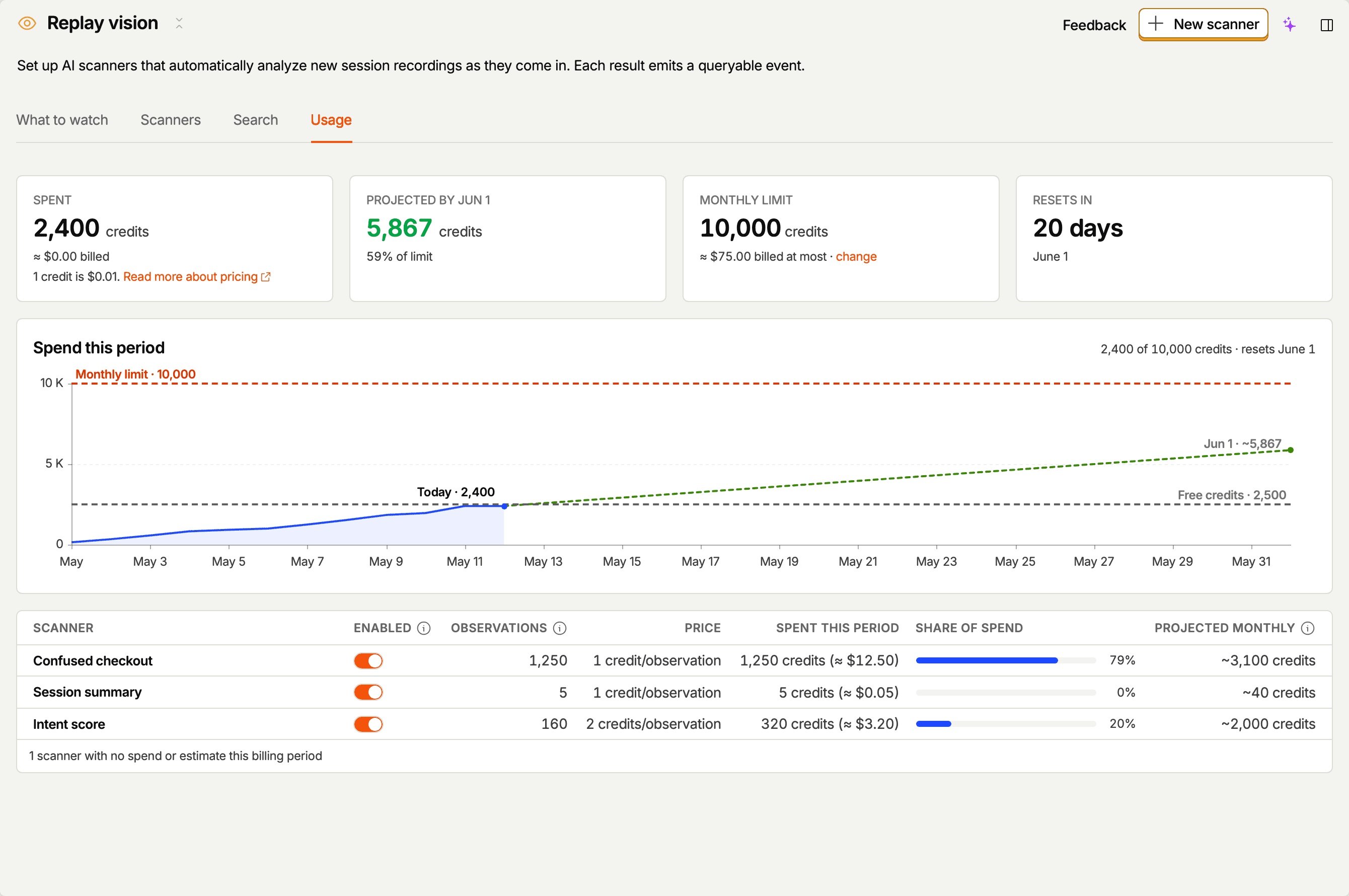
- Four tiles – Spent this period, Projected by the period's end date (with how close that is to the limit, or when you'll hit it), Monthly limit, and Resets in.
- Spend this period – a chart of cumulative spend for the current period, with a projected line to the period's end, and reference lines for your monthly limit and free credits. When the projection crosses the limit, the chart marks the day and says scanning will pause until the reset.
- A per-scanner breakdown – each scanner's enabled state, successful observations this period, price per observation (which model it uses), credits spent this period, share of spend, and projected monthly credits.
The Scanners tab also lists each scanner's Spend this period.
A scanner dominating the spend table is the first place to look when the budget runs down faster than expected – its sampling rate is the main cost lever.
Sizing scanners against the budget
The scanner editor shows an estimated cost for the scanner you're configuring – roughly how many observations per month and the credits they'll spend – based on:
- Your project's recent recording volume.
- The filters you've set.
- The Session coverage setting.
- The sampling rate.
- The selected model's price.
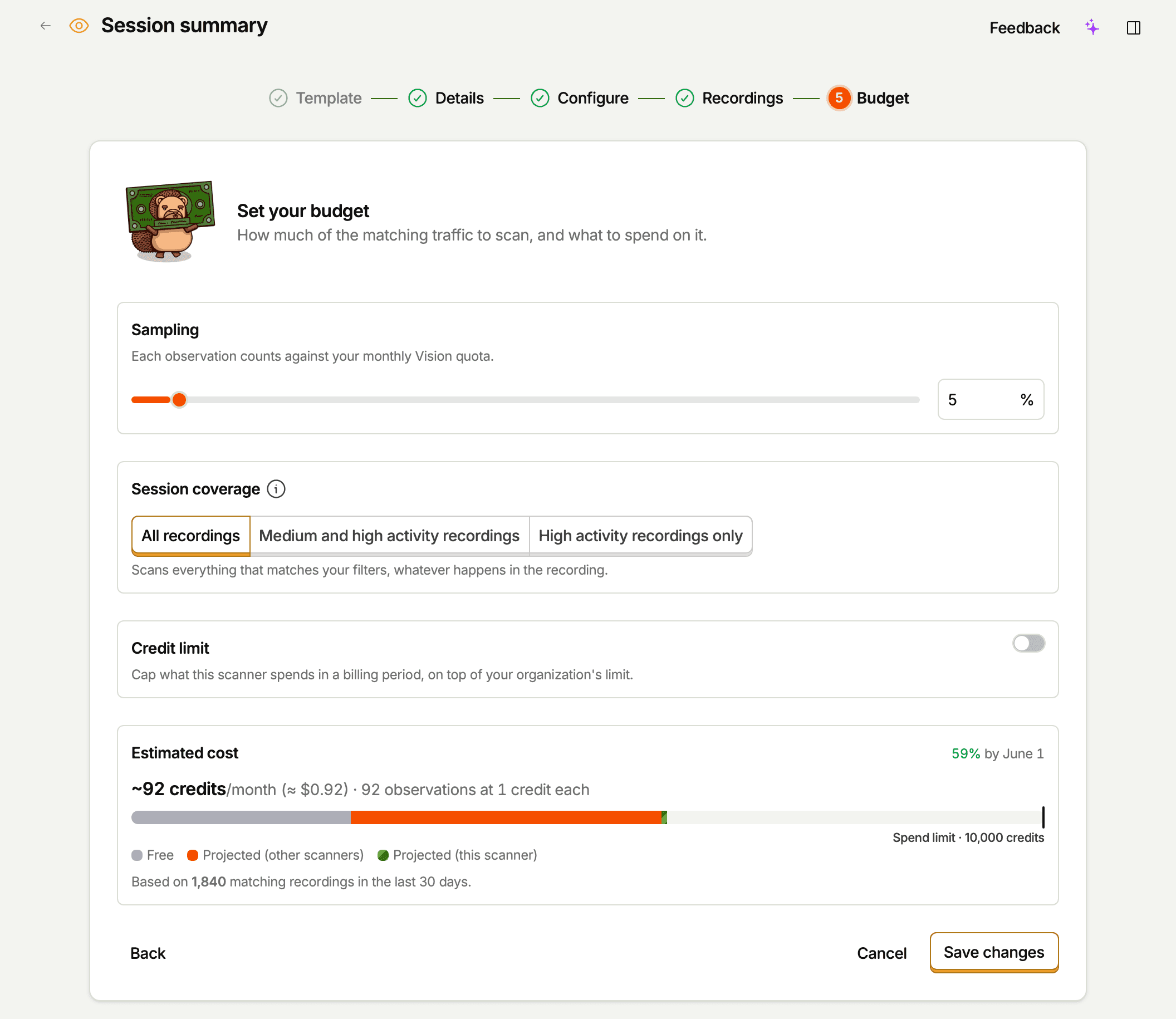
If the projection is uncomfortably close to your remaining budget, the cheapest knobs are:
- Narrow the filters – e.g. require a specific URL pattern, exclude bots, restrict to a cohort.
- Tighten session coverage – switching from All recordings to Medium and high activity recordings or High activity recordings only filters out low-activity sessions before sampling, so your budget goes toward recordings with meaningful activity.
- Lower the sampling rate – samples are random, so a 10% rate gives you a representative slice of matching sessions for one-tenth the cost.
- Pick a cheaper model – the price difference per observation is up to 7.5x across the lineup.
To project a hypothetical scanner before creating it (e.g. from a script or agent), use the vision-scanners-estimate MCP tool. It runs the same projection the editor shows, returning both the observation count and the credits it would cost (estimated_credits_per_month).
What to do if you're hitting the budget
Try these, in order:
- Open the Usage tab and look at which scanner is consuming the most spend. A scanner dominating the share-of-spend column is probably broader (or on a pricier model) than it needs to be.
- Tighten its filters, session coverage, or sampling rate, or move it to a cheaper model. Use the editor's estimate to find a setting that gives you enough signal without dominating the budget.
- Give the expensive scanners their own limits. A per-scanner limit keeps one scanner from spending the credits the others need.
- Disable scanners you're not actively using. A disabled scanner produces zero new background observations.
- Raise your spending limit on the billing page, or wait for the period to reset. The reset date is shown on the spend card and the Usage tab.