





Improving scanners with ratings
Contents
Rating observations is how you teach a scanner. Every thumbs up or down, and the note you leave with it, feeds a short set of rules PostHog learns for your project and for each scanner. New scans follow those rules. There is no settings page for them: you shape them by rating.
Rate an observation
Open any observation and answer Did the scanner get this right? below the result:
- Thumbs up (y) if the scanner got the session right.
- Thumbs down (n) if it got it wrong.
After you rate, a note field opens. A note is optional, but it's the strongest input you can give: say what the scanner got right or wrong, and why. Notes save as you type. While the note is open, click the selected thumb again to remove the rating.
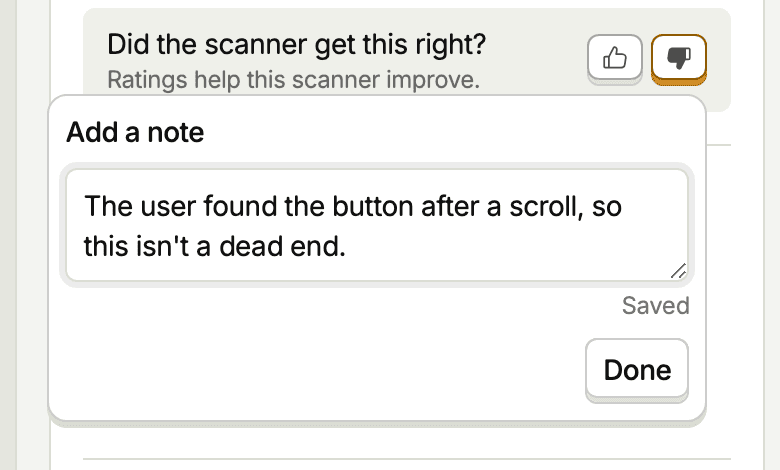
Ratings are shared across your team. Each observation has one rating, and the last one wins. Rating needs edit access on the scanner and view access to session recordings. You can still rate an observation after its recording has expired.
You can also rate from your editor or agent with the vision-observations-label-create and vision-observations-label-delete MCP tools. The vision-scanners-observations-stats tool returns thumbs up and thumbs down totals for a scanner.
What ratings teach
PostHog reads your new ratings and turns them into one-sentence rules, each one either something to encourage or something to avoid. Rules live at two levels:
- Project rules cover your product as a whole, such as how a page behaves or what counts as normal there. Every scanner in the project follows them.
- Scanner rules cover one scanner's question. Where a scanner rule and a project rule conflict, the scanner rule wins.
Each level holds a short list of rules. When a list is full, PostHog merges rules rather than adding more.
How ratings become rules:
- A note with a clear lesson can make a rule on its own. "The user only reached the review step, payment never completed" is enough to teach a checkout monitor not to answer yes there.
- Ratings without a note need a pattern. A thumbs down only says the answer was wrong. Several of them sharing a visible pattern, such as every thumbs down being a yes for the same kind of moment, can still become a rule.
- Thumbs up counts too. A note praising something the scanner did teaches it to keep doing that. Rate results the scanner got right as well as the ones it got wrong.
- Rules weigh evidence by count. When a new rating disagrees with a rule that more ratings support, PostHog narrows the rule to exclude that case instead of dropping it. A rule is retired only when at least as many ratings go against it as support it.
- Removing a rating removes its weight. A rule can't stay in place on the strength of ratings that no longer exist.
Rules refine how a scanner applies your prompt. They never change the question it answers, and they never override how scans handle privacy, masked content, or evidence. Rules never contain names, emails, IDs, URLs, or quotes from a session.
Every scan already knows that masked or unrecorded content isn't a bug, that repeated clicks on a working control are normal, and that personal data stays out of answers. Ratings that only restate these don't produce a rule.
When rules change
PostHog waits for a burst of rating to settle before it learns from it, so new ratings usually reach the rules within an hour. The first update reads ratings from the last 90 days.
Only scans that start after an update use the new rules. Every observation records the rules it ran with, so existing observations never change and aren't re-scanned. Rules stay with a scanner when you edit its prompt or settings.
Ratings only teach rules when your organization has AI data processing turned on, and only ratings on saved scanners count. One-off scans, like a recording summarized with the built-in prompt, don't teach rules.
Write notes that teach
- Describe the situation, not the session. "A user who closes the upgrade modal without paying isn't blocked" generalizes. "This user closed it at 2:14" doesn't.
- Say what the right answer would have been. "Should be no: the error toast cleared and the save went through" gives the scanner both the mistake and the fix.
- Leave out personal data. Rules drop identifiers anyway, so a note that depends on an email or a customer name teaches nothing.
When to edit the scanner instead
Rules sharpen judgment on the question you asked. They can't fix a scanner that asks the wrong question or looks at the wrong sessions:
- If the scanner answers a question you didn't mean to ask, rewrite the prompt. See scanner prompts and creating scanners – writing the prompt.
- If most results are about sessions that never reach the flow you care about, tighten the filters.
Editing the prompt starts a new scanner version. Past observations keep the prompt they ran with, so compare ratings within one version.