







Observations
Contents
An observation is one scanner's result for one recording. Each scanner has an Observations tab listing every observation it's produced, and the What to watch feed on the Replay Vision home picks out the ones most worth your time.
The Observations tab
The table shows a thumbnail of each recording, the person, the status, the result, and who or what triggered the scan. Filter by person email, date, status, trigger, and, depending on the scanner type, by verdict, score range, or category. Observations you haven't opened yet carry a New tag, tracked per user.
Each row has two actions: View details opens the observation page, and the search icon finds similar observations across all your scanners. Search observations above the table opens search scoped to this scanner, and summarizers also get a Copy all button that copies the filtered summaries as plain text.
The thumbnail is a frame from the recording that the model picked to show what the session was about.
The observation page
Click into an observation to open its page. The result sits on the left and the recording plays on the right.
- Question – the scanner's prompt condensed into the one question it asks of each session. Show full prompt opens the prompt that produced this observation, frozen even if you've since edited the scanner. If the prompt has changed since the scan, the page shows the first paragraph of the prompt the scan ran with instead.
- Result – the verdict, score, categories, or summary, with the model's confidence beside it. For monitors and scorers, PostHog judges from the prompt whether a yes or a high score is good or bad news, and colors the result to match: green for good, red for bad, and uncolored when it's neither. A scorer's score shades from red through amber to green across its scale.
- Reasoning – the model's explanation, with timestamp citations you can click to jump the player to that moment.
- Timeline – summaries with chapters get a Timeline tab next to Summary. It lists the chapters on a time rail that follows the player, and clicking a chapter seeks to it.
- Rating – thumbs up or down, see rating observations.
- Facts – the person, when it was scanned, the status, who triggered it, and a link to the scanner.
- Pinned properties – a fixed strip of session properties (by default entry referring domain, channel type, entry UTM source, and country). Click Edit to pick up to eight. The strip stays in the same place on every observation, so paging through results reads as a comparison.
- Details – expand for the observation ID, the session ID, a link to the
$recording_observedevent, timings, and the model.
Previous and Next step through the scanner's observations, keeping any filters you set on the Observations tab. The keyboard shortcuts are k and j.
If the recording has passed your project's retention period, the player is replaced by the frame saved at scan time, when there is one. You can still read and rate the result.
Sharing an observation
Click Share to copy a link to the observation. The link starts the recording where you are in the player, or you can untick Start recording at or type a different time. The person you share it with needs access to your PostHog project.
Rating observations
Below each result, PostHog asks Did the scanner get this right? Give it a thumbs up or down (y or n), then optionally add a note on what it got right or wrong and why. Click the active thumb again to remove a rating.
Ratings are shared across your team: each observation has one rating, and the last one wins. Rating requires edit access on the scanner.
Ratings change how scanners judge later sessions. Every so often, PostHog reads your team's new ratings and learns a short set of rules from them: some for the scanner that was rated, some for every scanner in the project. Later scans follow those rules. Written notes give it the most to go on, but patterns across ratings without notes count too. The rules aren't shown anywhere, and they never override privacy or masking rules. Existing observations aren't re-scanned.
Rate results the scanner got right as well as the ones it got wrong. Thumbs down alone can't tell a scanner what to keep doing.
Observation states
Observations move through a small state machine:
pending → running → succeeded | failed | ineligible
succeeded– terminal. The structured result is saved and a$recording_observedevent is emitted.failed– terminal. The observation page shows Scan failed with the reason. See troubleshooting for what each failure kind means.ineligible– terminal. The session can't be analyzed (no recording, too short, no events, etc.). The page shows Not scanned with the reason. Doesn't count against your quota. See running scanners.
Succeeded, pending, and running observations spend credits; failed and ineligible ones don't. A failed observation, and some kinds of ineligible one, can be retried with Retry scan on its page, which replaces it with a fresh scan of the same recording.
Observations in the replay player
Observations also show up when you watch a recording:
- The Observations tab in the player sidebar lists what every scanner found about the session. Click one to read its result, or View details to open its page. If the session has a summary with chapters, the tab shows them as a timeline you can click through. Scan this recording runs any of your scanners on the session you're watching.
- Marks on the seekbar show each scan's key moment: the moment its answer rests on most. Hover a mark to see which scanner and what it answered.
- The bar under the player summarizes the recording. Summarize this recording runs one of your summarizer scanners (pick which from the dropdown), or a built-in prompt if you have none, and shows the summary below.
Searching observations
The Search tab on the Replay Vision home searches what your scanners have written about your sessions. Describe a behavior in plain words, like "users who gave up at checkout", and results come back ranked by how well they match, split into Top matches and Other matches. Narrow the search to one scanner or a date range with the controls in the search box.
Before you type, the search box offers your recent searches and Suggested searches, which are themes drawn from what your scanners observed.
Each result shows the recording's thumbnail. Click it to watch the recording at the moment the observation cites (or from the start, if it cites none), or click Details to open the observation. Results whose recording has passed your retention period carry a Recording expired tag: the analysis is still there, but the recording can no longer be played.
Only sessions a scanner has analyzed are searchable. If nothing matches, Create a scanner for this starts a scanner from your search. Search needs AI data processing to be turned on for your organization.
Querying observations as events
Every successful observation is captured as a $recording_observed event in your project, so you can build insights, dashboards, and alerts on top of Replay Vision output using PostHog's SQL.
Event properties
| Property | Description |
|---|---|
scanner_name | Human-readable name of the scanner |
scanner_id | Scanner UUID |
scanner_type | monitor, classifier, scorer, or summarizer |
scanner_version | Version of the scanner config that produced this observation |
session_id | The recording that was observed |
recording_distinct_id | Distinct ID of the person in the recorded session (the subject, not whoever triggered the scan) |
recording_subject_email | Email of the recording subject at scan time, when known |
triggered_by | schedule (background sweep), on_demand, backfill, or retry (a re-run of a failed observation) |
triggered_by_user_id | The user who triggered an on-demand observation or retry; null for background sweeps and backfills |
model_used | The model that produced the result |
provider_used | The LLM provider behind model_used |
credits | What this observation cost, in credits (1 credit = $0.01), frozen at the price when it ran |
emits_signals | Whether the scanner was feeding findings into PostHog Signals when it ran |
scanner_output_confidence | The model's confidence (0.0 to 1.0) |
scanner_output_notability | How worth watching the model judged the session, from 0.0 to 1.0, whatever the scanner's answer was |
scanner_output_notability_reason | One sentence naming the moment that makes the session worth watching, or saying that nothing stands out |
scanner_output_key_moment_ms | Offset into the recording, in milliseconds, of the moment the answer rests on most. Null when the model didn't pick one |
scanner_output_reasoning | Monitor, classifier, and scorer – the model's reasoning text, including any inline citations. Summarizers don't have a separate reasoning field |
scanner_output_verdict | Monitor only – "yes", "no", or "inconclusive" |
scanner_output_tags | Classifier only – the array of vocabulary tags assigned |
scanner_output_tags_freeform | Classifier only – tags outside the vocabulary, when the scanner allows them |
scanner_output_score | Scorer only – the numeric score |
scanner_output_label | Scorer only – the name of the scorer's scale |
scanner_output_title | Summarizer only – the generated one-line title |
scanner_output_summary | Summarizer only – the generated prose summary |
scanner_output_chapters | Summarizer only – the recording broken into parts, in order, each with start_ms, end_ms, and a short title |
scanner_output_inactive_periods | Summarizer only – stretches the replay player marked inactive, each with start_ms and end_ms |
The notability and key moment properties can be empty on older observations. The event also carries the recorded session's GeoIP properties and, if you use group analytics, its group keys.
The timestamp on the event is the moment the observation completed, not the moment the underlying recording was captured.
SQL recipes
Monitor: count flagged sessions over time
Sessions a "Dead-end pages" monitor flagged yes, daily, over the last week:
Monitor: true rate (flagged / total)
The proportion of observed sessions a monitor flagged yes:
A gradually rising true rate is often a more useful early-warning signal than the absolute count.
Classifier: top tags
Most common intent tags from a classifier:
Scorer: distribution
Histogram of frustration scores:
For a percentile view:
Summarizer: recent summaries
Latest summaries from a summarizer scanner:
Cross-scanner: sessions most worth watching
Every scanner type also judges how worth watching each session is, separately from its answer. The highest-rated sessions from the last day, with the model's one-line reason:
The What to watch feed does this ranking for you, with more signals than notability alone.
Cross-scanner: spend by scanner
Each event carries a credits property with the observation's cost (1 credit = $0.01), frozen at the price when it ran, so spend is just another query. For billing-period totals against your quota, use the Usage tab on the Replay Vision home.
Credits by scanner over the last 30 days:
Cross-scanner: filter only high-confidence verdicts
Confidence is self-reported, so this is a heuristic, not a guarantee – but it's often a useful filter for downstream automation.
Saving affected users as a cohort
You can save the users behind a scanner's findings as a static cohort from the scanner's Overview tab. The cohort is a snapshot at creation time and won't live-update as new observations come in.
| Scanner type | Where to save it |
|---|---|
| Monitor | Save as cohort next to each verdict in the Verdict mix panel |
| Classifier | The cohort button next to each category in Top configured categories and Top freeform categories |
| Scorer | Not in the UI. Use the vision-scanners-affected-cohort-create MCP tool with a min_score and/or max_score |
| Summarizer | Not supported (narratives don't have categorical findings) |
A cohort saved from the Overview tab covers the tab's date range, up to 90 days, counted by when the session was recorded. The range has to end today, because a cohort always covers the most recent days. The MCP tool takes a trailing window in days instead, 30 by default.
Cohort creation is capped at 10,000 users per request. If your scanner has more affected users, narrow the date range.
Use these cohorts anywhere cohorts work in PostHog: funnel breakdowns, retention analysis, survey targeting, or experiment exclusion.
Wiring observations into the rest of PostHog
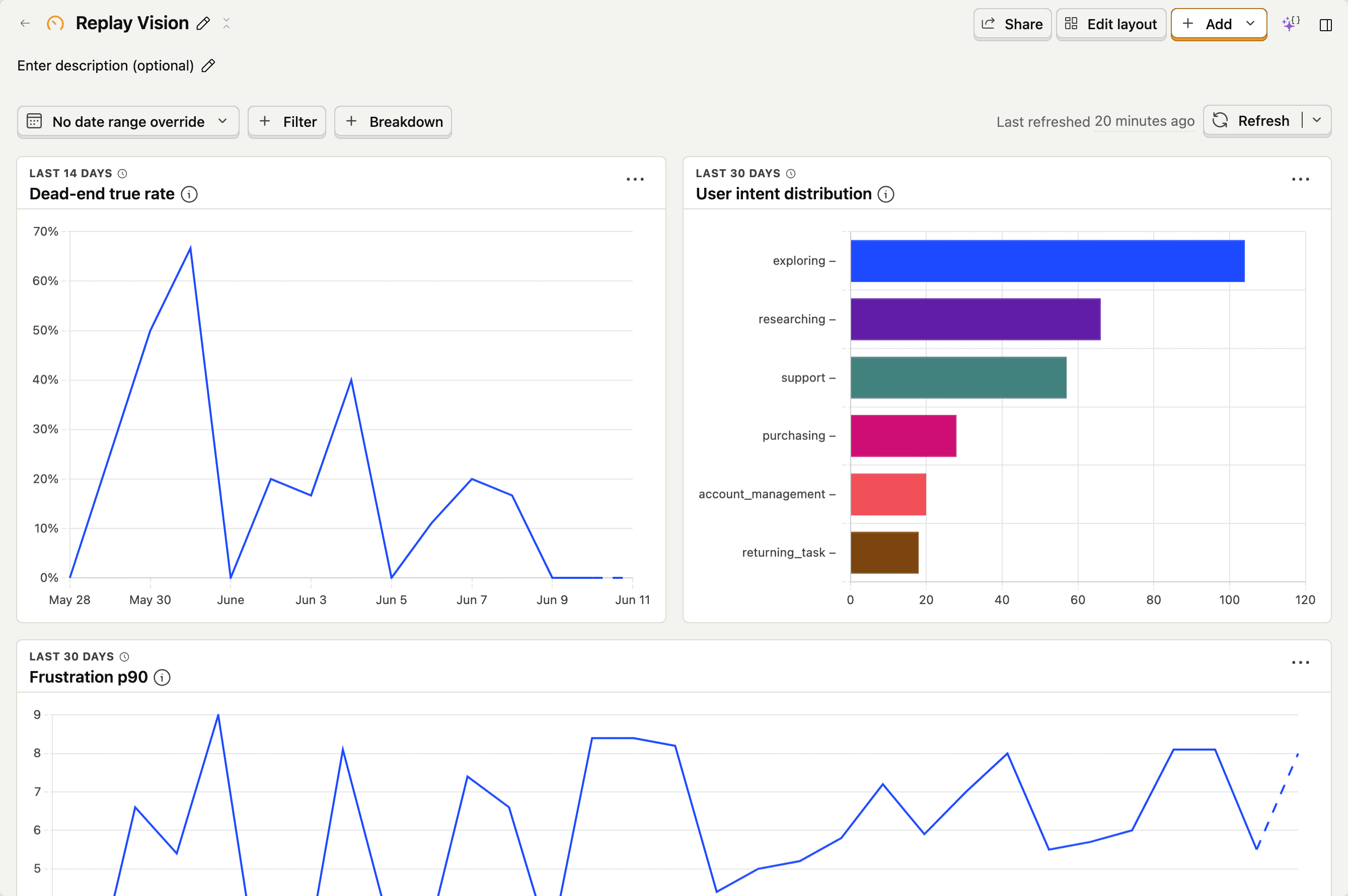
Insights and dashboards
The recipes above all become insights by saving the query. From there they go on dashboards like any other insight.
Alerts
Alerts on an insight built from $recording_observed give you a notification when the metric crosses a threshold – e.g. "alert me when the dead-end true rate over the last hour exceeds 5%." If you'd rather get the finding itself, with links to the matching sessions, use a scanner alert for a condition or a scout for a scheduled write-up.
Joining to other PostHog data
Because $recording_observed events live alongside everything else in your project, you can join them to anything – pageviews, custom events, person properties, cohorts. A useful pattern: find the events the user fired before the moment a monitor flagged them, grouped by URL.
The join is by session_id. From there it's the same SQL you'd write for any other event.