







Troubleshooting
Contents
Common things that go wrong with Replay Vision, and what to do about each.
My scanner isn't producing any observations
Start on the scanner's Overview tab. The Scanner status strip says what the background sweep is doing:

| Status | What it means |
|---|---|
| Running | The scanner checks for new recordings every five minutes. The strip shows when it last checked. |
| Starting | The first scan is running. Results usually appear within 15 minutes. |
| No matches | Nothing has matched the filters yet, or since the last configuration change. The filters may match no recordings, or sampling skipped them. |
| Throttled | The filters read a lot of data, so the scanner checks less often than every five minutes. It still catches up on every matching recording. |
| Delayed | The scanner hasn't checked for new recordings in a while. Checks resume on their own. If this lasts, contact support. |
| Stopped | The scanner reached its own credit limit, or your organization's Replay Vision credits are used up. Recordings skipped while stopped aren't scanned later. |
| Off | The scanner is disabled, or its sampling is set to 0%. |
If the status doesn't explain it, check, in order:
- Are the filters too narrow? Try removing filters and see whether observations start showing up. If they do, re-add filters one at a time to find the culprit.
- Is the session coverage too strict? High activity recordings only skips most recordings. Try a broader setting.
- Is your project recording sessions at all? Replay Vision only sees sessions Session Replay has captured. No recordings, no observations. See events or recordings aren't coming in.
- Is your organization over a usage limit? If Product Analytics or Session Replay is over its billing limit, new events or recordings are dropped at ingestion and scanners have nothing usable to scan. See usage limits stop scanning.
- Is AI data processing turned on? Scanners don't scan anything while it's off for your organization. An organization admin can turn it on in organization settings.
- Are the recordings too short? The background sweep skips recordings shorter than 15 seconds, with fewer than 10 seconds of activity, or with more than an hour of activity. If your filters only match recordings like these, nothing gets queued.
- Are all the matched sessions ineligible? The scanner may be producing ineligible observations but no successful ones. See ineligible sessions.
Recordings become candidates about 35 minutes after the session's last activity, so a session that just ended won't show up right away.
A fast way to confirm the scanner itself works: run it on demand against a recording you know is eligible. If that produces a result, the issue is in the filters, the sampling rate, or the quota – not the scanner's prompt.
A recording shows Skipped
In the Run tab's recording list, Skipped means the recording can't pass the scan-time checks, so the background sweep passed it over and an on-demand scan would come back ineligible. Hover the tag to see why, with the recording's own duration or active time next to the limit it misses. Recordings that are still in progress are only skipped for being too long, since they can still grow past the minimums.
Below the player, the same check shows as Skipped: next to Summarize this recording, and the scan buttons are disabled with the reason.
A scan started nothing
When you scan several recordings at once and some or all don't start, PostHog says why:
- Too many scans are already running. Each scanner and each project have a cap on scans in flight. Wait for some to finish, then try again.
- Your organization's credit limit is used up for this billing period. See quota and limits.
- This scanner reached its credit limit for this billing period. Raise the scanner's limit or wait for the next period.
Recordings the scanner has already observed are skipped rather than scanned again. Their existing observation is what you get.
I'm getting a lot of ineligible observations
Ineligibles don't cost you credits, but a high ineligible rate usually means something upstream is off. Each reason has a different fix:
| Reason | Most likely fix |
|---|---|
| No recording | The session's replay data is missing or expired. Usually a sign you're scanning sessions older than your replay retention, for example with a long backfill. |
| Nothing to play back | The recording has no screen data. If you expect visuals, its screen data may still be ingesting: retry the scan later. |
| Too short, Too inactive, Too long | The recording is outside the 15-second minimum duration, 10-second minimum activity, or one-hour maximum activity. The background sweep already skips these, so they come from on-demand scans. |
| Too large | The recording is too large to render as a video. No retry changes this. |
| No events | The session has no analytics events. If nearly every recent scan is No events, check whether your organization is over its Product Analytics limit – see usage limits stop scanning. |
| AI analysis not allowed | AI data processing was turned off for your organization when the scan ran. An organization admin can turn it on in organization settings, then retry the scan. |
The Observations tab is the source of truth: filter it by Ineligible status and hover a row's tag to see the reason.
Events or recordings aren't coming in
Replay Vision runs entirely downstream of ingestion: scanners can only scan recordings PostHog actually received, and the model's event context comes from the events captured in those sessions. If either stops flowing, Vision goes quiet without erroring:
- No new recordings: background sweeps find no matching sessions and produce nothing at all.
- Recordings but no events: sessions arrive without event data and every scan is marked ineligible with No events.
Billing limits are one cause (see usage limits stop scanning below), but the same symptom appears whenever capture itself stops: Session Replay is disabled in project settings or in the SDK config, replay capture conditions (sampling, minimum duration) filter out every session, or the snippet/SDK stopped loading after a deploy. Work through the Session Replay troubleshooting guide to get recordings flowing again.
Vision resumes automatically once new sessions arrive. Sessions that were never captured can't be scanned retroactively, so gaps in ingestion are permanent gaps in observations.
Usage limits stop scanning
Replay Vision depends on two other products' data, so their billing limits affect it even when your Vision quota is fine:
- Over the Product Analytics limit: new events are dropped at ingestion. Sessions still get recorded, but they arrive with no event data, so every scan of them is marked ineligible with No events. A sudden wall of No events ineligibles is the classic symptom.
- Over the Session Replay limit: new recordings aren't captured at all, so scanners find nothing new to scan and go quiet.
When either limit is exceeded, a banner appears on the Replay Vision pages linking to your billing settings. Raising the limit (or waiting for the billing period to reset) resumes scanning automatically – no scanner changes needed.
One caveat: sessions from the over-limit window are permanently unscannable. Dropped events and recordings are not retroactively recovered, so those ineligible observations won't succeed later. Scanning picks up with new sessions once ingestion does.
The model is making bad calls
Start by rating the results: give the wrong ones a thumbs down and add a note saying what the right answer was and why. PostHog learns rules from your team's ratings and later scans follow them, which fixes many systematic errors without hand-tuning.
To understand why the model got something wrong, the reasoning and citations on each observation are your debugging tool. Open three or four observations the scanner got wrong and read them next to the recording.
Common patterns and fixes:
- The model is guessing intent or emotion from sparse evidence. Rewrite the prompt around observable behavior (rage clicks, repeated retries, time without progress) instead of inferred states (frustrated, confused). See creating scanners – writing the prompt.
- The model is taking a position on ambiguous sessions. Add an explicit "when unsure" branch: "If there isn't enough evidence to tell, answer no" or "tag it
unclear." For a monitor, turn on Allow inconclusive verdicts. - A classifier is over-using one tag. Tighten that tag's definition in the vocabulary, or add an
unclear/othertag so the model has somewhere to put marginal cases. - A scorer is bunched up at the extremes. Explicitly anchor the middle of the scale in the prompt: "5 means moderate friction – occasional misclicks but the user eventually progressed."
- The question is the wrong one. Ratings refine how a scanner answers its question, but can't change the question. Rewrite the prompt.
See scanner prompts for what every scan already handles, so your prompt doesn't have to.
After each edit, scan a fresh batch of recordings and compare. A scanner can't re-scan a recording it already scanned successfully, so test on new recordings, run a backfill over a recent range, or duplicate the scanner to re-scan recordings the original already covered.
Confidence is always low
A few causes:
- The sessions never reach what the prompt asks about. When a recording doesn't show the flow or screen the prompt targets, the scan says so and keeps confidence at 0.3 or below. Tighten the filters so they only match sessions that reach it.
- Sessions are too short or too sparse. The model genuinely has little to go on. Tighten the filters to longer / event-rich sessions.
- The prompt is too open-ended. A prompt that asks the model to judge something it can't see (intent, satisfaction, "user happy?") will keep confidence low. Anchor it in observable behavior.
- The model picked a tag from a weak vocabulary. For classifiers, vague tag definitions push the model to hedge. Sharpen the definitions.
Confidence is self-reported, so don't over-index on it as a metric. A scanner that's wrong with confidence 0.95 is still wrong. Use confidence as a filter for downstream automation (e.g. "only alert when confidence > 0.7"), not as a quality bar for the scanner itself.
Failed observations
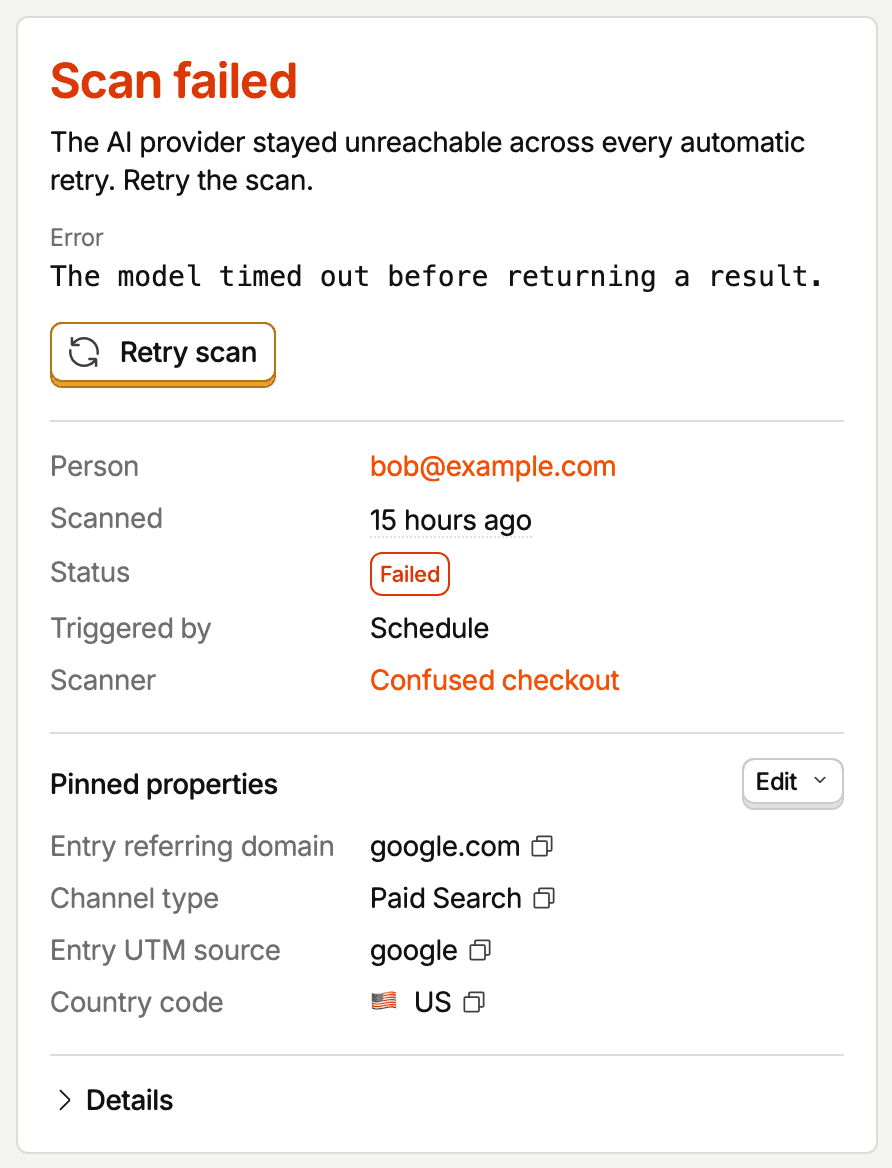
A failed observation shows Scan failed on its page with the failure's label, an explanation, and the error message. In the Observations tab, hover the Failed tag to see the same label. Failed observations cost no credits. Retry scan deletes the failed observation and scans the recording again, and costs credits only if it succeeds.
AI provider unavailable
The AI provider stayed unreachable across every automatic retry. PostHog retries the provider call up to four times, spaced out over a couple of minutes, before an observation lands here.
What to do: retry the scan. If you see a burst across many recordings, the provider is likely having availability issues – wait it out before triggering more on-demand work.
AI provider rejected the video
The AI provider wouldn't analyze this recording's video. A retry most likely fails the same way.
What to do: run the scanner on a different recording. If the same kind of recording keeps getting rejected, narrow the scanner's filters so it doesn't match those recordings.
Recording video failed
PostHog couldn't turn the recording into a video for the model.
What to do: retry the scan. Confirm the recording plays in the regular replay player. If it plays and the scan still fails, contact support. If it doesn't play in the regular player either, the underlying recording is the problem – not Replay Vision.
AI output did not fit the scanner
The model couldn't answer in the scanner's format across two separate attempts.
What to do: simplify or rephrase the prompt, then retry. A retry runs the scanner's current prompt, so edit it first. For classifiers, make sure tags the prompt names are in the tag list. For scorers, state the scale in the prompt.
Personal data in the answer
The model's answer included personal data the scanner didn't ask for, such as a name or an email address. PostHog asks the model to rewrite such an answer without it, and fails the scan if the rewrite still contains it. Nothing from the answer is saved.
What to do: retry the scan. If it keeps happening, check whether the prompt asks for details about people, such as what the user typed or who they worked with, and rephrase it to ask about behavior instead. If you need to know who the session belongs to, ask for that explicitly. See scanner prompts.
PostHog service unavailable
A PostHog service was slow or unavailable while preparing the recording.
What to do: retry the scan in a few minutes.
Interrupted
The scan was interrupted before it finished – for example by a deploy or a worker restart – and PostHog cleaned it up.
What to do: retry the scan. If the same recording is interrupted repeatedly, contact support with the observation ID.
Internal error
Something inside PostHog stopped the scan. These should be rare.
What to do: retry the scan. If it fails again, contact support with the observation ID.
The recording is no longer available
Recordings are deleted once they pass your project's retention period. The observation stays: its page says This recording is no longer available and shows the frame saved when the recording was scanned, if there is one. You can still read and rate the result. Search results mark these observations Recording expired.
Scans of recordings that have already expired come back ineligible with No recording. To keep recordings around for longer, change the retention period in your project's replay settings.
Something else
If you're hitting something that doesn't fit the above, reach out – the team is actively looking for sharp edges.