







Replay Vision
Contents
Replay Vision uses AI to automatically watch your session recordings and turn what it sees into structured, queryable data. You configure scanners – named AI probes that describe what to look for – and PostHog applies them to your recordings, producing observations you can query, chart, and alert on.
The key idea is that Replay Vision actually watches the video of each recording alongside its events. This lets it pick up on visual and behavioral cues – hesitation, confusion, where a user's attention goes – that aren't captured by clicks and pageviews alone. Instead of manually reviewing hundreds of replays to spot a pattern, you describe what matters once and let it run continuously.
How it works
Replay Vision is built around two concepts:
- Scanner – a configured AI probe scoped to your project. A scanner has a natural-language prompt describing what to look for, a scanner type that determines what kind of output it produces, a set of recording filters that select which sessions it applies to, a sampling rate, and a model that sets what each observation costs.
- Observation – one application of a scanner to a single recording. Each observation runs the scanner against that session and produces a structured result that's persisted and emitted as a queryable
$recording_observedevent.
When a scanner runs against a recording, PostHog:
- Renders the recording to a sped-up video (inactive periods are trimmed out).
- Sends that video to a Google Gemini model, which watches it and then asks for the session's events around the moments its answer turns on. When the recording captured network requests, it can also ask for the failed and slow ones.
- Asks the model to produce a structured response matching the scanner's type, plus a key moment and a judgment of how worth watching the session is.
- Checks the answer for personal data the scanner didn't ask for, then saves the result as an observation and captures it as a
$recording_observedevent in your project.
Each observation snapshots the scanner's configuration at the time it ran, so editing a scanner later doesn't change past observations.
Because Vision runs entirely on ingested data, it stops producing observations if events or recordings stop arriving. See troubleshooting for what to check.
What you can do with it
A few examples of what teams use Replay Vision for:
- Spot dead ends – flag sessions where users get visibly stuck on a page with no clear next action.
- Classify intent – bucket sessions by what the user appeared to be trying to do (browsing, purchasing, getting support).
- Score frustration – assign a numeric score to each session for how much friction the user experienced.
- Summarize sessions – generate a short narrative of what happened in each session, so you can skim instead of watching.
Each of these maps to a scanner type.
Finding your way around
Open Replay Vision from the side menu. The page has four tabs:
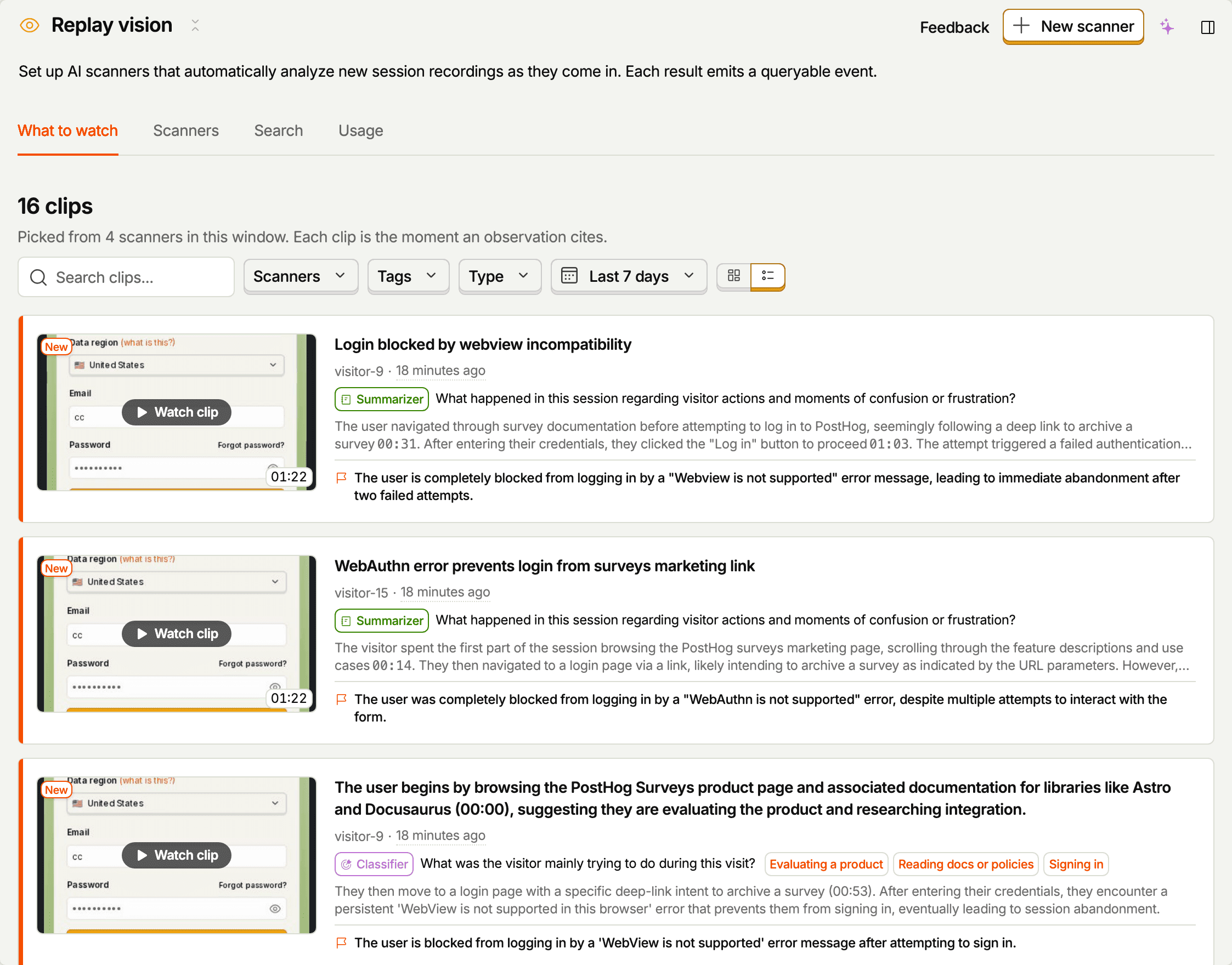
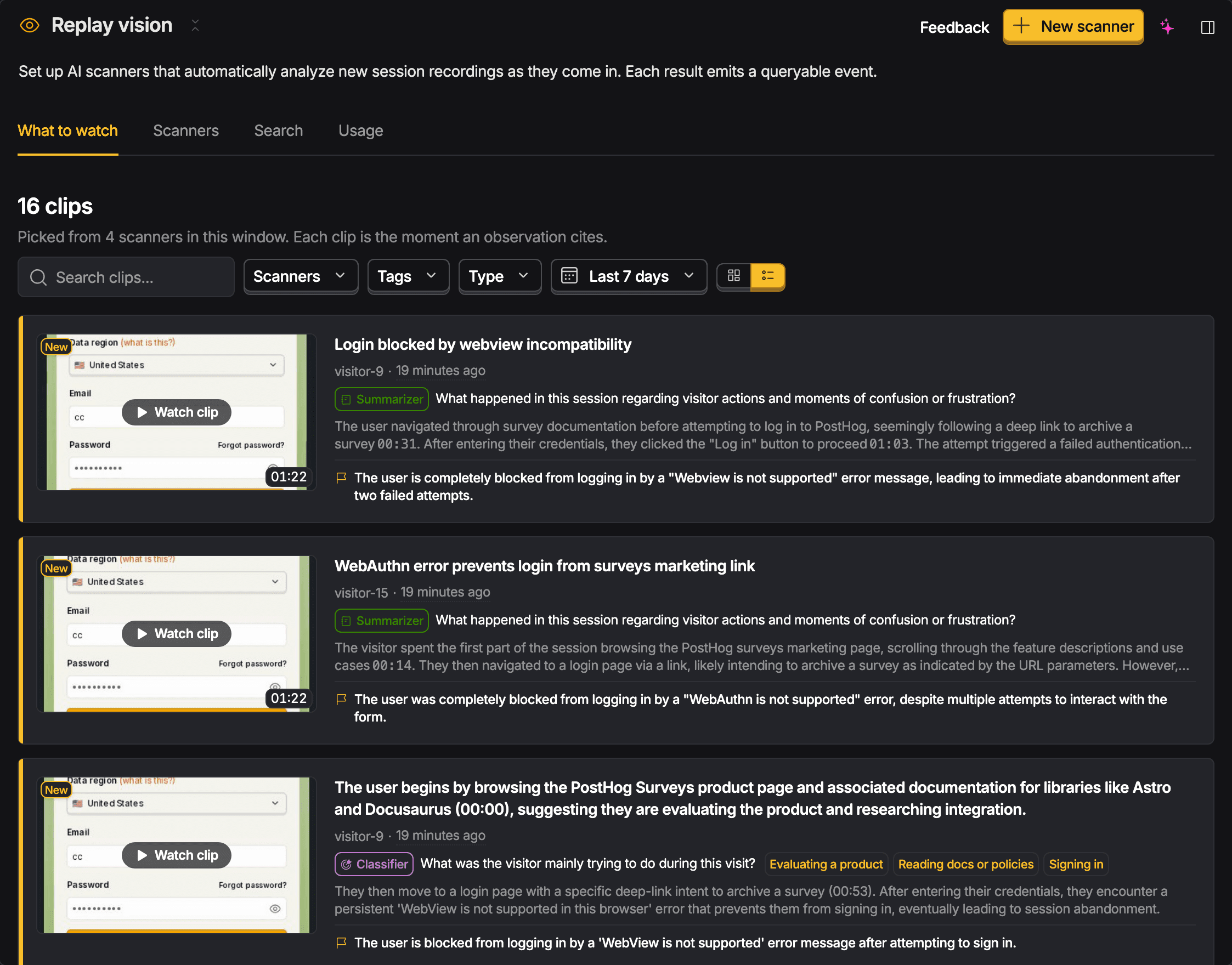
- What to watch – the observations most worth a look right now, picked across all your scanners. Each entry shows the moment the observation cites and why it was picked. Filter by scanner, tag, scanner type, or date range, or search the list.
- Scanners – charts of observations over time and your organization's spend, plus the list of scanners. Turn scanners on and off from the list, or open one to see its overview, observations, and settings.
- Search – describe what you're looking for in plain language and search what your scanners have observed. Narrow to one scanner or a date range. Results for recordings that have since expired are marked.
- Usage – what each scanner spent this billing period, its share of spend, and where spend is heading against your limit. See quota and limits.
Where to go next
- Want it set up for you? Run
npx @posthog/wizard replay-visionin your project directory. It reads your codebase and creates three scanners written for your product. See getting started. - New to Replay Vision? Walk through your first scanner end-to-end.
- Picking the right scanner type? Read the scanner types reference.
- Authoring a scanner? See creating scanners for the setup flow, filters, and sampling, and scanner prompts for worked examples.
- Already have observations? Learn how to read them and query them as events to build insights, dashboards, and alerts.
- Is the scanner getting it right? Rate each observation with a thumbs up or down, and add a note on what it got right or wrong. The scanner learns from your team's ratings on later scans. See improving scanners with ratings.
- Want a regular write-up? Put a scout on the scanner to read its findings on a schedule and report what's worth a look.
- Want to be notified? Add an alert that fires on matching observations or a metric threshold, and sends to Slack or a webhook.
- Hit a snag? Check troubleshooting.
Further reading
Other teams are pointing scanners at their own products. Join the PostHog Discord to ask what their scanners caught, post the prompts that work for you, and share feedback with the people who build it.