







External data sync failures
Contents
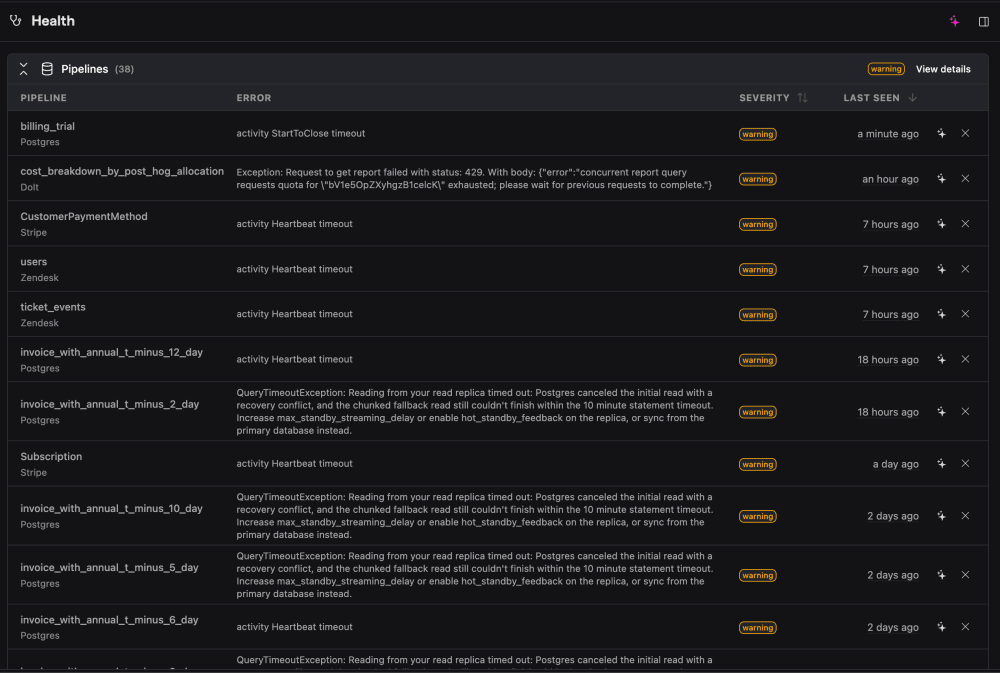
The external data sync failures check fires when one of your external data sources fails to sync, which means the connected data in your warehouse is stale or incomplete.

What this check looks for
Once a day, the check looks at your external data schemas and raises a warning for any that have failed, hit a billing limit, or recorded an error and stopped syncing. The issue includes the source name, source type, and the error from the failed run.
Why it matters
The connected data is stale or incomplete until the sync succeeds again. The most common causes are:
- Expired or rotated credentials.
- A permissions change on the source.
- An upstream schema change – a renamed or removed column.
Fix it manually
- Open the Pipeline status page (Data pipeline / Data Warehouse → Sources).
- Find the failing source, open its latest run, and read the error.
- Fix the root cause – reconnect or update the credentials, re-grant access, or update the schema mapping.
- Trigger a new sync and confirm it completes.
This check is not auto-fixed
Unlike the other checks, external data sync failures are surfaced as alerts but do not open an automatic fix. Fixing them usually requires re-entering credentials, which can't be done over the API – so this is the one check PostHog Desktop intentionally leaves to you.
That said, if you investigate it through PostHog Desktop, the agent can still diagnose the failure for you – listing and inspecting the source, reading the actual sync error, and applying config-only fixes (like resyncing or updating a schema mapping) where credentials aren't the problem. It will surface the exact error and ask you to reconnect the source when credentials are involved.