







Identifying users
Contents
You need to identify users to know who's using your product and what they're doing. Identifying users lets you follow users across devices and sessions, track their behavior over time in insights, build cohorts, and build a story across PostHog products. You can follow identified users across session replays, insights, errors they encounter, LLM traces, and more. It's one of the most important things to get right when setting up PostHog.
This page will cover how to identify users across SDKs. For the broader identity strategy (how to design your anonymous-to-identified flow, cross-platform consistency, and common pitfalls), see Identity resolution.
How identification works
Identification happens in layers as a person moves through your product, with each layer building on the one before it.
Anonymous
When someone first visits your site or app, PostHog automatically assigns them an anonymous ID, stored locally, and captures their events anonymously. If they've opted into tracking, this anonymous identity is tracked even across sessions. At this point you don't yet know who they are.
Identified on the frontend
As soon as you're able to, typically when a user logs in or creates an account, you call identify on the frontend with a distinct_id. That distinct_id is usually something stable like a UID, their email, or their database ID. This merges the anonymous person into the identified person, linking the two IDs together. From then on, looking up by either ID surfaces the user's full event history, from before and after they logged in.
Many frameworks wrap the base SDKs, so the way you access PostHog to call identify differs. The examples below are copied directly from each framework's setup guide.
For React, Remix, and React Router, access the library with the usePostHog hook rather than importing posthog directly. Because identify sends an event, call it inside an effect that only runs once you know the user.
Once initialized in instrumentation-client.ts, the posthog-js singleton is ready, so you import posthog directly and call identify as in the React example. The pre-release @posthog/next package instead exposes its own usePostHog hook and keeps client and server identity in sync:
The @posthog/nuxt module provides an auto-imported usePostHog() composable. It returns undefined during server-side rendering, so use optional chaining when calling methods like identify:
With the Composition API you import posthog directly (with the Vue 2 plugin it's available as this.$posthog):
Carried to the backend
You pass that same distinct_id into your server-side code and use it when capturing backend events. It's your job to find a way for the frontend and backend IDs to agree, whether through the user's auth session, or by passing the ID as a part of your API requests.
Backend SDKs have no concept of an anonymous session, so there's nothing to merge. Instead, pass the same distinct_id you use on the frontend when capturing events. Some SDKs expose an identify method, while others set person properties with $set on a captured event.
These properties only tell PostHog how to update person data during ingestion — they aren't kept on the stored event, so you can't filter, break down, or query events by them. To query the values you set, use person properties instead.
Some frameworks attach the distinct_id for you, often via contexts. The examples below are copied directly from each framework's setup guide.
For Django, Flask, and FastAPI, wrap the request in new_context() and call identify_context. With the Django middleware, the distinct ID is taken from request headers or the authenticated Django user automatically.
For Express, NestJS, and Next.js/Nuxt server routes, associate a distinct ID with everything captured inside a withContext callback.
For Phoenix and Plug apps, add the PostHog.Integrations.Plug integration to read the frontend's tracing headers and attach them to events captured during the request.
The result is one continuous identity, from the first anonymous pageview through to every server-side event. This lets you track a user across the entire stack.
The distinct ID isn't the only thing worth carrying across the stack. The session ID identifies a user's single browser session. Pass it to your backend events too, and those events are associated with that same session. This lets you line up errors, AI observability events, session recordings, and more from one session.
Setting person properties
When you call identify, the properties object is where you attach person properties — attributes that describe who the user is rather than what they did. Used well, they're what you filter, segment, and build cohorts on.
- What should live here: durable, person-level attributes such as email, name, plan tier, company, or signup date. Keep event-specific details (the button clicked, the page viewed) on the event itself.
- When to set them: whenever you identify a user, and whenever a value changes. Where possible, pass in all the person properties you have available each time you call
identify, so the profile stays up to date. - How to set them: through the
propertiesargument ofidentify, or by adding a$setproperty to acapturecall.
Property conflicts: when two profiles are combined through identify, alias, or a merge, and both have set the same property, the surviving (identified) person's value takes precedence.
Reset on logout
If a user logs out on your frontend, you should call reset() to unlink any future events made on that device with that user.
This is important if your users are sharing a computer, as otherwise all of those users are grouped together into a single user due to shared cookies between sessions.
We strongly recommend you call reset on logout even if you don't expect users to share a computer.
You can do that like so:
If you also want to reset the device_id so that the device will be considered a new device in future events, you can pass true as an argument:
Best practices when using identify
1. Call identify as soon as you're able to
In your frontend, you should call identify as soon as you're able to.
Typically, this is every time your app loads for the first time, and directly after your users log in.
This ensures that events sent during your users' sessions are correctly associated with them.
You only need to call identify once per session, and you should avoid calling it multiple times unnecessarily.
If you call identify multiple times with the same data without reloading the page in between, PostHog will ignore the subsequent calls.
For guidance on exactly where identify() should go in your auth flow — including SPA-specific timing and cross-platform considerations — see identity resolution.
2. Use unique strings for distinct IDs
If two users have the same distinct ID, their data is merged and they are considered one user in PostHog. Two common ways this can happen are:
- Your logic for generating IDs does not generate sufficiently strong IDs and you can end up with a clash where 2 users have the same ID.
- There's a bug, typo, or mistake in your code leading to most or all users being identified with generic IDs like
null,true, ordistinctId.
PostHog also has built-in protections to stop the most common distinct ID mistakes.
For a deeper look at choosing and coordinating IDs across environments, see choosing your identity strategy.
Advanced techniques
These advanced techniques are for sorting out edge cases and coalescing fragmented identities. They're meant for correcting errors. When possible, sort out identification problems with the techniques above instead.
Get the current user's distinct ID
You may find it helpful to get the current user's distinct ID. For example, to check whether you've already called identify for a user or not. For the most part, though, you should know who the user is already from your own systems.
To do this, call the following:
The ID returned is either the ID automatically generated by PostHog or the ID that has been passed by a call to identify().
Alias: Assigning multiple distinct IDs to the same user
Sometimes, you want to assign multiple distinct IDs to a single user. For example, if a distinct ID which is typically used on the frontend is not available in certain parts of your backend code, you can use alias to connect the frontend distinct ID to one accessible on the backend. This will merge all past and future events into the same user.
In the below example, we assign the user with frontend_id another ID: backend_id. This means that any events submitted using either frontend_id or backend_id will be associated with the same user.
There are two requirements when assigning an alias_id:
- It cannot be associated with more than one
distinct_id. - The
alias_idmust not have been previously used as thedistinct_idargument of anidentify()oralias()call. For example: Assume we previously calledposthog.identify('distinct_id_one'). It is not possible to usedistinct_id_oneas an alias ID:
You can view whether a user can be merged into another user using alias when viewing their properties in the PostHog app. Under their ID, you'll see Merge restrictions. This will indicate whether there are merge restrictions or not, i.e. whether you can use their ID as an alias_id or not.
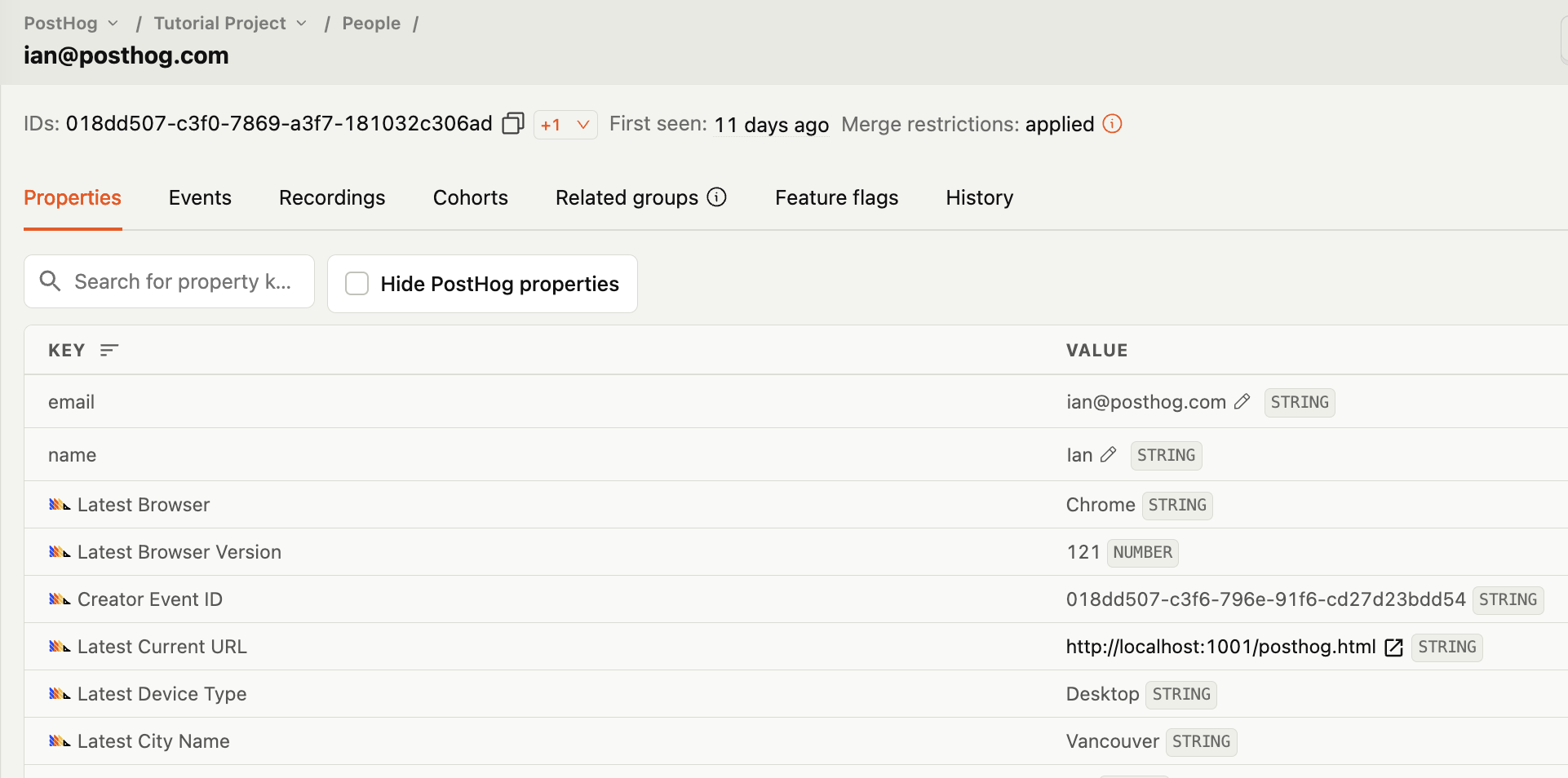
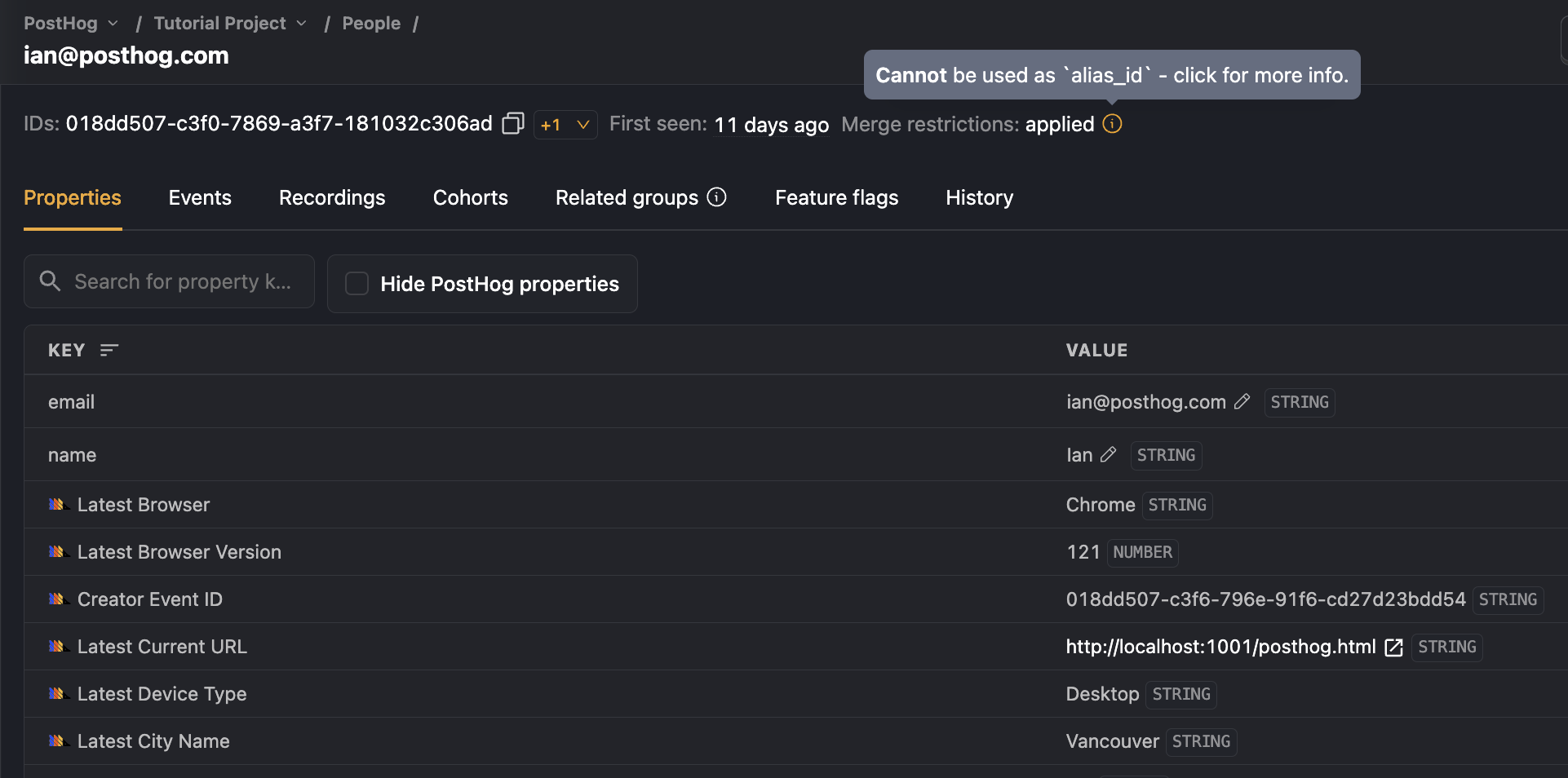
Note: When calling
aliasin the frontend SDKs, if you have set any properties onto the anonymous user, they are merged into the user withdistinct_id. For more details, see the FAQ on how properties are managed when identifying anonymous users.
How to identify users across platforms
We recommend you call identify as soon as you're able, typically when a user signs up or logs in.
This doesn't work if one or both platforms are unauthenticated. Some examples of such cases are:
- Onboarding and signup flows before authentication.
- Unauthenticated web pages redirecting to authenticated mobile apps.
- Authenticated web apps prompting an app download.
In these cases, you can use a deep link on Android and universal links on iOS to identify users.
- Use
posthog.get_distinct_id()to get the current distinct ID. Even if you cannot call identify because the user is unauthenticated, this will return an anonymous distinct ID generated by PostHog. - Add the distinct ID to the deep link as query parameters, along with other properties like UTM parameters.
- When the user is redirected to the app, parse the deep link and handle the following cases:
- The mobile app is already authenticated. In this case, call
posthog.alias()with the distinct ID from the web. This associates the two distinct IDs as a single person. - The mobile app is unauthenticated. In this case, call
posthog.identify()with the distinct ID from the web so pre-login mobile events stay connected to the web session. When the user later logs in on mobile, callidentify()again with your canonical user ID.
As long as you associate the distinct IDs with posthog.identify() or posthog.alias(), you can track events generated across platforms.
Here's an example implementation for handling deep links from web to mobile:
How to merge users
It may happen that, due to implementation issues, the same user in your product has multiple users in PostHog associated with them. In these cases, you can use $merge_dangerously to merge multiple PostHog users into a single user.
⚠️ Warnings:
- Merging users with
$merge_dangerouslyis irreversible and has no safeguards! Be careful not to merge users who should not be merged together. Due to the dangers, we don't recommend you merge users frequently, but rather as a one-off for recovering from implementation problems.- Before using
$merge_dangerously, first check if alias would better suit your needs.
Merging users is done by sending a $merge_dangerously event:
How to split a merged user back into separate users
If you've accidentally linked distinct IDs together that represent different users, or you've made a mistake when merging users, it's possible to split their combined user back into separate users. You can do this in the PostHog app by navigating to the user you'd like split, and then clicking "Split IDs" in the top right corner.
Warning: This will treat the distinct IDs as separate users for future events. However, there is no guarantee as to how past events will be treated. They may be considered separate users, or be considered a single user for some or all events.
Troubleshooting and FAQs
What happens if you call identify or alias with invalid inputs?
When calling either of these with invalid inputs (such as in the examples described in this doc e.g., using null strings with identify, or by trying to use a distinct ID of another user as an alias ID), the following will happen:
- We process the event normally (it will be ingested and show up in the UI).
- Merging users will be refused and an ingestion warning will be logged (see ingestion warnings for more details).
- The event will be only be tied to the user associated with
distinct_id.
PostHog also has built-in protections to stop the most common distinct ID mistakes. See the FAQ at the end of this page for more details.
We do not allow identifying users with empty space strings of any length, e.g.
' ',' ', etc.We do not allow identifying users with the following strings (case insensitive):
anonymousguestdistinctiddistinct_ididnot_authenticatedemailundefinedtruefalseWe do not allow identifying users with the following strings (case sensitive):
[object Object]NaNNonenonenull0We do not allow identifying a user that has already been identified with a different distinct ID. For example:
How are properties managed when merging users?
When a User B is merged into another User A, all the properties of the User B are added to User A, following the property conflict rule above. For example:
How are properties managed when identifying anonymous users?
When an anonymous user is identified as User A, all the properties of the anonymous user are added to User A, following the property conflict rule above. For example:
Do identified events cost more than anonymous events?
Slightly. Anonymous events can be up to 4x cheaper to process than identified events, because identifying a user involves resolving and updating person profiles. In almost all cases you should still identify your users. The picture you get from a complete person profile is worth it. The cost difference only really matters for very high-volume, genuinely anonymous traffic (such as a marketing site) where person profiles add little value.