







You're doing lifecycle emails wrong

Contents
Messaging tools like Customer.io and ActiveCampaign were built for a specific job: broadcast email with some segmentation on top. You upload a list, you define some basic audience filters, and set up a drip sequence. That model worked well for a long time – and it's still fine for newsletters, product announcements, and campaigns where you're addressing a stable audience with a consistent message.
PLG lifecycle messaging is a different job entirely. It needs to reason about sequences of behavior.
- Has this user completed onboarding and then gone quiet?
- Have they invited a teammate before hitting the feature wall?
- Did they upgrade, or did they hit the paywall three times and leave?
This logic requires asking arbitrarily complex questions about what a user has and hasn't done, in sequence, in real time. Messaging tools weren't designed to answer these questions – they were designed to send emails to lists.
So teams end up with trigger logic that's dumber than their product data. Not because they're doing lifecycle marketing wrong, but because they're using a broadcast tool to do behavioral work.
How this plays out in practice
Most teams build their messaging stack early, when event tracking is still basic. Signup event, maybe a key action or two. So the sequences were time-based, because that was all you could reliably trigger on. Day 1 welcome. Day 3 nudge. Day 7 check-in. It shipped, it ran, and it was good enough.
Then the product got more instrumented. Feature usage, activation milestones, plan changes – all of it flowing into the analytics tool. But the sequences kept running on the old architecture, because the open rates looked acceptable and there was always something more urgent.
The result is a hybrid nobody designed: time-based triggers standing in for behavioral logic, audience definitions evaluated at sync time rather than the moment of truth, and a messaging tool working from a portrait of each user rather than a live feed.
Here's what that actually looks like: A "hasn't invited a teammate" email that fires on day 5 built when you couldn't trigger on teammate invitations reliably. Now you can – but the sequence hasn't been updated. So users who invited a teammate on day 2 still get the email on day 5.
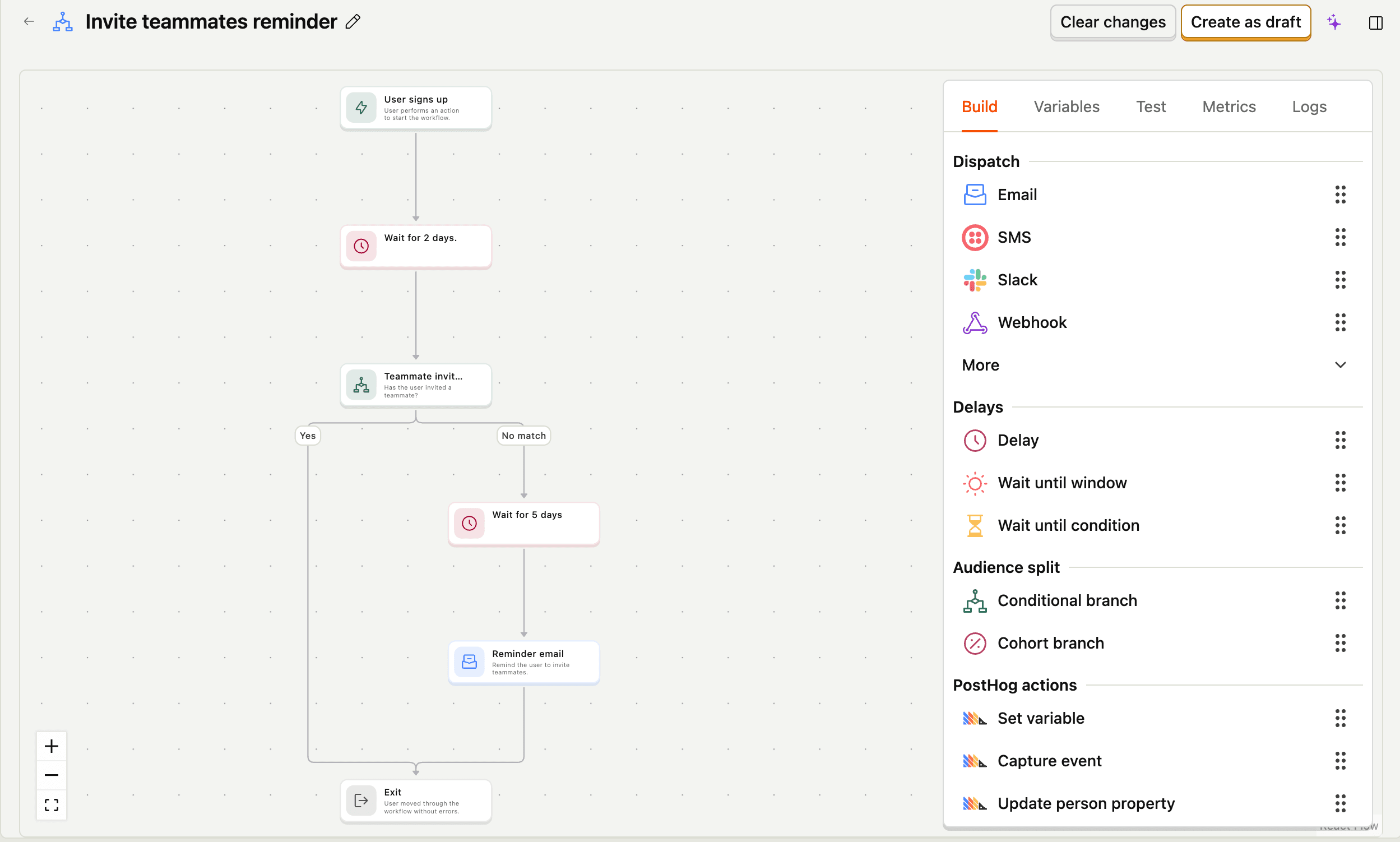
Low conversion on a sequence that's emailing the wrong people at the wrong time looks identical to low conversion from a weak subject line. The difference only becomes visible when you cross-reference what your messaging tool thinks is true about users against what your analytics tool actually shows.
The sync problem is a symptom, not the cause
The instinctive fix is to tighten the data pipeline: shorter sync intervals, better property mappings, a regular audit of what's actually making it across. That's worth doing. But it treats the symptom.
The deeper problem is that you're running behavioral logic in a tool that doesn't have the data to evaluate it properly. Evan Rallis from Grantable – who'd rebuilt complex production automation on Zapier and Make before moving to PostHog Workflows – put it clearly:
"There's no core dataset they live on top of unless you keep pushing data in manually. That is not a pretty process. And as your product changes, you have to keep re-wiring all of it."
You're not limited by how fast your sync runs. You're limited by what you remembered to sync. Your messaging tool can only ask questions about properties you explicitly pushed to it, not about the full event stream your product is already generating.
Jorge López at Croissant, who'd used Zapier, Windmill, and most of the alternatives, made the same observation from a different angle:
"Syncing data across tools is always hit-or-miss, and expensive. Now it's all in one place, and we can iterate way faster."
The speed gain is basically the difference between trigger logic constrained by a sync schema someone set up two years ago and trigger logic that can reason against everything your product knows about a user right now.
Real fixes to underperforming lifecycle emails
The right fix depends on whether you have a mapping problem, a sync problem, or an architecture problem. They look similar on the surface – low conversion, wrong people getting emails – but the solutions are different.
Audit your sequences before touching anything else
Go through your five most important sequences. For each trigger, ask whether it's time-based because time actually makes sense there, or because behavioral triggers were harder to set up when you built it. Cross-reference the audience against your analytics tool – are users getting emails about actions they've already taken?
Most teams find at least one sequence sending to users it shouldn't, and at least one behavioral signal they're tracking in analytics that never made it into their messaging logic.
Fix the obvious mismatches first. This alone moves the needle, and the exercise tells you exactly where the structural limits are.
Tighten the data pipeline
If your sequences are logically sound but still misfiring, the problem is probably the sync.
Set shorter sync intervals, create explicit property mappings you've actually verified, and regularly check what's in your messaging tool vs. what's in your analytics tool. Silent failures here are common – a property mapping breaks, nobody notices, sequences keep firing on stale data for months.
This is the least exciting fix, but also the most underrated one. A lot of performance problems disappear when the underlying data is accurate and fresh.
Pre-qualify audiences in your analytics tool before sending
Instead of defining audiences inside your messaging tool, build them where the data is freshest and sync the cohort across before triggering. This is more manual, but you're working from a source you trust rather than hoping the sync caught up in time. It is a good option if your trigger logic is the problem but sequences themselves are solid.
Move the trigger logic to where the data lives
The most structural fix is rethinking where the logic runs. As long as your automation lives in a separate tool, you're constrained by whatever you remembered to sync – you can only ask questions about properties that made it across the pipeline. When your automation runs directly on your full event stream, you can express the behavioral logic you actually want.
PostHog Workflows is built on this premise: the trigger logic, condition checks, and user data all live in the same place. A workflow can branch on real behavioral state, wait until a condition is met or a time window closes, and evaluate against everything your product knows about a user right now, not whatever made it across the last sync.
The sequences you actually want to write: "wait until this user has done X, or send this after 7 days if they haven't," are only expressible if the tool running them can see everything.
What changes when the data is right
When the trigger logic and the data are in the same place, a few things change that are hard to appreciate until you've experienced the alternative.
You stop writing time-based sequences as a proxy for behavioral ones. Instead of "day 5 nudge," you write "send this when the user hasn't invited a teammate within 5 days of signup" – and mean it literally. The sequence reflects what you actually know about the user at the moment it fires.
Sequences get shorter. A lot of the emails in a typical onboarding flow exist to cover uncertainty – you don't know if the user activated, so you send another nudge just in case. When you can branch on real behavioral state, you stop sending emails to people who don't need them.
And you can finally measure whether your sequences are working – not just open rates and clicks, but whether users who entered a flow actually did the thing. (If you need a framework for what to measure, start with product engagement.) Because the data for measuring it lives in the same place as the data that triggered it.
PostHog is your product's context layer. With a full suite of developer tools – AI observability, product analytics, session replay, feature flags, experiments, error tracking, logs, and more – PostHog ingests and stores all the data agents need to diagnose problems, uncover opportunities, and ship fixes. A data warehouse and CDP tie it all together, unifying that context into one source agents can read across. You can steer it all from Slack, the web app, the desktop (PostHog Desktop), or your own editor via the MCP.