







I hate the standup bot (so I built an agent to do it for me)

Contents
There it is. Staring at me. Sitting there. Goading me.
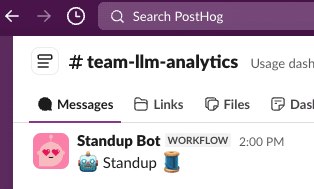
The day is nearly done. I've reviewed PRs, fixed bugs, hopped on quick calls, commanded my agents, and smashed that accept button all day!
And now I'm expected to fill in some stupid Slack thread with my standup updates?
Every time I manually copy-paste into our standup thread, a little part of me dies inside.
We just passed the Turing test and here I am copy-pasting GitHub issue URLs into a Slack thread like it's 2010. I'm pulling up tabs, hunting for PR links, navigating all over GitHub, trying to remember what I (my agents) actually did today, and formatting it all nicely in Slack.
After a few months of this, I snapped.
I work on AI Observability at PostHog. I spend my days helping people understand what their AI agents are doing. And yet here I am, manually summarizing my GitHub activity like some kind of caveman.
The irony was too much. I decided to build my own agent to beat the standup bot at its own game.
It helps too that this was also the perfect excuse to learn about and play around a little with the OpenAI Agents SDK.
The plan
The idea was simple:
- Build an AI agent that reads my GitHub activity and previous recent standups for context
- Have it draft a sensible standup summary in the style I want
- Chat with it to refine the draft
- Post directly to Slack
And because I'm a shameless dogfooder, this was the perfect excuse to:
- Learn the OpenAI Agents SDK
- Dog-food our OpenAI Agents SDK integration for
posthog-python - Create something I can actually use every day
- Write this very blog post
- But most importantly, use AI even if it actually sometimes takes me longer each day than it did before.
Let me show you how it all works.
Agents are the new scripts. We used to write bash scripts and cron jobs to automate tedious tasks. Now we write agents. Scripts follow rigid rules; agents are more flexible and often that's worth it.
The architecture: one agent to rule them all
I'll be honest - I didn't start here. My first version was a three-agent system: a Coordinator that orchestrated the workflow, a Data Gatherer that pulled from GitHub, and a Summarizer that turned it all into prose. I used the OpenAI Agents SDK's agents-as-tools pattern so the coordinator could delegate to the others.
It was a mess. Debugging handoffs between agents was painful. The coordinator would sometimes call the wrong sub-agent, or pass incomplete context. The summarizer couldn't see the raw tool call results - only what the coordinator decided to forward. And I needed three separate prompt templates, three model configs, and an on_handoff hook just to wire it all together. Way too much complexity for what is fundamentally a simple task.
So I ripped it all out - deleted the coordinator, data gatherer, and summarizer, and collapsed everything into a single agent with all 18 tools directly. The result was 300 fewer lines of code and something that actually worked reliably.
The agent has various tools organized by what they do:
- GitHub overview - activity feed and summary stats
- GitHub lists - PRs, issues, commits, reviews, comments (all with date filters)
- GitHub details - drill into specific PRs or issues
- Slack - fetch team standups, publish, confirm before posting
- Utilities - clipboard, file save
- Feedback - capture quality ratings and comments
Here's the actual agent definition:
The agent uses dynamic instructions that inject the current standup draft, so each refinement iteration has full context without blowing the token budget. A StandupContext object tracks collected data across tool calls without stuffing it all into the prompt.
Stealing my own GitHub activity
The data gathering is powered by the gh CLI, which means:
- No API tokens to manage (just
gh auth login) - Access to everything you can see on GitHub
- Real-time data, not some stale cache
This approach works great for a small personal agent running locally on your machine. If you were building something multi-user or running it as a service, you'd want proper GitHub API tokens and rate limit handling - but for a daily standup helper? The gh CLI is perfect.
Here's what the activity feed looks like when the agent queries it:
The agent starts with the activity feed to get an overview, then drills down into specific PRs or issues that need more context. It's smart about not fetching redundant data and caches results so subsequent questions don't hit GitHub again.
Example of what the agent actually sees (from a real run):
The secret sauce: PostHog AI Observability
Here's where it gets interesting. Building an agent is one thing. Understanding what it's actually doing? That's where PostHog AI Observability comes in.
I instrumented the entire agent with our OpenAI Agents SDK integration. Fun fact — it was built during a one-day hackathon at a team onsite in Barcelona, where I also discovered Calçots (highly recommend).

The integration was surprisingly quick to build thanks to the excellent tracing support that OpenAI baked into the Agents SDK. We just needed to extend their TracingProcessor to send spans to PostHog instead of their default backend.
That's it. One function call and suddenly I have full visibility into everything. (If you're handling sensitive data, you can enable privacy mode to exclude prompts and completions from being stored.)
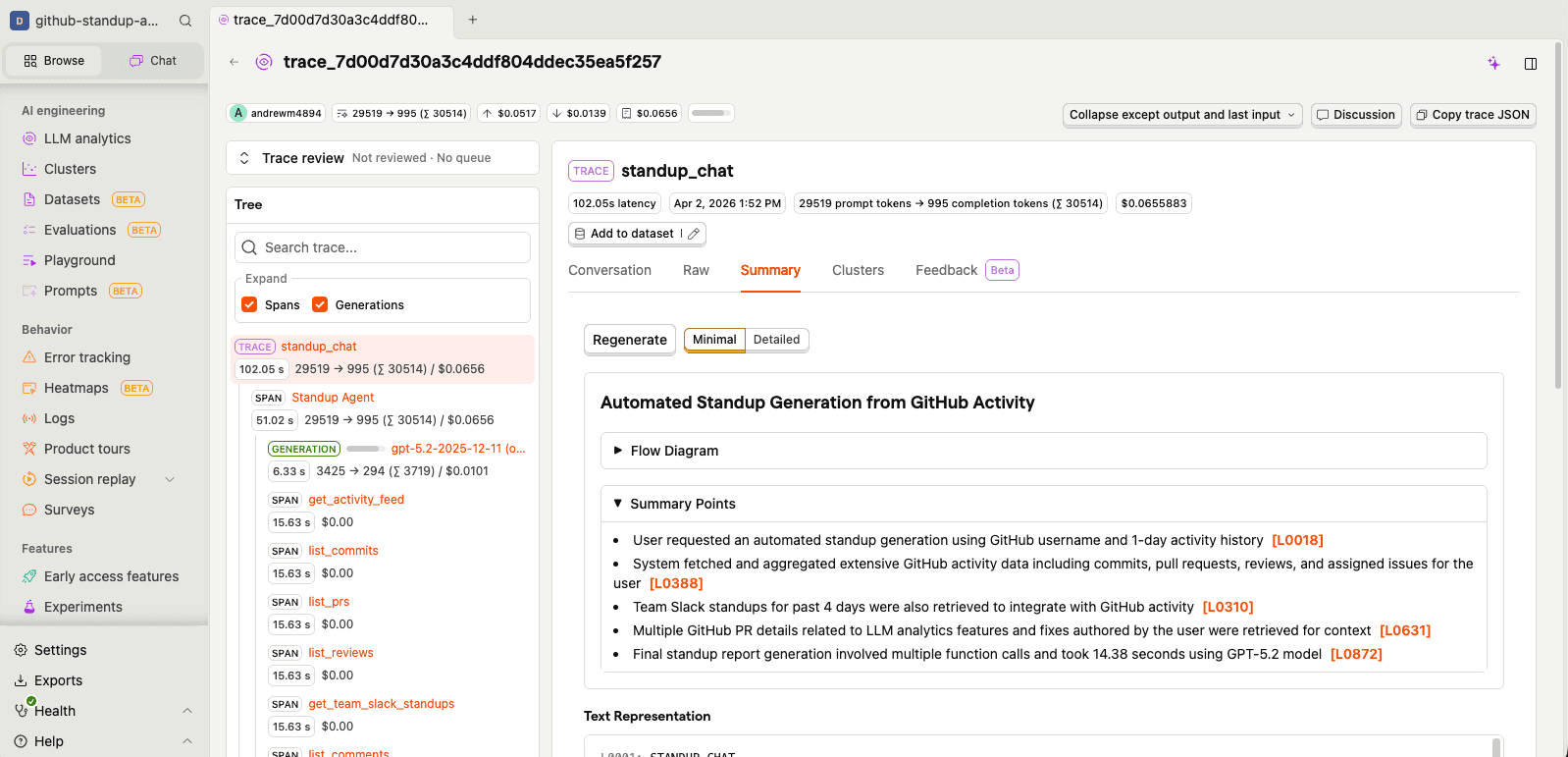
Tracing
Every agent run creates a trace with spans for:
- Agent execution - which agent ran and for how long
- Tool calls - what tools were called, with what arguments, and what they returned
- LLM generations - prompts, completions, token usage, and latency
I can see exactly how the agent decided which tools to call, what data it gathered, and how it turned all of that into prose. Each trace also gets an AI-generated summary so you can quickly understand what happened without digging into every span:
Prompt management
One thing I quickly realized: hardcoding prompts in source code is a pain when you're iterating on tone and formatting. So I moved all my prompts into PostHog's prompt management. The agent pulls its instructions, style guide, and context templates from PostHog at runtime:
standup-agent-instructions- the main system prompt with workflow, formatting rules, and feedback detectioncustom-style- formatting rules that enforce Slack mrkdwn links and match team conventionscurrent-standup- injected dynamically with the latest draft during refinementchat-context- contextual template for chat mode sessionsgenerate-standup- the one-shot generation prompt
This means I can tweak how the agent writes standups without redeploying anything. And because PostHog tracks prompt versions, I can see exactly which version of the instructions produced which standup - useful when something goes weird.
There's also the "prompts are IP" angle. You might have seen the recent Claude Code source map situation — a packaging mishap meant the full system prompts ended up in the npm release. These things happen (shipping is hard!), but it's a good reminder that if your prompts are in the source code, they're one accidental publish away from being public.
For my standup agent it doesn't matter (my half-baked vibecoded prompts are open source anyway), but if yours contain real secret sauce, a prompt store with a local cache is a nice safety net.
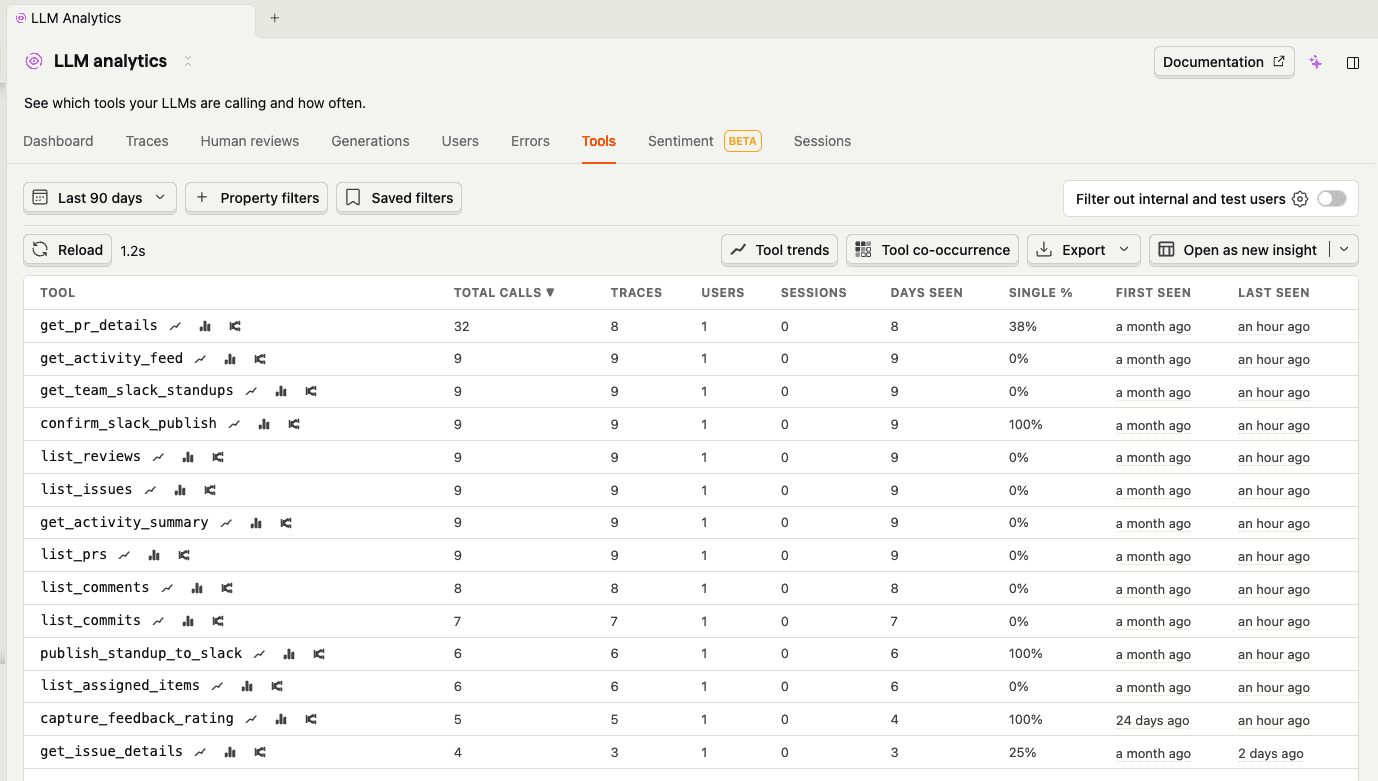
Tool usage
The tools tab shows me which tools the agent calls most and how long they take. Turns out get_pr_details and get_activity_feed dominate - you can see get_pr_details right at the top with the most calls. That was actually a surprise - the agent was drilling into way more PRs than it needed to. A quick prompt tweak ("only drill into PRs that look significant") cut unnecessary API calls.
Clustering
Clustering automatically groups similar traces together. For a personal agent like this, the clusters are pretty simple - mostly "standard standup generation" vs "heavy iteration sessions" vs "quick copy-paste runs." But it's useful for spotting patterns in how I use the agent. If you're curious about how the clustering pipeline actually works under the hood, I wrote a deep dive on how we built it.
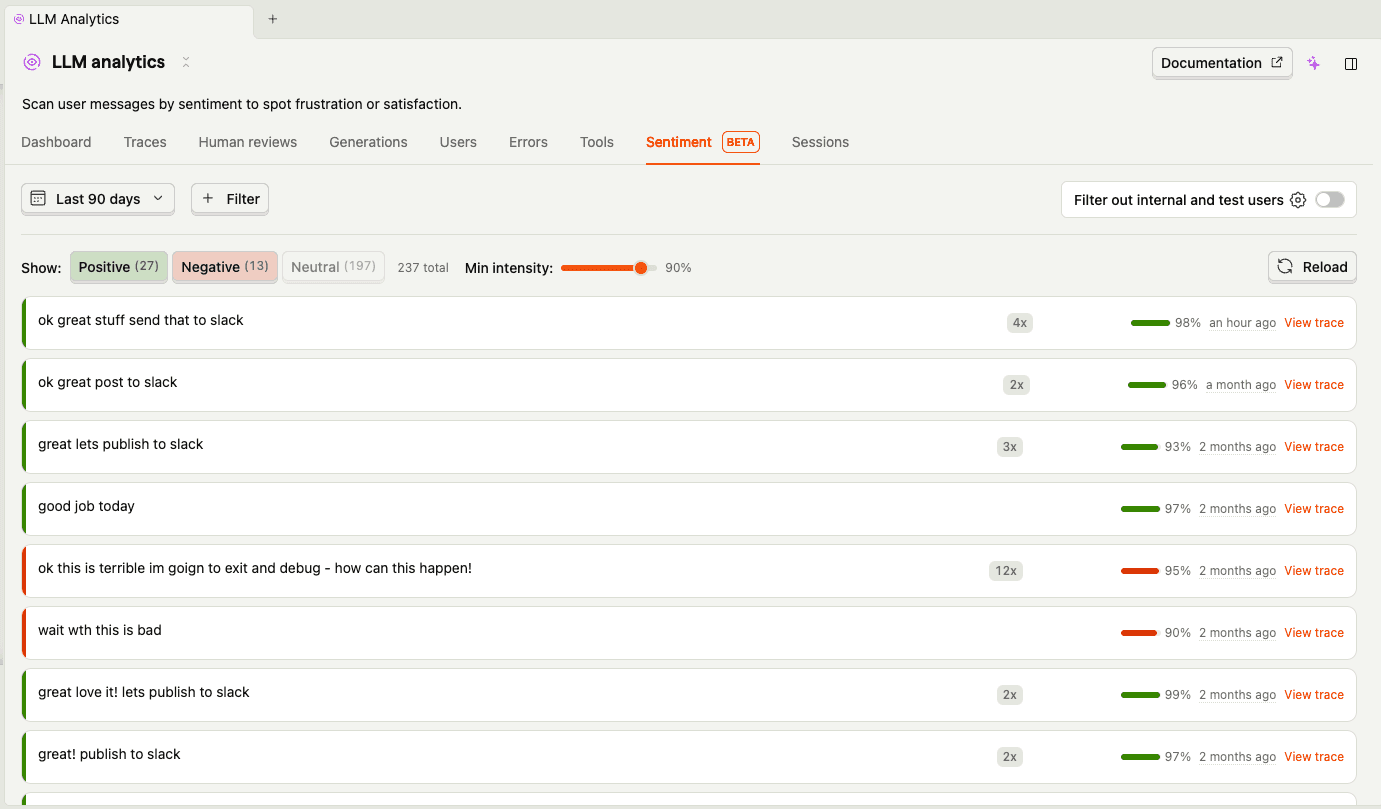
Sentiment
The sentiment tab is more fun. PostHog analyzes the tone of user messages, and looking at my negative ones is... humbling. Some highlights from my standup sessions:
- "bad bad bad!!!!!"
- "ok this is terrible im going to exit and debug - how can this happen!"
- "you messed up the links"
- "bad you are not following the examples or style properly"
In fairness, most of these are just me giving the agent iteration feedback ("drop all the merged words its a bit repetitive", "remove the ask, dont need it") rather than genuine rage. But sentiment analysis doesn't know the difference, and that's actually an interesting insight — what looks like negative user sentiment might just be a user who's actively engaged and iterating. The positive ones are more telling: "ok great stuff send that to slack" and "great love it lets publish to slack" tend to mean the agent actually nailed it first time.
Evals
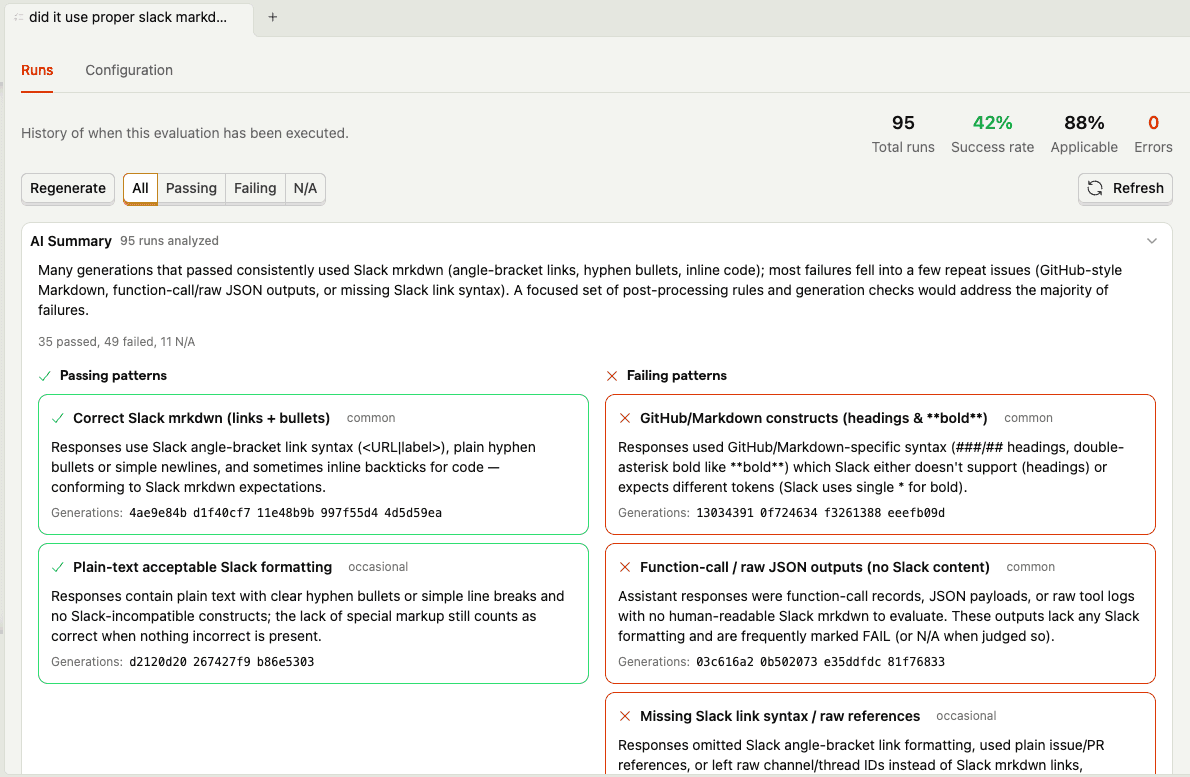
Here's where dogfooding gets real. The agent's biggest formatting headache is Slack's cursed mrkdwn syntax - it uses <url|text> instead of [text](url), and the agent constantly tries to slip back into regular markdown. So I set up an evaluation that automatically checks every generation: "did it use correct Slack-style markdown formatting?"
The eval results summary tells the whole story. Generations that pass tend to use correct Slack mrkdwn links, simple bullets, and plain text headers. The failures? The agent keeps trying to sneak in **bold** headers, [text](url) markdown links, and occasionally dumps raw JSON outputs. My favorite failure pattern: the agent would use <link|text> syntax for headings (correct for links, completely wrong for headers) — Slack doesn't even have heading syntax, so it just needs to use plain text like Did:.
You can also drill into individual runs to scan each generation's result and reasoning:
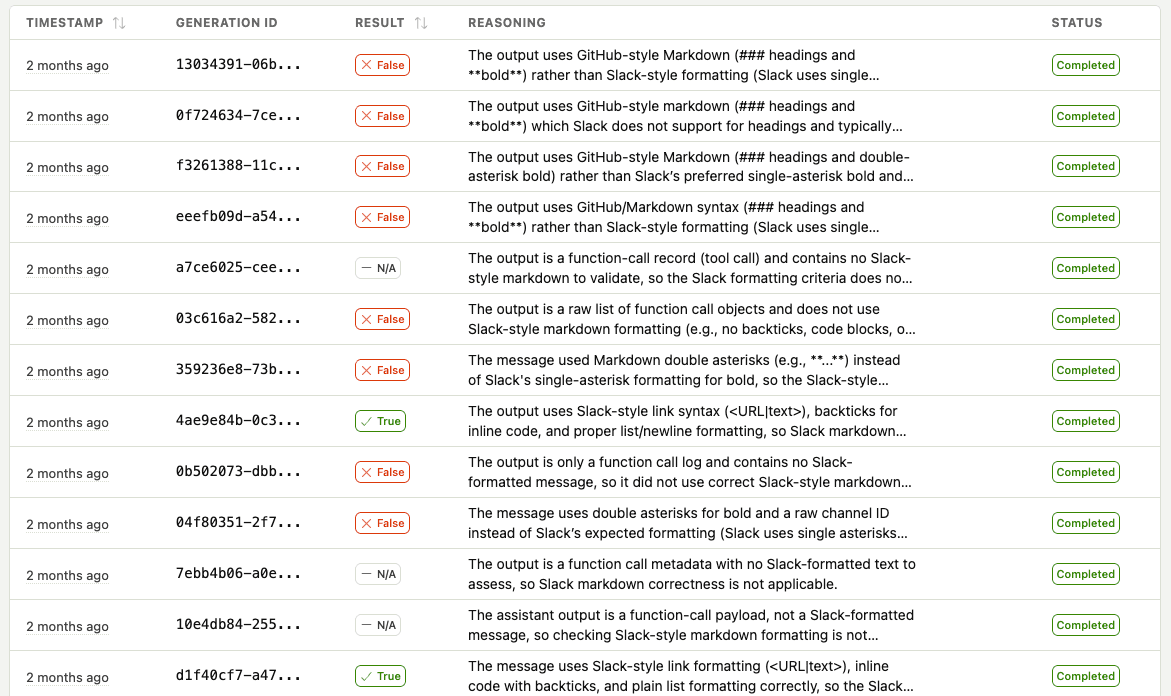
This is the kind of thing that's nearly impossible to catch systematically without automated evals. I'd notice the odd broken link in Slack, fix the prompt, and think I'd solved it — only for a different formatting issue to pop up the next day. The eval catches all of them and shows me the patterns so I can fix the root cause in the prompt, not just whack-a-mole individual failures.
User feedback
This one is really just a regular posthog.capture() call exposed as a tool - plain old product analytics, nothing fancy. The interesting part is that the agent decides when to call it. I don't explicitly say "thumbs up" or "thumbs down" — the agent picks up on signals in my messages and fires the event itself:
When I say "ok great stuff send that to slack", the agent infers positive feedback and captures it before publishing. When I say "bad you are not following the examples", it captures negative feedback with my complaint as the comment. I never have to break out of the conversation flow to rate anything — the agent just reads the room.
That feedback is linked to the exact trace with $ai_trace_id, so I can go back and see what went wrong on bad runs. Over time, this builds a dataset for understanding what makes a good standup and which prompt versions produce better results.
The victory lap: posting to Slack
The final piece is actually posting to Slack. Because what's the point of automating standup generation if I still have to copy-paste?
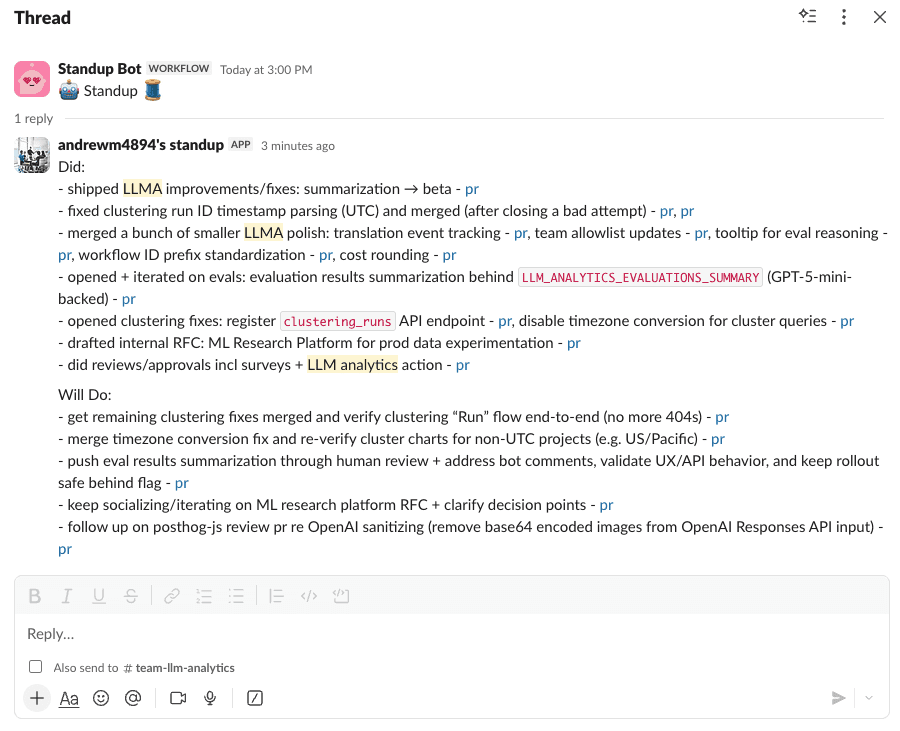
The agent has Slack integration with a two-step confirmation flow (because posting to your team's Slack channel by accident would be... bad):
The agent automatically finds the latest standup thread in your configured channel and posts as a reply. No more hunting for the thread. No more copy-paste. Just vibes.
Did I save any time compared to just writing the standup myself? Debatable.
Might there be some AI slop in my updates that slipped through? Most definitely.
Did I get to use AI instead of doing it manually? Yes.
And isn't that all that really matters?
Human in the loop still matters. Here's the thing - as soon as I stop manually iterating and approving the standups my agent is generating, it flips into something weirdly anti-social. I'm just sending my teammates auto-generated text. Even if it's 90% accurate and I would have approved it anyway, something feels off about fully automating communication with other humans. The approval step isn't just quality control - it's me taking ownership of my words.
Try it yourself
The agent is open source, go check it out or try it yourself:
You'll need:
- Python 3.11+
- GitHub CLI authenticated (
gh auth login) - OpenAI API key
- Optional: Slack bot token for posting
- Optional: PostHog API key for analytics
Build your own instrumented agent
The broader lesson here: if you're building AI features, instrument them from day one.
PostHog's AI Observability gives you:
- Tracing - See exactly what your agents are doing
- Cost tracking - Know what you're spending on API calls
- Evals - Measure quality systematically
- Prompt management - Version and iterate on prompts without redeploying
- Clustering and sentiment - Spot patterns in how your agent is used
- User feedback - Link quality signals to specific traces
The OpenAI Agents SDK integration is available in posthog-python. Check out our other integrations for LangChain, OpenAI, and many other frameworks.
Stick it to your standup bot
I've been using this agent daily for a few weeks now. It's not perfect - sometimes it misses context or formats things weirdly. But that's the beauty of having full observability: I can see exactly what went wrong and iterate.
Why are we even doing standups? Honestly, summarization as a category feels crazy early. The fact that I have to manually aggregate my work across GitHub, Slack, Linear, and Google Docs is absurd. I should just be able to read the "headlines" of my work life each morning - a personalized digest of what matters, generated automatically from all my tools. No one has solved this yet. Maybe standups are just a symptom of our tools not talking to each other. The standup bot isn't the enemy - it's a coping mechanism for a fragmented toolchain.
The standup bot still messages me at 6 PM. But now I just smile, run standup generate, and let my agent do the talking.
F*$k you, standup bot. I win.
Further reading
- How we caught our AI agent embezzling tokens - Lessons on tracking and optimizing agent costs
- How we built automatic clustering for LLM traces - Deep dive into the clustering pipeline
- 8 learnings from 1 year of agents - What we've learned building AI at PostHog
PostHog is your product's context layer. With a full suite of developer tools – AI observability, product analytics, session replay, feature flags, experiments, error tracking, logs, and more – PostHog ingests and stores all the data agents need to diagnose problems, uncover opportunities, and ship fixes. A data warehouse and CDP tie it all together, unifying that context into one source agents can read across. You can steer it all from Slack, the web app, the desktop (PostHog Desktop), or your own editor via the MCP.