







AI is killing no-code experiments

Contents
Every no-code A/B testing tool makes the same pitch: run experiments without relying on engineers.
But these tools don't actual remove dev work, they defer it. No-code tools inject changes on top of the rendered page. When an experiment wins, someone still has to rebuild the winning variant. The total dev effort is the same, it just happens after the experiment instead of before it.
The injected approach also hurts the experiment itself. On client-rendered pages and single-page applications (React, Vue, Angular), the tool swaps in the variant after the page renders. Users see the original content flicker before the change kicks in. On SPAs it's even worse: the framework can re-render and revert your changes entirely.
Some of this can be mitigated and no-code experiments can work well on server-rendered apps, but the more complex your variant, the more likely it breaks.
AI is changing all this, and in doing so, is making no-code experiments extinct.
What if AI just wrote the code?
AI code generation is fulfilling the promise of no-code experiments: it actually lets you run experiments without relying on engineers. Writing code is becoming less of a bottleneck. Now the hard part is moving where it should have been all along: figuring out what experiments to run.
You still need to describe your test in plain language and learn how to set up experiments correctly, but the coding can now be done with the combination of your favorite coding agent and PostHog MCP (or CLI). When you combine these, you just describe your test and the agent generates:
- The actual code change implementing your variant
- An experiment in PostHog with your success metric
- All the wiring to connect the two
The result is a real PR with real code. And because the variant is baked into the code rather than injected after render, you avoid the DOM manipulation issues that plague no-code tools. The work is also done upfront, not deferred. When the experiment wins, your production code is already shipped. There's no rebuilding step.
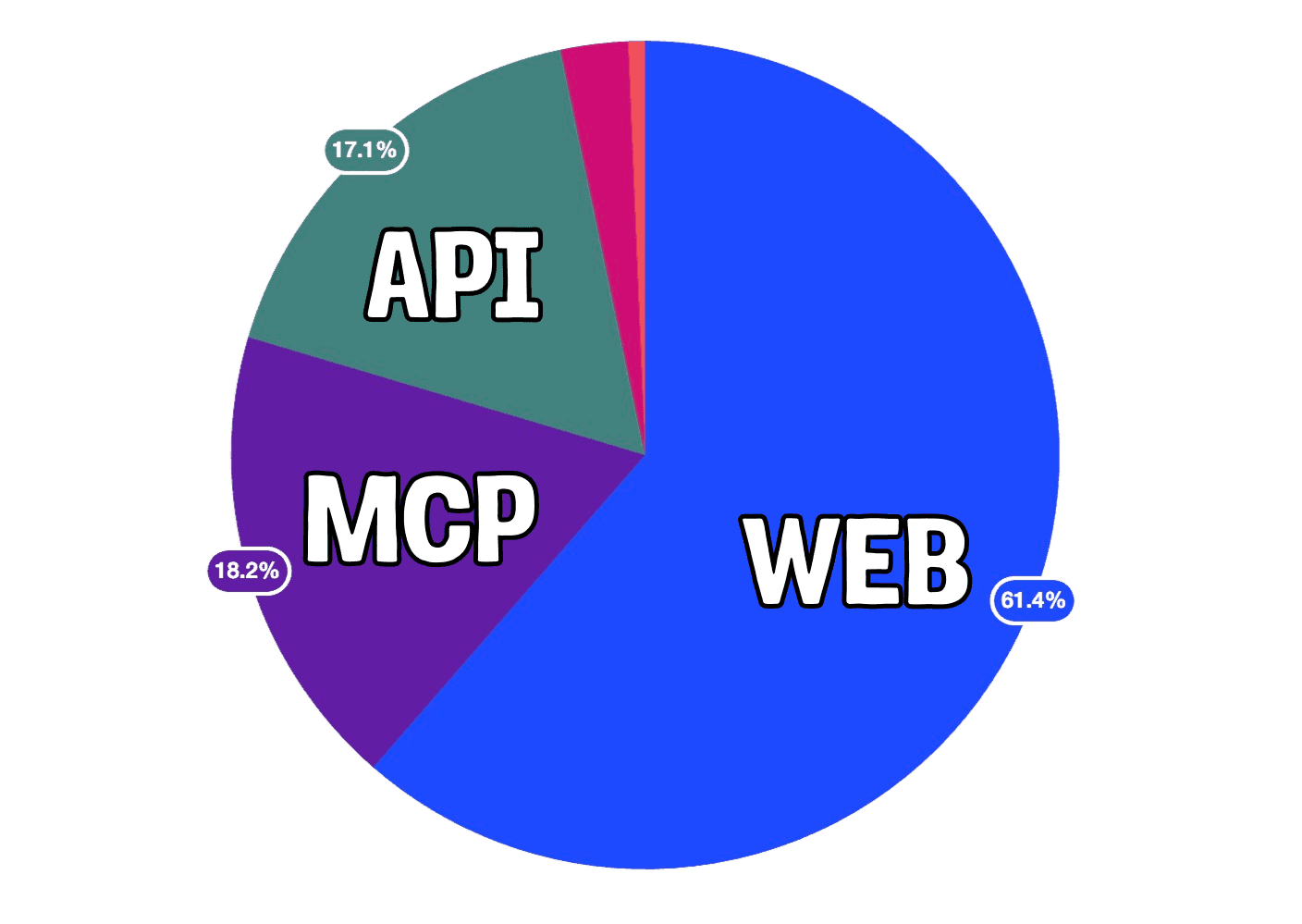
And this isn't just a theoretical improvement. We've seen it in practice. 18% of our experiments last week were created through the MCP and we only expect that number to grow.
Note: If you're evaluating flags on the client side (the default), experiments on your landing page can still show a brief flash. For zero-flicker experiments, you evaluate flags server-side and bootstrap them (which is not possible for no-code experiments). It's a one-time setup, not a per-experiment effort.
How the daily workflow changes
With no-code tools, growth designs the experiment visually, runs it, finds a winner, and then creates a ticket for engineering to rebuild it in real code.
With AI code generation, growth writes an experiment brief, AI generates a PR, engineering reviews it, and the winner ships instantly. The work happens upfront instead of after the experiment, and it leads to a faster, more iterative process:
| Traditional no-code | AI code generation | |
|---|---|---|
| 1️⃣ Growth creates experiment | Visual editor | AI prompt |
| 2️⃣ Dev builds experiment | Not needed (upfront) | Not needed (AI generates) |
| 3️⃣ Dev reviews | Not needed (upfront) | Reviews a PR. Minutes for simple changes |
| 4️⃣ Experiment runs | With flicker risk on SPAs | No injection issues. No flicker with server-side flag eval |
| 5️⃣ Winner found | Need to rebuild in real code | Flip feature flag to 100%. Done |
| 6️⃣ Cleanup | Rebuild winning variant + remove test from tools | Remove flag wrapper + dead variant code (soon automated) |
The experiment brief is everything
Coming up with good ideas should be the bottleneck, not implementing them. With AI handling the code, the experiment brief becomes the most important artifact in the whole process. It is the design spec. The more specific you are, the better the output.
You don't have to write it alone. PostHog AI can help. It knows how to set up experiments and how users are using your product. You can use it to hone your brief before you pass it to your agent to start generating code.
You'll want to include these four things in your final prompt:
- What: "Test urgency-driven CTA on the signup page"
- Why: "Current CTA ('Get started') is generic. Hypothesis: a time-limited free trial message increases signup conversion."
- Metric: "Signup button click-through rate"
- Design detail: "Replace the main CTA button text from 'Get started' to 'Start your free 14-day trial'. Add a subtitle line below the button: 'No credit card required'. Keep button size, color, and position identical."
Content and copy changes are the fastest wins, but because this is real code (not just HTML and CSS overlays), you can go beyond surface-level experiments. Layouts, multi-step forms, conditional UI based on user segments. Anything you can describe, AI can generate. For more complex changes, be even more specific about spacing, element order, and responsive behavior.
This brief translates directly into a prompt. Open your editor with the PostHog MCP server connected and start the conversation:
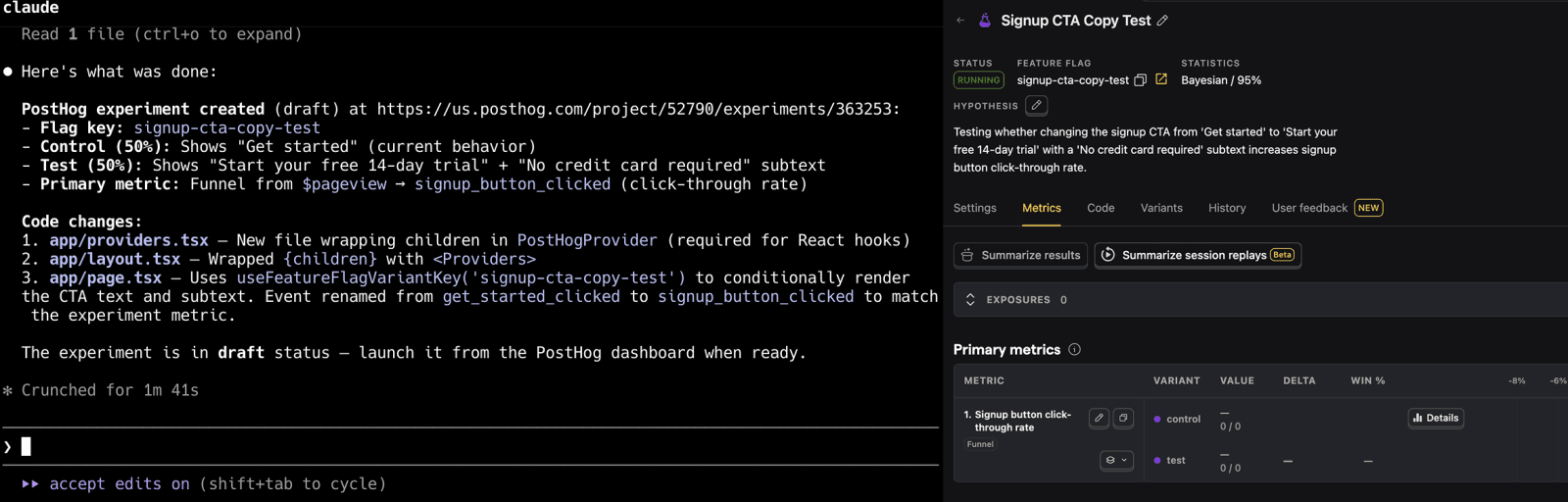
"Create an A/B test on the signup page. The control keeps the current 'Get started' CTA. The variant should change it to 'Start your free 14-day trial' and add 'No credit card required' below the button. Split traffic 50/50. Track signup button click-through rate as the primary metric."
You don't need to get everything right in one message. The agent will look at your code, ask about edge cases, and suggest things you might have missed. After a few back-and-forth messages, it generates the code change, the experiment in PostHog, and all the configuration. Review what it produced, then open the PR.
Previewing before you launch
Many rely on the visual preview no-code experiments provide and might be worried about losing them, but again thanks to agents, this is solvable. Don't underestimate the power of LLMs when it comes to debugging and helping "non-technical" people understand what's going on.
Experiments in PostHog deploy behind a disabled feature flag. No users see it. From there, three ways to preview:
Run locally. Pull the branch, run your dev server, and toggle the flag in your local environment. You see the variant with real styling and real components. If you get stuck, use an agent to help you debug.
PostHog toolbar. Edit the feature flag to release to 0% of users, ship the code for your experiment, open your production site, launch the toolbar, and force-toggle the experiment flag to the test variant. You see it live with real data, only in your browser. Nobody else is affected.
Flag override by email. Add a release condition on the flag (e.g., email = yours → test variant at 100%). You see the experiment everywhere, including on mobile. No toolbar needed.
So is no-code dead?
No. No-code visual editors (PostHog toolbar, VWO, etc.) still work for quick, disposable tests where you don't care about flickering and don't plan to ship the result long-term. But I wouldn't make no-code the primary experimentation strategy. Not when AI code generation lets you run proper, production-quality experiments with the same or less total effort.
The future is experiments that produce actual code, written by AI and reviewed by humans. No DOM injection, no re-render issues, no gap between "the test won" and "we shipped it."
Further reading
PostHog is your product's context layer. With a full suite of developer tools – AI observability, product analytics, session replay, feature flags, experiments, error tracking, logs, and more – PostHog ingests and stores all the data agents need to diagnose problems, uncover opportunities, and ship fixes. A data warehouse and CDP tie it all together, unifying that context into one source agents can read across. You can steer it all from Slack, the web app, the desktop (PostHog Desktop), or your own editor via the MCP.