The agent that already understands your context
The answers are already in your data. PostHog AI finds them across your events, replays, errors, logs, and warehouse tables. Ask in PostHog or Slack, or connect your coding agent through MCP.
- Query product behavior and connected business data
- Create flags, dashboards, surveys, and alerts
- Investigate errors and summarize session replays
More data in, better answers out
Events and replays show what people did. Errors and logs show what broke. Feed PostHog AI the rest of your stack too. Every source you add is more context to answer from.
Already in PostHog
 Stripe
 HubSpot
 Salesforce
 Zendesk
 Postgres
 Snowflake
 And your code
Connect GitHub, and context can become a pull request. The agent works from your repo and the product data behind it.
Connect GitHub →Illustrative conversation: PostHog AI investigates a drop in billing page upgrades using SQL, the data schema, and session replays. It finds that an annual-first default hurts conversion, recommends a change, and offers to save the work as a notebook. All findings are sample data.
Answers you can trust
Every company counts differently. Without a definition of “active user” or MRR, an AI picks its own, so the same question can give different answers.
With the semantic layer, you define these once (no more re-explaining your data model), and PostHog AI uses your definition every time. Your team signs off on each one, and answers using it are marked as approved.
Set up your definitions →Slice it any way you like. MRR still means one thing.
Your product data wherever you work

PostHog AI in PostHog Web
Start with a trend, then ask for the SQL behind it, the replays that match, or a survey to learn why. It’s all one conversation, so each question builds on the last.
It sees the page you’re on. No need to explain which chart you mean.
Save what you sell and who your customers are with /remember.
It edits the filters on your open insight. Tweak a chart by asking.
Notebooks mix text, charts, and replays in one doc. PostHog AI writes them for you.
Also in Slack
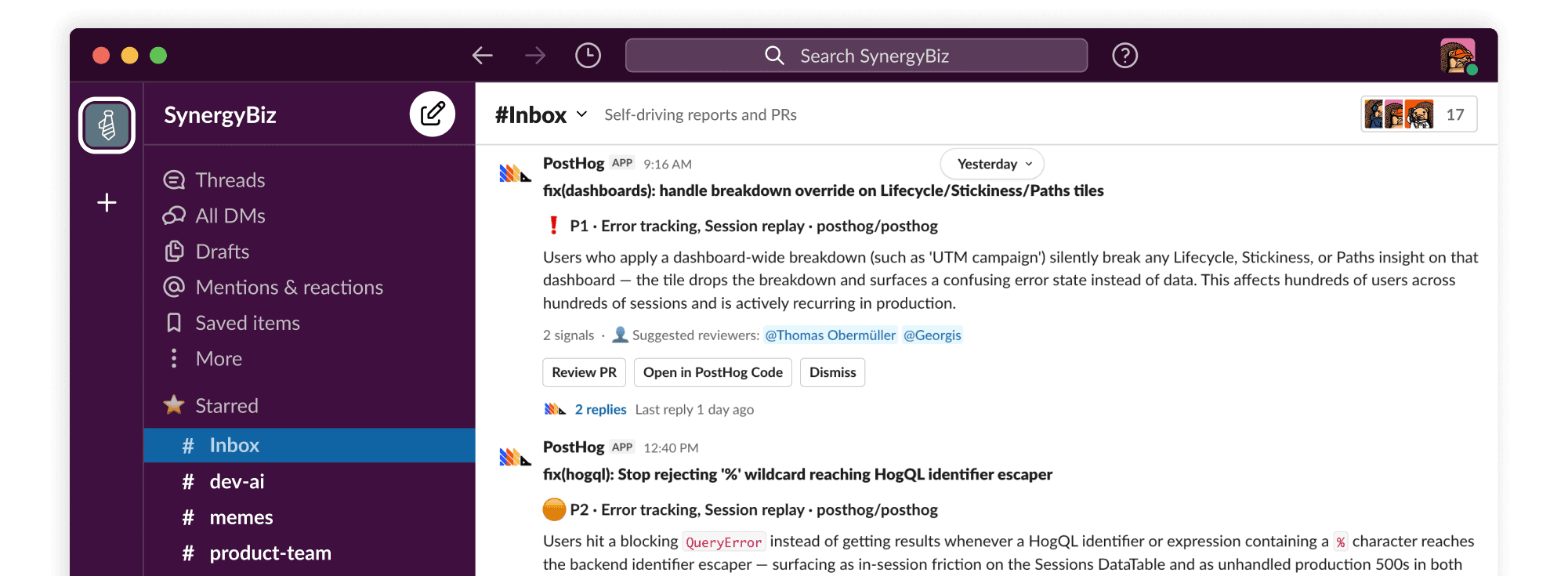
Product discussions happen in Slack, so PostHog goes there too. Mention @PostHog in a thread to analyze your data, or to hand a fix to a coding agent.
PostHog in your coding agent
Plug PostHog into Claude Code, Cursor, or wherever you’re building.
Ask “how often is this endpoint hit?” before you rewrite it.
See how an experiment is trending before you ramp, hold, or roll back.
See whether latency or conversion moved before you ship the next thing.
Also in your terminal and CI
posthog-cli api gives you the MCP tool catalog as shell commands, including SQL queries.
Agents that keep working when the chat window is closed
Scouts
Agents that investigate your product on a schedule and file a report when something needs you.
How scouts work →Inbox
Reports ranked by priority, each with its evidence, plus a pull request when there is a fix.
Reports and pull requests →Replay Vision
Scanners that watch your session replays for you and turn what they see into data you can query.
How Replay Vision works →Actual jobs for your AI
Prompts for the work PostHog AI can take off your plate.

Explain the graph everyone is staring at
“How did usage change this week compared to last week? Check errors and replays for a cause.” Try this prompt
Skip to the part where they got stuck
“Find sessions with rage clicks or errors, and summarize what the users were trying to do.” Try this prompt
Find the errors that hit the most users
“Which errors affected the most users this week?” Try this prompt
Read the feedback pile
“Summarize survey responses from the last 30 days.” Try this prompt
Make an opinion testable
“Find a high-traffic page and suggest an A/B test for it. Then draft the experiment.” Try this prompt
Build a dashboard by describing it
“Build a dashboard with daily active users, top pages, and retention.” Try this prompt

It’s not magic (but it feels like it)
PostHog AI knows when things break, what users love, and what to build next. Every organization gets 500 free credits a month to ask harder questions that help you build a better product.
The sensible questions

Real things real people really said
about PostHog AI (really!)
Pssst, are you Post-It certified?
“I enjoy and trust the experience of PostHog’s AI probably more than Claude just because I feel like it has a little bit more context into all of the events.”
Building your own AI?
PostHog AI works because it sits with your product data. Your AI can too.
AI Observability →
Inspect prompts, responses, tool calls, latency, tokens, and cost in one trace.
Evaluations →
Evaluate model output to find poor answers and catch regressions.
MCP Analytics →
See agent intent, failed tool calls, and capabilities missing from your MCP server.
Skills →
Store agent skills with full version history, and share them with your team through MCP.