







9 best open source analytics tools for developers and startups

Contents
What are the criteria for this guide?
This guide only includes analytics tools that:
Are open source in the full sense. The core product is published under an OSI-approved license (MIT, Apache-2.0, GPL, or AGPL) that lets you read, modify, and run the code for your own business. "Source-available" licenses that restrict production use don't count.
Have built-in analysis views. This includes end-to-end analytics tools and dashboard tools that connect to existing data sources, but not data pipeline platforms.
Are actively maintained. A release or merged pull requests within the last six months, and maintainers who respond to issues.
Are free to start. Either a free, self-hostable release or a hosted free tier. Self-hosting is covered for every tool that offers it, but it's an option here, not a requirement.
TL;DR: What open source analytics tool should you choose?
PostHog if you're building a product and want product and web analytics, AI observability, session replay, feature flags, experiments, error tracking, and more in one platform. Matomo if you want a like-for-like Google Analytics replacement. Plausible, Umami, or Rybbit if you want lightweight, cookieless web analytics. OpenPanel if you want simple product analytics without PostHog's depth. Metabase or Apache Superset if your data already lives in a warehouse. OpenReplay if session replay is the priority.
The best open source analytics tools
You want visibility into what users are doing – but you also want control over where that data lives, and you don't want to pay enterprise prices to get it. Open source analytics tools give you all three: insight into user behavior, data that stays where you put it, and a free path to start on.
For developers and startups, the trade-off to understand is time. Every tool here is free to run, but some take an afternoon to self-host and others take enough resources that a hosted free tier would be a better deal.
This guide covers the best open source analytics tools available today, from full product analytics platforms to lightweight web analytics and BI tools.
At a glance
| Tool | License | Self-hosting setup | Minimum to self-host | Free cloud tier |
|---|---|---|---|---|
| PostHog | MIT | Docker Compose | 4 vCPU, 16GB RAM | 1M events/month |
| Matomo | GPLv3 | PHP app + MySQL/MariaDB | 2 CPU, 2GB RAM (100k pageviews) | None (21-day trial) |
| Metabase | AGPLv3 | Docker or JAR + app database | 1 core, 1GB RAM | None (14-day trial) |
| Plausible | AGPLv3 | Docker Compose | 2GB RAM | None (30-day trial) |
| OpenPanel | AGPLv3 | Docker Compose | Any Docker host | None (30-day trial) |
| Umami | MIT | Node.js + PostgreSQL, or Docker | Node.js 18.18+, PostgreSQL | 100k events/month |
| Rybbit | AGPLv3 | Docker Compose (setup script) | 2GB RAM, Docker | None (7-day trial) |
| Apache Superset | Apache-2.0 | Kubernetes for production | 2 vCPU, 8GB RAM | No official cloud |
| OpenReplay | AGPLv3 | Docker or Kubernetes | 2 vCPU, 8GB RAM, 50GB | Self-hosted free; cloud usage-based |
1. PostHog
What is PostHog?
- Created: 2020
- License: MIT
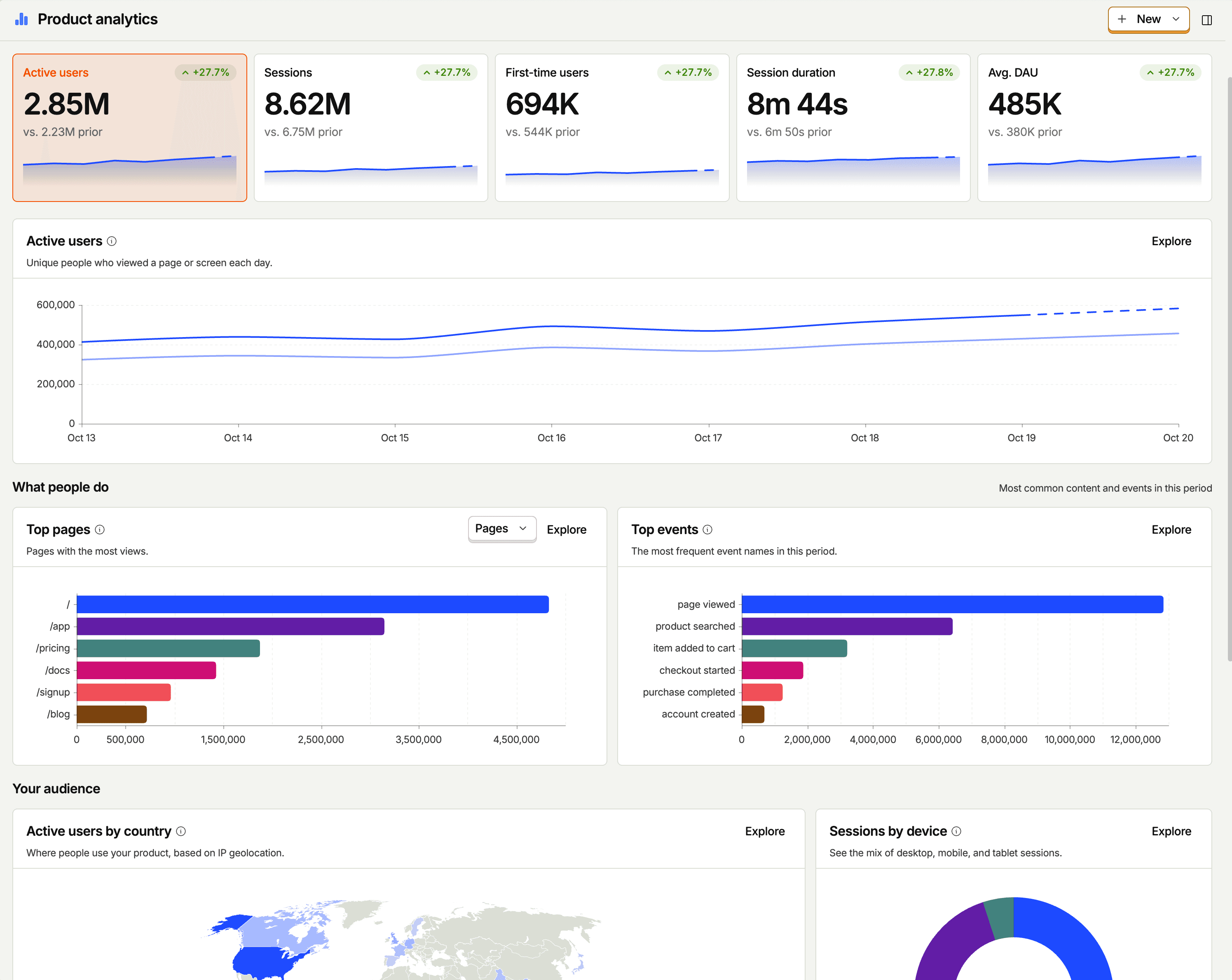
PostHog is an all-in-one platform that combines product analytics with several other developer-focused tools, such as web analytics, AI observability, session replay, feature flags, experiments, error tracking, surveys, logs, and more.
What sets it apart from the other tools here is that all of that data lands in one place. PostHog's data warehouse stores everything it collects alongside data you sync in from Stripe, HubSpot, Salesforce, Postgres, and dozens of other sources, with no pipelines to maintain, and it can query Snowflake, Redshift, and others in place. You then query all of it with standard SQL, joining a Stripe revenue column to a signup event for example, or ask PostHog AI to write the query for you.
The first million rows a month are free.
Because the data is in one place, you can work with it from wherever you already are. The PostHog MCP lets Claude, Cursor, Codex, or any MCP client query your project and make changes in plain English, and tagging @PostHog in Slack answers a data question or ships a fix as a draft pull request. The same foundation powers PostHog's self-driving features, where agents watch your product data and flag what's worth fixing.
Who should use PostHog?
Developers, AI product builders, and startups who need an in-depth understanding of what users are doing in their app, or want to track the complete journey from their marketing website through to their app.
It's also the obvious pick if you're building an AI product: AI observability sits next to product analytics and session replay, so you can see what an LLM call cost, what it returned, and what the user did next, all in one place. There's a generous free tier, which means ~97% of companies use PostHog for free.
Pros and cons
| Pros | Cons |
|---|---|
| Product analytics, web analytics, session replay, flags, experiments, error tracking, and AI observability in one platform | Self-hosting not recommended above ~300k events per month |
| Built-in data warehouse: query product data and synced sources like Stripe and HubSpot with SQL | Steeper learning curve than lightweight analytics tools |
| MCP and Slack app let you query and change your project from Claude, Cursor, Codex, or a Slack thread | Open-source release includes free-plan features only; paid features are cloud-only |
| Session replay for web and mobile apps | |
| Generous free tier: 1M events a month, and 97% of companies pay nothing |
FAQ
What does it mean for PostHog to be your product's context layer?
It means everything your product generates ends up in one queryable place. Events, sessions, replays, errors, LLM traces, flag states, and experiment results are stored together and share one model of users and sessions, and the built-in data warehouse adds business data synced from other sources alongside them.
The practical result is that a question like "did users who hit this error last week churn, and what were they paying us?" is one SQL query instead of three tools and a spreadsheet. The same applies to agents: anything you connect through the MCP gets the full picture of your product, not a slice of it.
PostHog says it makes your product "self-driving" – how does that work?
It means PostHog digs through your product data, finds what's worth fixing, and has agents do the work.
It starts with context. A full suite of developer tools – AI Observability, Product Analytics, Session Replay, Feature Flags, Experiments, Error Tracking, Logs, and more – captures everything happening in your product, and a Context Warehouse unifies it into one source agents can read across.
From there, Scouts read across all of it and sort what's worth knowing from what's just noise. What clears the bar becomes a report in your inbox: an agent picks it up, roots out the cause, and opens a PR. You review and merge.
You can steer it from Slack, the web app, or your own editor via the MCP or CLI.
What tools can PostHog replace?
Several. The built-in product analytics is an alternative to tools such as Mixpanel, Amplitude, and Heap and it can replace Google Analytics for website and marketing analytics.
With session replay for both web and mobile apps, plus Heatmaps, PostHog can replace the likes of Hotjar and FullStory. It also includes feature flag and experimentation features like those found in LaunchDarkly or error tracking like Sentry.
If you're building with LLMs, AI observability covers what you'd otherwise get from Langfuse, LangSmith, Helicone, or Braintrust: traces, token costs, and evals, next to the product analytics and replays for the same users. See our comparison of AI observability tools.
And logs means it can stand in for Datadog, Splunk, or Grafana Loki for centralized log management, with logs linked to the session replay and error that produced them. See our comparison of log monitoring tools.
For every head-to-head and alternatives guide we've written, see all PostHog comparisons.
What's included in open source?
PostHog Open Source is a free Docker Compose deployment for hobbyists and proofs of concept. The code is MIT-licensed includes the core features of each product, but not the paid add-ons, such as group analytics, data pipelines, SSO, and RBAC. You can create one project per organization. Everything runs on one machine, so it will not scale past a few hundred thousand events without significant work. PostHog does not give support for it, and it is provided without guarantee.
What are the hosting requirements?
We recommend a VPS with at least 4 vCPU, 16GB RAM, and 30GB+ storage (8GB RAM is the absolute floor). The open source deployment runs on a single machine, so it suits up to a few hundred thousand events per month. Above that, we recommend PostHog Cloud, because scaling self-hosted PostHog to higher volumes is complex.
Is there a hosted option?
Yes, and it's the one PostHog itself recommends for most teams. PostHog Cloud is hosted in the US or the EU, and every product has a free tier that resets monthly: 1 million events, 5,000 web and 2,500 mobile session recordings, 1 million feature flag requests, 100,000 exceptions, 100,000 LLM events, 1,500 survey responses, and a lot more.
Above the free tier, pricing is usage-based per product, and you can set a billing limit on each one so a traffic spike can't run up a surprise bill.


Install PostHog with one command
Paste this into your terminal and make AI do all the work.

2. Matomo

What is Matomo?
- Created: 2007
- License: AGPLv3
Matomo is an open-source platform for website analytics. The user experience is closely modeled on the previous version of Google Analytics, known as Universal Analytics, which many people prefer to Google's current offering.
It looks little dated compared to some tools in this list, but it's a mature and reliable platform used by many large government and non-profit organizations. Matomo 6, which requires PHP 8.1+ and MySQL 8 or MariaDB 10.6+, is in beta as of October 2026.
Who should use Matomo?
Teams moving off Google Analytics who want comprehensive website and marketing analytics without its privacy implications. It's a better fit for a marketing site than for understanding what users do inside your app.
Pros and cons
| Pros | Cons |
|---|---|
| Easy GDPR compliance | Features like session replay and heatmaps not included in open-source release |
| Google Analytics data import | Session-based analytics less appropriate for app analytics |
| Easy installation for Wordpress and popular CMS | Dated user interface |
| Used by many large orgs (United Nations & EU) | More complex to self-host than lightweight analytics tools |
| Strong web and marketing analytics features | |
| Built-in tag manager |
FAQ
What tools can Matomo replace?
It's mainly pitched as an alternative to Google Analytics 4, especially for those looking for ironclad GDPR compliance. Matomo even offers a data import tool for Google Analytics, so you can bring your data with you.
What's included in open source?
Matomo on-premise includes all the core website analytics features, such as user and event tracking, e-commerce tracking, customizable dashboards, user segmentation, scheduled email reports, and alerts. Premium features are paid: heatmaps and session recording come with the Team bundle (from €275 per month), while A/B testing is only in the Enterprise bundle (from €3,400 per month). Matomo says individual plugins can still be bought separately.
What are the hosting requirements?
The minimum requirements for 100,000 pageviews per month are: one server 2 CPU, 2 GB RAM, 50GB SSD disk. Matomo recommends separate app and database servers for anything over 1 million page views per month.
Is there a hosted option?
Yes. Matomo Cloud includes all features, charges by "hits per month", and comes with a 21-day free trial. The hosted version includes features, like A/B testing and heatmaps, that are paid extras for the on-premise release.
3. Metabase
What is Metabase?
- Created: 2015
- License: AGPLv3
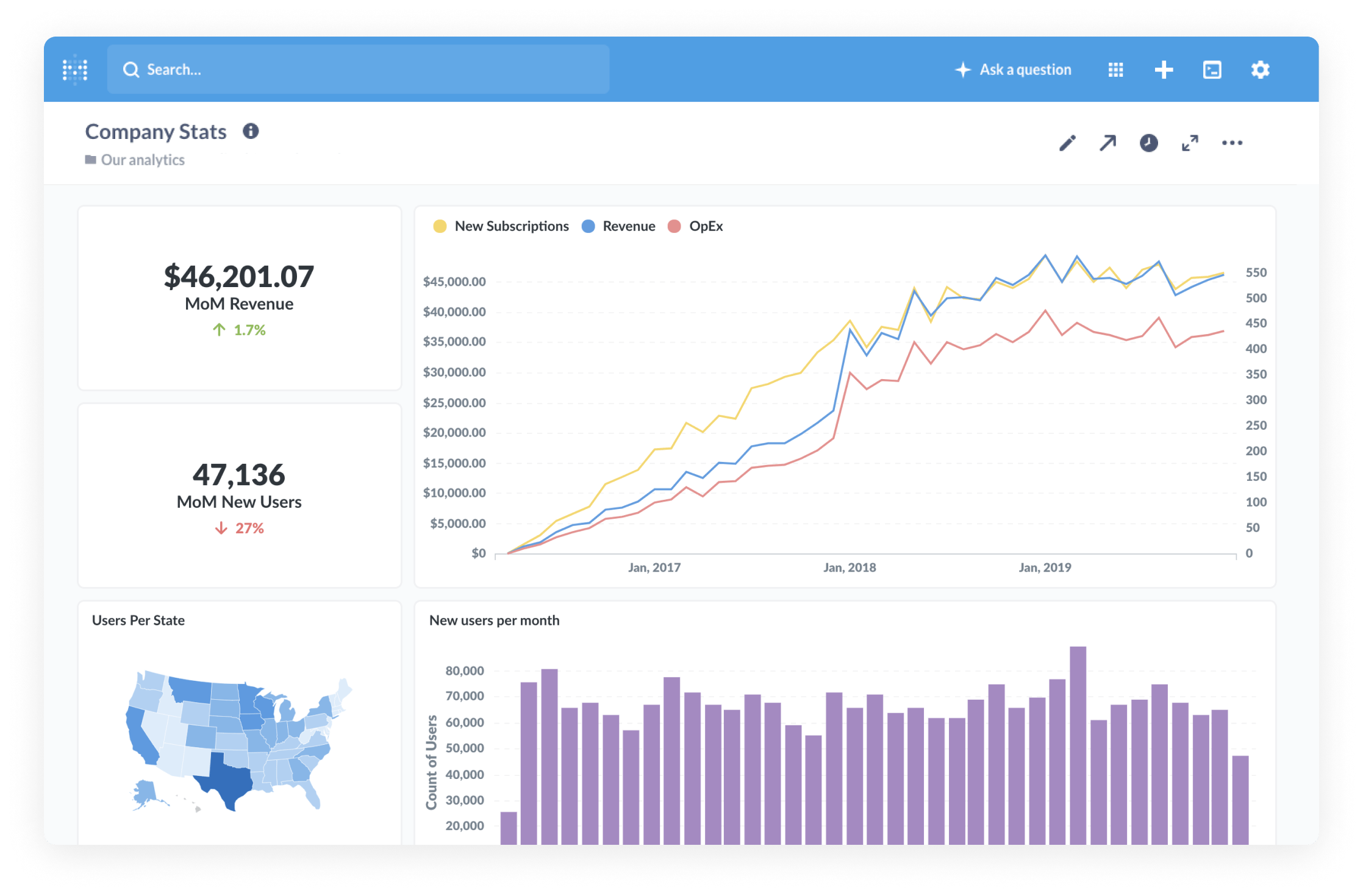
Metabase is one of the most popular open-source BI tools. Metabase's visual query builder enables you to create shareable dashboards in just a few minutes with a drag-and-drop interface, and there's a native SQL editor for advanced users.
Metabase is a great tool for business and revenue reporting. It requires more technical knowledge than either PostHog or Matomo, but it's powerful in the right hands.
Who should use Metabase?
Startups that already have product and company data in a database or warehouse, and at least one person comfortable with SQL. It won't collect events for you, so it pairs with one of the other tools rather than replacing them.
Pros and cons
| Pros | Cons |
|---|---|
| Connects to all popular closed and open-source databases | Requires separate event collection and storage setup |
| Visual query builder for building simple queries | Less accessible for non-technical users |
| Full SQL editor for advanced users and queries | Lacks features beyond BI |
| Join and query data from multiple sources | |
| Light hosting requirements |
FAQ
What tools can Metabase replace?
Metabase is a direct alternative to business intelligence tools like Google's Data Studio, Tableau, and Microsoft's Power BI. There are official connectors for all the most popular databases (Redshift, BigQuery, Snowflake, etc), and community and partner-managed connectors for the likes of ClickHouse and DuckDB.
What's included in open source?
The open-source version includes the same core query and visualization features as paid versions, but without advanced permission and security features tailored to large companies.
What are the hosting requirements?
Metabase recommends two servers: one for the application and one for the database. It needs at least 1 core and 1GB of RAM with additional resources required depending on the number of concurrent users.
Is there a hosted option?
Yes. Metabase Cloud offers a free 14-day trial, then the Starter plan costs $100 per month for the first five users, plus $6 per month for each extra user.
4. Plausible Analytics
What is Plausible?
- Created: 2019
- License: AGPLv3
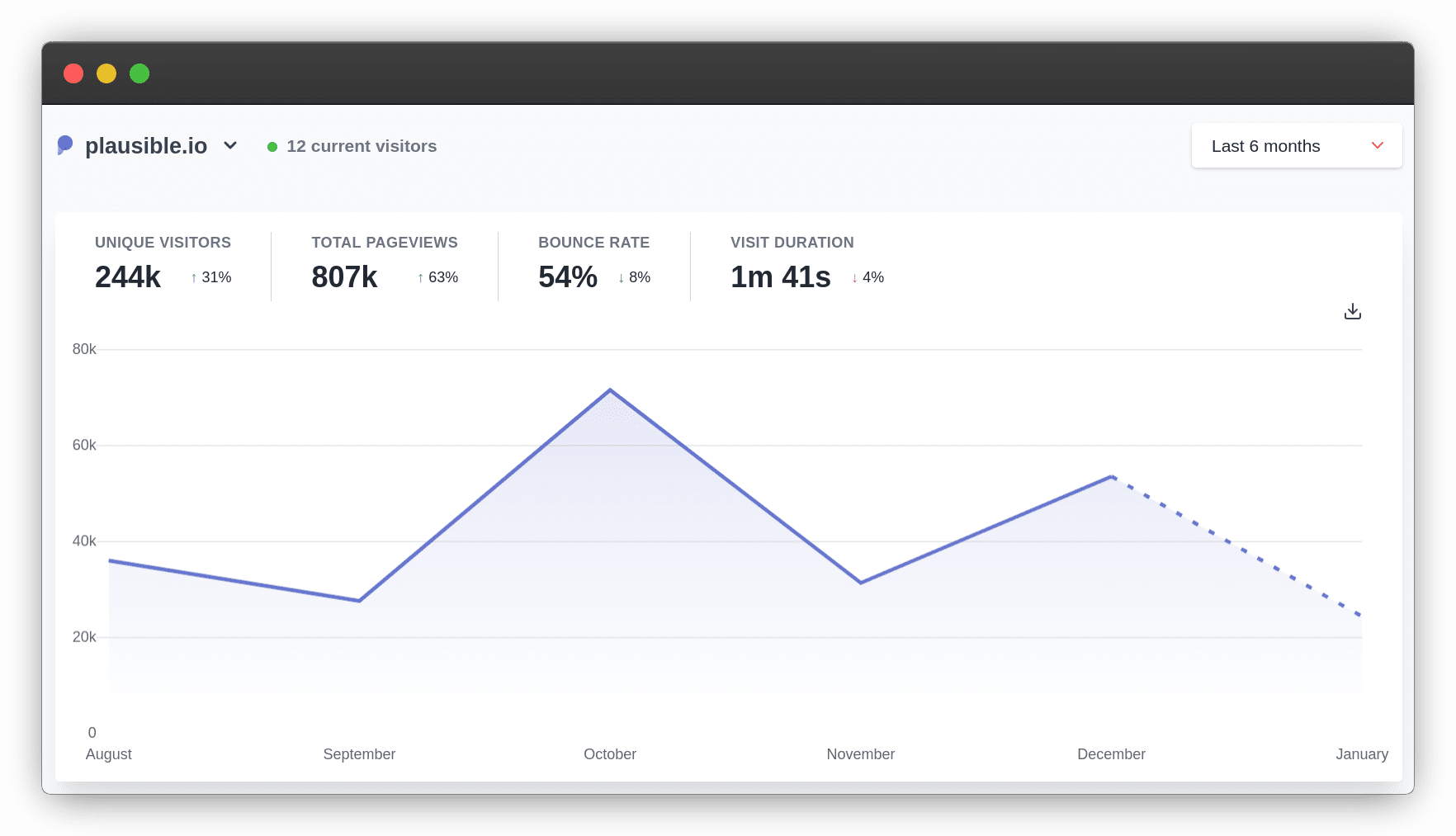
Plausible Analytics is a lightweight web analytics tool focused on providing GDPR-compliant website analytics that doesn't infringe on user privacy. This means Plausible doesn't rely on cookies and is compliant with regulations like GDPR out of the box.
It's very fast and easy to use, though this comes at the expense of features. It's ideal for anyone who just wants simple web analytics features, like tracking top pages and referrers, but it's less useful for app analytics and understanding user behavior.
Who should use Plausible?
Anyone who wants easy-to-use website analytics that doesn't want to use Google Analytics, have cookie banners, or collect any private data.
Pros and cons
| Pros | Cons |
|---|---|
| Fast and easy to use | Limited analytics features |
| Minimal impact on website performance | Open-source release only updated twice a year |
| Cookieless GDPR-compliance | No free tier on hosted version |
| Google Analytics import available | Some premium features excluded from the community edition |
| Will scale to large traffic requirements |
What tools can Plausible replace?
It's a popular alternative to Google Analytics for people who want something fast and easy to use. Unlike Google Analytics, Plausible's lightweight tracking script has minimal impact on website performance.
What's included in open source?
The community edition covers most of what the paid versions do, including tracking all common website metrics, goal and conversion tracking, and reports in Slack or via email. Plausible holds back some premium features, though: marketing funnels, user journeys, ecommerce revenue goals, SSO, and the sites API aren't available when you self-host. Plausible publishes long-term community releases roughly twice a year (v3.1.0 in November 2025, v3.2.0 in January 2026, plus a security patch in May 2026), whereas the cloud version gets continuous updates.
What are the hosting requirements?
Plausible recommends at least 2GB of RAM, and it requires a CPU that supports SSE 4.2 or NEON instruction set or higher.
Is there a hosted option?
Yes. There's no free tier, just a 30-day free trial, but it's cheap even at high volumes. Plans start at $9 per month for 10,000 pageviews or events on the Starter plan. Growth ($14 per month) adds extra sites and team members, and Business ($19 per month) adds funnels, user journeys, revenue tracking, and the Stats API. Prices scale with monthly pageviews from there.
5. OpenPanel
What is OpenPanel?
- Created: 2024
- License: AGPLv3
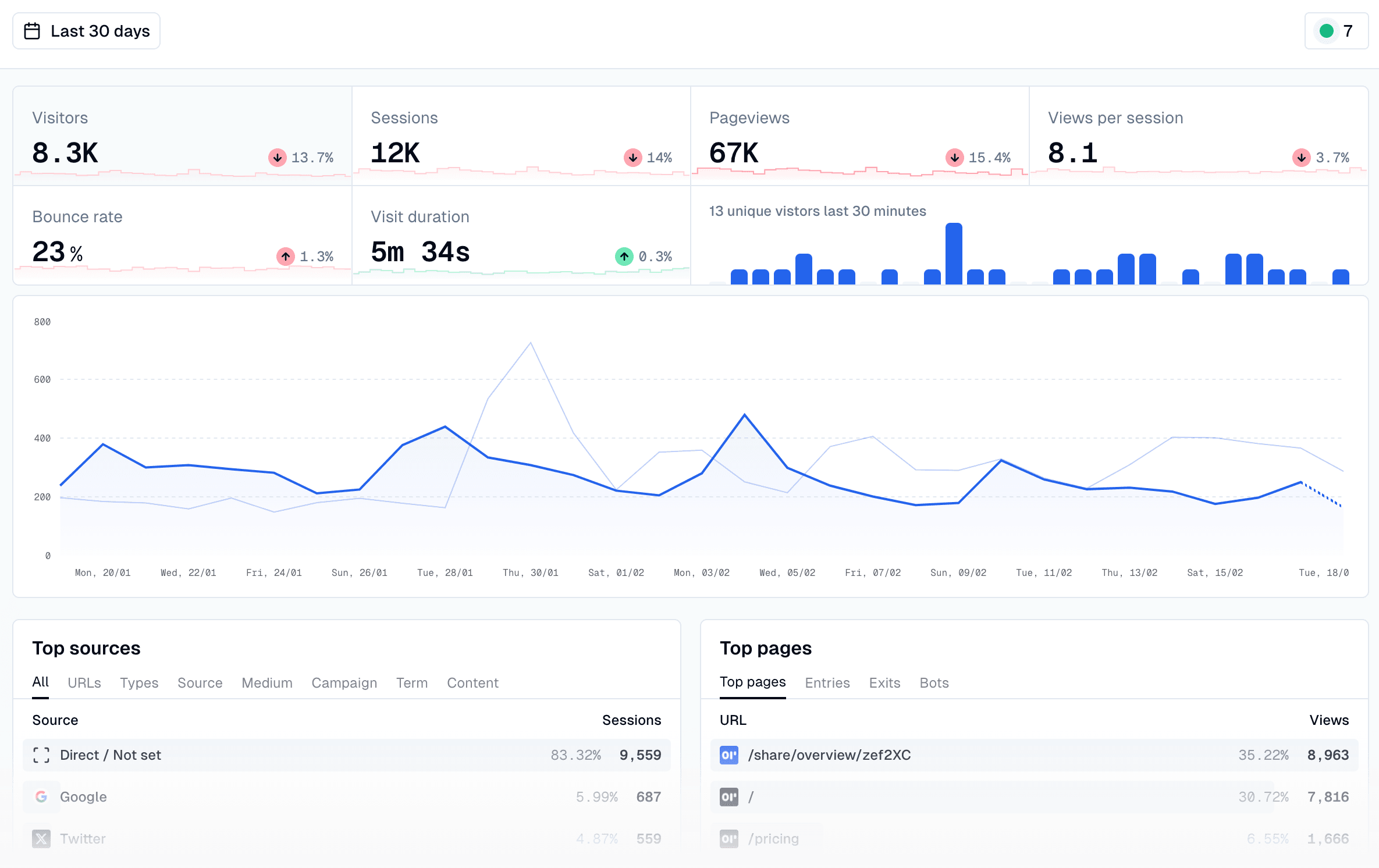
OpenPanel is inspired by Mixpanel and Plausible. It aims to offer some tools common of a product analytics tools, but with the speed, simplicity, and privacy-friendly features Plausible brings to web analytics.
This means that, unlike Plausible, you can build custom dashboards, as well as build insights that track retention within your app. OpenPanel also creates profiles for individual users that show how often they use your app, events they trigger, and most visited pages.
Who should use OpenPanel?
Developers who want basic product and website analytics for their project, but don't want to the more in-depth analysis of a tool like PostHog.
Pros and cons
| Pros | Cons |
|---|---|
| Fast and easy to use | Young project and small community |
| More analysis options than Plausible | Only supports basic product analytics features |
| No cookies required | |
| Basic funnel and retention analysis | |
| Cheaper than typical product analytics tools |
FAQ
What tools can OpenPanel replace?
OpenPanel could replace Mixpanel, Amplitude, and Google Analytics. It isn't as advanced as any of these tools, but it covers most of the essential features they offer. OpenPanel is focused on product analytics, but it also offers session replay. Unlike PostHog, it doesn't include feature flags or a way to run experiments, though it can break down results by experiment variant.
What's included in open source?
The open-source version is available with no limitations. Features include custom dashboards and charts (line, bar, area, map, pie, funnels, histograms, and retention), user profiles, a realtime analytics view, and tracking scripts for most popular frameworks, including Next.js, React, and React Native.
What are the hosting requirements?
OpenPanel doesn't provide minimum requirements, but recommends hosting using Hetzner, and notes it'll work on any server where you have pre-installed Docker, Docker Compose, Node and pnpm.
Is there a hosted option?
Yes. There is no free tier, but 100k events a month cost just $20, and 1 million events are $90 per month.
6. Umami
What is Umami?
- Founded: 2020
- License: MIT
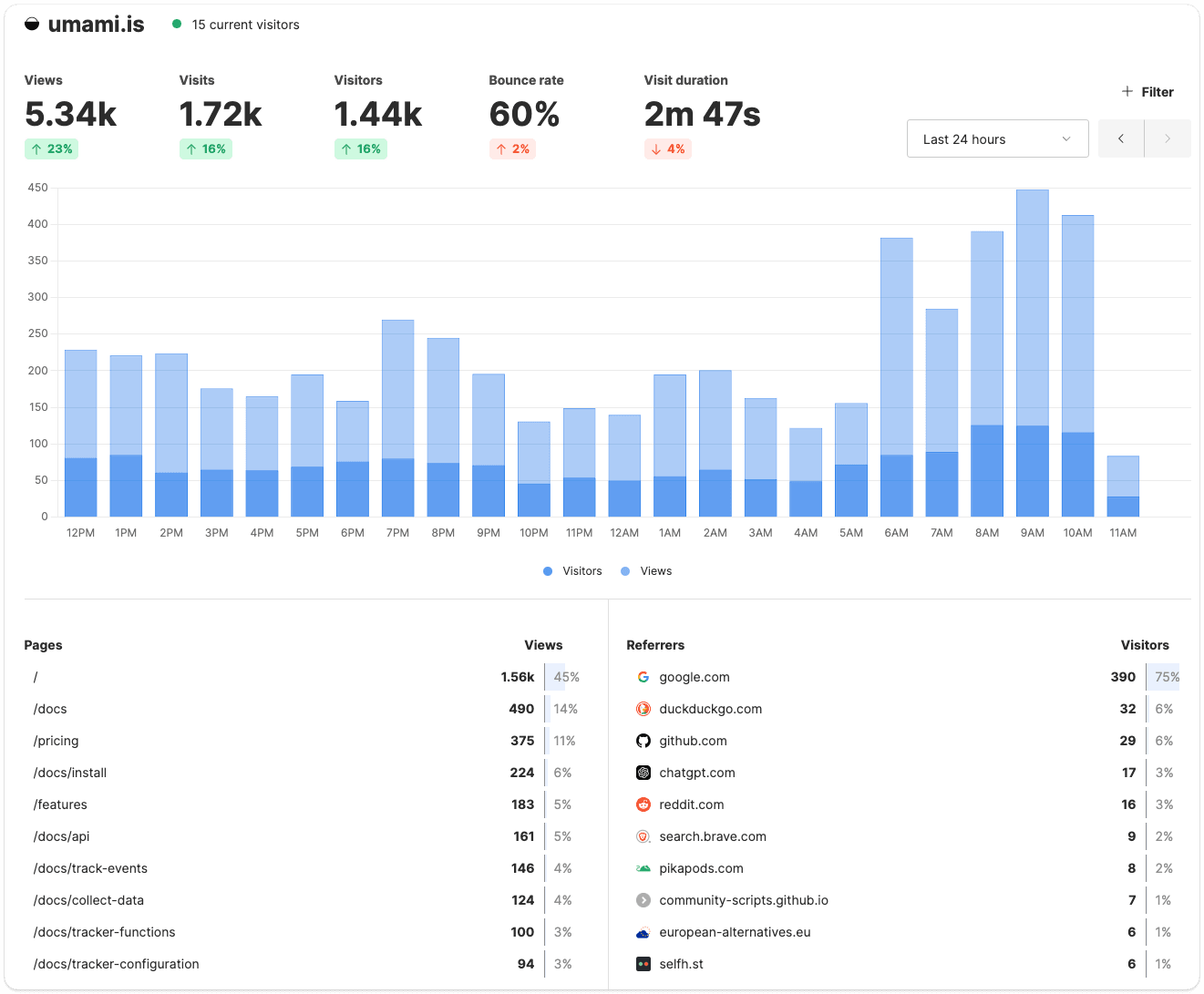
Umami is another popular privacy-first website analytics tool. Like Plausible, it tracks basic website analytics, doesn't collect any personal information, and is extremely fast. Similar to OpenPanel, it's added some product analytics features, such as user journeys, retention, funnels, segments, and cohorts, though it only supports very basic analysis.
Umami 3.1 (April 2026) added session replay, 3.2 (June 2026) added heatmaps for clicks and scrolls, and 3.4 (September 2026) added an MCP server.
Who should use Umami?
Similar to Plausible, Umami is ideal for anyone who wants easy-to-use website analytics that respects privacy. The two products are very similar, so which you choose will depend on personal preferences.
Pros and cons
| Pros | Cons |
|---|---|
| Easy to use and clean UI | Less polished than Plausible |
| Supports basic event tracking | Postgres database less scalable than Plausible's ClickHouse backed event database |
| No cookies required | |
| Minimal impact on website performance | |
| Easy to self host |
FAQ
What tools can Umami replace?
Google Analytics mainly, but also any other tool focused mainly on website analytics, including closed-source alternatives like Fathom.
What's included in open source?
The open source product includes the same reports as the paid one. Umami tracks all common website metrics, supports custom events, and offers basic funnel, user journey, and retention analysis, plus session replay and heatmaps. Umami's documented data import and export tools are for Umami Cloud.
What are the hosting requirements?
Umami requires a server with Node.js version 18.18 or newer and a PostgreSQL database (minimum v12.14). Umami v3 removed support for MySQL.
Is there a hosted option?
Yes and, unlike Plausible, there's a free tier. You can track up to 100k events per month on Umami Cloud for free. The Pro tier starts at just $20 per month for 1 million events per month.
7. Rybbit
What is Rybbit?
- Created: 2025
- License: AGPLv3
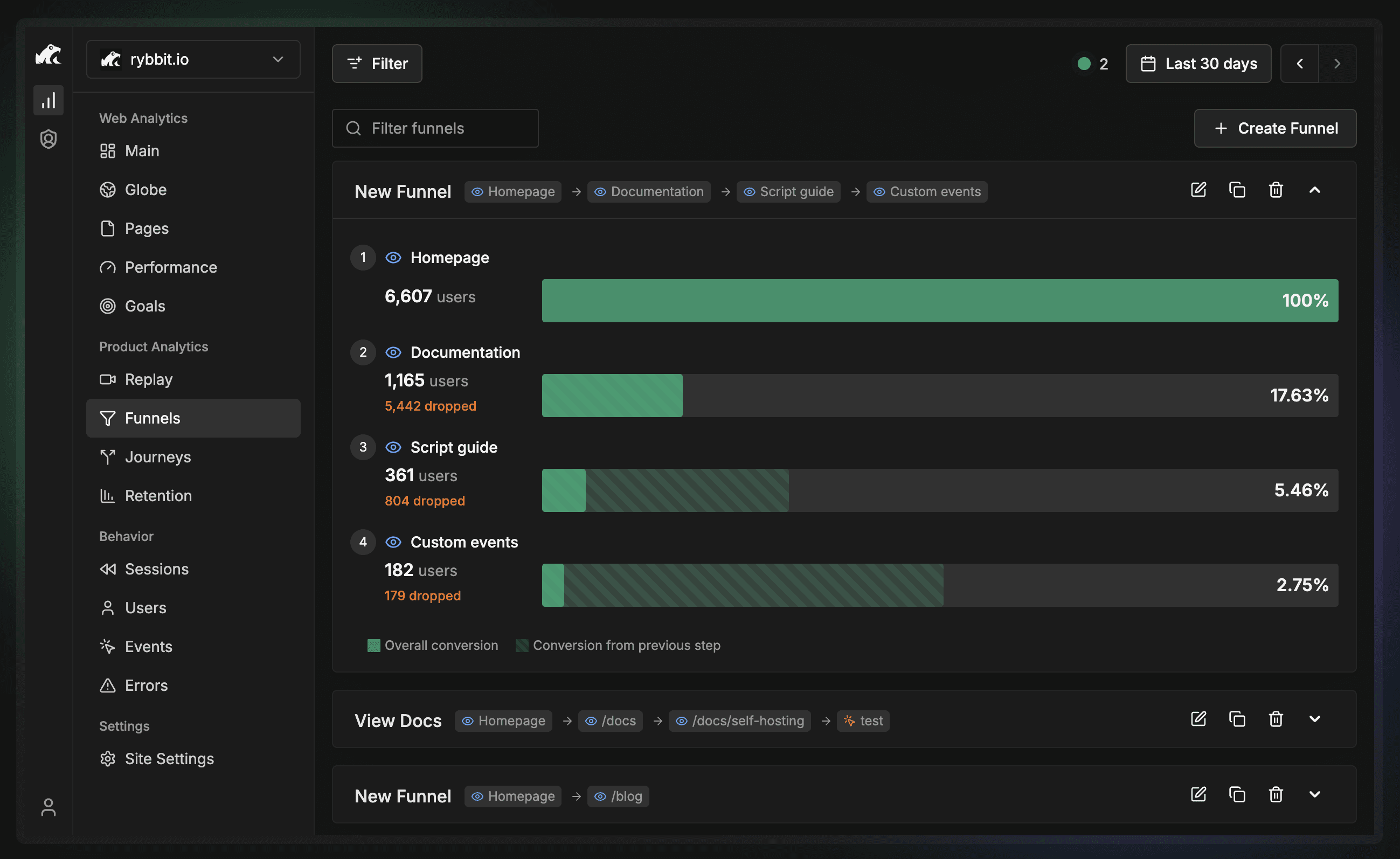
Rybbit is a newer open source analytics tool that sits between the lightweight web analytics tools and a full product analytics platform. It's cookieless like Plausible and Umami, but adds funnels, goals, retention, user journeys, session replay, and error tracking, and it's built on ClickHouse, so it's designed to handle high event volumes.
It's young but under active development (v2.8.0 shipped in July 2026), and it now shows up in most roundups of self-hosted analytics tools.
Who should use Rybbit?
Developers who want privacy-first web analytics with more behavioral analysis than Plausible or Umami offer, and who are comfortable running a Docker Compose stack.
Pros and cons
| Pros | Cons |
|---|---|
| Cookieless, no consent banner needed | Young project; fast-moving but less battle-tested |
| Funnels, retention, journeys, and session replay included | Web vitals are cloud-only |
| ClickHouse backend scales to large traffic | No free tier on the hosted version |
| Simple Docker Compose self-hosting | No feature flags or experiments |
FAQ
What tools can Rybbit replace?
Google Analytics for most sites, and Plausible or Umami if you want the same privacy stance with more analysis. It isn't a replacement for PostHog or Mixpanel if you need experiments, feature flags, or deep product analytics.
What's included in open source?
The self-hosted version includes the core analytics, funnels, goals, retention, user journeys, session replay, and error tracking. Web vitals are a cloud-only feature.
What are the hosting requirements?
Rybbit recommends a server with at least 2GB of RAM, Docker and Docker Compose, and a domain pointed at the server. A setup script handles the rest.
Is there a hosted option?
Yes. There's no free tier, but there's a 7-day free trial. Paid plans start at $13 per month, and the Pro plan at $26 per month adds session replay.
8. Apache Superset
What is Apache Superset?
- Created: 2016
- License: Apache-2.0
- GitHub Stars: 75.1k as of October 2026
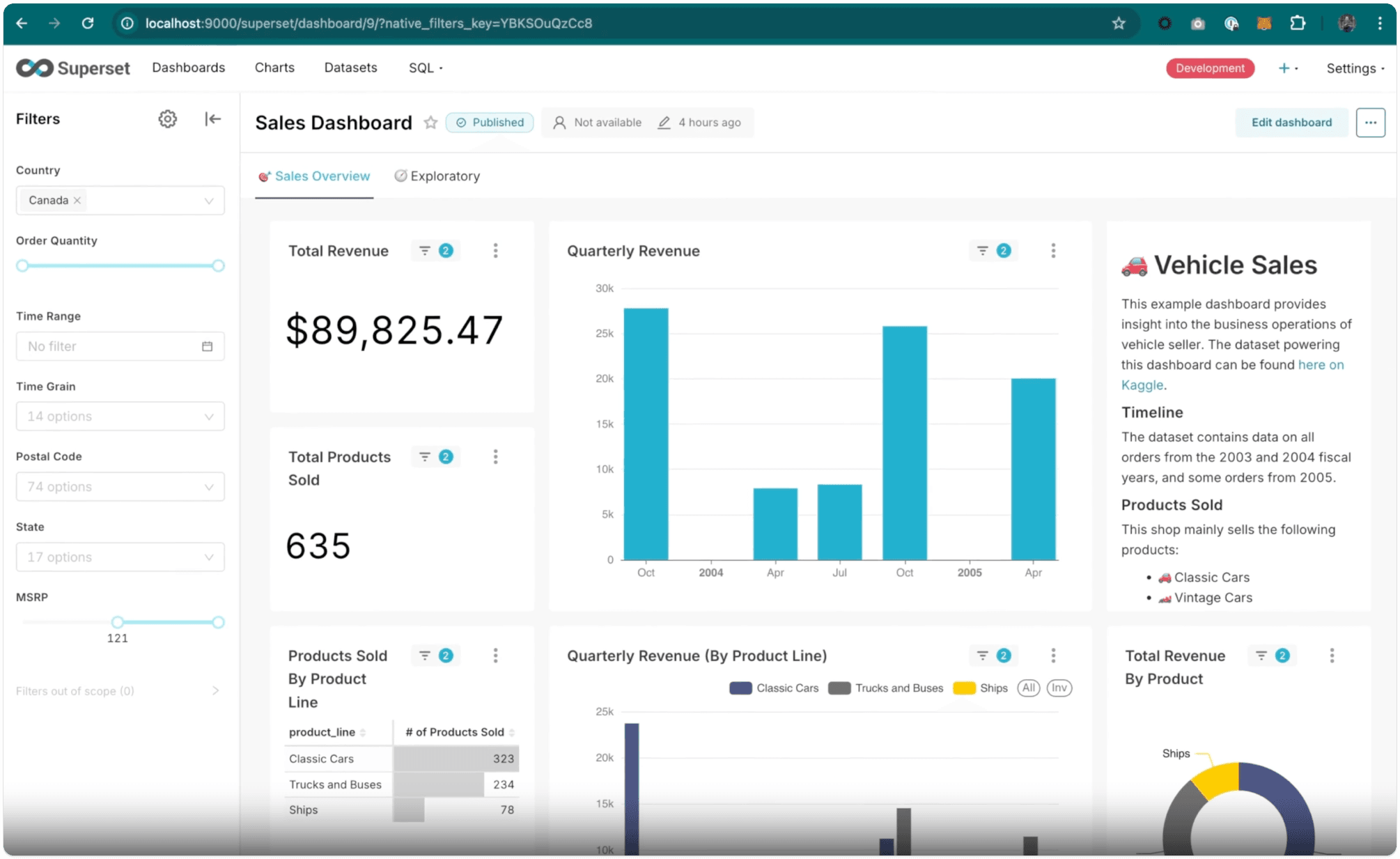
Superset is another of the big open-source business intelligence tools alongside Metabase and Redash. It's also considered the most complex and least accessible for non-technical users, though its range of visualizations and charting options is unmatched. Superset is ideal for enterprises with experienced in-house data teams, or anyone with lots of SQL experience.
Who should use Apache Superset?
Later-stage companies with a data team and the infrastructure to run Kubernetes. For most startups, Metabase gets you the same dashboards with far less to operate; Superset earns its place once you have dedicated data people who want full control over visualizations.
Pros and cons
| Pros | Cons |
|---|---|
| Huge range of visualization features | Not suitable for non-technical users |
| Highly customizable | Relatively complex to host |
| Very scalable for large orgs | |
| Large community |
FAQ
What tools can Superset replace?
Looker, Tableau and Power BI.
What's included in open source?
There's no paid version, so all features are included in the open source release, which includes 40+ pre-installed visualizations and vast options for data scientists to customize them to their needs.
What are the hosting requirements?
While there is a Docker Compose deployment, it's not recommended for production use cases, which require deploying Superset on Kubernetes. Superset's FAQ indicates 8GB RAM and 2vCPUs is "adequate to run a moderately-sized instance".
Is there a hosted option?
Not directly, though third-parties offer managed instances.
9. OpenReplay
What is OpenReplay?
- Created: 2021
- License: AGPLv3
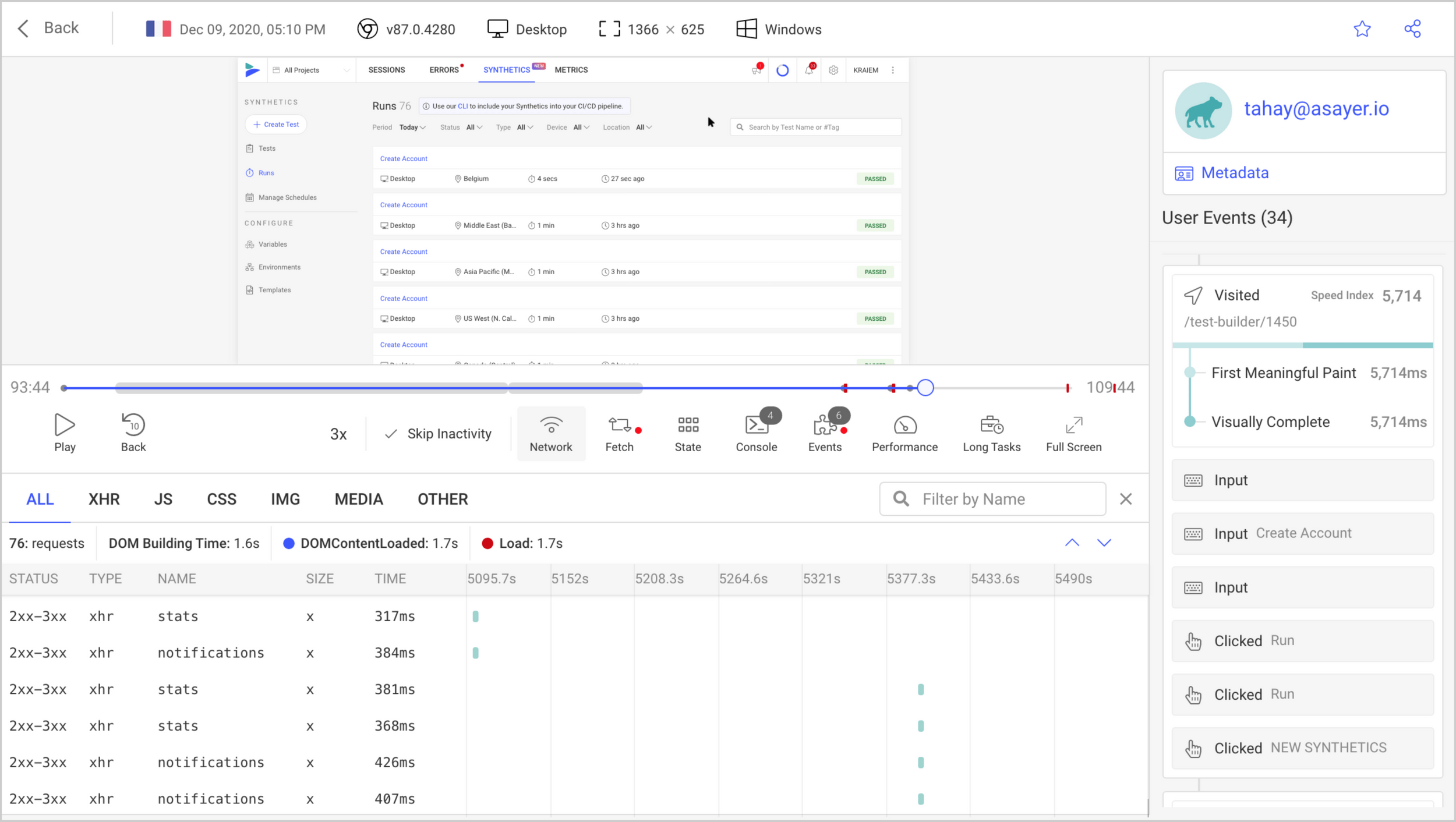
OpenReplay is a session replay suite built for developers to find and eliminate problems.
In addition to session replay, it also includes some product analytics features, such as conversion funnels, user paths, heatmaps, trends, and custom dashboards. These features aren't as developed as dedicated analytics tools like Mixpanel or PostHog, but they're a useful augment to the core replay features.
Who should use OpenReplay?
Companies that want an alternative to LogRocket that they can self-host.
Pros and cons
| Pros | Cons |
|---|---|
| Comprehensive session replay features | Analytics features are secondary to session replay |
| Useful for discovering issues in your app | Data export limited to Enterprise plans |
| Built-in performance monitoring | |
| Supports both web and mobile app tracking |
FAQ
What tools can OpenReplay replace?
OpenReplay is an alternative to LogRocket and other similar dev-focused session replay tools, like PostHog. It can also replace the likes of Hotjar, and includes a co-browsing feature that's similar to Hotjar's.
What's included in open source?
The free community edition includes OpenReplay's core features for session replay, app monitoring, and analytics, with no limits on users or projects but a cap of 50,000 sessions per month. The Enterprise edition removes the session cap and adds SSO, an audit trail, multi-tenancy, and dedicated support.
What are the hosting requirements?
OpenReplay typically recommends a minimum of 2 vCPUs, 8 GB of RAM, 50 GB of storage, though this varies depending on the hosting provider.
Is there a hosted option?
Yes. OpenReplay restructured its pricing in 2026: alongside the free self-hosted edition there's a usage-based Serverless plan where you pay for the sessions you record, a Dedicated plan from $199 per month, and an Enterprise plan.
Should you self-host, build your own, or use a cloud analytics tool?
Every tool in this guide is free to download. None of them is free to run. So before you pick one, it's worth being clear about which of the three paths you're really choosing, because each costs you a different thing.
Self-hosting
This is the default assumption with open source, and for the lightweight tools it's great. Umami, Plausible, Rybbit, and OpenPanel all run from a Docker Compose file on a small server. You'll spend an afternoon on setup, then a few minutes a month on updates and backups. If you were going to rent a server anyway, the analytics is effectively free.
The heavier tools are a different story. PostHog, Matomo, and Superset want more hardware to start with, and require more resources as you scaled: PostHog recommends its cloud above roughly 300k events a month, Matomo wants separate app and database servers past 1 million pageviews, and Superset expects Kubernetes in production. Past those thresholds, self-hosting requires regular maintenance to run reliably.
Also consider what database your prefer. PostHog, Plausible, OpenPanel, and Rybbit store events in ClickHouse, which handles large volumes but is another service to run. Umami and Metabase use PostgreSQL, Matomo uses MySQL, or MariaDB. If your team already operates one of these, favor the tools built on it.
Building your own
Every startup considers this once, especially now with AI reducing the barrier of entry. Pipe events into Postgres, put Metabase on top, done; and for the first month, maybe it is.
Then you need to stitch anonymous visitors to the users they become, group events into sessions, filter out bots, and get funnel and retention math right across time zones. Then someone asks for session replay, which you can't build. By the time you've handled that list, you've rebuilt one of the tools above, slower and with no one else maintaining it.
Building your own makes sense when you have a data team and a question none of these tools answers. If that's you, notice that Metabase and Superset are already in this guide: they're the build-your-own path with the hard parts done. Point them at the data you already have and skip the pipeline.
Using a cloud tool
Most of the tools here also come as a hosted service, and for the heavy ones it's often the cheaper option once you count engineering time. PostHog and Umami both have free tiers (1 million events and 100k events a month respectively), and Plausible, Rybbit, and OpenPanel start at roughly the price of a small server.
The usual reason to avoid the cloud is data residency. Check that before you rule it out: PostHog and Plausible, among others, offer EU hosting, which covers most GDPR requirements without you running anything.
Our rule of thumb
Self-host the lightweight tools if you want to. Use the cloud for the heavy ones unless you have a compliance reason not to. Build your own only when nothing on this list does what you need, and even then, start with Metabase or Superset rather than a blank repo.
Which open source analytics tool should you choose?
- A developer or startup who wants every product and AI signal in one queryable platform instead of five tools? PostHog
- Need a privacy-first Google Analytics replacement with GDPR compliance built in? Matomo
- Want to query and visualize data that's already in your warehouse? Metabase
- Just need fast, lightweight web analytics without cookies or tracking? Plausible
- Want basic product analytics with user profiles and retention, without the complexity of PostHog? OpenPanel
- Prefer a clean, simple web analytics tool similar to Plausible? Umami
- Want cookieless web analytics with funnels, replay, and error tracking built in? Rybbit
- Need advanced visualizations and have an experienced data team to run it? Apache Superset
- Looking for a self-hostable session replay tool to replace LogRocket? OpenReplay
Frequently Asked Questions
What are the best open source analytics tools you can self host?
Based on our research, the best open source analytics tools you can self-host right now are:
- PostHog – Best all-in-one platform for developers and startups: product and web analytics, session replay, feature flags, experiments, error tracking, and AI observability, with all the data in one place
- Matomo – Best open source alternative to Google Analytics for website and marketing analytics
- Metabase – Best open source BI tool for teams with data already in a warehouse
- Plausible – Best lightweight, privacy-first web analytics tool
- OpenPanel – Best simple product analytics for developers who want more than Plausible
- Umami – Best privacy-first web analytics alternative to Plausible
- Rybbit – Best lightweight analytics tool with session replay and error tracking included
- Apache Superset – Best for advanced data teams who need complex visualizations
- OpenReplay – Best open source session replay tool for developers
What's the difference between open source and cloud analytics tools?
Open source analytics tools let you self-host on your own infrastructure, giving you full control over where your data lives. This is useful for GDPR compliance, data sovereignty, or cost management at scale.
Cloud analytics tools are managed by the vendor – easier to set up and maintain, but your data lives on their servers. Most tools in this list also offer a cloud-hosted option if you'd rather not manage infrastructure yourself.
For cloud product analytics tools, see our guide to the best product analytics tools for startups.
Should I self-host PostHog?
You can, but for most teams PostHog Cloud is the better choice – even if open source and data control are important to you.
Here's why:
- Automatic updates: PostHog Cloud gets continuous updates and new features as soon as they ship. When self-hosting, you'll need to manage these updates yourself or you'll always be running slightly behind.
- Generous free tier: PostHog Cloud includes 1 million events, 5,000 web and 2,500 mobile recordings, 1 million feature flag requests every month, and a lot more at no cost. Around 97% of PostHog users pay nothing. It's hard to beat free with zero infrastructure overhead.
- Scaling complexity: PostHog only recommends self-hosting for deployments up to ~300k events per month. Beyond that, managing the infrastructure yourself becomes a real engineering burden.
- Easy to get started: You can be up and running in minutes with no servers to provision. The PostHog setup wizard detects your framework, installs the right SDK, and configures everything automatically – no manual setup required.
The main reason to self-host is strict data residency requirements that can't be met by PostHog's EU Cloud option. If that's your situation, the open source release is a solid starting point. For everyone else, cloud is the faster, easier, and usually cheaper path.
Which open source analytics tools are best for GDPR compliance?
Plausible and Umami are cookieless by default and collect no personal data, making them the simplest path to GDPR compliance. Matomo is widely used by government and enterprise organizations specifically for its GDPR compliance features, including data anonymization and consent management.
PostHog offers cookieless tracking and EU Cloud hosting if you want a managed option with EU data residency.
For a deeper breakdown, see our guide to the best GDPR-compliant analytics tools.
Can I use PostHog for free?
Yes, two ways. There's a self-hostable open source release under the MIT license, and PostHog Cloud gives every product a free tier that resets each month:
- Product and web analytics: 1 million events
- Session replay: 5,000 web and 2,500 mobile recordings
- Feature flags and experiments: 1 million flag requests
- Error tracking: 100,000 exceptions
- AI observability and evals: 100,000 LLM events
- Logs: 10 GB ingested
- Surveys: 1,500 responses
- Data warehouse: 1 million rows synced, with historical syncs free
- Data pipelines: 10,000 events and 1 million rows exported
- Workflows: 10,000 messages per channel
- PostHog AI: 500 credits
See PostHog's pricing page for full details.
What is the best open source alternative to Google Analytics?
For deeper product analytics beyond website traffic, PostHog is the strongest option. Matomo is the most direct open source alternative to Google Analytics – it even supports importing your existing GA data. Plausible and Umami are also good options if you want something simpler and privacy-first.
How is PostHog different from other open source analytics tools?
Most tools in this guide do one thing well. PostHog is built so that everything about your product ends up in one place you can query, and so that people and agents can act on it from there:
- All-in-one toolkit: Product analytics, web analytics, session replay, feature flags, experiments, surveys, error tracking, logs, and AI observability, sharing one model of your users and sessions
- One place for all your data: A built-in data warehouse syncs Stripe, HubSpot, Salesforce, Postgres, and dozens of other sources next to your product data, and you can query it all with SQL
- Built for agents as much as people: The MCP and Slack app let Claude, Cursor, Codex, or a Slack thread query your project and make changes, and self-driving features flag what's worth fixing
- Open source: MIT-licensed and actively maintained in public
- Free to start: Every product has a monthly free tier, and 97% of companies use PostHog for free

Subscribe to our newsletter
build mode
Read by 75,000+ founders and builders
We'll share your email with Substack
PostHog is your product's context layer. With a full suite of developer tools – AI observability, product analytics, session replay, feature flags, experiments, error tracking, logs, and more – PostHog ingests and stores all the data agents need to diagnose problems, uncover opportunities, and ship fixes. A data warehouse and CDP tie it all together, unifying that context into one source agents can read across. You can steer it all from Slack, the web app, the desktop (PostHog Desktop), or your own editor via the MCP.