







PostHog Code and the self-driving product

Contents
Update: PostHog Code is now PostHog Desktop – it does a lot more than just write code these days. This post still uses the old name, since that's what we called it at launch.
Today, PostHog Code enters beta.
It's a desktop app that runs coding agents on top of your product data. The obvious stuff ships itself. The tricky stuff shows up as a prioritized to-do list for you to steer.
We built it to chase one idea: self-driving product development.
How we're defining self-driving
A self-driving product can prompt itself.
It understands your codebase, your data, and your users. It proposes and ships work on its own, inside of guardrails you set.
The self in self-driving isn't autonomy from the engineer. It's autonomy from user instruction as the starting point.

A self-driving product puts the 1% gains on cruise control: the bugs, UX issues, paper cuts, and conversion tweaks. The things that drain engineering hours, but rarely need strategic input.
This is where product data does the heavy lifting. In a typical week, PostHog customers generate 100,000+ failed queries and ~1.5 million new error tracking issues. Each one is a signal an agent could act on.
Acting on signals takes more than writing code. Claude Code, Codex, and others already do that part well. To make them self-driving, we add 5 things on top: tools, skills, signals, memory, and evaluation.
Our AI engineering handbook goes deep on each. Here's the short version.
Anatomy of a self-driving product
1. Tools – what the agent can do
Tools are small, specific actions the agent can take. At PostHog we treat them as atomic capabilities – things like create_insight or read_taxonomy. The latter does a lot of heavy lifting. It lets the agent check what events and properties actually exist before it writes a query or an instrumentation PR.
2. Skills – how to get the job done
If tools are the fork and knife, skills are the recipe. A skill ties tools, docs, and rules into a playbook. You can see the gap in our own data: docs-search is the most-called tool on PostHog's MCP server, at ~28K calls a month.
PostHog Code has skills for the workflows we see most – instrumenting events, auditing flags, adding error tracking. Writing a skill feels like writing a doc, and most engineers would rather ship the feature than document it. But for an agent, the skill is the feature.
3. Signals – when the work should happen
Tools and skills cover the what. Signals cover the when. PostHog Code sits on top of your product data, so the pattern itself is the prompt. Raw observations get grouped, enriched, and turned into concrete plans. You open a pre-framed to-do list instead of triaging a noisy inbox.
4. Memory – what the agent already knows
Signals say something's happening now. Memory says what happened last time. Without it, the agent re-runs work it's already done and re-opens the same PR every Tuesday.
5. Evaluation – did it actually work?
The loop doesn't close without this. Testing AI agents looks nothing like testing normal software, and "it runs without erroring" is not a pass.
PostHog Code schedules evals as long-running Temporal jobs, so the check runs hours or days after the PR merges. The same dashboard, funnel, experiment, or LLM-as-a-judge eval that fired the signal gets re-queried.
If the metric didn't move – or moved the wrong way – the agent reverts or reopens the work.
The product autonomy loop
Stitch all that together, and you get a loop we like to call product autonomy: Collect data → cluster signals → check memory → notify workers → do work → review and ship → evaluate → write back to memory.

You can't run this reliably inside a general-purpose coding agent because the critical signals live somewhere else. For a lot of companies, that somewhere else is PostHog.
How this works in PostHog Code:
Errors, replays, and external signals flow into the signals pipeline and are clustered into signal reports.
Each task that lands in your inbox is ranked by urgency, and links to relevant context and research done by background agents.

You pick the tasks worth working on, and the model and harness that fit each one.
The split-screen Command Center handles up to nine agents in parallel – our engineers call it dopamine mode (you'll understand why).
Long jobs run in the cloud, so your laptop stays free.
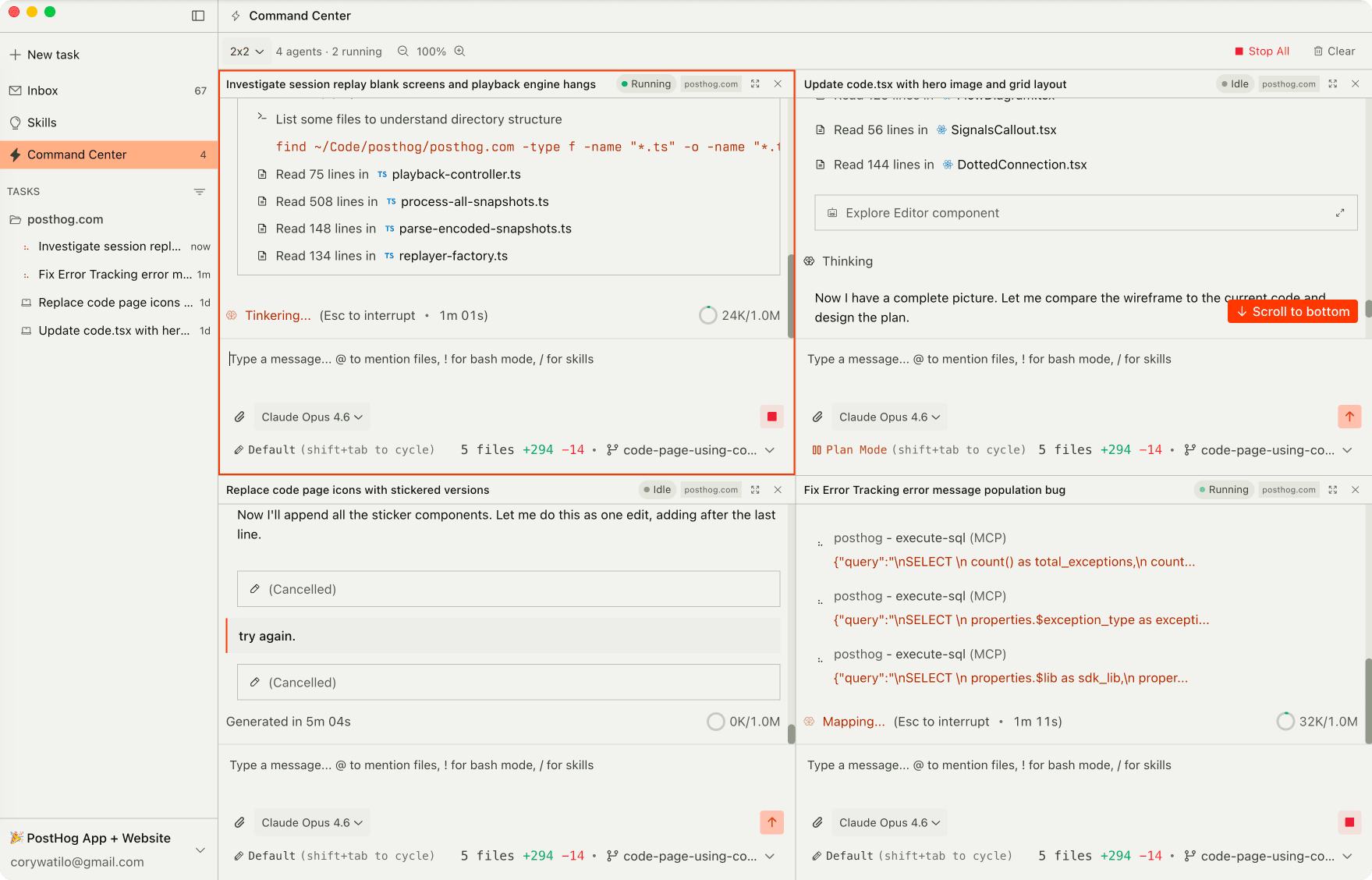
The PostHog side is wired in by default. One-click instrumentation drops events, flags, and experiments into your code without you typing the boilerplate.
The PostHog MCP handles impact measurement, error debugging, and dashboard building.
Plug in other MCP servers to take more actions, or pull in extra context as you build.
With the routine work automated, you get more room for the big stuff. Prompt your own tasks, build with full product-data context, and keep shipping new features alongside the self-driving work.
Try PostHog Code
Product engineers keep telling us this is the missing piece – an agent that understands your codebase and your product.
We're not fully self-driving yet, but we're getting closer every week, and you get to watch it happen from the driver's seat.
Want to take it for a test drive?
PostHog Code is in Beta. Join the waitlist to get early access.
PostHog is your product's context layer. With a full suite of developer tools – AI observability, product analytics, session replay, feature flags, experiments, error tracking, logs, and more – PostHog ingests and stores all the data agents need to diagnose problems, uncover opportunities, and ship fixes. A data warehouse and CDP tie it all together, unifying that context into one source agents can read across. You can steer it all from Slack, the web app, the desktop (PostHog Desktop), or your own editor via the MCP.