







How to understand AI agent performance in your product

Contents
If you're anything like literally every other tech company in the world right now, chances are you've already shipped, or are planning to ship, an AI product. Tools of the past make it hard (impossible, really) to understand how your product is performing. Users might return every day because your agent works brilliantly, or because it tells them the weather, which isn't that useful if you're a finance company.
This tutorial is about answering the real questions that matter when you ship an AI agent: When someone asks your agent to do something, does it actually succeed? And if it doesn't, how the hell do you improve it in a measurable way?
The AI product improvement loop
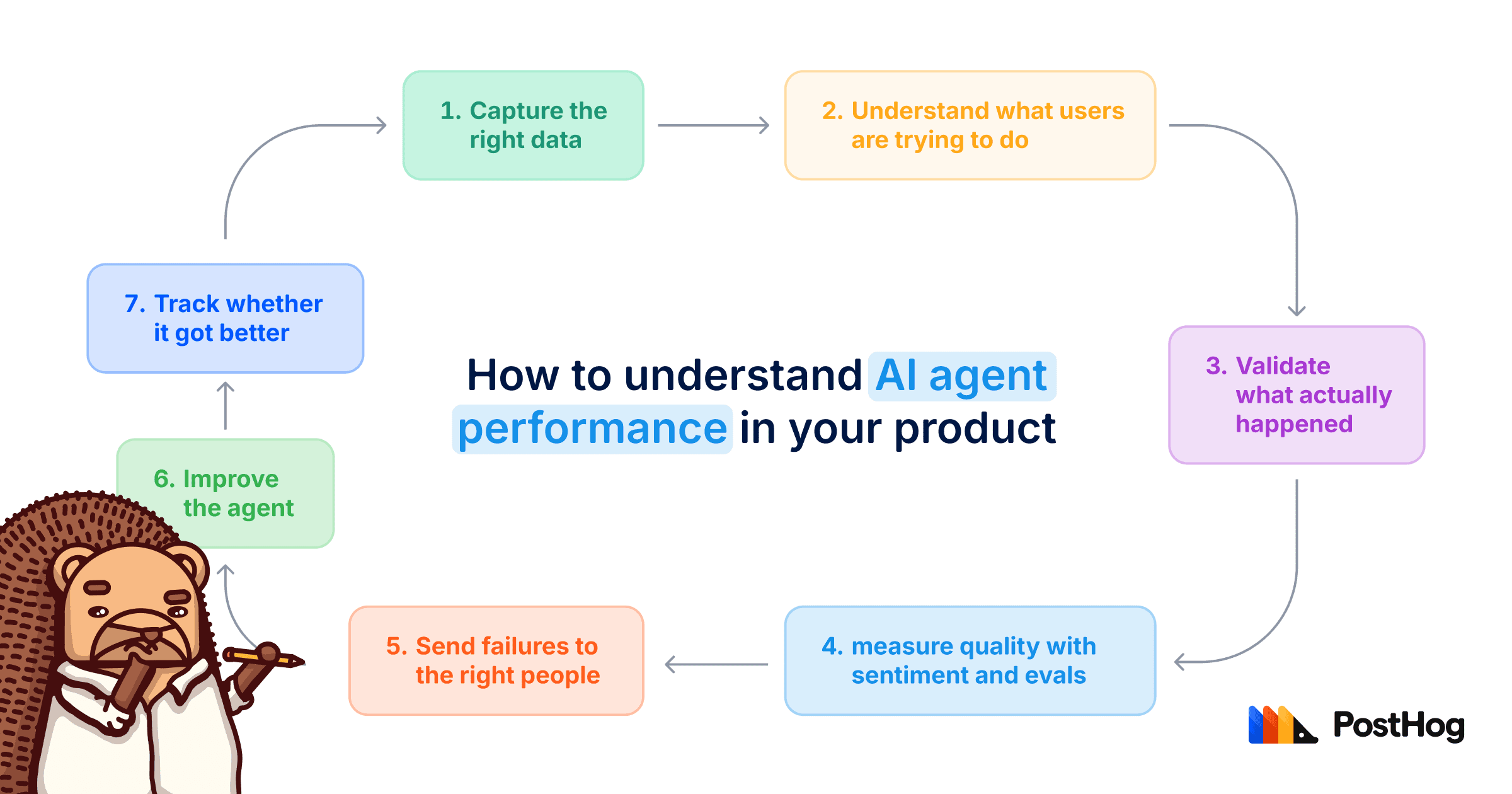
Let's make this concrete. Imagine you've added an AI assistant to a banking app and people are using it, but you don't know what they're asking, whether the answers are correct, or where the agent is failing. We're going to work through that example using this loop:
- Capture the right data
- Understand what users are trying to do
- Validate what actually happened
- Measure quality with sentiment and evals
- Send failures to the right people
- Improve the agent
- Track whether it got better
Vibes are fun but hard to base business decisions on! So we're going to tie actual production data from real users to outcomes.
Step 1: Capture the right data in the right format
The first thing to understand about AI observability is that you need to make sure you're sending PostHog the right data.
To do that, start with our AI Observability getting started docs.
The docs cover traces, generations, sessions, spans, and how to instrument them.
The important part, if you haven't done this type of thing before, is understanding the difference between a generation and a trace.
A generation is a single LLM call.
A trace is the broader chain of events around that call. For an agent, that might include the user's original request, tool calls, retrieved context, intermediate steps, final answer, and any other work the agent did along the way.
For an agentic product, you'll usually also want sessions and spans. A session groups related traces, such as every turn in one conversation. A span records one operation inside a trace, such as a tool call, vector search, or retrieval step. You can send every generation correctly and still make debugging painful if the conversation isn't grouped into a session or the tool calls aren't captured as spans.
That distinction matters because most AI product failures don't happen in a single isolated model call. They happen somewhere in the chain:
- The agent picked the wrong tool.
- The retrieval step pulled bad context.
- The system prompt was unclear.
- The user asked something ambiguous.
- The agent technically answered, but not in a way that helped.
If you only capture the final LLM response, you'll completely miss most of what actually matters.
You also want to tie this AI data back to your existing product data in PostHog. That means connecting traces and generations to users, organizations, errors, and session replays.
That way, you're not just looking at a random LLM response in isolation. You can understand who asked the question, what they were doing before and after, and whether the agent helped them complete the thing they were trying to do.
If in doubt about how to set this up, use the PostHog wizard:
Once you've started sending data correctly, let it run until you have at least 1,000 traces or 1,000 generations in a 7-day window. That's the minimum for clusters to run.
Step 2: Find out what users are asking your agent to do
Once data is flowing into PostHog, the first place I'd start is clusters.
Clusters automatically group similar LLM traces or generations together, so you can discover common patterns in how users interact with your LLM features without reading every conversation manually.
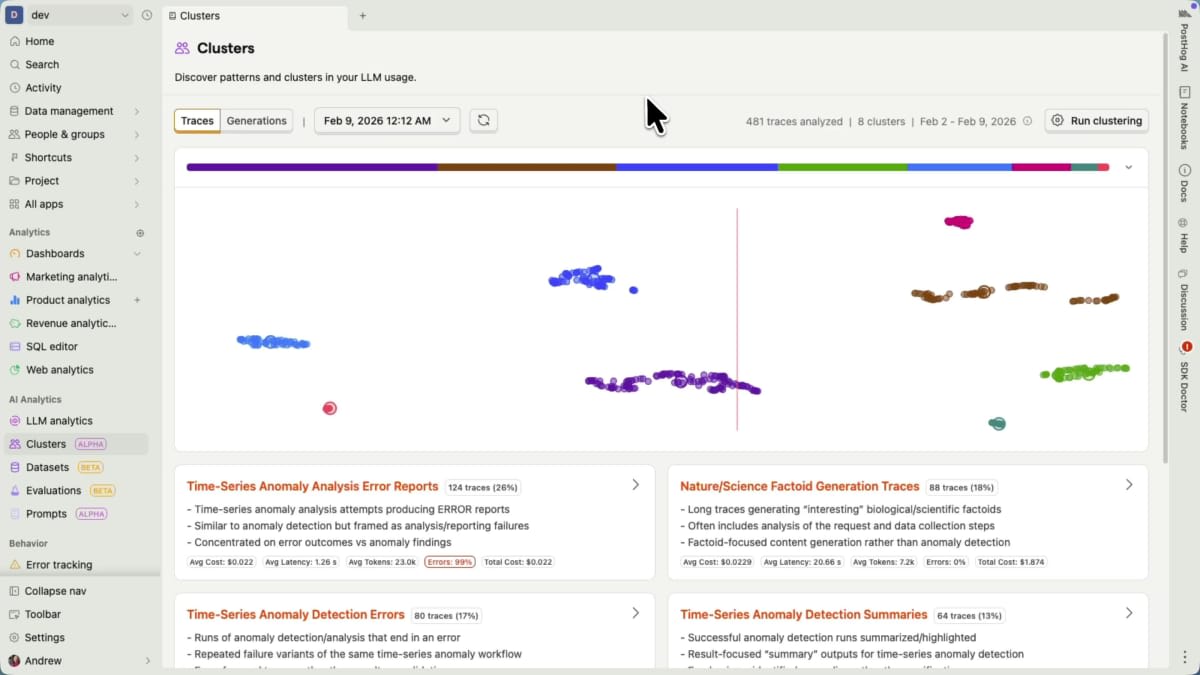
The Clusters tab shows the biggest themes across your traces and generations.
This matters because users can ask for the same thing in a thousand different ways.
Back to our banking app. You might see users ask:
- "How much money do I have in my bank account?"
- "What's my balance?"
- "Can I afford to pay my credit card this month?"
- "How much do I have across all my accounts?"
- "What's happening with my home loan?"
The shape of those questions can vary infinitely, but the questions usually cluster around common themes.
In this example, you'd probably see clusters for things like:
- Bank balance
- Credit card repayments
- Home loans
- Spending summaries
- Transaction questions
That's why clusters are the place to start. They tell you what users are actually asking your agent to do.
Step 3: Validate the clusters
The important thing with clusters is understanding what your customers are asking, and why.
Click on a card to jump into a cluster and look at the title.

Each cluster card gives you the theme, a summary, and example traces to validate.
That title is the common theme PostHog has identified. You can also see example traces and understand why those traces were grouped together.
In our banking app, imagine you have a cluster called Bank balance.
One person might ask:
"How much money do I have in my bank account?"
Another person might ask:
"I want to understand how much money I have in my account today."
Someone else might ask:
"Help me understand how much money I have across my different accounts."
Those all probably belong in the same cluster.
But don't just trust the cluster blindly.
Treat clusters like any other AI-generated output: useful, but worth validating before you build a process around them.
Open a few traces and read them yourself.
By that, I mean literally read through the trace and the generations inside it. Look at what the user asked, what context was available, what tools were called, and what the agent returned.
If you use PostHog MCP, you can point your agent at a cluster and ask it to research errors, costs, latency, and common failure points. Going back to our example banking app, this can help you discover things like, "Questions about bank balance have higher latency because of a slow database query."
But be sure to always check the work, as a polished summary can still be confidently wrong!
You probably don't need to do this for every trace, but you should review enough to feel confident that the cluster means what you think it means.
Note: I'd also watch a few session replays to get the full context of what the user was doing. Or if you're lazy like me, get Replay Vision to do it for you.
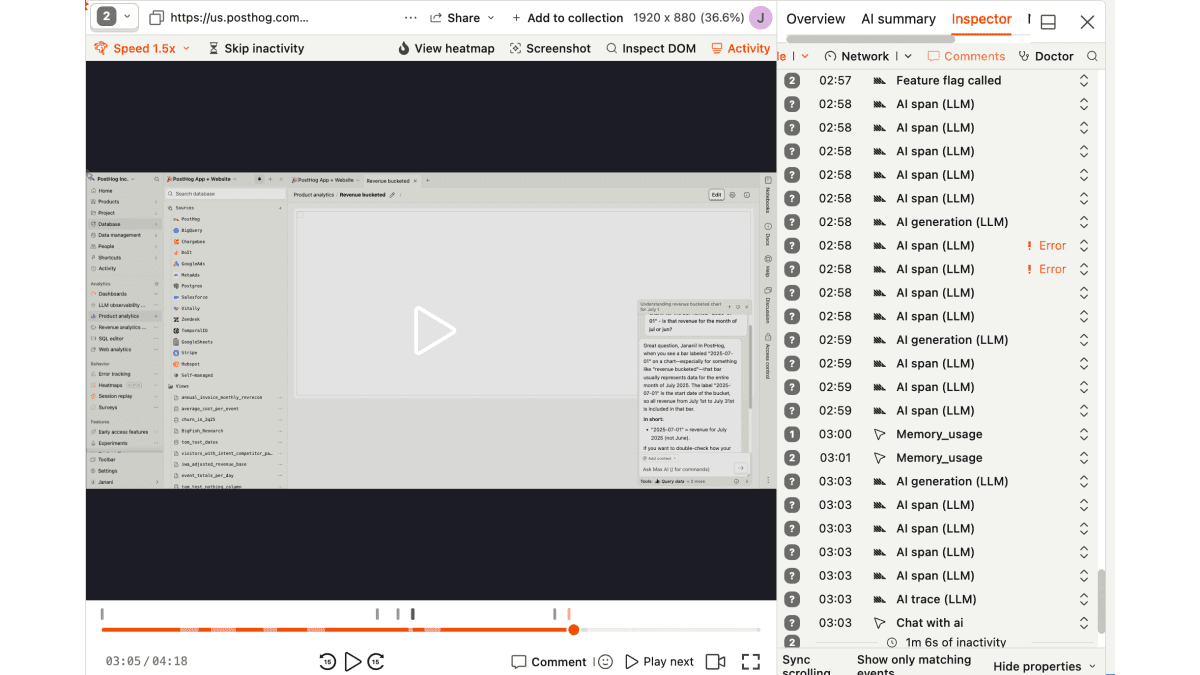
If you haven't linked traces to replays yet, set that up here.
The reason session replay is useful here is that it gives you visual validation for what your customer was trying to do, and the trace tells you what the user said to the agent. Those are usually, but not always, the same thing. Hence me calling it out.
For example, a user might ask your agent "Why isn't this working?" which is basically useless on its own. But the replay might show they were stuck on a billing settings page, clicking the same disabled button over and over again. The context matters.
Once you've validated a few important clusters, the next step is to measure them systematically.
That usually means adding two things:
- Sentiment analysis
- Product evals
Step 4: Add sentiment analysis
Sentiment classification automatically labels user messages in your LLM traces and generations as positive, neutral, or negative.
You can set this up by creating a sentiment analysis evaluation in AI Evals.
This helps you understand, at a glance, how customers feel while they're interacting with an AI feature.
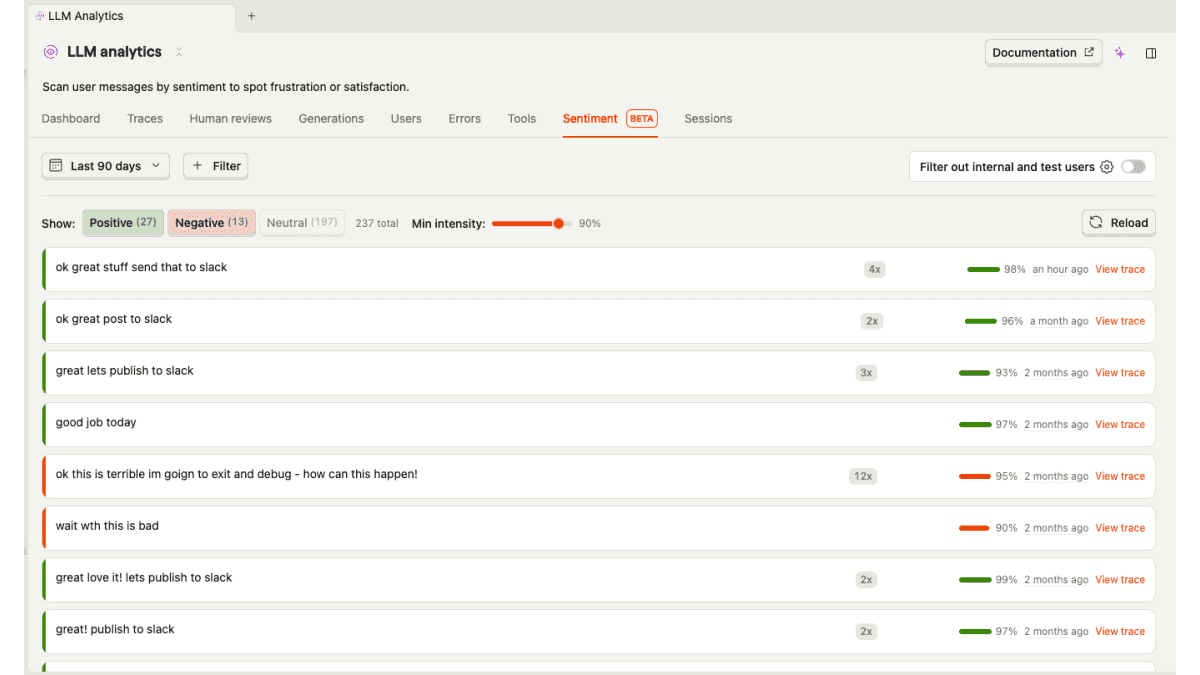
The Sentiment tab helps you find positive or negative messages, then jump straight into the trace for context.
This is awesome if you're lazy (like me!) because you don't need to read every trace just to find the ones where people are frustrated, confused, or clearly unhappy with the experience.
Sentiment also gives you a quick and dirty way to gauge quality over time. If negative sentiment starts trending up after a model change, prompt change, tool change, or product release, you know where to look.
That said, sentiment has limits. A user can be polite while getting a completely wrong answer. A user can sound annoyed even though the agent eventually solves the problem. So sentiment is useful, but it doesn't tell you whether the agent actually succeeded.
That's where product evals come in.
Step 5: Add product evals
A useful product eval is usually tied to a real user goal.
For example:
- Did the agent answer the user's question?
- Was the answer relevant?
- Did the agent use the correct tool?
- Did the agent hallucinate?
- Did the agent ask for information it already had?
- Did the agent successfully complete the requested task?
One simple starting point is a boolean (true or false) eval:
"Did the agent successfully answer the user's question? True or false."

Create a boolean eval and give it a narrow job, a clear pass condition, and the context it needs to judge the answer.
That won't be perfect, but it gives you a consistent signal you can track over time.
The important thing is to avoid creating evals that are too vague.
"Was this a good response?" is less useful than:
"Did the agent return the correct bank balance using the customer's live account data? True or false."
The closer your eval is to the user's actual job-to-be-done, the more useful it becomes.
A good way to decide which evals to create is to start from your clusters.
If one of your biggest clusters is Bank balance, you probably want an eval for whether the agent answered bank balance questions correctly.
If you want somewhere to start, PostHog has built-in eval templates for relevance, helpfulness, hallucinations, jailbreaks, and toxicity. For the Bank balance cluster, you'll still want a custom eval that checks whether the answer used the customer's live account data. A relevant answer can still be completely wrong.
Key point: Clusters give you common themes. Evals give you a deterministic way to evaluate how your agent is performing.
If you want to be even lazier, you can get an agent to monitor the evals for you too.
Every eval automatically gets an evaluation report. After each batch of results, an agent reviews what changed and summarizes the trends, with example generations as evidence. It might tell you that negative sentiment is rising, or that your Bank balance eval is failing more often.
These reports can land in your PostHog inbox as signals for Self-driving, or be sent to Slack or email. This gives you somewhere useful to start investigating without watching a dashboard all day.
Step 6: Turn evals into dashboards
The other key thing with evals is that you can generate insights from them.
You can create trend insights from $ai_evaluation events and add them to your AI Observability dashboard.
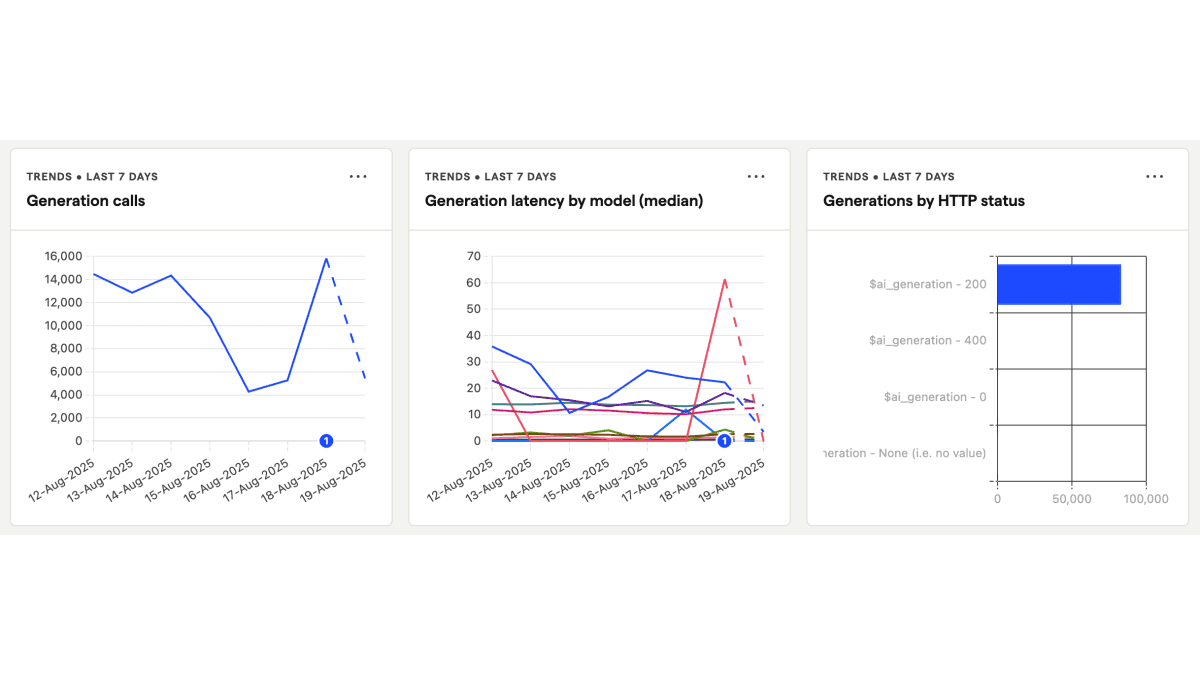
Start with something like the Bank balance accuracy eval and chart its success rate over time. This gives you a baseline for your AI product's performance.
For some more ideas, you might track:
- Total traces
- Success rate
- Failure rate
- Negative sentiment rate
- Success rate by cluster
- Failure rate by model
- Failure rate by prompt version
- Failure rate by tool used
- Cost per successful conversation
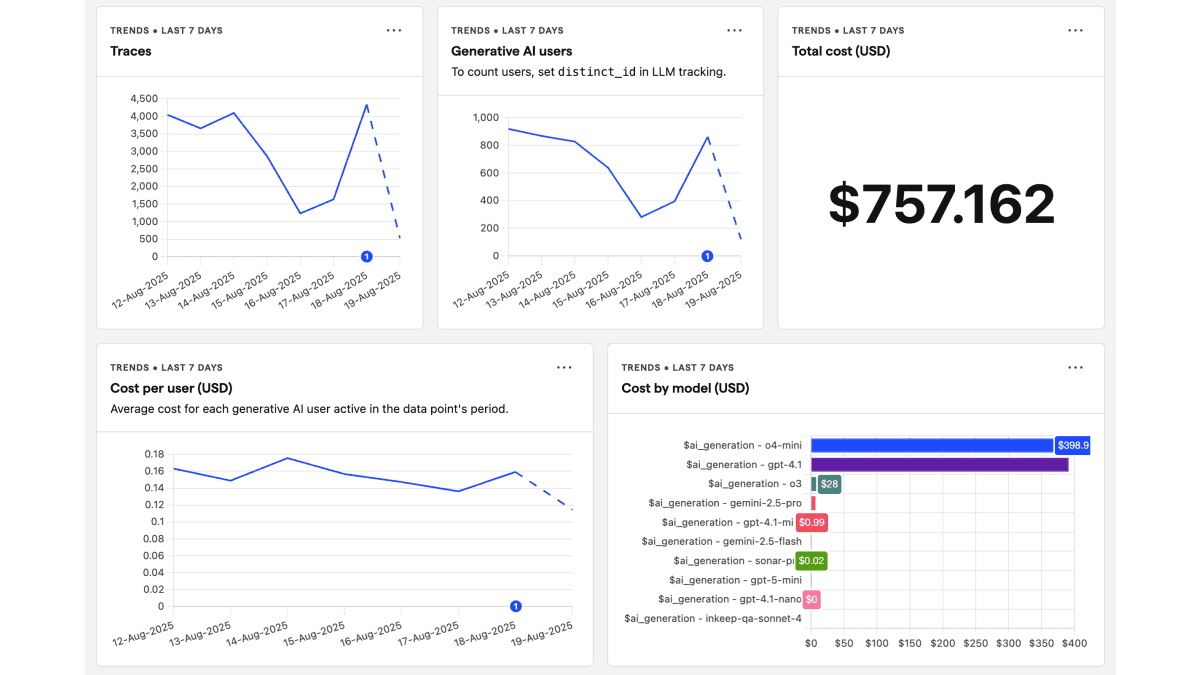
Put the metrics you care about on one dashboard so the whole team is looking at the same definition of "better."
This is where things start to get properly useful.
Now, when one of the almighty execs asks, "Is the agent getting better?" you don't need to guess. You can share the dashboard and show actual data!
- If you change the system prompt, you can see whether success rate improved.
- If you add a new tool, you can see whether failure rate dropped.
- If you switch models, you can see whether quality improved enough to justify the cost.
This is the difference between AI observability and just staring at a pile of traces.
Step 7: Send failures to where your team works
Dashboards are great, but let's be honest: They are often ignored.
If an agent fails consistently in production, you probably don't want that failure sitting quietly in a dashboard waiting for someone to maybe look at it next Thursday. You want the right people to know.
In PostHog, you can set up a workflow so that when an eval fails, it sends the eval reasoning to Slack, email, or wherever your team works.
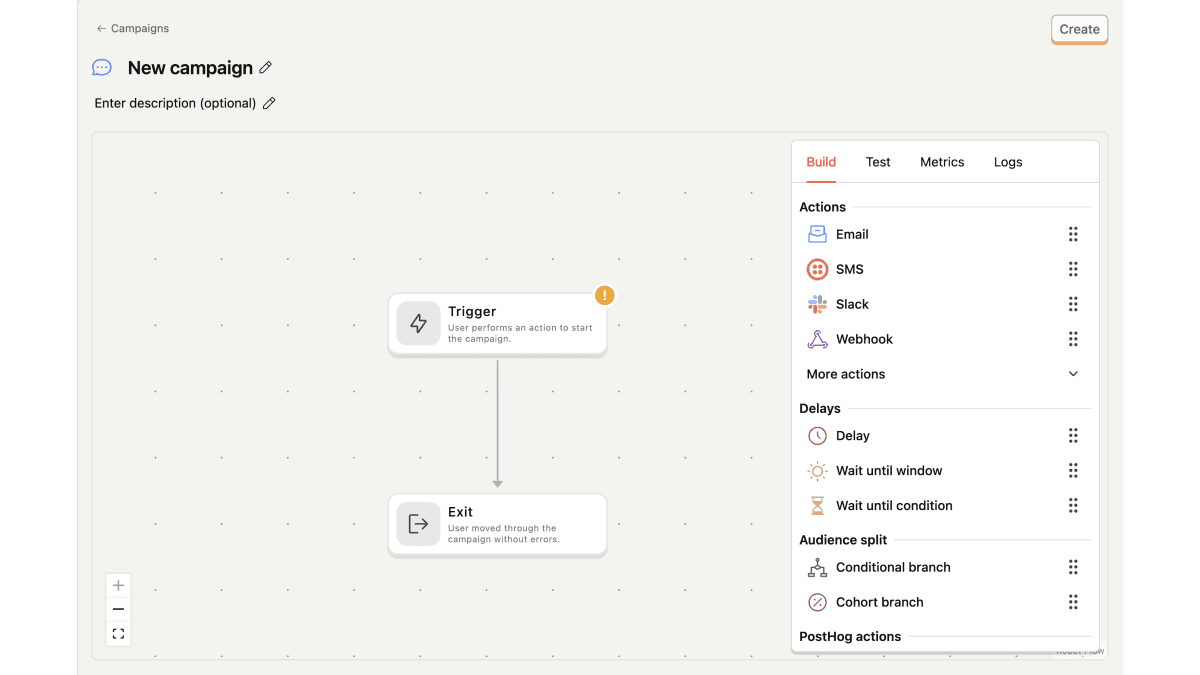
Trigger the workflow from a failed $ai_evaluation event, then route it to the channel your team actually watches.
For example, let's say a user asks:
"What's my bank account balance today?"
For whatever reason, the agent hallucinates and says:
"You're really wealthy. You have $100 million."
But the user does not have $100 million. They have minus $1,000 because buying PostHog merch is more fun than paying bills!
You can imagine the customer would be pretty unhappy.
What you want is a short summary sent to the right channel, something like:
"Chatbot failed because the user wanted to know how much money was in their bank account and the agent returned the wrong balance."
You can (and should!) also include buttons like:
- View the trace
- Open the person profile
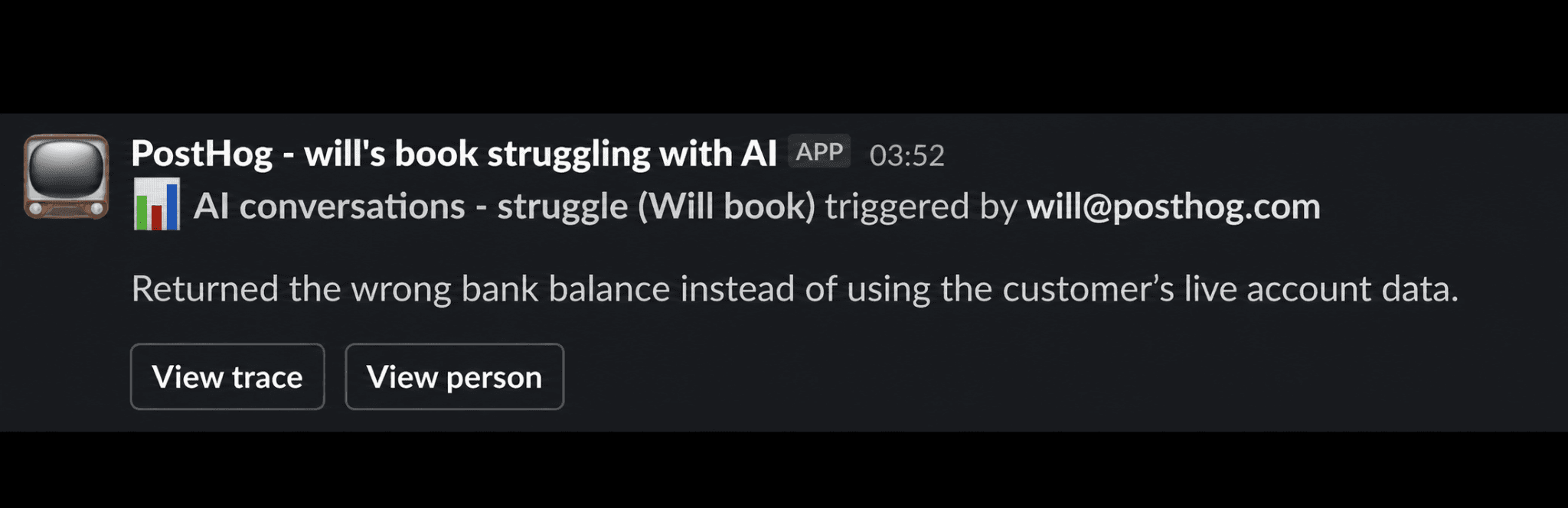
The alert should include the eval reasoning and links back to the trace and person, so someone can actually do something with it.
This is super powerful because your team gets notified when someone is struggling. Your product team can open the trace and start testing improvements in the Playground. Your GTM team can use the person and account context to spot patterns, find affected customers, and coordinate support when there's a genuine reason to reach out.
For what it's worth, this has worked incredibly well internally at PostHog. It's helped us spot confused customers earlier, offer better support, and help people get more value out of the product.
Step 8: Improve the agent
Once you know where your agent is failing, you can start improving it.
That might mean:
- Updating the system prompt
- Changing the model
- Adding a tool
- Improving retrieval
- Passing better context
- Changing the product UX around the agent
- Adding guardrails
- Improving escalation to a human
This is why traces are so important. If all you know is "the agent failed," that's not very useful. If you can see the full trace, you can usually understand where it failed. Maybe the user asked a good question, but the agent picked the wrong tool. Maybe the tool returned the right data, but the agent summarized it badly. Maybe the retrieval step pulled irrelevant context.
Each of those failures needs a different fix, and this is where the Playground becomes useful.
Take the failed bank balance trace from the last step. Your product team can test different prompts or tool behavior in the Playground and see whether the agent now returns the right answer.
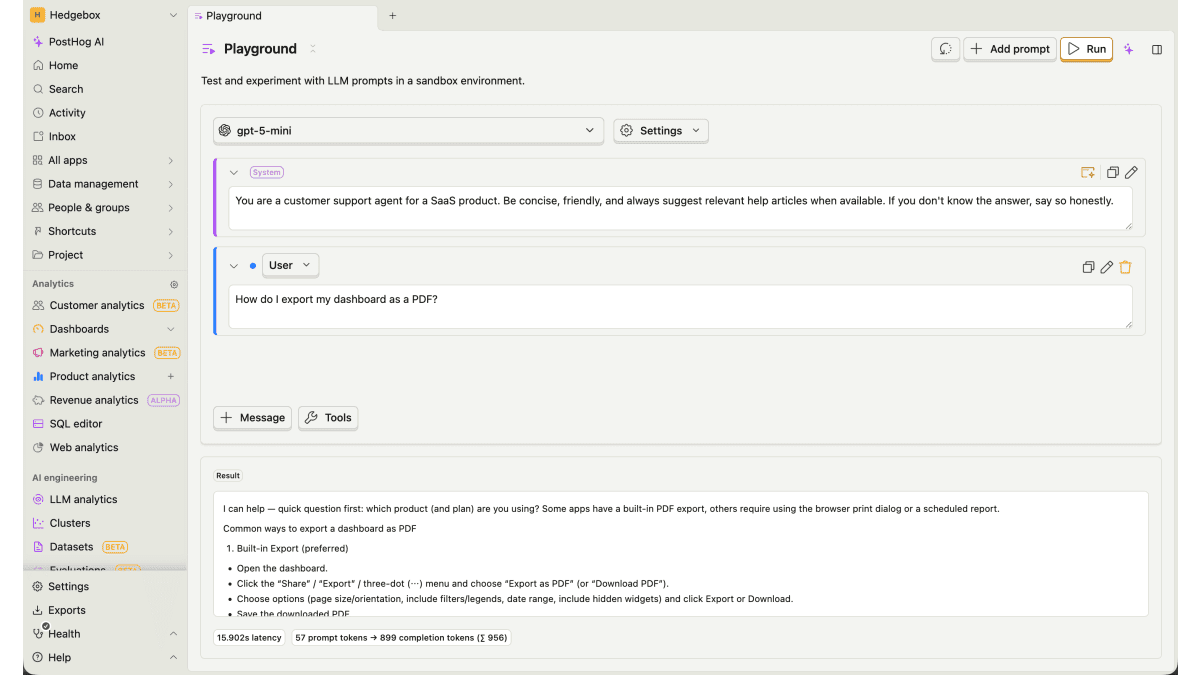
Open a failed generation in the Playground to test prompt or model changes against the same production example.
That gives you a much faster feedback loop! Instead of debating abstractly about whether the prompt is good, you can test it against real production failures.
Want to make the loop feel properly like you're living in 2030? First, install the PostHog Slack app. Then, in Slack, mention @PostHog and tell it what you want fixed. The agent picks up the task and replies in the thread while it works. It'll even open a PR for you to review!
But wait, what if I want to experiment?
Once you have evals in place, you can go one step further and A/B test changes to your agent using experiments.
For example, you could test:
- System prompt A vs. system prompt B
- Claude vs. GPT vs. Gemini
- Tool-using agent vs. non-tool-using agent
- Short answers vs. detailed answers
- Different retrieval strategies
- Different escalation rules
The important thing is that you now have a success metric. That's the point of doing all this. You're building an analytics stack where changes to your AI product can actually be measured.
What you should end up with
By the end of this process, you should have:
- Traces and generations flowing into PostHog
- AI data connected to users, organizations, sessions, and replays
- Clusters showing what users are asking your agent to do
- Sentiment analysis showing how users feel
- Product evals showing whether the agent succeeded
- Dashboards tracking performance over time
- Workflows sending important failures to your team
- A process for improving prompts, tools, models, and UX
- A way to A/B test whether changes actually helped
That's the AI product improvement loop! You understand what users are trying to do. You measure whether the agent helped them do it. You investigate failures. You improve the agent. You track whether it got better.
Taking it further
Once you're doing all of this, you should also look at Replay Vision.
If you're manually watching every replay yourself, you're wasting time. Replay Vision can summarize replays for you, so you can understand what users were doing without spending your entire life watching people rage-click buttons.
It's doing for UX research what LLMs have done for development speed.
Which is good, because otherwise we're all going to spend the next five years watching videos of people arguing with chatbots. And that would suuuck.
PostHog is your product's context layer. With a full suite of developer tools – AI observability, product analytics, session replay, feature flags, experiments, error tracking, logs, and more – PostHog ingests and stores all the data agents need to diagnose problems, uncover opportunities, and ship fixes. A data warehouse and CDP tie it all together, unifying that context into one source agents can read across. You can steer it all from Slack, the web app, the desktop (PostHog Desktop), or your own editor via the MCP.