







The best Sentry alternatives & competitors, compared


Contents
Sentry is one of the most widely-used error tracking tools on the market, and for good reason. It's mature, reliable, and most developers have used it at some point.
But Sentry isn't the only option. Whether you're looking for deeper product context, a more generous free tier, or a tool that combines error tracking with analytics and session replay, there are strong alternatives worth considering.
In this guide, we compare the best Sentry alternatives, including tools that go beyond traditional error monitoring to help you understand who is affected and why it matters.
Here's the short version:
1. PostHog
- Founded: 2020
- Who it's for: Developers, AI product builders, and startups or scaleups who want error tracking to be part of understanding their product rather than a separate tool.
- Who it isn't for: SRE teams who need deep APM, profiling, and infrastructure monitoring; Sentry, Datadog, or New Relic will serve them better.
What is PostHog?
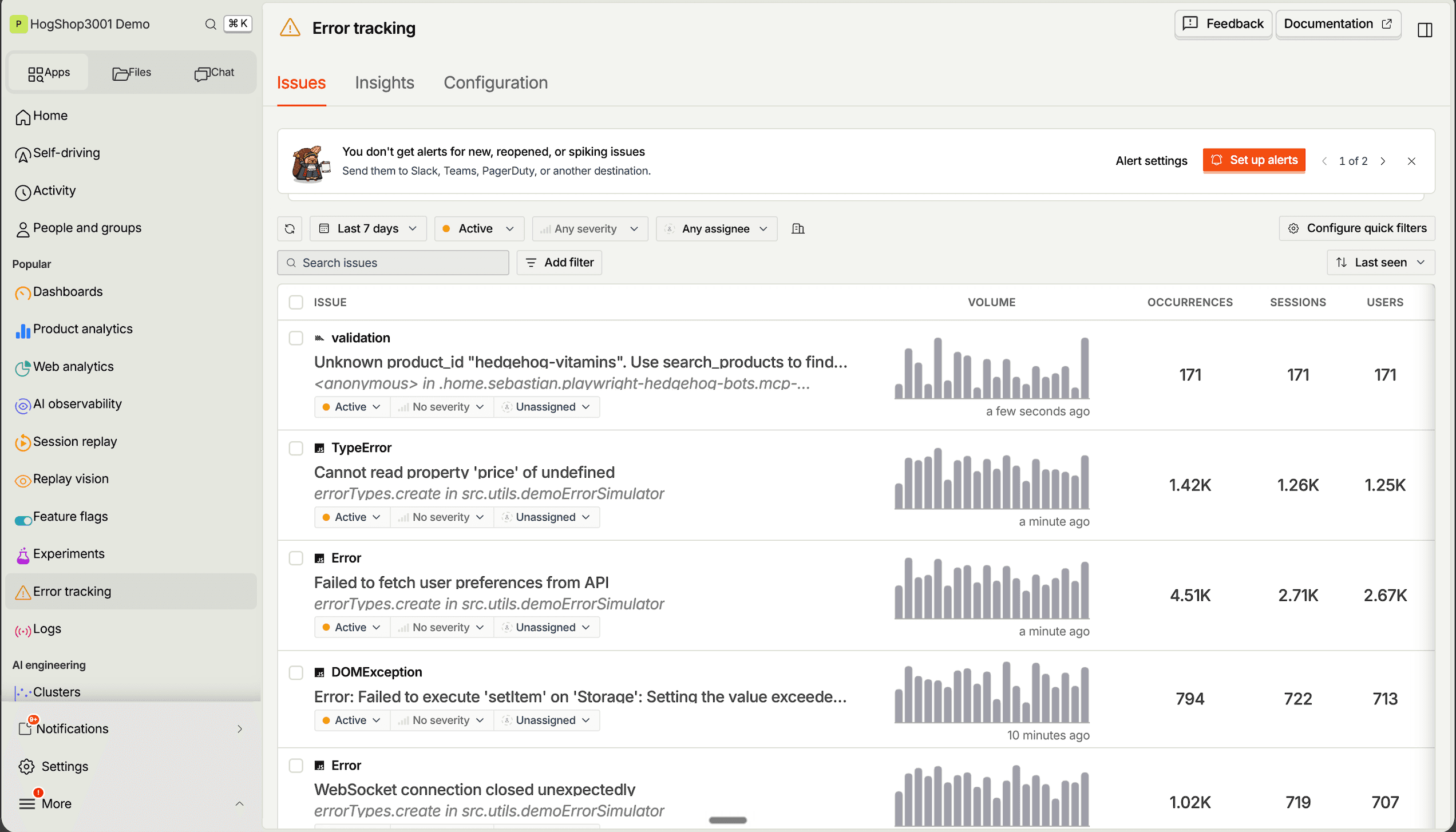
PostHog (that's us 👋) is an all-in-one developer platform combining error tracking, session replays, product analytics, web analytics, A/B testing, feature flags, logs, AI observability, and a lot more into one product.
This means it's not only an alternative to Sentry but also tools like Amplitude, LaunchDarkly, and Langfuse.
PostHog acts as your product's context layer: an error shows up with the replay, flags, logs, and user behind it already attached, and the built-in data warehouse adds your Stripe, HubSpot, or Postgres data alongside it. You can query all of it with SQL or hand it to an agent from Slack or your editor via the MCP.
Key features
Error tracking: Capture errors and exceptions with stack traces and source maps, group them into issues you can assign and resolve, tag them with the release that shipped them, and alert Slack, Discord, Teams, or a webhook.
Session replays: View exactly how users are using your site. Includes event timelines, console logs, network activity, and performance monitoring, with retention from 30 days on the free plan to a year on Boost and Scale. Replay Vision runs AI scanners across recordings so you don't have to watch them one by one.
Product analytics: Custom trends, funnels, user paths, retention analysis, and segment user cohorts. Also, direct SQL querying for power users.
Feature flags: Rollout features safely with local evaluation (for faster performance), JSON payloads, and instant rollbacks.
AI observability: Capture every LLM generation and trace with its cost, latency, tokens, and errors, tied to the user and session that triggered it. Run evals on production traffic and A/B test prompts or models behind a flag.
Data warehouse and CDP: Sync Stripe, HubSpot, Postgres, and other sources into the data warehouse and query them alongside your product data, then push events back out to your tools with CDP destinations or batch exports.
How does PostHog compare to Sentry?
Main differences between PostHog and Sentry
- PostHog offers 100k free errors and 5,000 web and 2,500 mobile recordings free per month vs Sentry's 5k errors and 50 recordings on the free tier.
- PostHog ties every error to user sessions, product analytics, session recordings, feature flags, logs, and distributed traces. Sentry focuses on stack traces and performance monitoring.
- PostHog includes SQL querying and warehouse syncs to analyze product data directly; Sentry doesn't offer a built-in SQL workspace or first-party warehouse connectors, and its data forwarding covers error events only on the Business plan.
- Sentry supports 100+ platforms, including Unreal Engine, Godot, and game consoles; PostHog has 19 official SDKs (including Rust, Elixir, .NET, Unity, and Roblox) but doesn't cover Unreal or consoles.
- PostHog's AI features are included: 500 PostHog AI credits a month, a free MCP server, and a Slack app. Sentry's Seer agent is a paid add-on at $40 per active contributor per month and isn't available on the free plan.
Main similarities between PostHog and Sentry
- Both capture exceptions with detailed stack traces and environment context.
- Both offer logs and AI observability (Sentry calls its version AI agent monitoring), and both have free MCP servers.
- Both offer AI assistants: PostHog AI can be used for querying data, debugging, and shipping fixes; Sentry has Seer for automated root cause analysis and fix suggestions.
- Both integrate with GitHub, Slack, and popular CI/CD tools.
PostHog and Sentry pricing comparison
| PostHog | Sentry | |
|---|---|---|
| Free plan | 100k errors, 5,000 web + 2,500 mobile replays, 1M events, 10 GB logs | 5k errors, 50 replays, 5M spans, 5 GB logs |
| Users on the free plan | Unlimited | 1 |
| Paid plans | No base fee; usage-based per product | Team $29/month, Business $89/month, plus usage |
| AI features | PostHog AI (500 credits a month free), MCP server, and Slack app included | Seer at $40 per active contributor per month, not on the free plan |
| Self-hosting | Free (MIT, open core) | Free (FSL, source-available) |
Bottom line
If you're looking for error tracking and session replay, along with many more tools for making your product better, PostHog is a great alternative to Sentry. This is especially the case for startups and scale ups, thanks to PostHog's generous free tier.


Install PostHog with one command
Paste this into your terminal and make AI do all the work.

2. Rollbar
- Founded: 2012
- Who it's for: Small teams that want focused error tracking with AI fixes and nothing else to configure
- Who it isn't for: Teams that need performance monitoring, log management, or a self-hosted option.
What is Rollbar?
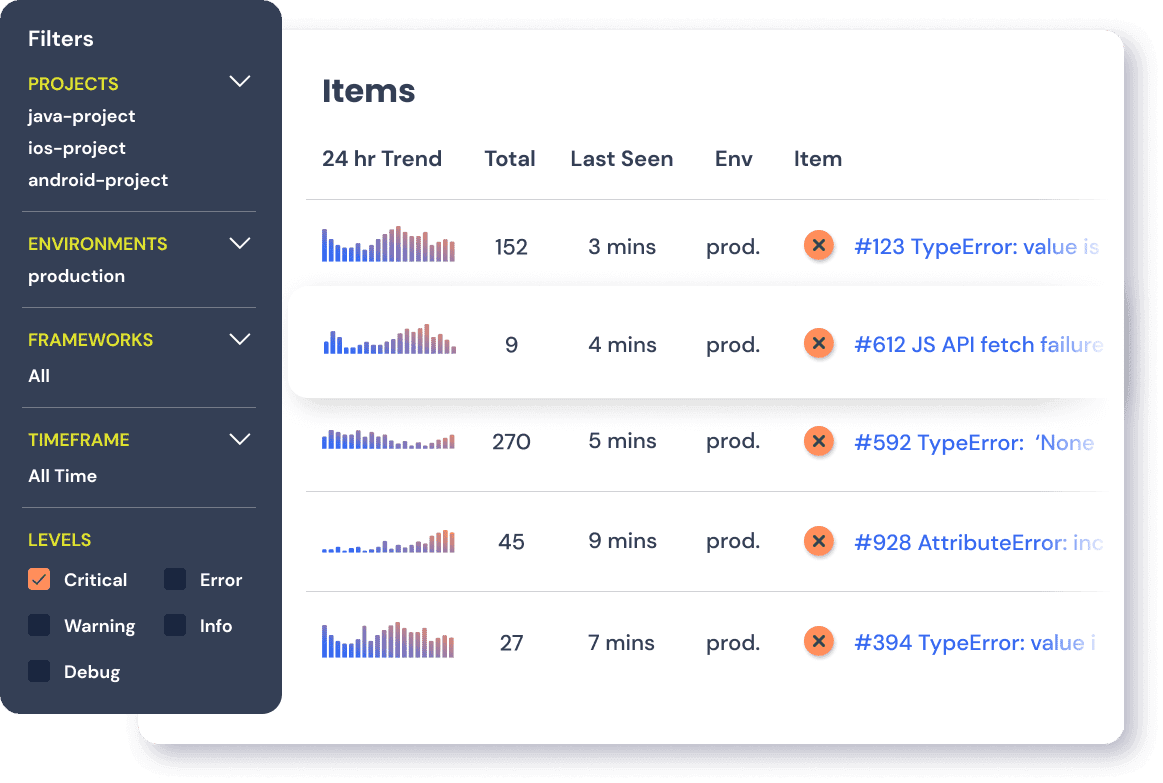
Rollbar helps teams find and fix errors in their code fast through real-time error tracking, issue management, and AI root cause analysis. In 2025 it added session replay, and in 2026 it launched Resolve, an agent that writes a fix, runs the tests, and opens a PR. Their whole platform is designed to help teams quickly detect, prioritize, and resolve issues in their applications.
Key features
Error tracking: Real-time error detection with automatic grouping and issue tracking.
Alerting: Customizable alerting with notifications where you need them.
Error context: Detailed error context including stack traces, code, and telemetry.
Custom workflows: Use Rollbar's rules engine to trigger API or webhook-based actions.
Session replay and AI fixes: Replays attached to errors (1,000 a month free), plus AI root cause analysis and the Resolve fix agent, both billed through AI credits that paid plans include.
How does Rollbar compare to Sentry?
Main differences between Rollbar and Sentry
- Sentry includes built-in performance monitoring and distributed tracing; Rollbar focuses purely on error tracking.
- Sentry offers a self-hostable, source-available option (its main web app uses the FSL, which converts to Apache-2.0 after two years); Rollbar is cloud-only and proprietary.
- Sentry's UI is built for large teams managing multiple projects; Rollbar's simplicity suits smaller setups.
- Sentry has a larger free tier (5k errors vs Rollbar's limited free plan).
Main similarities between Rollbar and Sentry
- Both provide real-time error detection with automatic grouping and notifications.
- Both integrate with GitHub, Slack, Jira, and CI/CD pipelines.
- Both support wide language and framework coverage.
- Both offer customizable alerting rules and workflow automation.
Rollbar and Sentry pricing comparison
| Rollbar | Sentry | |
|---|---|---|
| Free plan | 5k error occurrences, 1,000 session replays, 30-day retention | 5k errors, 50 replays, 5M spans, 5 GB logs |
| Users on the free plan | Unlimited | 1 |
| Paid plans | Essentials from $9/month, Advanced from $13/month | Team $29/month, Business $89/month, plus usage |
| AI features | Root cause analysis and Resolve via AI credits (none on the free plan) | Seer at $40 per active contributor per month, not on the free plan |
| Self-hosting | None | Free (FSL, source-available) |
Bottom line
If Sentry is too complex or expensive for your needs, Rollbar might be a great alternative to try.
3. Raygun
- Founded: 2007
- Who it's for: .NET-heavy teams, and ecommerce or media sites, that want crash reporting, real user monitoring, and APM from one vendor with AI error resolution included.
- Who it isn't for: Small projects, since there's no free tier and Crash Reporting starts at $40 a month billed annually, or teams outside .NET, Node.js, and Ruby who want APM.
What is Raygun?
Raygun is a full-stack monitoring platform focused on ecommerce and media companies (if you got here searching for the Australian B-girl: wrong Raygun, but if your app ever does the kangaroo in production, this one will catch it).
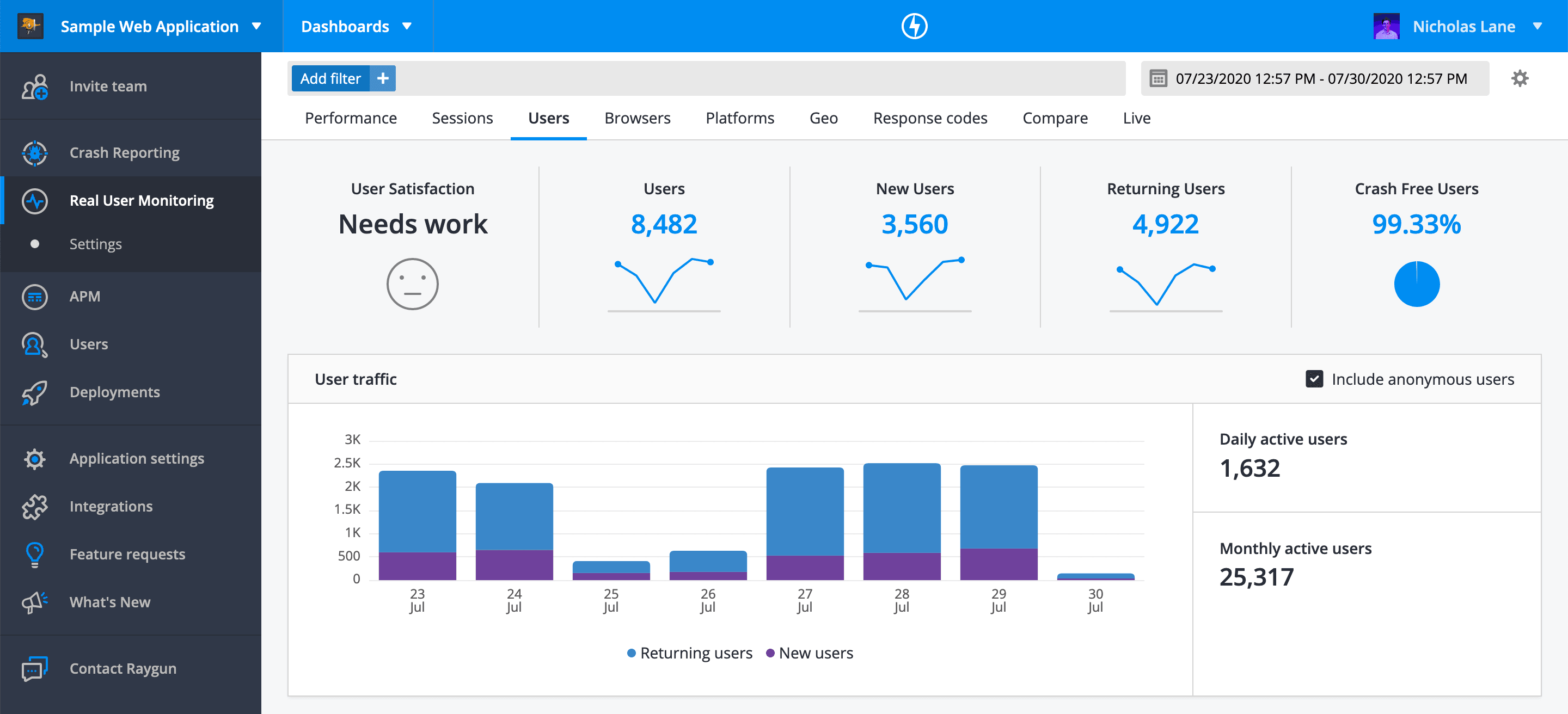
It provides crash reporting, performance monitoring, and user experience insights. Its suite of tools enables teams to quickly detect, diagnose, and resolve issues across their entire tech stack. It's also built an AI error resolution system to help with this.
Key features
Error tracking: Real-time error and crash reporting with detailed stack traces and code-level insights.
Performance monitoring: Get insights into your app's performance for your users. Track metrics like Core Web Vitals and load times.
Application performance monitoring: Uncover backend performance issues with tracing and visualizations.
AI error resolution: Raygun's suite of tools has AI error resolution built in to make all of this easier.
How does Raygun compare to Sentry?
Main differences between Raygun and Sentry
- Raygun includes AI error resolution in every Crash Reporting plan; Sentry's Seer is a paid add-on.
- Sentry offers a free tier; Raygun only provides a 14-day free trial, with Crash Reporting starting at $40 a month billed annually.
- Sentry is source-available (FSL) and can be self-hosted or used in the cloud; Raygun is subscription only.
- Raygun is .NET-first (its APM covers .NET, Node.js, and Ruby); Sentry has broader framework coverage.
Main similarities between Raygun and Sentry
- Both provide real-time crash reporting with detailed stack traces.
- Both offer application performance monitoring alongside error tracking.
- Both integrate with popular issue trackers and notification tools.
- Both support web, mobile, and backend environments.
Raygun and Sentry pricing comparison
| Raygun | Sentry | |
|---|---|---|
| Free plan | None (14-day trial) | 5k errors, 50 replays, 5M spans, 5 GB logs |
| Users on the free plan | Trial only | 1 |
| Paid plans | Crash Reporting from $40/month billed annually; RUM and APM from $80/month each | Team $29/month, Business $89/month, plus usage |
| AI features | AI Error Resolution included in every Crash Reporting plan | Seer at $40 per active contributor per month, not on the free plan |
| Self-hosting | None | Free (FSL, source-available) |
Bottom line
If you're looking for a simple tool to do error tracking and performance monitoring, Raygun is one to try out. Their lack of a free tier makes them harder to recommend for small projects though.
4. Datadog
- Founded: 2010
- Who it's for: Enterprises already running Datadog for infrastructure, APM, and logs who want errors in the same place, with the backend trace a click away.
- Who it isn't for: Small teams; the free plan is 5 hosts with 1-day retention, Error Tracking is a separate line item, and there's no self-hosted option.
What is Datadog?
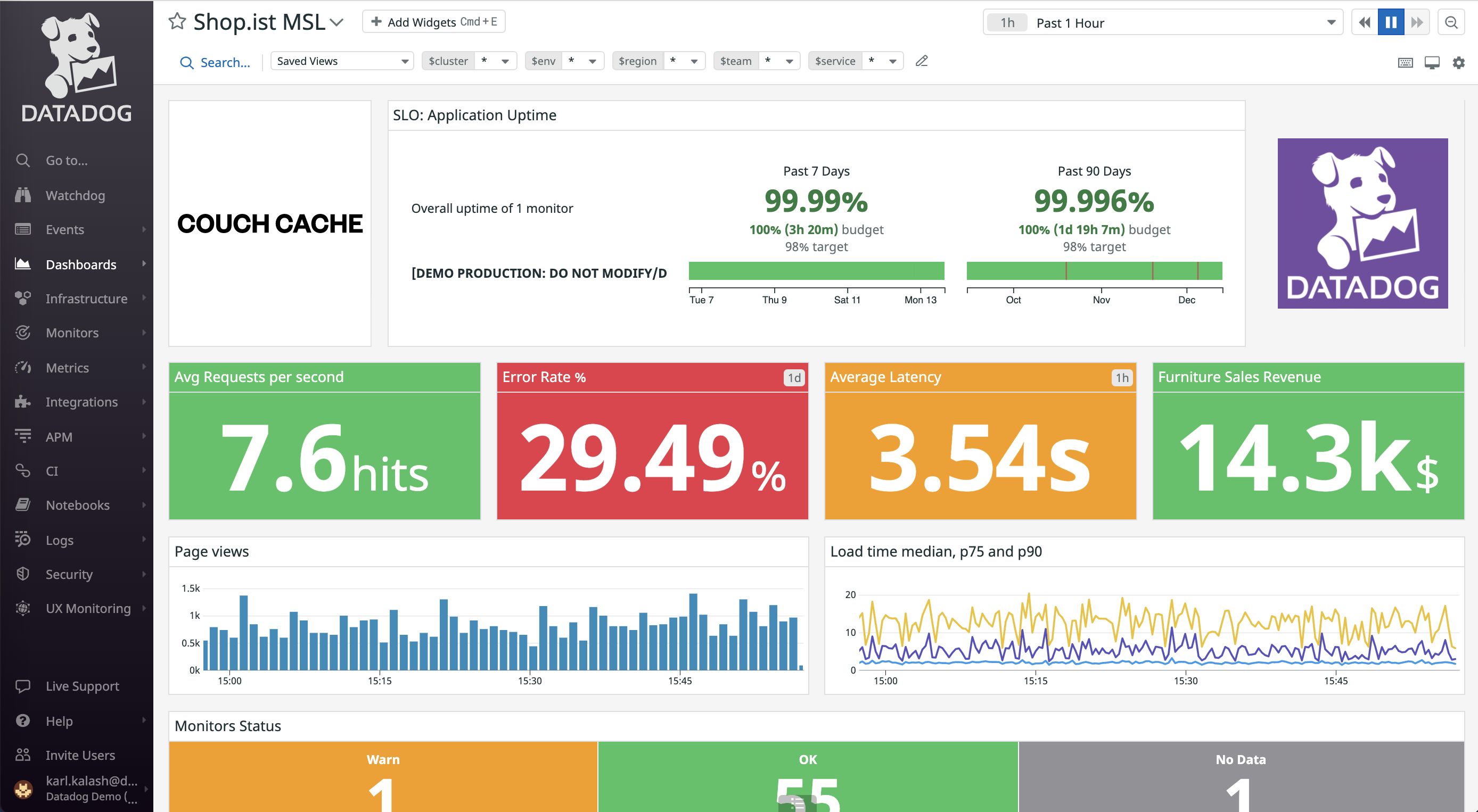
Datadog is a cloud observability and monitoring platform that provides real-time visibility into infrastructure, applications, logs, and network performance. It enables organizations to ensure performance, security, and reliability across their entire stack.
Key features
Performance monitoring: Monitor your app (and infrastructure) performance across your stack, from frontend to workflows to databases. Troubleshoot issues with distributed tracing.
Log management: Aggregate and analyze logs in real-time to correlate events, identify issues, and gain insight into system performance.
Infrastructure monitoring: Get visibility into your infrastructure's performance, health, and security across your cloud or hybrid environment.
Security and compliance monitoring: Ensure your data is secure and compliant with industry standards. Protect against reported vulnerabilities.
Integrations: 1,000+ integrations covering nearly every cloud service, database, and framework you're likely to run.
How does Datadog compare to Sentry?
Note: Although Datadog has a free tier, its 1 day data retention is not enough for real usage.
Main differences between Datadog and Sentry
- Datadog is a full observability platform covering infrastructure, APM, logs, and metrics; Sentry focuses on application-level errors and performance.
- Datadog's RUM includes replay-like functionality tied to backend traces; Sentry treats session replay as a separate product.
- Datadog pricing is enterprise-scale and can get expensive quickly; Sentry is more accessible for smaller teams.
- Datadog requires more setup and configuration; Sentry is faster to deploy for error tracking alone.
Main similarities between Datadog and Sentry
- Both provide real-time exception alerts and error grouping.
- Both integrate with popular frameworks, cloud providers, and deployment tools.
- Both support distributed tracing across microservices.
- Both offer team dashboards and notification integrations.
Datadog and Sentry pricing comparison
| Datadog | Sentry | |
|---|---|---|
| Free plan | Infrastructure for 5 hosts with 1-day retention; no free Error Tracking | 5k errors, 50 replays, 5M spans, 5 GB logs |
| Users on the free plan | No per-seat pricing | 1 |
| Paid plans | Per product (per host, per GB, per million spans); Error Tracking billed by error volume as its own line item | Team $29/month, Business $89/month, plus usage |
| AI features | Watchdog anomaly detection and root cause analysis built in | Seer at $40 per active contributor per month, not on the free plan |
| Self-hosting | None (BYOC for log storage only) | Free (FSL, source-available) |
Bottom line
For huge enterprises, Datadog is likely already on your monitoring radar. The main complaint is the cost, which might make other tools more appealing, especially for smaller teams.
5. New Relic
- Founded: 2008
- Who it's for: Teams that want full-stack observability on a usable free tier (100 GB a month and one full-platform user), including session replay for web and mobile.
- Who it isn't for: Teams that only need error tracking; per-user pricing adds up past one full-platform seat, and setup is heavier than a dedicated error tracker.
What is New Relic?
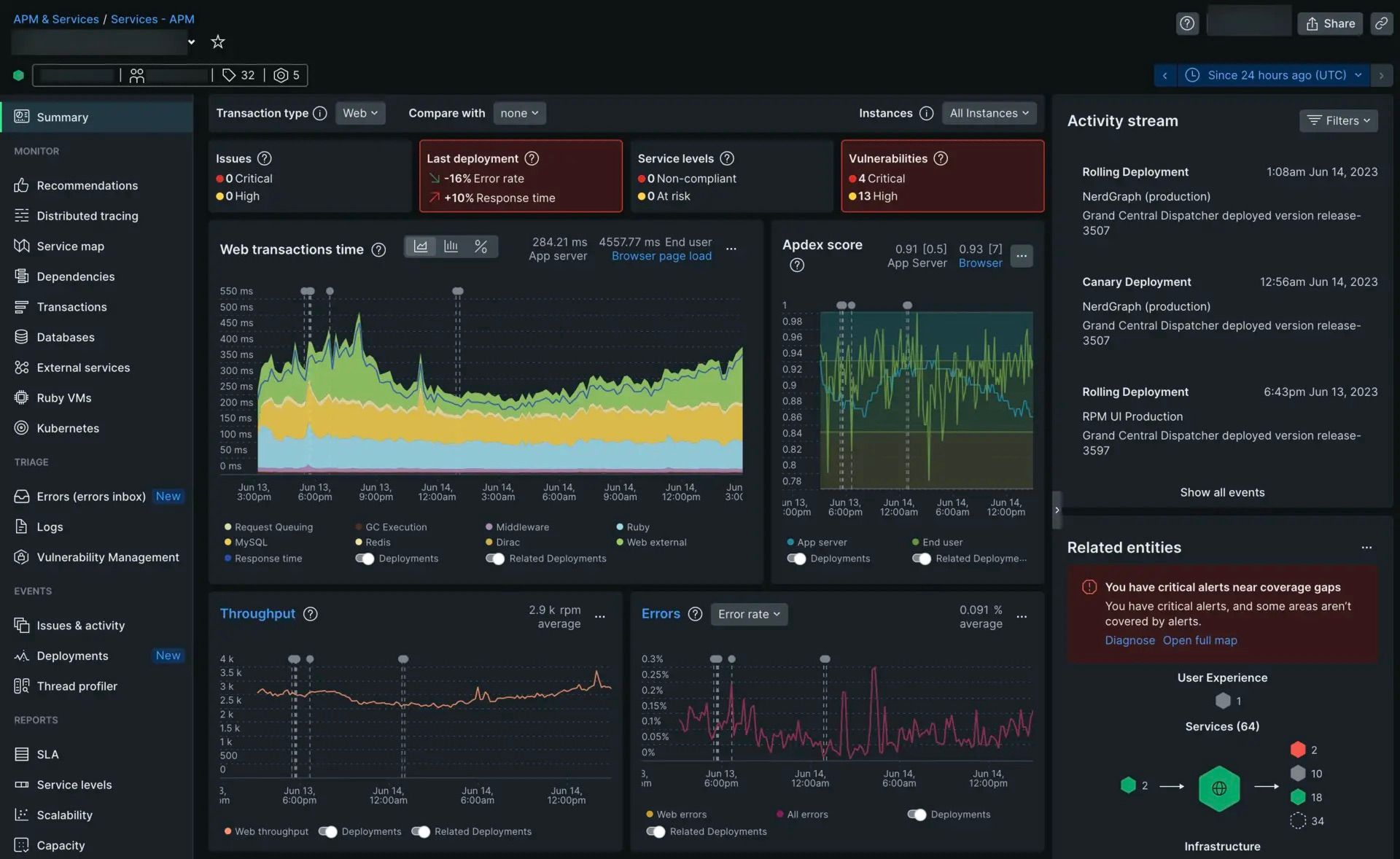
New Relic is a cloud-based observability and analytics platform that provides full-stack visibility into application performance, infrastructure, and user experience. It helps organizations monitor, troubleshoot, and optimize their software in real time, enabling proactive issue resolution and improved customer experiences.
Key features
Full-stack observability: Monitor applications, infrastructure, and digital experiences across your entire stack
Real-time monitoring: Track performance and errors with AI-powered insights and analysis
Log management: Aggregate and analyze logs with distributed tracing for quick troubleshooting
Integrations: Connect with over 780 tools and open source ecosystems
Flexible pricing: Usage-based pricing model with a free tier, makes it cheaper to get started with (than Datadog)
How does New Relic compare to Sentry?
Main differences between New Relic and Sentry
- New Relic offers full-stack observability including infrastructure monitoring; Sentry focuses on application errors and performance.
- New Relic has a more generous free tier (100 GB/month data ingest); Sentry's free tier is limited to 5k errors.
- New Relic uses AI-powered anomaly detection across all telemetry; Sentry's AI features (Seer) are focused on error resolution.
- New Relic supports 780+ integrations; Sentry has fewer but deeper developer tool integrations.
Main similarities between New Relic and Sentry
- Both provide real-time error monitoring with stack traces and context.
- Both offer performance monitoring and distributed tracing.
- Both integrate with popular CI/CD and collaboration tools.
- Both support web, mobile, and backend applications.
New Relic and Sentry pricing comparison
| New Relic | Sentry | |
|---|---|---|
| Free plan | 100 GB data ingest a month | 5k errors, 50 replays, 5M spans, 5 GB logs |
| Users on the free plan | 1 full-platform user, unlimited basic users | 1 |
| Paid plans | $0.40/GB beyond 100 GB; full-platform users from $10 for the first and $99 each after | Team $29/month, Business $89/month, plus usage |
| AI features | New Relic AI for queries, anomaly detection, and root cause analysis; agentic features in preview | Seer at $40 per active contributor per month, not on the free plan |
| Self-hosting | None | Free (FSL, source-available) |
Bottom line
New Relic is similar to Datadog: it has a ton of observability and monitoring features (along with the added bonus of a free tier). Definitely one to consider for enterprise DevOps and SRE teams.
6. LogRocket
- Founded: 2016
- Similar to: PostHog
- Typical users: Product managers, engineers, support teams
- Typical customers: B2B SaaS, B2C retail companies
What is LogRocket?
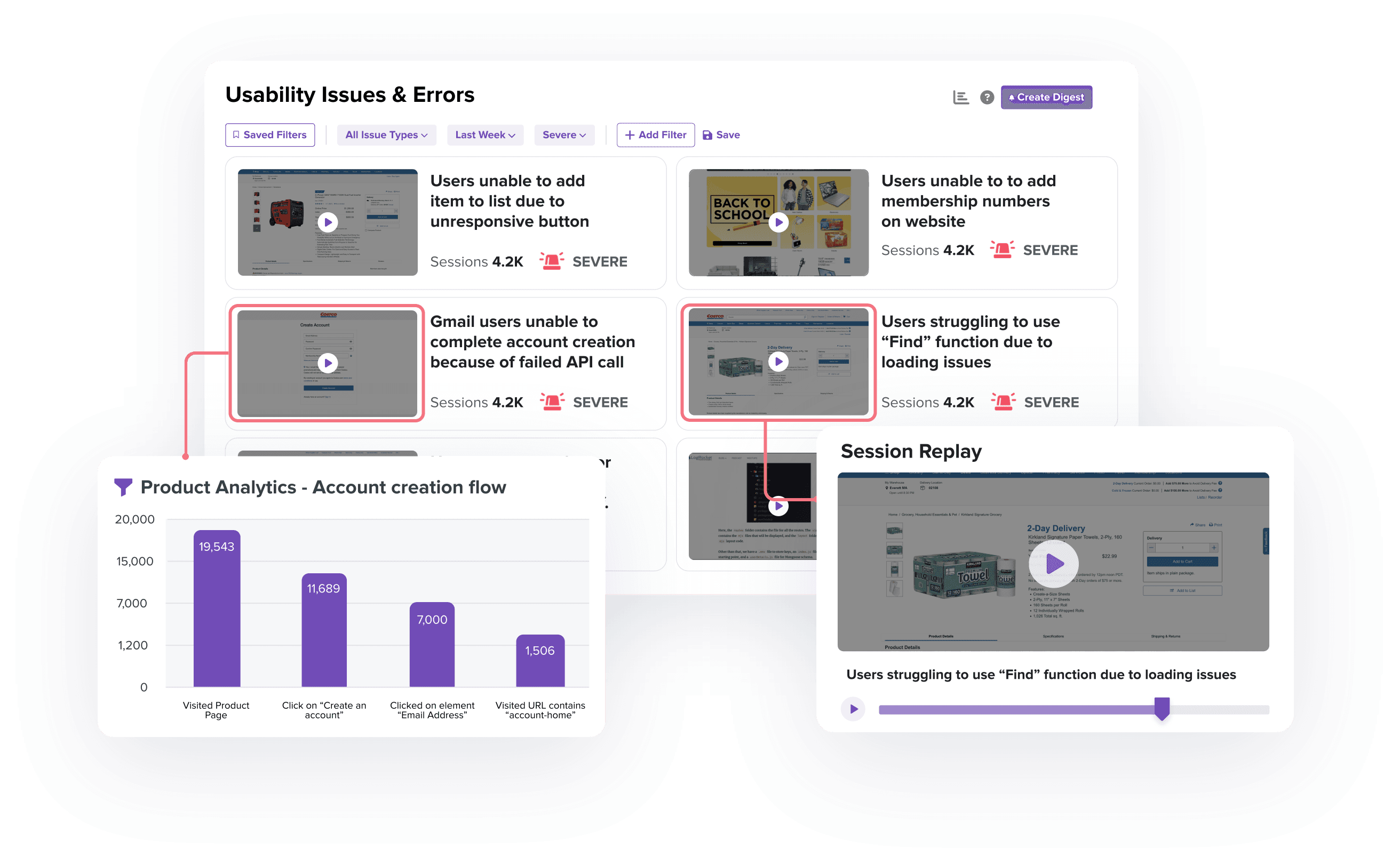
LogRocket is a product experience platform with product analytics, error tracking, session replay, and performance monitoring. It focuses on helping product managers, engineers, and support teams identify and fix issues.
Key features
Error tracking: Identify and triage the most impactful issues with JavaScript and network errors as well as stack traces.
Session replay: Understand exactly what users are doing on your site. See the screens they visit, places they click, as well as console and network logs, errors, and performance data.
Performance monitoring: Monitor frontend performance such as web vitals, CPU and memory usage, and network speed.
Product analytics: Capture usage data and visualize it with conversion funnels, path analysis, and retention charts.
Galileo AI: Session summaries, automatically surfaced issues, and funnel insights, included on Pro plans and above.
How does LogRocket compare to Sentry?
Main differences between LogRocket and Sentry
- LogRocket emphasizes frontend debugging with visual session replays; Sentry focuses on backend and full-stack error monitoring.
- LogRocket captures user interactions, network calls, and console logs together; Sentry treats replay as a supplementary feature.
- Sentry is source-available (FSL) and can be self-hosted or used in the cloud; LogRocket is cloud-only and proprietary.
- Sentry has stronger backend error tracking; LogRocket is primarily frontend-focused.
Main similarities between LogRocket and Sentry
- Both detect JavaScript errors with stack traces and source maps.
- Both integrate with Slack, GitHub, and issue tracking tools.
- Both offer performance monitoring for frontend applications.
- Both help engineering teams reduce debugging time.
LogRocket and Sentry pricing comparison
| LogRocket | Sentry | |
|---|---|---|
| Free plan | None (14-day trial) | 5k errors, 50 replays, 5M spans, 5 GB logs |
| Users on the free plan | Trial only | 1 |
| Paid plans | Core from $176/month billed annually; Pro for 100k+ sessions; Enterprise custom | Team $29/month, Business $89/month, plus usage |
| AI features | Galileo AI on Pro and above | Seer at $40 per active contributor per month, not on the free plan |
| Self-hosting | Enterprise plans only | Free (FSL, source-available) |
Bottom line
LogRocket, like PostHog, is focused more on engineering, product, and support teams. It's a good alternative to Sentry for these types of teams, though without a free plan it's a harder sell for small ones.
7. AppSignal
- Founded: 2012
- Who it's for: Ruby, Elixir, Node.js, and Python teams who want errors, APM, host metrics, and logs in one simple tool, with a free plan of 30k requests.
- Who it isn't for: frontend-heavy or mobile teams, or anyone who needs session replay or self-hosting.
What is AppSignal?
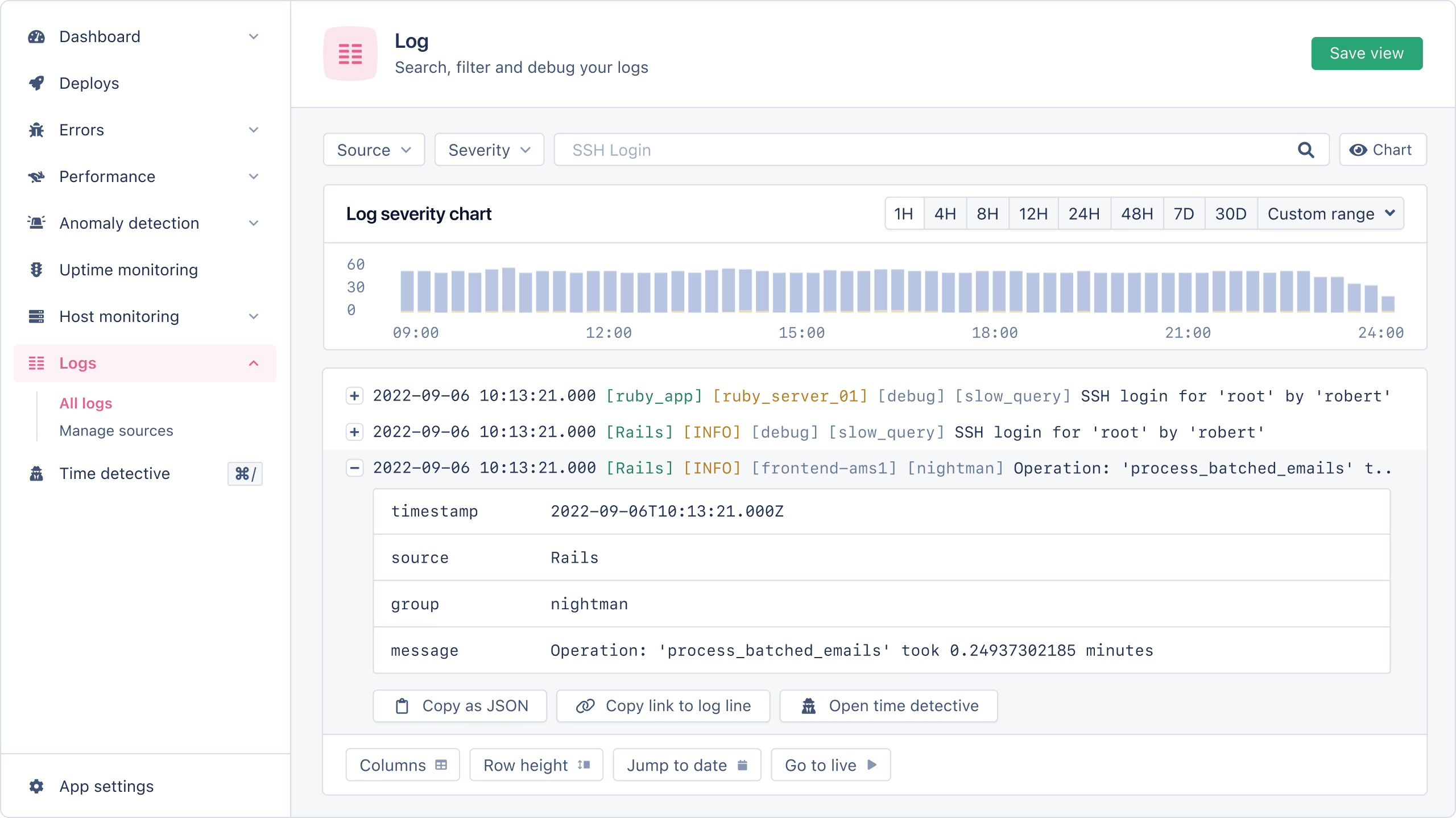
AppSignal is an application performance monitoring (APM) and error tracking tool designed for developers. It offers insight into errors, performance issues, host metrics, uptime monitoring, and logs in one unified platform. It's known for its ease of setup, developer-friendly experience, and real-time alerting.
Key features
Error tracking: Capture exceptions, get alerts, and debug with full request details for your favorite languages like Ruby, Elixir, Python, and more.
Performance monitoring: Track response times, slow queries, background jobs, and memory leaks. Find and fix bottlenecks.
Host monitoring: Monitor CPU, disk, network, and memory usage across your infrastructure. Compare hosts to see which ones are underperforming.
Anomaly detection: Get real-time alerts for any metric or unusual patterns in app behavior from any of the above sources.
Log management: Store and search logs with a clean and intuitive UI. Ingest from any source.
How does AppSignal compare to Sentry?
Main differences between AppSignal and Sentry
- AppSignal has deep support for Ruby, Elixir, Node.js, and Python; Sentry supports 100+ platforms.
- Sentry’s free tier is built around errors/spans/replays; AppSignal’s free plan is request/log–centric (≈ 50k requests, 1 GB logs, 5-day retention).
- AppSignal includes host monitoring for CPU, memory, and disk; Sentry focuses on application-level metrics.
- Sentry is source-available (FSL) and can be self-hosted or used in the cloud; AppSignal is SaaS-only.
Main similarities between AppSignal and Sentry
- Both provide real-time error tracking with detailed diagnostics.
- Both offer performance monitoring and anomaly detection.
- Both integrate with popular deployment and collaboration tools.
- Both are designed for developer-friendly workflows.
AppSignal and Sentry pricing comparison
| AppSignal | Sentry | |
|---|---|---|
| Free plan | 30k requests, 1 GB logs, 5-day retention | 5k errors, 50 replays, 5M spans, 5 GB logs |
| Users on the free plan | Unlimited | 1 |
| Paid plans | From $279/year for 250k requests; long-term log storage add-on $89/month | Team $29/month, Business $89/month, plus usage |
| AI features | None advertised | Seer at $40 per active contributor per month, not on the free plan |
| Self-hosting | None (only the collector runs on your infrastructure) | Free (FSL, source-available) |
Bottom line
For developers using one of the languages AppSignal supports, it's a great alternative to Sentry. With OTel support and a lightweight free plan, it’s easy to adopt and covers the essentials without extra complexity.
8. GlitchTip
- Founded: 2020
- Who it's for: Teams leaving Sentry over cost or licensing who want to keep their SDKs and self-host, or pay $15 a month for the hosted version.
- Who it isn't for: Teams that want session replay, profiling, AI root cause analysis, or the user context around an error.
What is GlitchTip?
GlitchTip is an open-source (MIT) reimplementation of Sentry's backend, built by Burke Software. It's compatible with Sentry's SDKs, so you point the Sentry client you already use at a GlitchTip DSN and keep going. You can self-host it with Docker Compose or Helm on as little as 512 MB of RAM, or use the hosted version, which has EU hosting on every plan.
It covers the basics well and skips the rest: there's no session replay, profiling, or AI root cause analysis, and alerts are email and webhooks only.
Key features
Error tracking: Exceptions, log messages, and CSP violations, grouped into issues you can comment on, assign, and resolve. Source maps upload through its CLI.
Uptime monitoring: Ping, GET, POST, and heartbeat checks with alerts when a service goes down.
Performance monitoring: Transactions and spans with p50 and p95 timings, captured through the Sentry SDK's tracing options.
Logs: Added in 2026, with native OpenTelemetry log ingest, alongside an MCP server for agents.
How does GlitchTip compare to Sentry?
Main differences between GlitchTip and Sentry
- GlitchTip is MIT-licensed and free to self-host on modest hardware; Sentry's main web app is source-available (FSL) and its self-hosted stack is far heavier to run.
- Sentry includes session replay, profiling, metrics, and the paid Seer agent; GlitchTip has none of these and keeps to errors, uptime, performance, and logs.
- GlitchTip's hosted free plan covers 1,000 events a month with unlimited users; Sentry's covers 5k errors for 1 user.
- GlitchTip alerts by email and webhook only; Sentry has native Slack, PagerDuty, and issue-tracker integrations.
Main similarities between GlitchTip and Sentry
- Both use the same SDKs, so switching doesn't mean re-instrumenting your code.
- Both offer error tracking, uptime monitoring, and performance monitoring.
- Both can be self-hosted or used as a hosted service with EU data residency.
- Both are open to inspection: GlitchTip is fully open source, Sentry is source-available.
GlitchTip and Sentry pricing comparison
| GlitchTip | Sentry | |
|---|---|---|
| Free plan | 1,000 events a month hosted; unlimited self-hosted | 5k errors, 50 replays, 5M spans, 5 GB logs |
| Users on the free plan | Unlimited | 1 |
| Paid plans | Small $15/month (100k events), Medium $50, Large $250 | Team $29/month, Business $89/month, plus usage |
| AI features | None (has an MCP server) | Seer at $40 per active contributor per month, not on the free plan |
| Self-hosting | Free (MIT) | Free (FSL, source-available) |
Bottom line
If you want Sentry's SDKs without Sentry's bill or license, and you don't need replays, profiling, or AI, GlitchTip is the most direct swap on this list. Teams that want the user context around an error will outgrow it quickly.
Which Sentry alternative should you choose?
- Want every error to arrive with the replay, flags, logs, and user behind it, in a platform your agents can work from via the MCP, on a free tier you won't outgrow? Go with PostHog.
- Need simple, reliable error tracking without complexity? Try Rollbar.
- Looking for AI-powered error resolution and strong .NET/Flutter support? Consider Raygun.
- Enterprise-scale observability across your entire stack? Datadog ties everything together.
- Full-stack monitoring with a generous free tier? New Relic is worth exploring.
- Frontend-focused debugging with visual replays? LogRocket excels here.
- Ruby or Elixir shop wanting deep language support? AppSignal is purpose-built for you.
- Want a drop-in, open-source Sentry replacement you can self-host for free? GlitchTip speaks Sentry's SDK protocol.
Is PostHog right for you?
Here's the (short) sales pitch.
We're biased, obviously, but we think PostHog is the perfect Sentry replacement if:
- You value transparency. We're open source and open core.
- You want all the tools to help you build a better product (like product analytics, session replays, and A/B testing).
- You want to try before you buy. We're self-serve with a generous free tier.
- You're building with AI agents. The MCP server, Slack app, and CLI give them the same context you have.
It's completely free to get started – no credit card required. Our AI setup wizard handles configuration in minutes, or you can check out the error tracking install guide to do it yourself.
Install PostHog with one command
Paste this into your terminal and make AI do all the work.
Frequently asked questions
What does it mean for PostHog to be your product's context layer?
Most Sentry alternatives give you a better or cheaper view of the same thing: the error. PostHog stores the error next to everything else your product generates, so error tracking, session replay, logs, product analytics, feature flags, experiments, and AI observability share one model of users and sessions.
The data warehouse and CDP extend that to business data from Stripe, HubSpot, Postgres, and other sources, synced in and pushed back out. The upshot for debugging: "which errors hit paying customers this week" is one query, and an agent working from Slack, the web app, or your editor via the MCP sees the whole product, not just its exceptions.
PostHog says it makes your product "self-driving" – what does that mean?
It means PostHog digs through your product data, finds what's worth fixing, and has agents do the work.
It starts with context. A full suite of developer tools – AI Observability, Product Analytics, Session Replay, Feature Flags, Experiments, Error Tracking, Logs, and more – captures everything happening in your product, and a Context Warehouse unifies it into one source agents can read across.
From there, Scouts read across all of it and sort what's worth knowing from what's just noise. What clears the bar becomes a report in your inbox: an agent picks it up, roots out the cause, and opens a PR. You review and merge.
You can steer it from Slack, the web app, or your own editor via the MCP or CLI.
What is Sentry used for?
Sentry is an error tracking and performance monitoring platform that helps developers detect, diagnose, and fix bugs in production. It captures exceptions with detailed stack traces, groups similar errors, and integrates with developer tools like GitHub and Slack for streamlined workflows.
Why look for Sentry alternatives?
Common reasons include: needing more context around errors, wanting a more generous free tier, consolidating multiple tools into one platform, or finding Sentry's pricing too expensive as you scale.
What's the best Sentry alternative overall?
PostHog is the best all-around Sentry alternative for most teams. It combines error tracking with session replay, product analytics, feature flags, A/B testing, AI observability, and surveys, giving you a complete view of both the technical issue and its user impact.
Which Sentry alternatives are open source?
PostHog is fully open source under the MIT license with a public roadmap. Sentry itself is self-hostable and source-available; its main web app uses the Functional Source License (FSL) and converts to Apache-2.0 after two years. Most other alternatives like Rollbar, Raygun, LogRocket, and AppSignal are proprietary and cloud-only.
Which Sentry alternative has the best free tier?
PostHog offers 100k free errors/month, plus 1M free analytics events, 5,000 web and 2,500 mobile recordings, and unlimited team members. New Relic offers 100 GB/month of data ingest. Sentry's free tier is limited to 5k errors and 1 user.
Which Sentry alternative is best for frontend debugging?
LogRocket excels at frontend debugging with visual session replays tied to errors. PostHog also offers session replay with error correlation, plus broader product analytics capabilities.
Which Sentry alternative is best for enterprise observability?
Datadog and New Relic are built for enterprise-scale observability, covering infrastructure, APM, logs, and metrics across your entire stack. Both can get expensive at scale, but offer deep visibility into complex systems.
What other error tracking tools are available?
Beyond the tools in this guide, there are many other options worth considering, from simple alerting tools to full observability suites. See our full roundup of the best error tracking tools for a broader comparison.

Subscribe to our newsletter
build mode
Read by 75,000+ founders and builders
We'll share your email with Substack
PostHog is your product's context layer. With a full suite of developer tools – AI observability, product analytics, session replay, feature flags, experiments, error tracking, logs, and more – PostHog ingests and stores all the data agents need to diagnose problems, uncover opportunities, and ship fixes. A data warehouse and CDP tie it all together, unifying that context into one source agents can read across. You can steer it all from Slack, the web app, the desktop (PostHog Desktop), or your own editor via the MCP.