





Error tracking in PostHog Web
Contents
The PostHog web app is home base for error tracking. It's where you triage, resolve, and route issues, with each one already grouped and symbolicated and carrying the affected user's session replay, events, and the release it shipped in. So you can see why something broke instead of trying to reproduce it.
Open Error tracking in PostHog to see the issues list: every open issue with its status, assignee, first and last seen, and occurrence count. From there, filter and search to find what matters, then open an issue to dig in.
Before you start
- Set up Error Tracking – install exception capture in your app so exceptions reach PostHog.
- Open the web app – no install needed, just sign in to PostHog.
What you can do here
- Monitor and search issues – filter, search, and save views over your issues so the important ones surface first.
- Manage and resolve issues – work an issue end to end: inspect the stack trace and context, then resolve, suppress, or reopen it.
- Assign issues to teammates – route an issue to the person or team who owns the code.
- Send alerts – get notified when a new issue appears or an existing one starts spiking.
- Detect spikes – spot bursts and regressions in exception volume before they page you.
- Set up integrations – push issues to Linear, GitHub, or GitLab and keep them in sync.
- Debug with PostHog AI – ask PostHog AI, right here in the web app, to search your issues and root-cause straight from the stack trace. It's an interaction mode inside the web app, not a separate surface.
Fix with AI prompts
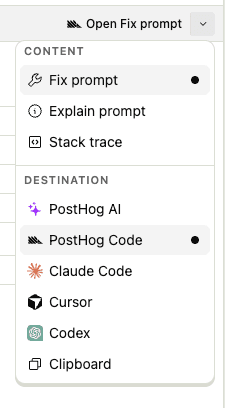
For any issue, PostHog can generate a ready-to-use prompt that helps your coding assistant debug and fix the error. Each prompt includes the issue's stack trace along with prepared instructions for the AI to follow.
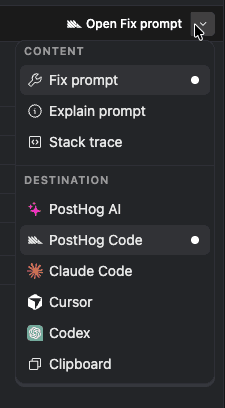
Click Fix with AI on the issue details page. You choose two things:
- What to generate – a fix prompt, an explain prompt, or just the raw stack trace.
- Where to open it – directly in PostHog AI in your browser, copied to your clipboard, or via a deeplink that opens it in your editor: PostHog Desktop, Claude Code, Cursor, or Codex.
Self-driving reports
When recurring exceptions are grouped into a report and a code fix is possible, Self-driving opens a draft pull request. Reports queue up in the Self-driving inbox, with the highest-priority reports first, and nothing ships until you merge. To get these reports, set up Self-driving.
- Read the report – the recurring issue behind it, with the related stack traces, session replays, and events attached.
- Review the draft pull request – see the files it changed, the diff, and its checks before you merge.
- Hand it to an agent – start a discussion to investigate an issue, or start a task to draft a fix.
Related
- Learn how exceptions become issues in Issues and exceptions.
- Debug from your editor or terminal over MCP.