







The best data warehouses for developers, compared

Contents
With most warehouses, answering a data question involves an ingestion pipeline, a dbt model, a permissions grant, and a BI dashboard. And they're all often owned by another team.
The right warehouse for you depends on how much of that plumbing you need for the scale, customizability, and control you're looking for. Analytics-native tools make it easy to query product data with SQL while general-purpose engines trade more setup for more control and scale.
There's no wrong answer here – the right pick comes down to what you care about most:
- If you want a queryable context warehouse connected to product analytics, replay, flags, errors, logs, and more: PostHog
- If you're building embedded or local-first analytics: MotherDuck
- If you need real-time analytics over large event volumes: ClickHouse
- If you run data engineering and ML on shared data: Databricks
- If you need enterprise-scale governance and multi-cloud: Snowflake
- If you're already on Google Cloud: BigQuery
What's the best data warehouse for developers overall?
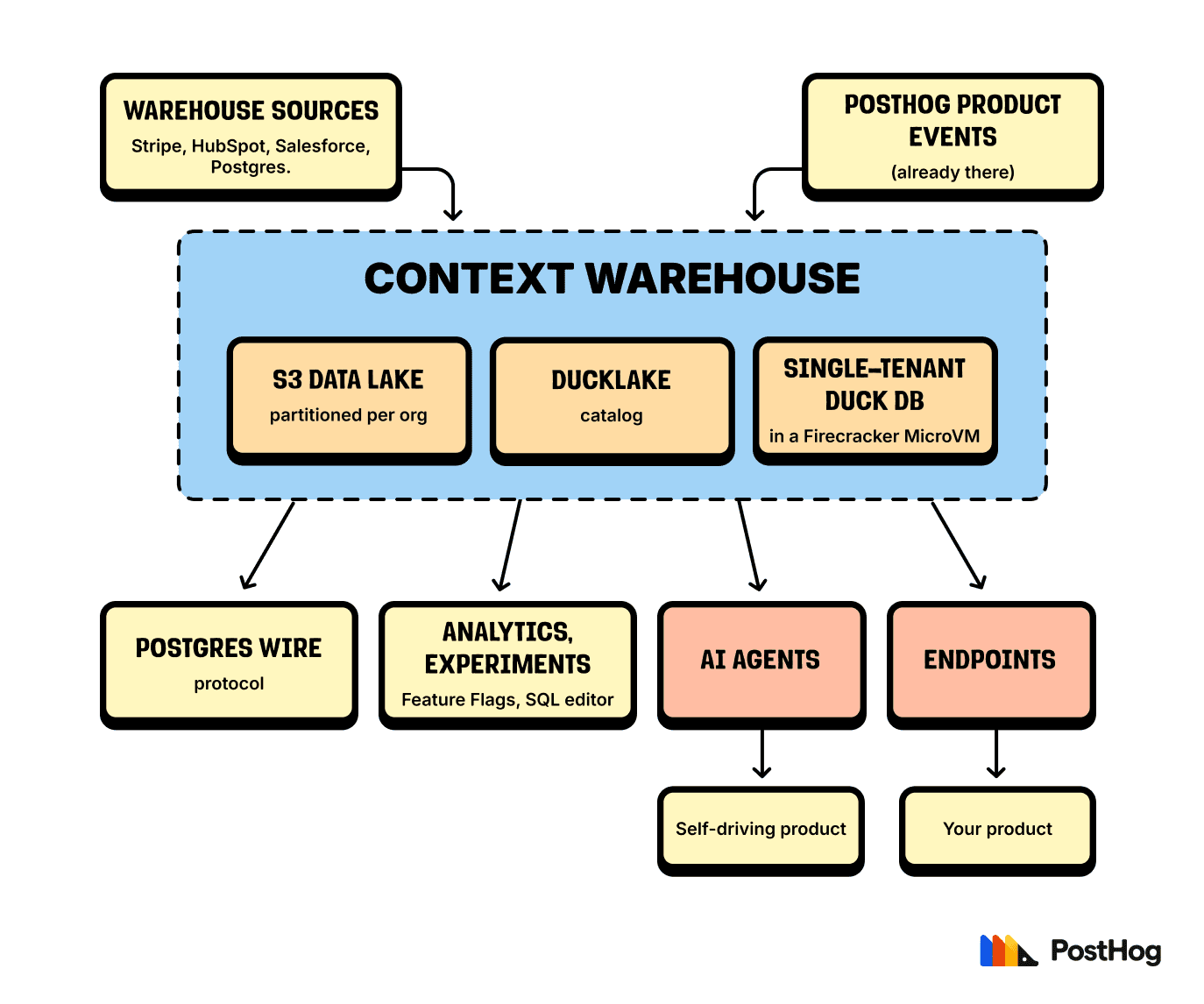
For most developers, it's PostHog. It's a context warehouse, not just a data warehouse: your product and business data live together, wired directly into the tools and agents that act on it, with no pipelines to maintain.
You get two ways in: connect an existing warehouse (Snowflake, BigQuery, Databricks, ClickHouse) as a source and sync the tables you need, or use PostHog's integrated warehouse so data never travels.
Other popular sources are Stripe, Postgres, and Google Sheets, which can be fiddly to wire into a general-purpose warehouse, but are just a few clicks in PostHog.
Either way, queries run on PostHog compute and the results sit next to product analytics, session replay, feature flags, error tracking, and more – so a query that turns up an odd event leads straight to the user's session or the error behind it, without matching records across tools.
Because the data is already unified, PostHog's own agents can query it the same way you do. That's the basis for a self-driving product: Scouts read across product signals and business context together, and an agent picks up what's worth fixing and opens a PR, with no manual data wrangling required.
What makes PostHog good for developers:
- Setup:
npx @posthog/wizard warehouseauto-detects your databases and APIs and connects them (managed, with no pipelines to maintain) - Ingestion: Direct SDK event capture, 500+ ELT connectors (Postgres, Stripe, Snowflake, BigQuery, and more), and CDC from Postgres (alpha)
- Data access: SQL, REST API, an MCP server, and PostHog AI for natural-language queries
- Pricing: Usage-based with per-product allowances; a free tier lets you start without an enterprise contract
- License: Open source core (MIT, except the proprietary
ee/directory)
Not ideal if: you need to leave data in your existing warehouse and query it in place, or you need a general-purpose lakehouse for ML and company-wide data engineering.
Alternatives to consider: ClickHouse if you specifically want an open-source warehouse engine; Snowflake or BigQuery if a data platform has to serve the whole business.


Connect the context warehouse with one command
The wizard auto-detects your databases and APIs and syncs them into PostHog.

What's the best data warehouse for embedded and local-first analytics?
MotherDuck runs DuckDB as a serverless cloud service, so you can build analytics features without managing database servers or giving up the local DuckDB workflow.
Queries can span local files and cloud-hosted data, so you develop locally and move larger workloads to the cloud when you're ready.
What makes MotherDuck good for developers:
- Setup: Connect DuckDB – serverless, with almost no infrastructure to manage
- Ingestion: Hybrid execution across local files and cloud data; common formats like Parquet and CSV
- Data access: SQL plus DuckDB clients and SDKs, so embedded apps query it directly
- Pricing: Free plan for experimentation; usage-based on cloud compute and storage after
- License: DuckDB engine is MIT; MotherDuck's managed service is proprietary
Not ideal if: you need high-throughput event analytics, deep enterprise governance, or one platform for product analytics and session replay.
Alternatives to consider: ClickHouse for large real-time event workloads; Snowflake or BigQuery for broader enterprise warehousing.
What's the best data warehouse for real-time analytics at scale?
ClickHouse fits teams that need low-latency queries across large event datasets.
Its columnar engine reads only the columns a query touches, and compression plus vectorized execution let it scan huge volumes fast – a strong fit for observability data, customer-facing dashboards, and event analytics. Self-host the open-source database or use ClickHouse Cloud.
What makes ClickHouse good for developers:
- Setup: Self-host the open-source build, or use ClickHouse Cloud to skip most of the ops
- Ingestion: High ingestion rates with batch or streaming pipelines
- Data access: SQL and APIs, with connectors for common visualization tools
- Pricing: Self-hosted is free (you run the infra); Cloud is consumption-based on compute and storage
- License: Apache 2.0
Not ideal if: you need transactional guarantees for an app backend, frequent row-level updates, or a governance-first enterprise warehouse over raw query speed.
Alternatives to consider: PostHog for product teams that want analytics and warehouse access together; MotherDuck for a lighter local-first model; Snowflake for enterprise governance; Databricks for ML workloads.
What's the best data warehouse for unified data and AI/ML workloads?
Databricks fits organizations running data engineering and machine learning on shared datasets.
Its lakehouse model pairs warehouse-style SQL with data lake storage, notebooks, pipeline orchestration, and model-lifecycle tools, so engineers and data scientists work on the same governed data without copying it between systems.
What makes Databricks good for developers:
- Setup: Workspace configuration – more platform knowledge than a lightweight serverless warehouse
- Ingestion: Spark pipelines and managed jobs into lakehouse storage; structured data alongside ML training files
- Data access: SQL warehouses, native notebooks, and APIs
- Pricing: Usage-based by workload, cloud, and compute choice; your cloud provider bills infra separately
- License: Proprietary platform; Apache Spark, Delta Lake, and MLflow are open source
Not ideal if: you mainly want event analytics, dashboards, or occasional SQL – it's more platform than the job needs.
Alternatives to consider: Snowflake for enterprise SQL without a heavy ML requirement; ClickHouse for high-volume event analytics; PostHog if your questions are about users and product, not pipelines.
What's the best data warehouse for enterprise-scale data?
Snowflake suits large organizations that need a managed warehouse with strong governance, high concurrency, and deployment across major clouds.
It separates storage from compute, so you scale query capacity without reorganizing the data, and independent compute clusters let analysts, apps, and pipelines share data without competing for one pool.
What makes Snowflake good for developers:
- Setup: Fully managed SaaS – Snowflake handles infrastructure, maintenance, scaling, and updates
- Ingestion: Connectors and batch/stream loading; independent compute clusters per workload
- Data access: SQL, drivers, and APIs
- Pricing: Compute credits plus storage; rates vary by edition, cloud, and region
- License: Proprietary (no self-hosting)
Not ideal if: you want lightweight embedded analytics, or product analytics tied directly to session replay and feature flags.
Alternatives to consider: Databricks for integrated ML; ClickHouse for open-source real-time analytics; BigQuery for a Google Cloud-native warehouse; PostHog if you're a product team rather than a data org.
What's the best data warehouse for teams already on Google Cloud?
BigQuery fits teams already on Google Cloud that need to analyze product, advertising, or operational data without managing warehouse infrastructure.
Google Analytics 4 can export events straight to BigQuery, and the Data Transfer Service can import Google Ads data, which cuts the ingestion work of comparing acquisition campaigns with downstream behavior.
What makes BigQuery good for developers:
- Setup: Serverless on GCP – no clusters to provision
- Ingestion: Native GA4 export and Data Transfer Service for Google Ads, plus batch and streaming loads
- Data access: SQL and APIs, with Google Cloud IAM for access control
- Pricing: Per-query (data processed) or capacity-based; storage and streaming billed separately
- License: Proprietary (no self-hosting)
Not ideal if: you want product analytics with built-in dashboards and behavioral context, or self-hosting and cloud portability drive the decision.
Alternatives to consider: PostHog if you want the behavioral answer, not just the raw table; ClickHouse for self-hosted real-time analytics; Snowflake when multi-cloud enterprise governance matters more than Google integrations.
Other frequently asked questions
How is PostHog different from a general-purpose data warehouse?
A general-purpose warehouse stores data for varied reporting, engineering, and ML work. PostHog frames its Context Warehouse around product work: warehouse data sits with product analytics, session replay, feature flags, error tracking, logs, and more, so a query result connects straight to the user session or error behind it.
It's also the direction PostHog is built around: a self-driving product that acts on its own data. Scouts read across your warehouse, product data, and errors, sort signal from noise, and an agent picks up what's worth fixing and opens a PR for you to review and merge.
You can steer it all from Slack, the web app, or your editor via the MCP or CLI.
Which data warehouses offer free options?
PostHog has free usage allowances, MotherDuck has a free plan, and ClickHouse is free to self-host under Apache 2.0, though ClickHouse Cloud is trial-only. Snowflake and BigQuery offer trials or limited monthly capacity.
Which data warehouses are open source?
ClickHouse (Apache 2.0) is the clearest open-source warehouse engine here. DuckDB, the engine behind MotherDuck, is MIT (the managed cloud service is proprietary), and PostHog's core is MIT with a proprietary ee/ directory. Databricks is proprietary but builds on open-source Spark, Delta Lake, and MLflow. Self-hosting gives you more control but adds operational work.
Should I choose a general-purpose or analytics-native warehouse?
A general-purpose warehouse supports broad data-engineering workloads; an analytics-native one connects stored data directly to product analysis.
PostHog fits product developers who want analytics, replay, flags, errors, and warehouse queries together. Databricks, Snowflake, or BigQuery fit better when a data platform has to serve the wider business.

Subscribe to our newsletter
build mode
Read by 75,000+ founders and builders
We'll share your email with Substack
PostHog is your product's context layer. With a full suite of developer tools – AI observability, product analytics, session replay, feature flags, experiments, error tracking, logs, and more – PostHog ingests and stores all the data agents need to diagnose problems, uncover opportunities, and ship fixes. A data warehouse and CDP tie it all together, unifying that context into one source agents can read across. You can steer it all from Slack, the web app, the desktop (PostHog Desktop), or your own editor via the MCP.