







How we built user behavior analysis with multi-modal LLMs (in 5 not-so-easy steps)

Contents
PostHog captures a lot of user behavior data — the pages people visit, the buttons they click, and everything in between, all captured as events and session recordings. By “a lot,” I mean billions of events and terabytes of S3 snapshots. Watching those sessions is incredibly useful for understanding how products are actually used, but there’s an obvious problem: there are far too many to review manually.
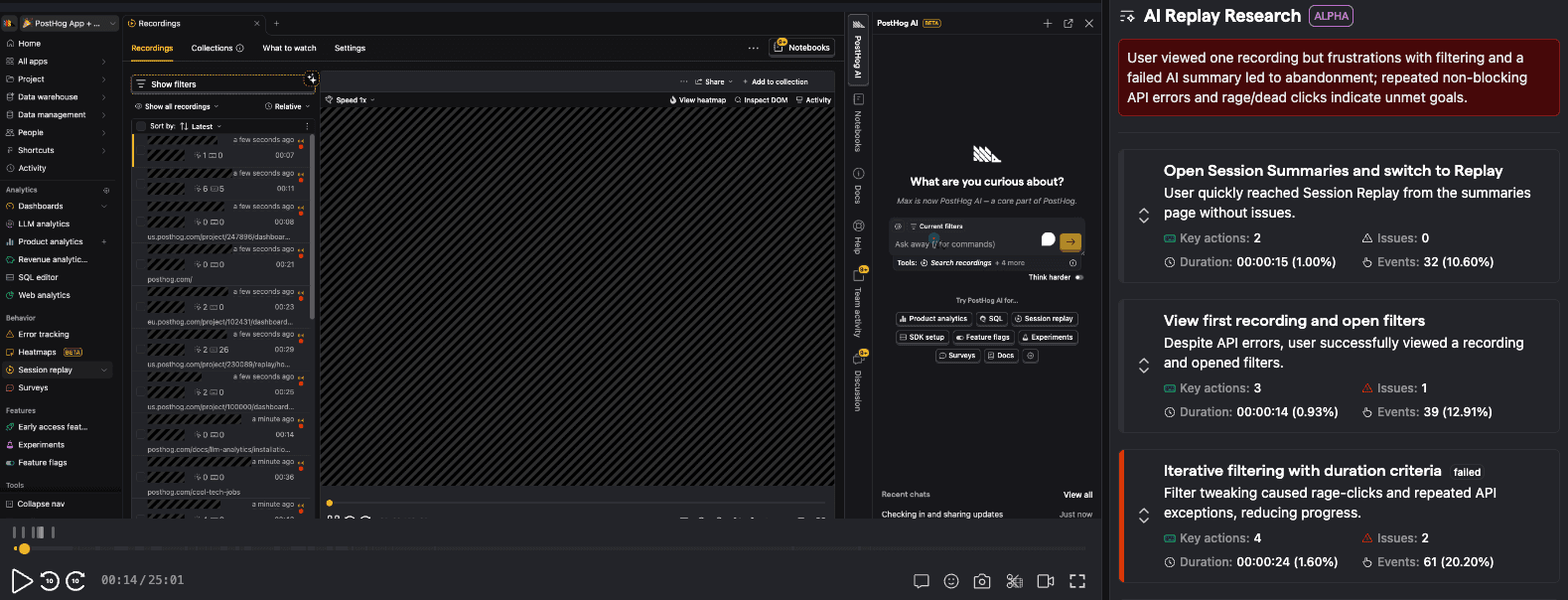
So, we created a tool to watch and analyze user sessions. It highlights the issues - so you can find what's broken without watching hundreds of hours of recordings yourself. It's called Session Summaries, we release it in beta today. You can use it right now, for free, with PostHog AI.
In this post, I'll walk through what we learned through the process of building it, where we messed up, and lots of practical tips on how to make user behavior analysis work in production. All the code is open-source, and here's a 36-second demo of how it works:
Step 1: "Analyzing a single user session should be easy"
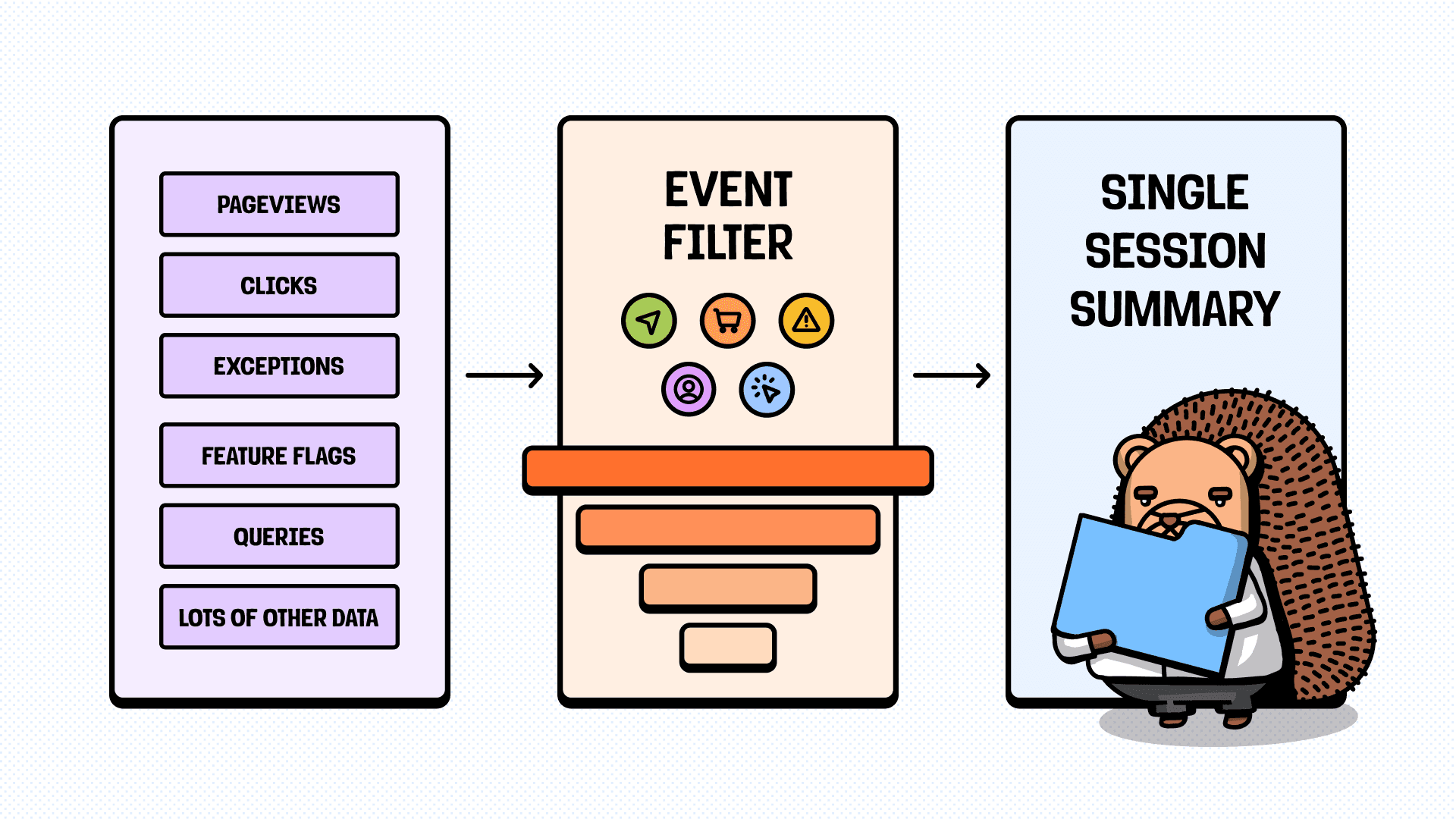
Let's forget about scaling for a moment and focus just on a single user session: a user visited a website or app, navigated a bit, did something useful, and left. The logic seems straightforward: take all the session events, send them to an LLM, and get a summary.
However...
Not all the context is equally useful
Usually, each user-generated event has lots of metadata attached to it. User info, URLs, event type, CSS selectors, timestamps, and so on. In PostHog's case, a single session with all metadata could easily exceed 1 million tokens. Even if we forget about pricing and context limits, providing too much data will cause the lost-in-the-middle effect: the LLM will highlight what happened at the very start or end but completely miss the main part.
Our approach:
- We start with what's essential: keeping a minimal set of events and fields, and adding new ones only if they increase the quality of the summary.
- Mappings for everything. If event data includes URLs, we use a
url_Nalias and attach a mapping. Same for tab IDs, and any repeating parameters. - CSV input. Neither JSON nor TOON (heh) will provide the same generation quality per input token.
- We don't return JSON either. If it works with free text - awesome, if not - we return YAML or CSV.
Parallelization breaks the narrative
If a user spends hours on your site, their session could be huge. If you have lots of such users (like we do), it’s tempting to split each session into segments and analyze them in parallel to cut latency. It's a trap. If the LLM doesn't know what happened before or after, it loses critical context on what the current segment's events actually mean, so the combined result is worthless.
Our approach:
- Wherever possible, process the data for the entire session in one large call, so the LLM has full context (up to 200k tokens). If you must segment (the context too large), do it in a separate step, then provide each parallel call with full context for its own segment and just minimal context for the previous and next ones. Lots of context for the current slice, a little for its neighbors to keep the LLM grounded.
- Hope that users are ok with waiting for a couple of minutes. Using faster models (like OpenAI
nanoones) can allow streaming the summary after 10-15s, but thinking models on "high" provide better results quality-wise, and quality is the goal.
Crying wolf effect
Fast-growing products (startups specifically) have a bad habit of generating lots of exceptions spurious, especially frontend ones. LLMs see this, panic, and hallucinate a summary of the session in which the user completely failed on all their goals. In reality, the user successfully got what they came for and didn't even notice these exceptions.
Our approach:
- We programmatically pre-filter events that look like exceptions, especially if one causes multiple others as an avalanche, and they create a context that LLM can't ignore. For example, drop all JS exceptions that aren't API errors.
- We tried... It didn't help (Check Step 2).
Step 2: See what the user sees
Even with noise reduction, the core problem remains: we can't be sure whether the issues highlighted by the LLM actually affected users. A TypeError in logs looks scary, but if a retry succeeded in 200ms - the user never noticed. Since we have lots of snapshots, we can generate videos of the sessions and see what the user saw.
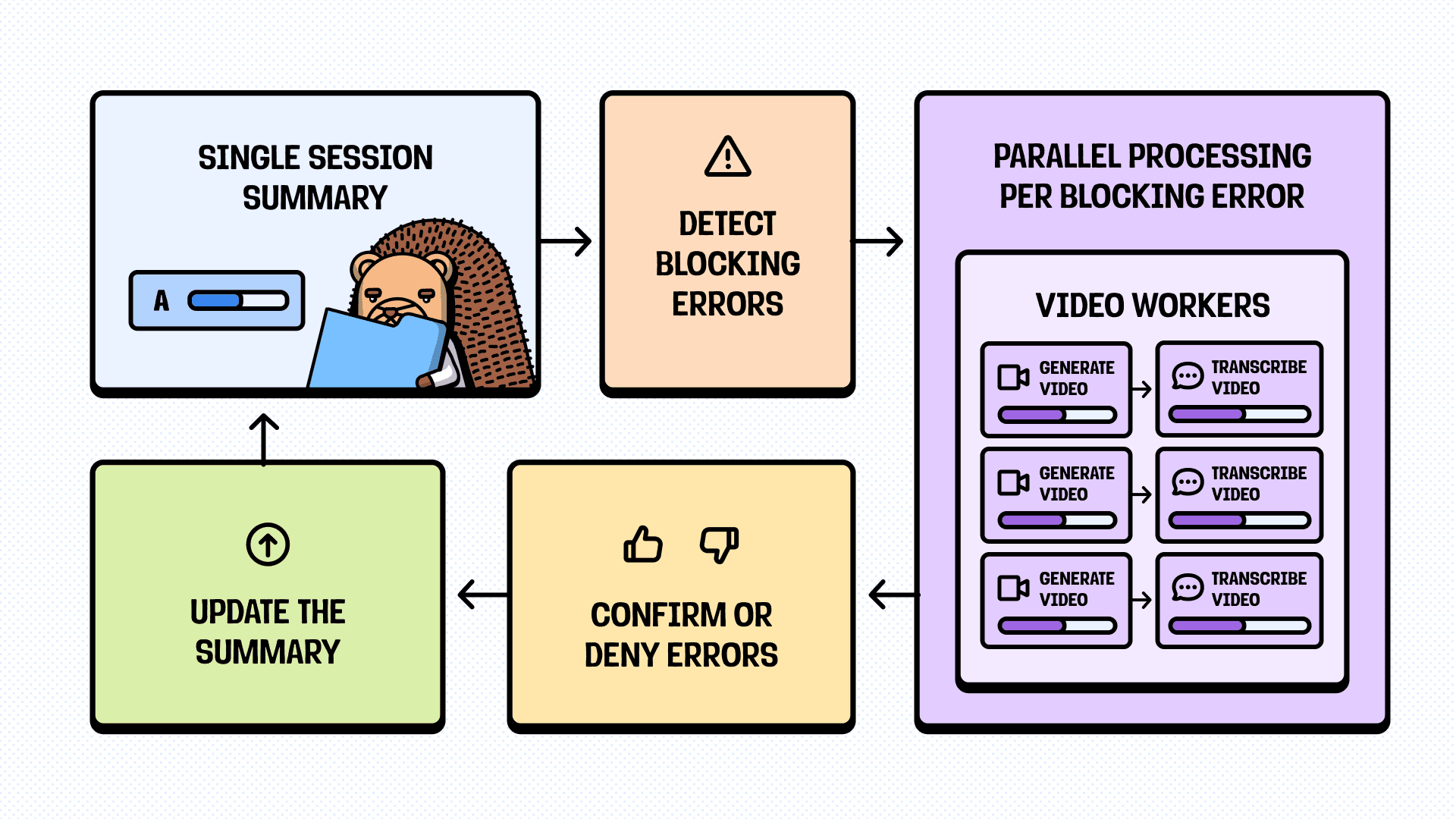
When the single-session summary flags something as a "blocking error" - an exception that supposedly prevented the user from completing their goal - we don't trust it blindly. Instead, we:
- Generate a ~10-second video clip, starting a couple of seconds before the flagged event
- Send the clip to a multi-modal LLM to transcribe the video
- Confirm or deny the issue, and update the summary
And it works pretty well, but it raises the question: why not use only the session recording? Why use events at all?
Video explains the issue, but not the reason
If we use only video, we can see that the user visited the page, waited for 5 seconds at the loading state, and left. We don't see the ClickHouse timeout error, outdated data cached in Redis, or malformed query parameter in the users URL. We know what happened, but creating a detailed report would require extensive manual investigation - so why read the summary in the first place?
Our approach:
- Approach 1 (what we're doing now): Combine videos with issues highlighted by LLM from the events, to triage them before surfacing.
- Approach 2 (in progress): We transcribe all the videos of user sessions and combine them with events, creating complete blobs of data that will (almost) never hallucinate when summarized.
We haven't shipped approach 2 (yet) because...
Videos are heavy
At first glance, transcribing all the user session videos seems like a no-brainer. For example, Gemini Flash multi-modal models cost 10-20 times cheaper than thinking LLMs from Anthropic or OpenAI (or even Gemini's own). It can go even lower with open-source models.
However, let's try basic math, using numbers from now (end of 2025).
- One frame of video at a good-enough resolution costs 258 Gemini Flash tokens.
- If
1 frame per second * 60 seconds in a minute * 60 minutes in an hour * 258 tokens = 929k tokens. - Meaning, analyzing just one large-ish session already costs a million tokens.
We can even use lighter models and lower resolutions, but at some point, the quality drop is too much. Also, these models are this cheap because they aren't exactly clever. We can ask it to transcribe what's on the screen, but it won't be able to make meaningful conclusions on the whole journey. So, either we need to use a much more expensive model from the start, or we need another model to analyze transcription afterward.
Our approach:
- We don’t analyze the whole video — at least 40–60% is usually inactivity we can skip. We only need to transcribe the parts where the user actually did something. But we still need events or snapshots to identify those moments.
- We don't analyze all the videos - there's a clear set of parameters (like event count, or active duration) that can be used to decide if it's worthwhile to check this session.
Videos are really heavy
Even with all the optimizations above, video files add up. A 10-second GIF clip at 1080p can be 7-15MB. Multiply by hundreds of thousands of sessions, and we're looking at terabytes of storage costs daily. The example is obviously laughable, but even with the regular .mp4 format (tens of times smaller), it's easy to reach terabytes pretty quickly.
Our approach:
- We use
.webm. It's roughly half the size of the.mp4, supported by most multimodal models, and can be played in most browsers by default (in the UI or not). - We render videos at 8-10x - 1 frame per second is usually enough for LLM to understand the context well.
- Keep in mind that
puppeteer,playwright, and similar libraries have different recording settings, and speeding up can result in data loss.
Step 3: Analyze lots of sessions at once
A single session summary is useful enough, but watching one session at a time doesn't solve the original problem - there are thousands of sessions, and we need to find issues across them. We decided to start small, with 100-session batches. It won't cover all the sessions, but it can cover a good enough sample (or a specific org), and already saves tons of time.
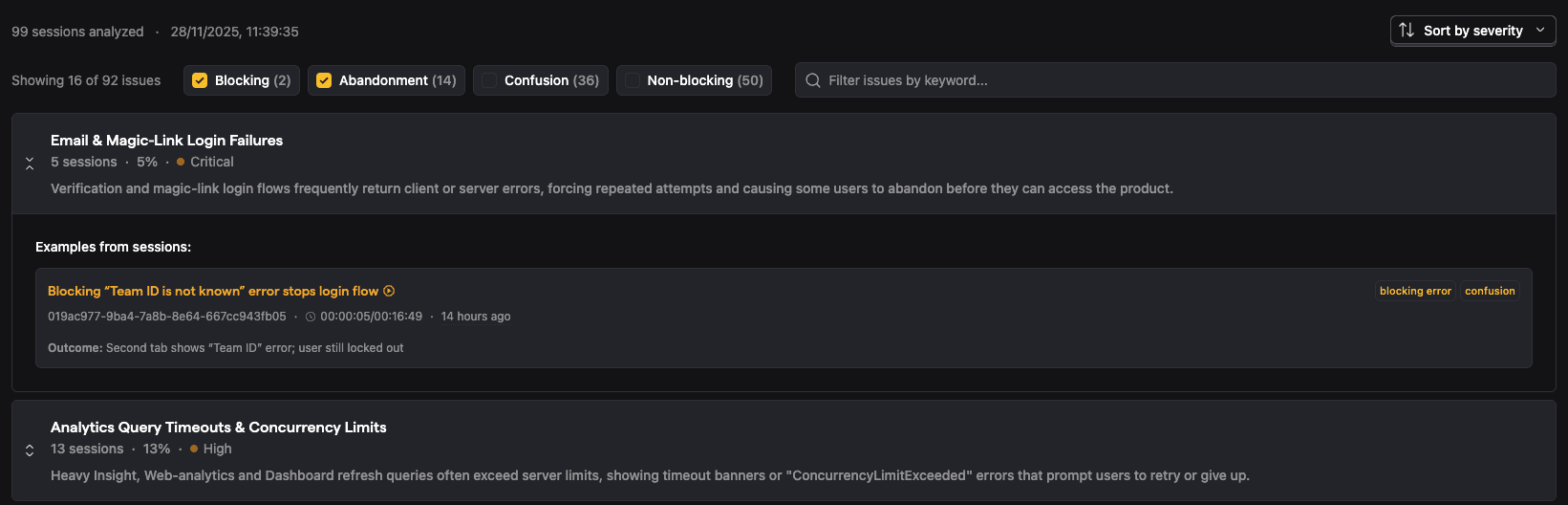
The session group summary surfaces patterns across sessions, including severity, the number of affected sessions, and specific examples. The complex part, obviously, is how to extract these patterns.
Patterns are hard to catch
In an ideal world, we’d send 100 single-session summaries in one LLM call and get back an extracted set of patterns. Sadly, that breaks down on multiple levels. First, we’d hit the model’s context limits — enriched summaries are heavy on metadata. Second, even if they did fit, we’d run into the same lost-in-the-middle problem, with the first and last sessions getting far more attention than everything in between.
Also, we could've just picked a sample of sessions and selected patterns from them, but then the quality of the final report would be too dependent on our luck in picking the initial sessions. LLMs love finding patterns, but without proper control, we would've gotten either duplicates or incredibly insightful "wow, users clicked buttons" ones.
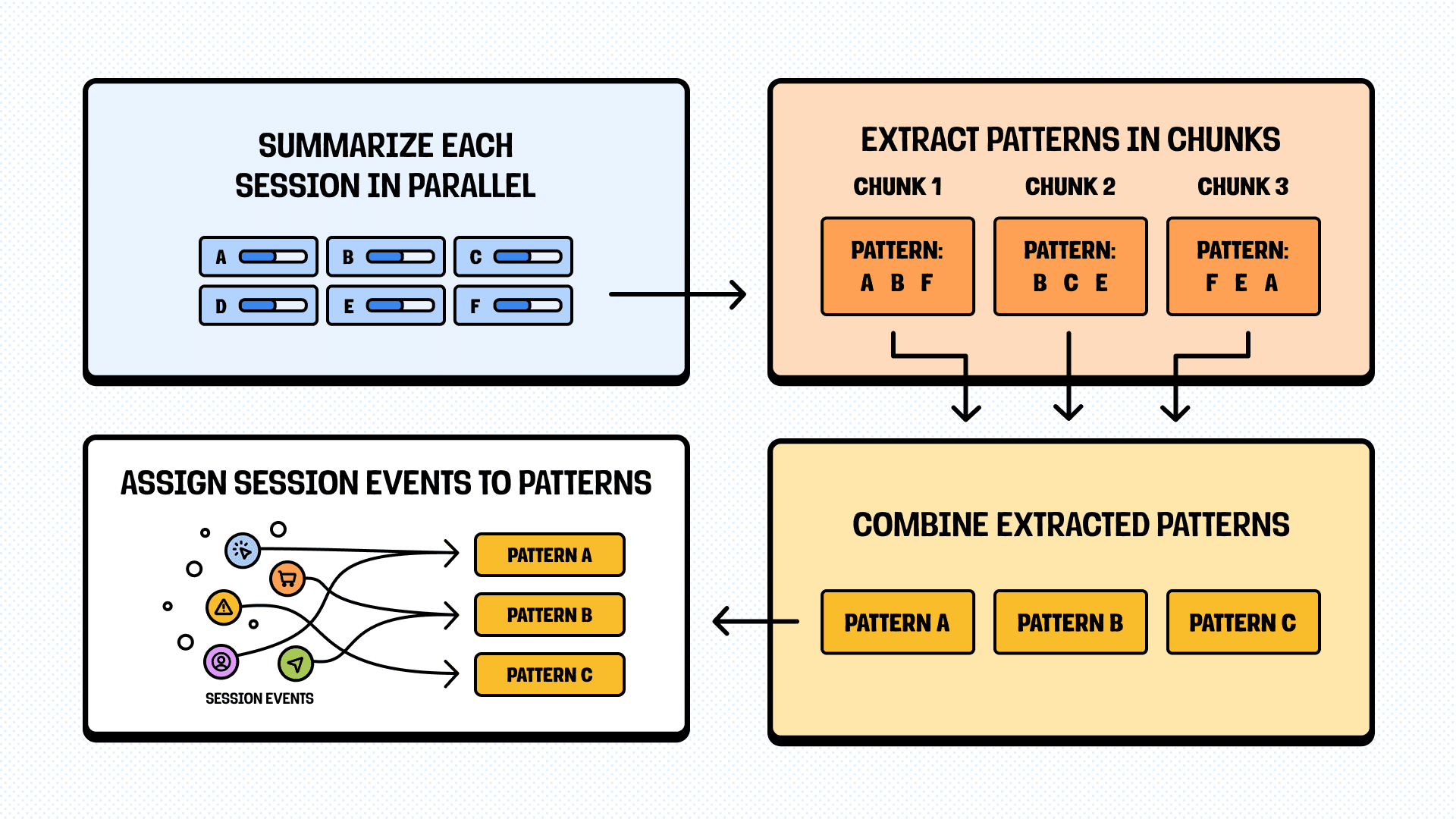
Our approach: We use a four-phase pipeline instead of a single prompt:
- Summarize each session individually (in parallel).
- Extract patterns from summaries in chunks of meaningful size (to keep attention in the middle).
- Combine patterns extracted from each chunk by either joining similar ones or extending the list.
- Iterate over chunks of single-session summaries to assign events back to patterns for concrete examples.
Crying wolf effect (now with patterns)
Even if we got patterns, there's just too much data to process easily, so we need to rank them properly. For example, a blocking error that happens once in 100 sessions is annoying. The same error in 80 sessions is critical. Or the exception could occur 10 times, but only for a single user out of 100, and saying "issue X happened 15 times" could cause a false alarm.
Our approach:
- We limit 1 example per session per pattern. So, if the report says "happened 15 times," you can be sure it happened in 15 different sessions, not one user rage-clicking the same broken button.
- We calculate detailed pattern statistics: occurrence count, affected sessions, percentage of total, and severity.
- The default report shows only issues with blocking errors by default, but you can show other types if you want to dig deeper.
Patterns need to be verifiable
Extracting patterns is only half the job. If users can't verify that the patterns are real, they won't trust the report. "Users experience checkout timeouts" is useful. "Users experience checkout timeouts - here are 5 specific sessions where it happened, with timestamps and video clips" is actionable.
To make it work, we needed a way to easily display the whole story to the user and give them the tools to validate the issue themselves. So we did.
Our approach:
- We display not just the issue, but also the segment that the issue was part of, what happened before the issue, and what happened after.
- We ensure the timestamp and event type of the issue are clear and easy to validate.
- Or even easier, we load the video of the session at the moment it happened (actually, a couple of seconds before).

Step 4: Make it work reliably
Now we have a pipeline that works across 100 sessions: single-session summaries → video validation → pattern extraction → pattern enrichment. The problem? It's fragile. If the whole thing falls apart because of one bad response, the feature is unusable.
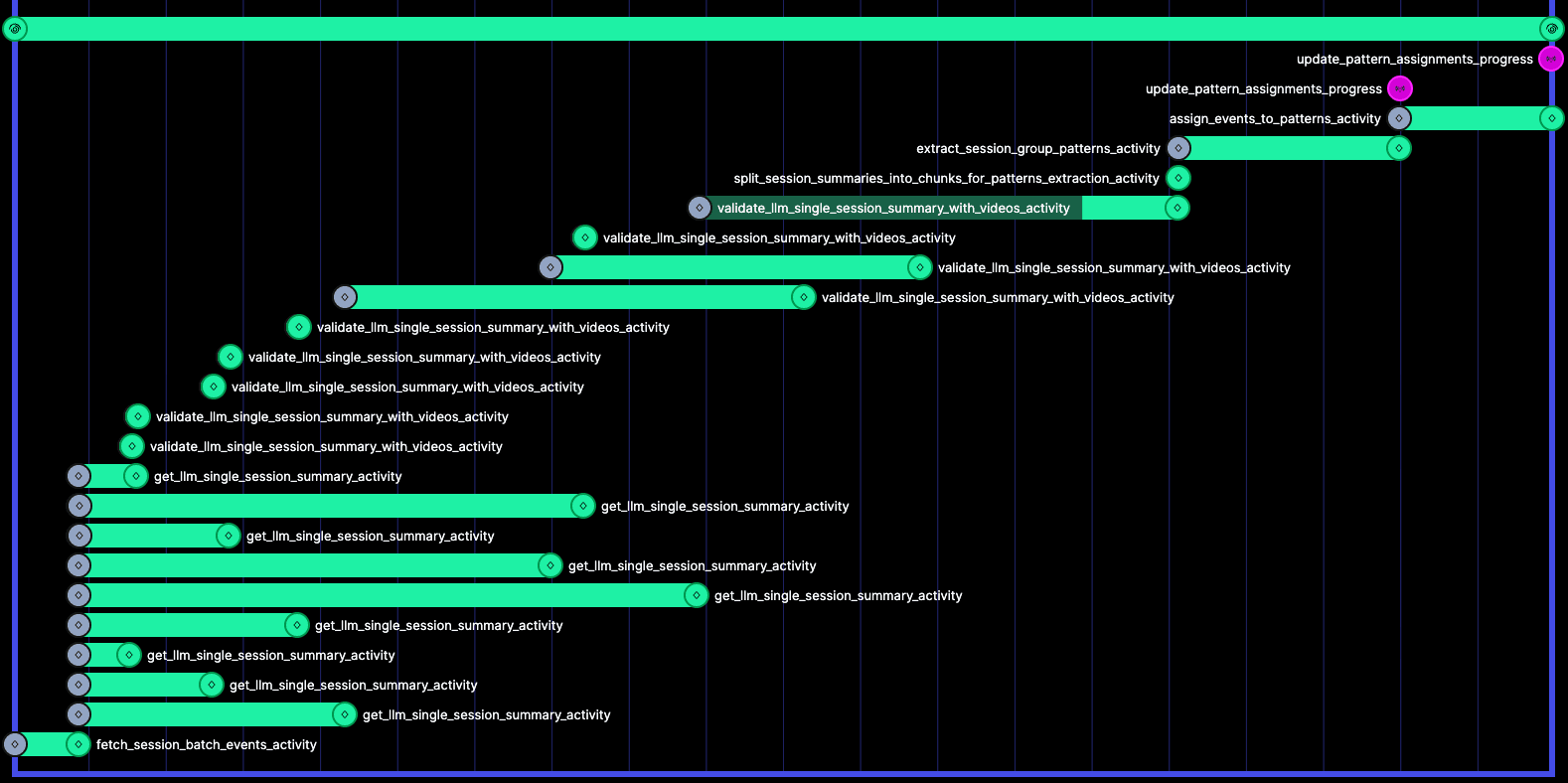
To make it more predictable, we use Temporal workflows, with each workflow spawning hundreds of atomic and easily retriable activities, so we’ll get a proper result - sooner or later.
Expect every one of the LLM calls to fail
We're making ~150-200 LLM calls per a single report, any of which can (and often will) fail. Timeouts, rate limits, malformed responses, hallucinations, and lots of other creative reasons my human mind isn’t capable of predicting. Treating every such failure as fatal means the feature never works in production.
Our approach:
- We set failure thresholds instead of stopping at the first error. Each stage lets roughly 20–25% of requests fail (after exceeding the retries) so the process can keep moving.
- A report based on 80 sessions instead of 100 is usually good enough to find patterns, compared to not getting a report at all.
- It gets even more creative with streaming, as incomplete chunks will raise lots of false alarms. So, we have conditional tracking and logging to handle such cases.
Aggressive caching
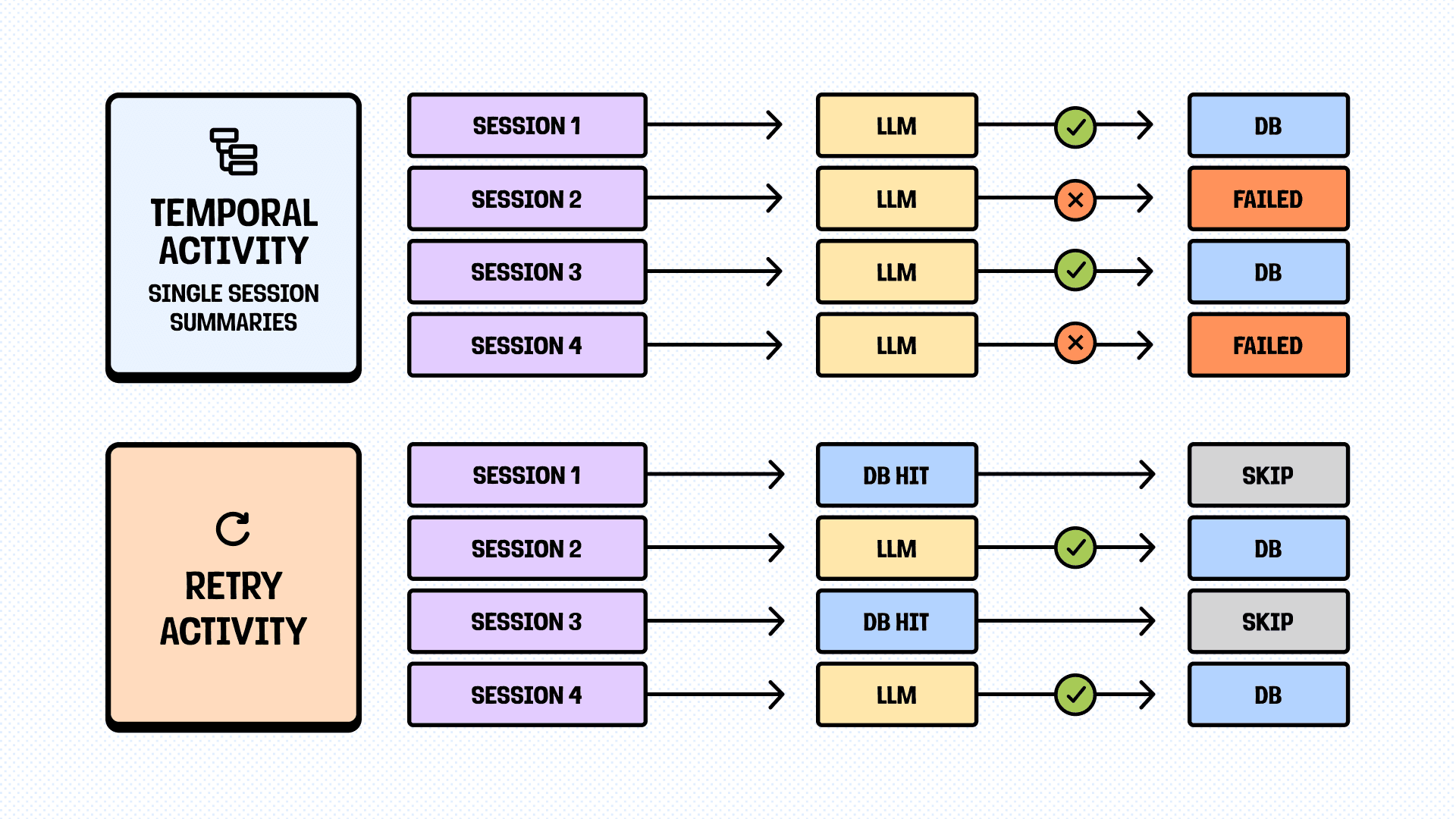
If any analysis step fails, but you have proper atomic activities and cache the results, you can even retry the whole workflow for cheap. Storage is cheap and fast (especially non-persistent ones, like Redis), while LLM calls are not and take time.
Our approach:
- If it’s an isolated step (like a single session summary that can be used as-is), we use DB.
- If it’s an intermediate step (like pattern extraction), we use Redis.
- The main logic is “will it change the result if I add one more session to the input?”.
“Phenomenal cosmic power, itty bitty living space”
Temporal is amazing for orchestrating complex workflows, but it has limits. Event history is capped at around 2MB. When we tried to use it as-is, we hit the limit even before making a single LLM call – just by pulling the data to analyze from the DB (an obvious anti-pattern).
Redis, as a stateful bridge, provides plenty of opportunities for workarounds. Firstly, we can store all the intermediate steps there without the need to calculate space (and just pass the keys). Secondly, we use Redis to stream the progress, LLM calls, combined data, and whatever else we want, with great latency.
Our approach:
- Clear Redis TTLs (24 hours tops), as even with seemingly unlimited memory, we slow it down significantly if not paying attention.
- Gzip compression for everything (on the input/output).
- If storing in the DB, the Redis step is skipped explicitly to avoid duplicating data for nothing.
Step 5: Ship the beta, learn, iterate (We are here)
Session Summaries are available now in free, public beta. So, if you want to check our findings above, give it a try. Just ask PostHog AI to summarize your sessions. Worst case: you’ll notice where we messed up. Best case: you’ll learn something useful about your users and your product.
What Session Summaries can do:
- Find issues: Surface recurring problems that actually impact users
- Chat: Ask follow-up questions to dig deeper
- Video validation: Confirm issues with the visual proof
What it will be able to do soon:
- Full video understanding: Find sessions with a specific behavior and answer free-form questions
- Proactive alerts: Analyse thousands of sessions in the background and provide signals on where to look
- Go beyond sessions: make it work with Error tracking, Support tickets, LLM traces, you name it
We’ll share more updates and learnings down the road. Or we'll get distracted by something shiny. Probably both.
In the meantime, try it, break it, and let us know.
P.S. If you are still reading and find it interesting, we're hiring AI Product Engineers. We have tons of ideas to ship, and we'd love to hear yours.
PostHog is your product's context layer. With a full suite of developer tools – AI observability, product analytics, session replay, feature flags, experiments, error tracking, logs, and more – PostHog ingests and stores all the data agents need to diagnose problems, uncover opportunities, and ship fixes. A data warehouse and CDP tie it all together, unifying that context into one source agents can read across. You can steer it all from Slack, the web app, the desktop (PostHog Desktop), or your own editor via the MCP.