







Not everything needs an LLM

Contents
LLMs love to yap. Ask a simple question and you get a few hundred words of "it depends." It's annoying as hell.
This is why we love decision models like Jev for simpler tasks. You ask a structured question and get a typed answer with a probability, which looks something like this:
- Noul. Are hedgehogs mammals? → Yes, 0.99
- Choice. Which animal family do hedgehogs belong to? → Mammal, 0.99
- Score. What is the current conservation status of hedgehogs? → Least Concern, 0.77
Whereas LLMs return free-form and overly confident prose, decision models make model uncertainty explicit. In a calibrated model, answers that score 0.8 are right about 80% of the time. That means a score of 0.5 is a coin flip.
We've been experimenting with them at PostHog and several use cases have made it to production. This is everything we've learned about using decision models so far: when to use them, how to use them, and mistakes to avoid.
1. Use them to gate expensive LLM calls
Decision models are up to 444.6x cheaper and 193.6x faster than frontier models,1 so you can use them to check whether you even need to make an expensive LLM call at all.
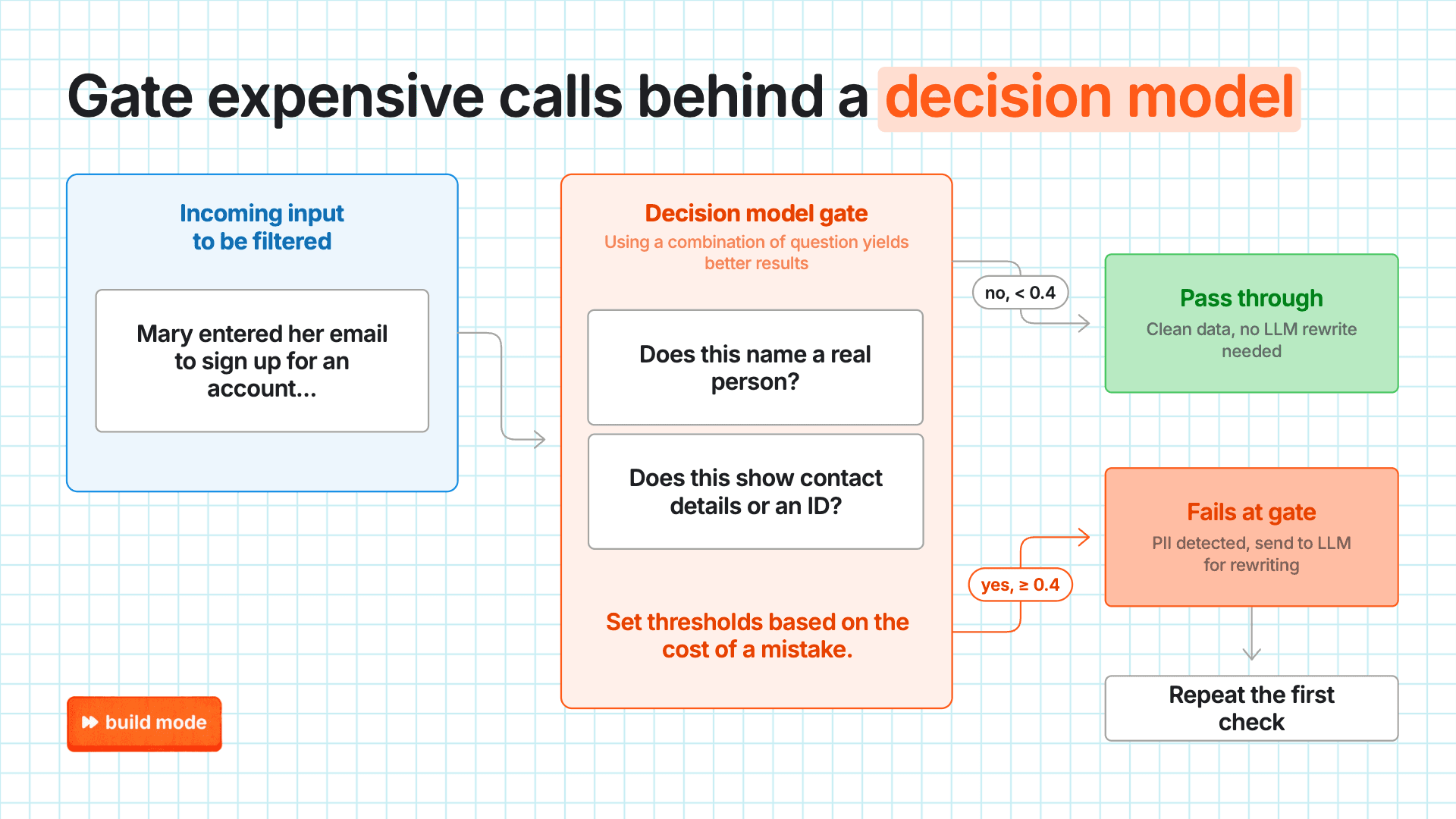
We do this in a pipeline that scrubs personal info in Replay Vision, our product that watches and summarizes user session recordings for you. Here's how it works:
- Each session summary goes through 2 yes/no questions from a decision model. Using narrow questions like this cuts false flags to about a tenth of what a single question produced.
- 1. “Does this name a real person?”
- 2. “Does this show contact details or an ID?”
- If either scores 0.4 or above, Gemini rewrites the summary without the personal info and it gets checked again.
- Otherwise, it's clean and passes through the gate. In production, 98.7% skip the LLM call entirely.
Without the decision model, we'd have to keep fussing with prompts and regexes that miss things, or sending every summary to Gemini to catch the 1% that need it.
But remember they make mistakes
A probability score of 0.85 still means ~150 wrong answers per 1,000 checks, so plan ahead for false positives and false negatives.
In the PII example, a false positive only costs us an extra LLM call, whereas a false negative stores personal data as clean. That's why we set the threshold low at 0.4.
When false positives are the costlier mistake, use higher thresholds. For example, we recently updated the PostHog in Slack bot, so it can answer questions without being tagged. To avoid being annoying, it checks every message in a channel to see (1) whether it's asking for information, and (2) whether PostHog could answer it. Only messages that pass both at 0.85+ go through.
Takeaway: Use decision models to filter jobs before they hit an expensive LLM call, and set the threshold based on which mistake costs you more.

Subscribe to our newsletter
build mode
Read by 75,000+ founders and builders
We'll share your email with Substack
2. Use them as model routers
Our PostHog in Slack bot also uses a decision model as a model router.
When the bot gets tagged, it first checks whether the message asked for a specific model. If not, one choice question picks from the list:
Pick the cheapest option that will most likely finish the task correctly on the first try. A failed run costs more than a smarter option.
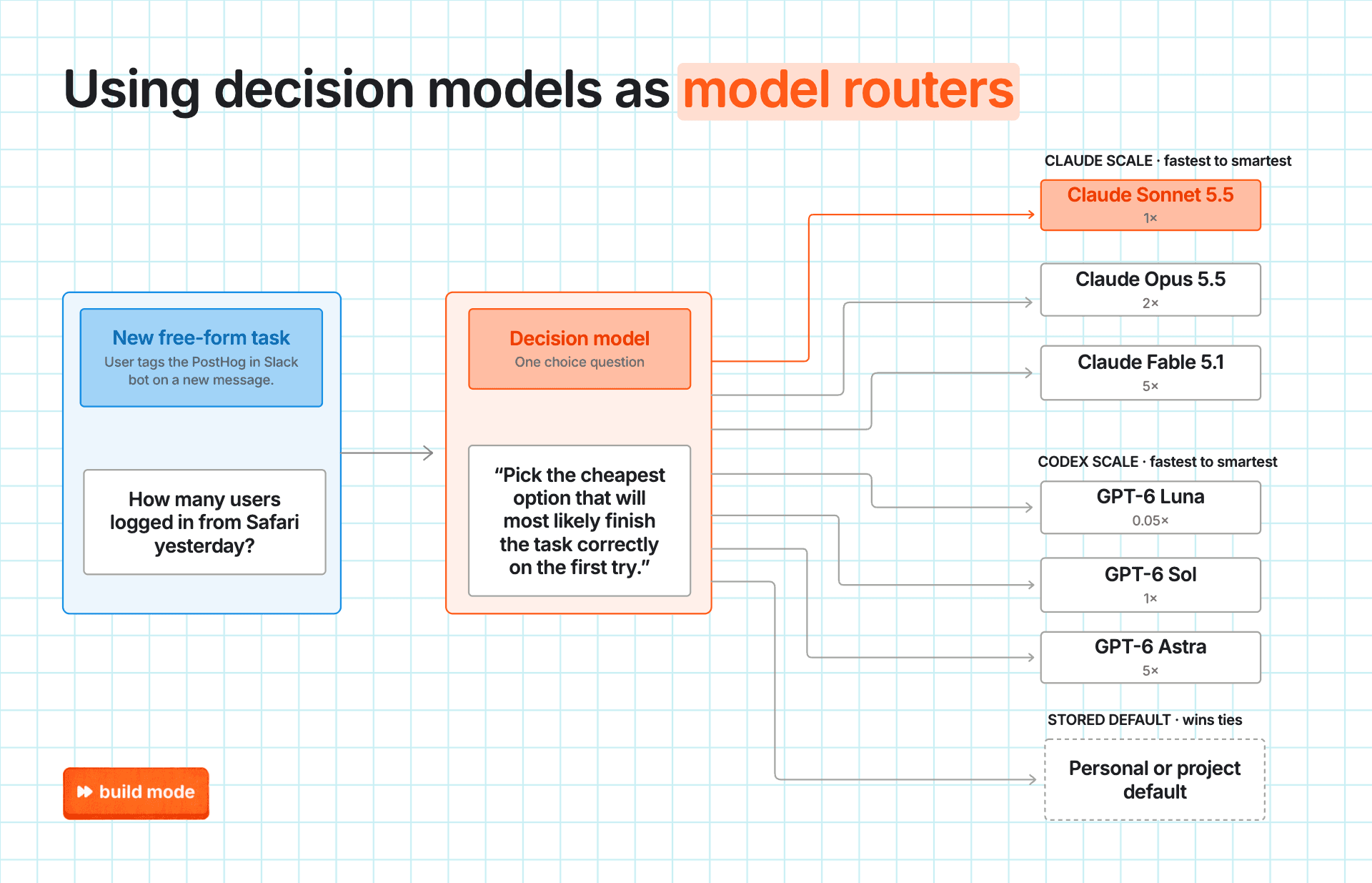
Each option in the list carries a short note on what that model is good for. GPT Luna is described as “a light and very cheap model. Good for short answers, lookups, summaries and very small edits.” The decision model then scores the request against each option’s text.
But don't assume they're interchangeable
Different tasks, models, and providers all have different thresholds.
We were experimenting with using them to auto-merge similar logs in Error Tracking and found that thresholds changed between v1 and v2 of the same model. We had to make its thresholds configurable per PostHog project and keep the judge in shadow mode while recalibrating based on hand-labeled data.
This is one of the reasons why Fernando on our growth team pushed for a model-agnostic interface early. We now have an internal AI gateway for swapping and testing models, including self-hosted ones.
Takeaway: Use a
choicequestion to route free-form LLM requests to the cheapest model that can handle it. Keep in mind that thresholds don't carry over, so set them per task and per model.
3. Use them for face-value checks
If a question requires more context or chains of reasoning, it's better to use an LLM. However, you can still use a decision model if you have a way to flatten, or pre-process the input, so it's checkable at face-value.
In Replay Vision, when a user searches for a theme like "onboarding friction," there's a chance for the query to return a few unexpected results because of the way embedding distance works.
A decision model can’t "Rank the top 10 sessions that contain summaries that match the user's search query." It’s too complicated.
Instead, we use the embeddings first to derive an initial list of session recordings to pass to the decision model. Then, the only task left for the decision model is to look at how closely each result in the list matches the user's original search term:
Does this summary describe a session that matches what the search looks for?
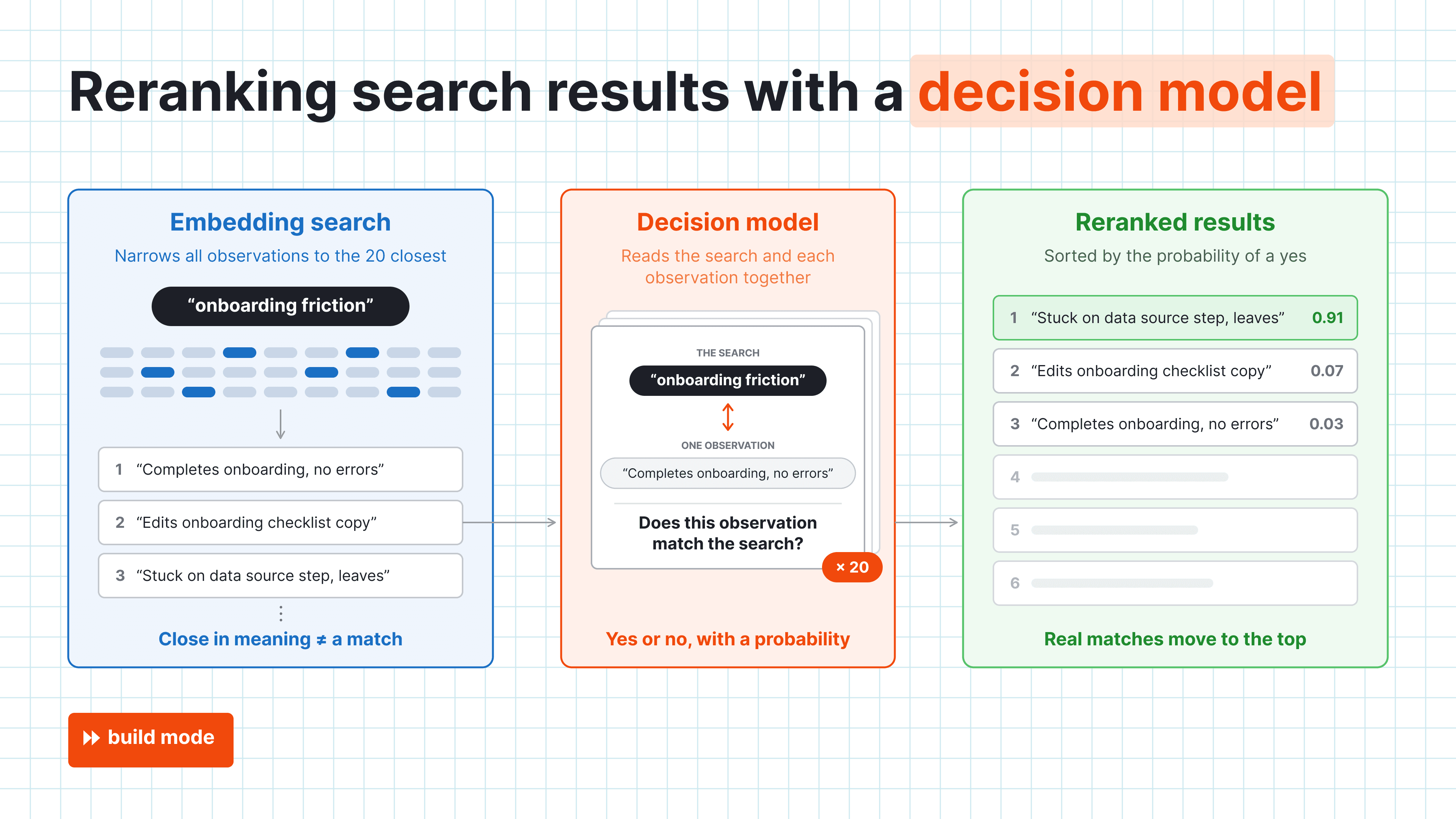
Results are then reranked by that probability. On 20 test queries, this improved ranking quality by about 25%.
But avoid multi-step reasoning
We've tried using a decision model for multi-step reasoning before. Before embeddings were ready in Replay Vision, we tried ranking a "Highlights" feed of sessions worth a human's time. The questions were:
- Is this session worth watching?
- If so, why is it worth watching? (With choices like “error on screen,” “slow or stuck,” “user confused”, “user gave up", etc.)
Processing these two questions in order required an hourly job that sent large requests – up to 32 sessions and 12-38k tokens each – which flooded the model server and blocked other products' calls for hours.
So yes, technically, you can chain decision models into multi-step judgments, but it's not operationally worth it. Leave that to LLMs, or do the heavy lifting before the decision model sees the data like in the embedding search example above.
Takeaway: Decision models judge what's in front of them in a single pass. Leave multi-step reasoning to LLMs.
4. Use them in place of overqualified LLMs
Decision models can take any job where an LLM is overkill, either because it's too slow or too expensive.
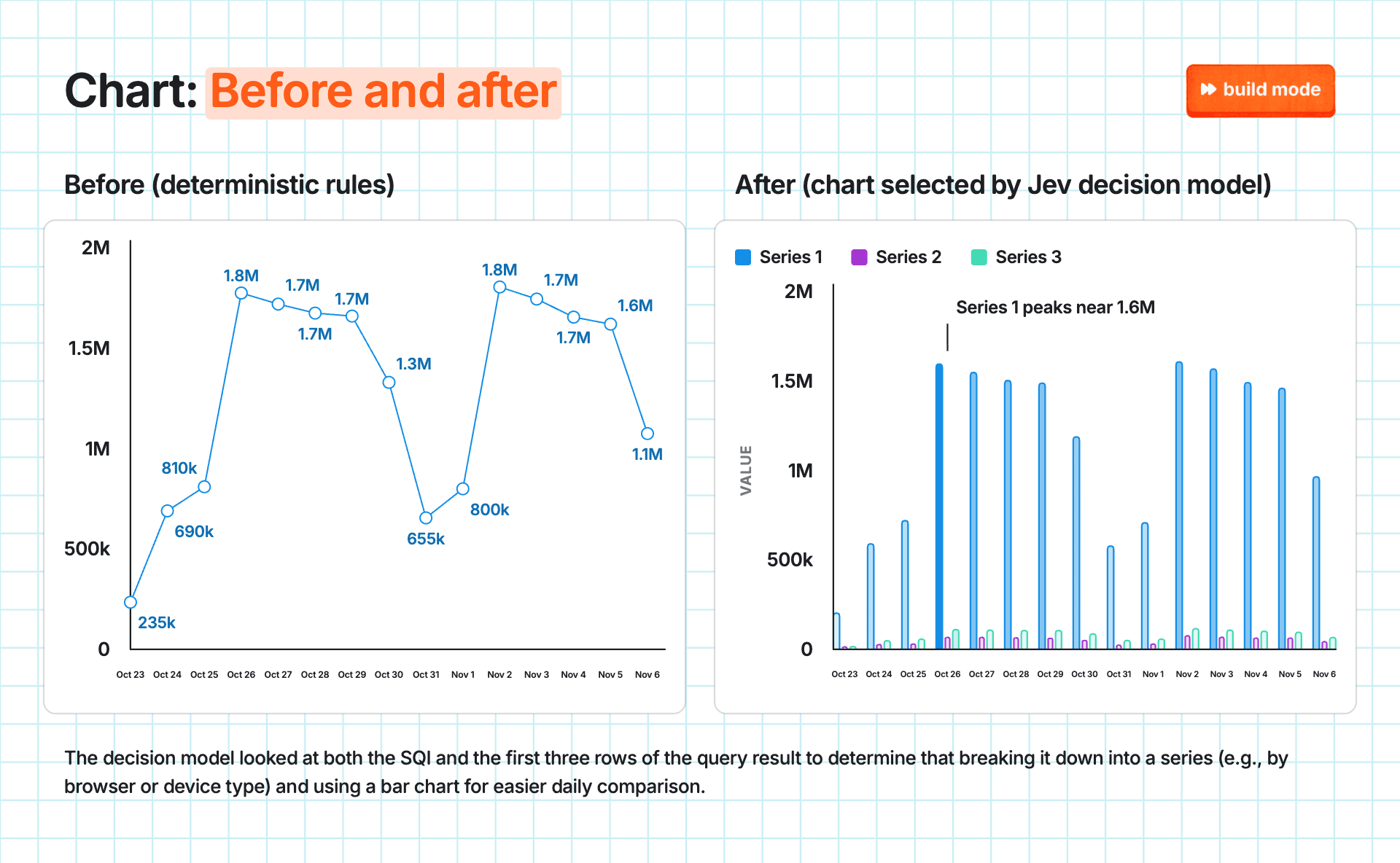
One example is our smarter chart picker for SQL queries. PostHog used to pick a visualization using deterministic rules like:
- A date column, a number column and multiple rows → Line chart
- Two or more text columns plus a number → Heatmap
- Any number column → Bar chart
Now, a decision model looks at both the SQL itself if your org opts in, and the first three rows of the results to suggest a better chart.
The example below is based on a simple query about pageviews by browser. The original rules picked a basic aggregate line chart; with Jev, it chose a bar chart split by browser:
But keep LLMs for open-ended jobs
Anything more open-ended should still go to an LLM.
Still, out of curiosity, we tried Jev on ranking our internal PR review agent's findings with five noul questions that roughly asked if the change is worth a developer's attention. The results were inconclusive with an AUC of 0.52.
If Jev were an LLM, we’d solve this by sending more context, but Jev can’t handle large requests. Its long-context mode is also slower and less accurate.2 Typical decision models just aren’t built for this kind of reasoning.
Hybrid decision models like Jeeves can help bridge this gap, though. Developed by our in-house AI research team, Jeeves is a decision model that reasons before deciding when it’s unsure.
It's now our default for any decision call at PostHog that doesn't name a model, and there are similar variations by other developers, like Kev.
Takeaway: Use decision models as evaluators for inputs that are too simple for a language model, yet too fuzzy for a regex. Anything more complex is still too much to hand over to a decision model. For now, at least.
Subscribe to our newsletter
build mode
Read by 75,000+ founders and builders
We'll share your email with Substack
- According to TypeSafe AI.↩
- Jev takes 64k tokens per request and 32k per question by default. And even though TypeSafe added an opt-in header that raises both to 262k, they still warn that the long-context mode is slower and less accurate. Source: TypeSafe Docs↩
PostHog is your product's context layer. With a full suite of developer tools – AI observability, product analytics, session replay, feature flags, experiments, error tracking, logs, and more – PostHog ingests and stores all the data agents need to diagnose problems, uncover opportunities, and ship fixes. A data warehouse and CDP tie it all together, unifying that context into one source agents can read across. You can steer it all from Slack, the web app, the desktop (PostHog Desktop), or your own editor via the MCP.