







Learn platform
Contents
Why Learn exists
There's a gap between what PostHog can do and what people know what to do with it. And it's growing.
The goal of the Learn platform is to teach humans how to use PostHog well.
Yes, Learn content is educational content specifically made for humans. It is not content written for agents, but it can be fed to an agent, if a human uses agents as their go-to tool. It's just not to be confused with agent food.
But what does "use PostHog well" mean? It means humans:
- Understand PostHog concepts and mental models
- Know what to measure in their product, and why
- Use PostHog to answer real questions about their product
- Interpret PostHog data and make informed decisions
- Direct their agents confidently and check their work
- Explain what they learned to a friend
In the end, if someone can do these things, we've accomplished our jobs as educators. And it's proof that we have real power users in the wild.
How humans learn
Since Learn content is written for humans, there's two things at play: humans all learn well differently, and how humans learn has changed in the AI-age.
More importantly, the humans we write for are product engineers, founders, and builders, so our entire Learn strategy is focused on these learners.
In general, humans learn in a bunch of different ways. We won't try to cover all of them, because we care most about our ICP. We're betting that our ICP learns in the following ways:
- Learn with an agent: Give your coding agent a prompt that teaches a topic using your own code and PostHog project.
- Learn with a story: Read a story that follows a product decision and ends with an action.
- Learn by doing: Tinker with an example app and inspect the PostHog data your actions create.
- Learn with friends: Build projects and share them with the PostHog community for feedback.
- and more?! :)
Learn content types
To satisfy different preferences in learning, we have different content types.
Learn with an agent
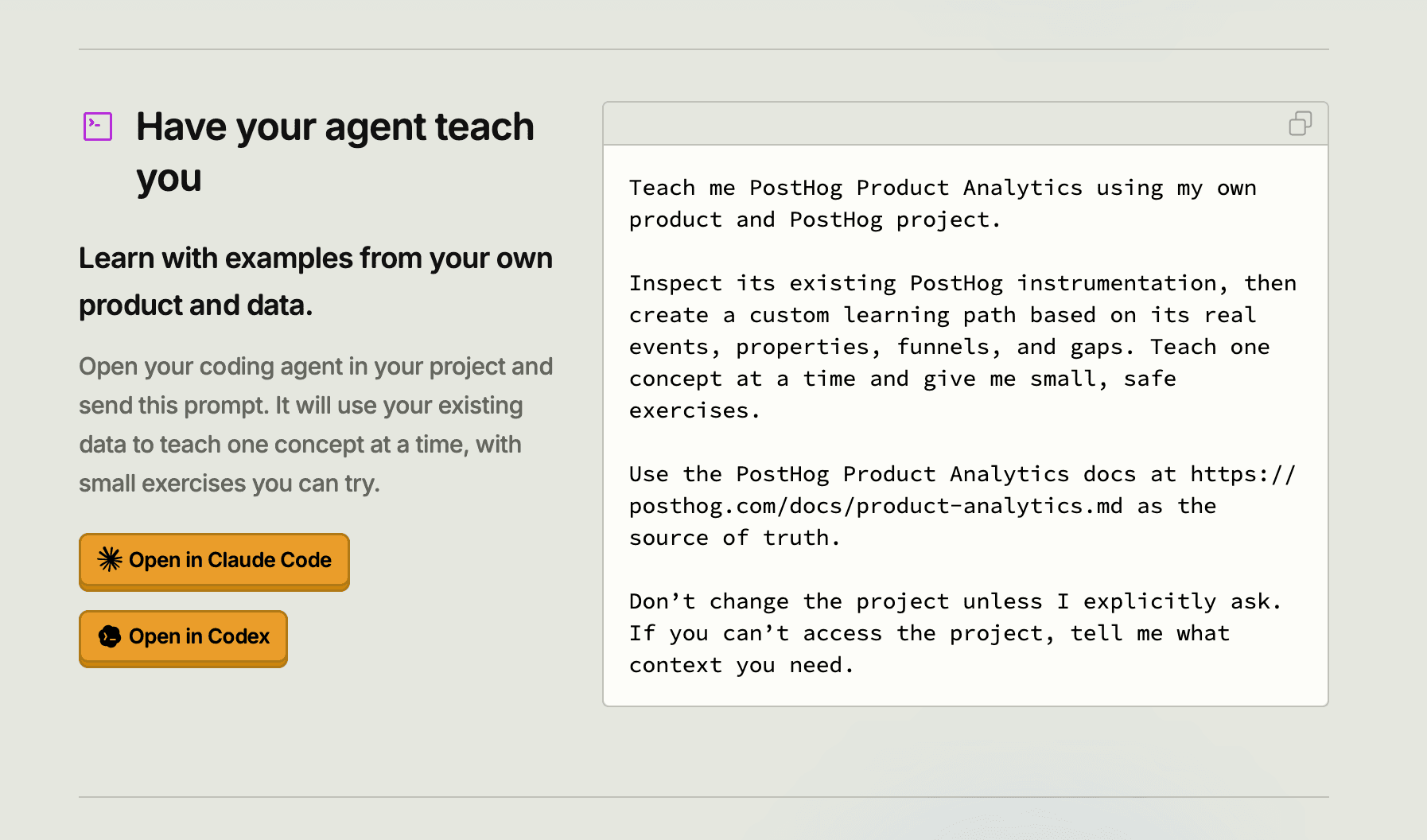
This content type is best for learners who like to use agents as a learning tool. The first iteration of this learning type is a prompt they can hand their coding agent that:
- Asks the agent to inspect their code and PostHog project
- Teach them one concept at a time with small exercises, using their own project
- Allows them to stop the agent, ask questions, and check its answers against docs
- Doesn't change their project for them, unless they ask it to
An example of this is available today on the Product Analytics Learn page.
We plan to add more here.
Learn with a story

This content type is best for learners who prefer to read. Yes, there are still humans who read, literary crisis and all.
Our pocket guides are written like stories and they follow a product question from "what's going on" to "what should I build next?". They show product decisions made along the way, the data behind those decisions, and end in an action the reader can take.
Learn by doing

This content type is best for learners who like to tinker.
Twig is a working example product with PostHog already instrumented. Learners can click around, inspect its data, and complete Labs in its embedded Playground.
How to contribute
Learn is a platform that all PostHoggers can contribute to. If you have a question customers keep asking, a useful example, a story, or an exercise that you think would be helpful – we want to make sure you can share it with our learners!
In general, to contribute to learn content:
- Start with what you want the learned to understand or do. Make this clear from the beginning.
- Choose a format that teaches it best: with an agent, pocket guide, or Twig. If you have a new format, open a docs request issue and pitch it to us!
- Start writing. Use existing examples and components where you can, so we aren't rebuilding the same lessons in different places.
- Get feedback from the relevant product team to check that it teaches the product accurately.
We're here to help shape the experience if you feel stuck along the way. Ask us in #team-wizard-and-docs.
We also have more specific guides if you are interested in writing a pocket guide or adding Twig components:
Visibility and distribution
In the before times, learning was a byproduct of a human doing a task: reading, testing something, building. Learning happened naturally when someone did a task because they learned skills they needed to complete the task.
In the now times, humans are doing less tasks, and they're passing on the work to agents. This doesn't mean it's over for education, it just means they have less chances to learn by doing.
If we don't make it easy for them to choose to learn, they simply won't learn – and the education deficit gets worse. To make it easy for them to seek it out, we need good visibility and distribution.
Visibility
To increase awareness of learn content, we need visibility! Learners won't know it exists if they can't physically see it anywhere on the website or in the product. To increase visibility:
- Add learn card to Docs homepage/index page
- Add touchpoints in the web app
- Advertise in wizard runs
- Add a desktop icon for the website
Distribution
Distribution is treated like an ongoing project, so this section is subject to change as we add other distribution ideas.
| Channel | Plans | Status |
|---|---|---|
| X | Threads that contain pared-down versions of pocket guides, with a link to the pocket guide at the end for the full version | Planning |
| Paid ads | Paid ads campaign with pocket guide covers | Planning |
| Community | Book club – regular meetings in Discord to discuss pocket guides, with guided discussion topics | Planning |
| Blog | "Docs are dead" blog post | Idea |
| IRL | Print out physical copies of pocket guides for HogPatch | Idea |
| Video shorts | 30s video shorts – pocket guide teasers | Idea |
Feedback
We want people to love learn content, so we need feedback. Currently we have workflows to ask for feedback from pocket guide readers. Other planned feedback strategies include:
- Workflow emails for Twig users
- Community events
- Product team feedback