







In-depth: DuckDB vs Postgres
Contents
We've made some apples to oranges comparisons over the years. None have been so diametrically opposing than Postgres and DuckDB. However, that also makes for a neat pairing: comparing Postgres and DuckDB is a masterclass on how databases are layers upon layers of design decisions. At almost every layer, Postgres and DuckDB go separate paths.
They have some things in common. Both speak a variant of SQL. Both are tabular. And they both store data. That's about it.
Postgres and DuckDB weren't built to serve the same purpose. Postgres is a general-purpose, client-server, row-based, OLTP database. It's designed for broad scenarios and is often used as the central database for an application or system. DuckDB is an embedded database and query engine that's lightweight and exclusively designed for analytics.
We'll break apart the dimensions that differentiate Postgres and DuckDB. Then, we'll discuss why a single company (us) might use both.
Memory structure
The best place to start is memory structure and architecture.
Postgres is a row-based OLTP (Online Transaction Processing) database. DuckDB is a column-based OLAP (Online Analytical Processing) database. Postgres's OLTP design uses heaps and B-trees. DuckDB's OLAP design uses min-max indices.
Let's break down what all of these terms mean.
Row-based versus column-based
This orientation dictates how tabular data is stored on disk.
In a row-based database, a single entry is stored sequentially. Imagine a database of students. In the student table, each student entry's name, age, description, height, etc. all live next to each other on disk. Retrieving a student's name and height is virtually the same as retrieving just one of those fields.
In a column-based database, a column of data across all entries is stored sequentially. Imagine a columnar version of a student table. Instead of age and description living side-by-side, all the students' age values are stored sequentially. If a program needed the average age across all the student's, all the ages would be easily retrieved and calculated. Conversely, if a program needed a single student's age, description, and height, the query operator would need to visit different rows to find the right entry for each.
Often, row-based and column-based databases are referred to as OLTP and OLAP databases respectively. However, that's an imprecise analog.
Row-based databases are typically OLTP databases. OLTP databases are built for lots of small, fast transactions: the inserts, updates, and deletes that power an application's day-to-day work. These operations touch individual records constantly, so storing each row contiguously means you can read or write a whole entry in a single pass. Technically, some OLTP databases support columnar or hybridized storage, like SQL Server with its columnstore indexes. However, most are row-based like Postgres.
Column-based databases are typically OLAP databases. OLAP databases are built for analytical queries that scan and aggregate enormous numbers of rows across just a handful of columns: sums, averages, counts, and rollups over an entire dataset. Storing each column contiguously means a query reads only the columns it needs, and compression works far better when similar values sit next to each other. Most column-based databases are targeting analytical queries and would be classified as OLAP databases.
Heap versus row groups
Beyond low-level memory arrangement, Postgres and DuckDB also use different data structures to optimize access. These are effectively abstractions that make traversing the memory layout efficient.
Postgres uses heaps and B-trees. The heap is where the actual rows live, stored unordered. Because each entry's fields are physically adjacent on disk, what matters is locating a specific entry. To do that, Postgres builds B-tree indices that can be traversed in logarithmic time, returning a pointer to the row's exact location in the heap.
DuckDB meanwhile leans on columnar storage with zone maps. A zone map is a min-max index for every column. If a certain zone map's maximum value is outside of a filter range, DuckDB's engine could safely skip that group of rows.
For Postgres, heaps and B-trees make it efficient to locate specific cells of data. The average query is searching for a specific field from a specific entry: with a B-tree, the runtime can locate it without scanning the whole table. Meanwhile, the average DuckDB query is aggregating swaths of data with filters: instead of making it easy to find a specific thing, min-max indices help exclude information that isn't relevant.
Decoupled storage
One of the trademark advantages of DuckDB is the concept of decoupled storage. In Postgres, all of the application data lives within Postgres. Postgres safekeeps the data and builds the data structures to efficiently access that data. With DuckDB, the data could live externally in a Parquet or Data Frame file. DuckDB will set-up temporary data structures to ingest and analyze the data without permanently housing it. This decoupled arrangement makes it possible for DuckDB to process terabytes of data while living on a server with gigabytes of storage.
Client-server versus embedded
Beyond memory structure is the database's architecture for interfacing with users. Postgres is a client-server database. DuckDB is embedded.
A client-server database (sometimes called standalone or standalone-server) runs as a long-lived server process. A typical Postgres instance runs for a long, long time. To connect to that instance, you'd use a network socket to send queries over the wire. The instance is always available; even when the user client is idle, the database server is running. Postgres supports multiple clients, being able to field multiple queries at once.
DuckDB has no server. Instead, it is embedded. It just lives within an application process. There's no server, no connection, no network hop. It's akin to how Excel runs locally. DuckDB could be used also as a library that spins up a short-lived process with no permanent data.
Postgres's client-server model is what makes it good at concurrent multi-user access, persistent shared state, and acting as the central source of truth for a system. It's robust and reliable, but at the cost of connection overhead, network round-trips, and operational requirements of running a nonstop server. DuckDB, meanwhile, is zero setup, lightweight, and has no network latency penalties, but it's also limited to a single process that cannot be shared across users.
Notably, Postgres is always used as a database. It has to spin up a database server, and it has to be accessible via a client process. Even if both the client and server are on the same device, this partitioned structure is required. DuckDB, meanwhile, could be used as a database or it could be invoked as a library to analyze a data file (like Parquet). Despite having “DB” in a name, DuckDB is often used as a query engine rather than a database. It'll forgo a lot of initialization work in these scenarios, strictly building data structures for the query at-hand. That's exactly how we use it at PostHog – a query engine for our data warehouse product.

Communicating with Postgres (and why we built Duckgres)
Now seems like a great time to bring up the Postgres Wire Protocol as well as our open-source project, Duckgres.
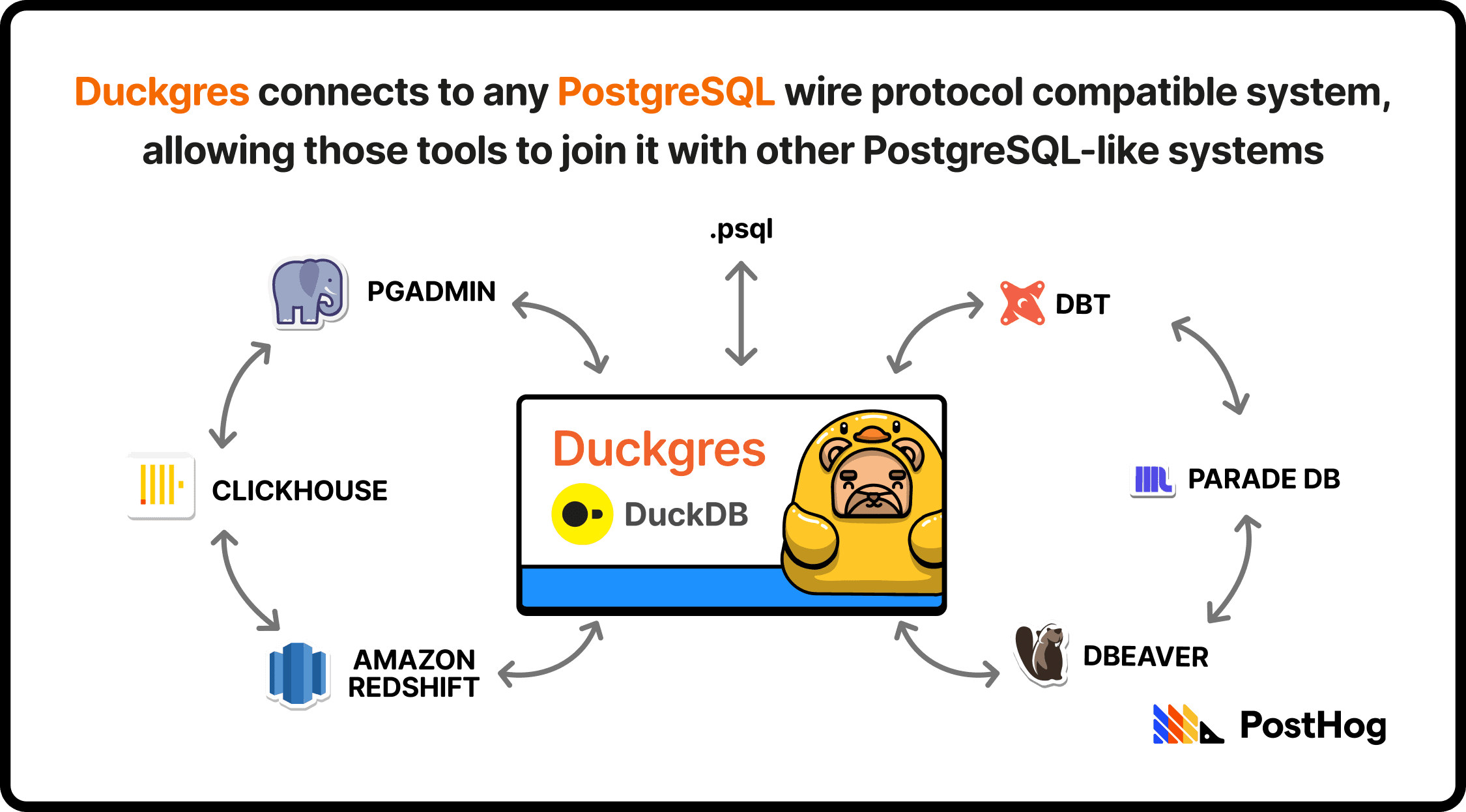
The Postgres Wire Protocol is the precise messaging format Postgres clients and servers use to talk to each other over a socket: how a client authenticates, sends a query, and receives rows back. It's been stable for years, which is why it became a de facto standard. A huge ecosystem of tools, BI dashboards, ORMs, and drivers (e.g. psql or my personal favorite, pgAdmin) all speak it. If your database can talk the wire protocol, that entire ecosystem can talk to your database, regardless of what's actually running underneath.
DuckDB isn't a Postgres database, but Duckgres is a nifty way to connect it with Postgres-ready systems. Duckgres is a Postgres wire protocol server that wraps around DuckDB. By scaffolding DuckDB in a Postgres-shaped shell, it looks and behaves like a Postgres database while DuckDB does the analytical heavy lifting underneath. You can point any Postgres-compatible BI tool, dbt model, or service at a DuckDB warehouse, and it'll just … work. Duckgres also integrates with DuckLake (DuckDB's creators' data lakehouse), auto-attaching a DuckLake catalog to every connection. That forms a tidy trinity: DuckDB for fast querying, DuckLake for durable storage, and Duckgres for integrating with Postgres systems.
Query Execution
Speaking of querying, let's understand how queries execute differently on Postgres and DuckDB. Queries don't just accelerate or struggle due to the memory differences between Postgres and DuckDB. They're also affected by each database's query optimization strategy.
Postgres uses a Volcano model. To optimize queries, it has a tree of operators. Each operator pulls one row at a time from its child. This makes it optimal for retrieving small sets, like 3 matching rows out of 10M entries. It's cheap on CPU, low latency, fantastic for high concurrency, and can handle thousands of simultaneous transactions.
DuckDB meanwhile uses vectorized execution. Operators process batches of thousands of values at a time (specifically 2,048 values at maximum). Processing values in these tight, uniform batches is exactly what lets the compiler auto-vectorize the inner loops into SIMD CPU instructions (i.e. parallelized math). That means you can process dozens of millions of rows in just tens of thousands of batches.
Postgres and DuckDB are both incredibly fast, but at contrasting things. At a million rows, Postgres could manage analytical queries slowly. At 10 million rows, it'll buckle without some specialized materialized views. At 100 million rows, the Volcano model isn't able to survive. This is what DuckDB is built for. But Postgres could handle thousands of single row look-ups without breaking a sweat. DuckDB, conversely, has a minimum overhead and would struggle with the same job.
Scalability
Finally, let's discuss scalability. Postgres and DuckDB scale in different ways. There are two types of scaling: horizontal (more instances running in parallel) and vertical (a fatter instance). Postgres and DuckDB both vertically scale and sort-of-kind-of horizontally scale.
Postgres scales vertically. You give a single primary node more CPU, memory, and faster disks, and it'll handle more load. To spread read traffic, you add read replicas that stream changes from the primary, and you put a connection pooler in front to manage the thousands of clients that might accumulate.
Beyond that, you can partition large tables natively, and with third-party extensions like Citus, shard data across multiple nodes.
DuckDB scales differently because there's no server to scale. As an embedded engine, it scales vertically. A bigger box means faster, bigger queries. It's built to push a single node hard: out-of-core execution lets it process datasets larger than available memory by spilling to disk. Vectorized execution keeps the CPU saturated. In other words, DuckDB has tricks up its sleeve to chomp through calculations.

Where DuckDB really scales is storage. DuckDB reads directly from columnar files like Parquet sitting in object storage, so your data can grow into terabytes in S3 while DuckDB pulls in only the columns and row groups each query needs. This partitioned storage and compute is massively advantageous in an era where data files are massive and detached object storage is incredibly cheap.
But DuckDB cannot be partitioned or sharded, so it cannot horizontally scale. That is, sort-of. DuckDB is used for analyzing data, not serving as a source of truth. Therefore, you can run dozens of DuckDB instances that are connected to the same Parquet file. They're independent systems, but akin to replicas in function.
Our database stack
As promised, we'll spill the beans on our own set-up. PostHog uses three databases. Each has a distinct purpose.
The first is Postgres. We've been a Postgres company from day one. We use Postgres as a source of truth. All records of our users, application state, and metadata is stored in Postgres. Virtually all of PostHog's non-analytical features use Postgres as a data store.
The second is ClickHouse. We adopted ClickHouse when Postgres struggled to handle our users' analytical requirements. ClickHouse is an OLAP database like DuckDB, but has a similar client-server set-up as Postgres. It's blazingly-fast and can be tuned for repeat queries. ClickHouse is also incredibly scalable, being able to scale horizontally and vertically. This makes ClickHouse an ideal home for our customers' hot analytical data that's routinely accessed in the PostHog app.
And finally, there's DuckDB. We integrated DuckDB when we launched our data warehouse product, which is effectively a warehouse for all of your PostHog (and other) data. To make it easy for our users to query their warehouse, we set-up a system that uses DuckDB as a query engine. And given that many analytics tools are used to connecting to Postgres-like databases, we decided to build Duckgres, a DuckDB wrapper that makes it Postgres Wire Protocol compatible. Like our other products, it's open source and perfect for any DuckDB deployment that needs compatibility with BI tooling.

Subscribe to our newsletter
build mode
Read by 75,000+ founders and builders
We'll share your email with Substack
PostHog is your product's context layer. With a full suite of developer tools – AI observability, product analytics, session replay, feature flags, experiments, error tracking, logs, and more – PostHog ingests and stores all the data agents need to diagnose problems, uncover opportunities, and ship fixes. A data warehouse and CDP tie it all together, unifying that context into one source agents can read across. You can steer it all from Slack, the web app, the desktop (PostHog Desktop), or your own editor via the MCP.