







The best Helicone alternatives & competitors, compared


Contents
If you're a Helicone user, you've probably seen the news: Mintlify acquired it in March 2026, and the platform is now in maintenance mode. It'll keep running, getting security updates and receiving new model support, but the roadmap is frozen, and new signups are disabled entirely.
If you're an existing customer, nothing is breaking tomorrow, and Mintlify has said it will support migrations. But if you're evaluating tools for a new project, Helicone is no longer on the menu.
"No new features, ever" is also a significant limitation in a space that reinvents itself every six months. The AI observability space is still maturing. Tools and best practices are being reinvented every six months. Whether the next must-have is agent tracing, evals, OTel support or something else, Helicone won't have it.
So whether you're planning a migration or starting a new project, here are the best Helicone alternatives available today – what each does well, how it compares, and who it's actually for.
What does Helicone's maintenance mode mean for you?
For Helicone, maintenance mode means the platform still works and will keep getting security updates, bug fixes, and support for new models, but no new features.
You don't have to move right away. If Helicone does what you need, you can keep using it for now. Mintlify has said it will help existing customers move to other platforms if they choose to. The choice matters more if you're starting something new or planning for the next year or two.
If you do decide to move, look at how each tool fits into your workflow. Helicone uses a proxy-based approach, while many alternatives rely on SDKs and code-level instrumentation. Also consider the features you need the most, whether that's tracing, cost tracking, prompt management, evaluations, or something else.
1. PostHog
- Founded: 2020
- Similar to: Langfuse, LangSmith
- Typical users: Engineers and product teams
- Typical customers: Startups and SaaS companies
What is PostHog?
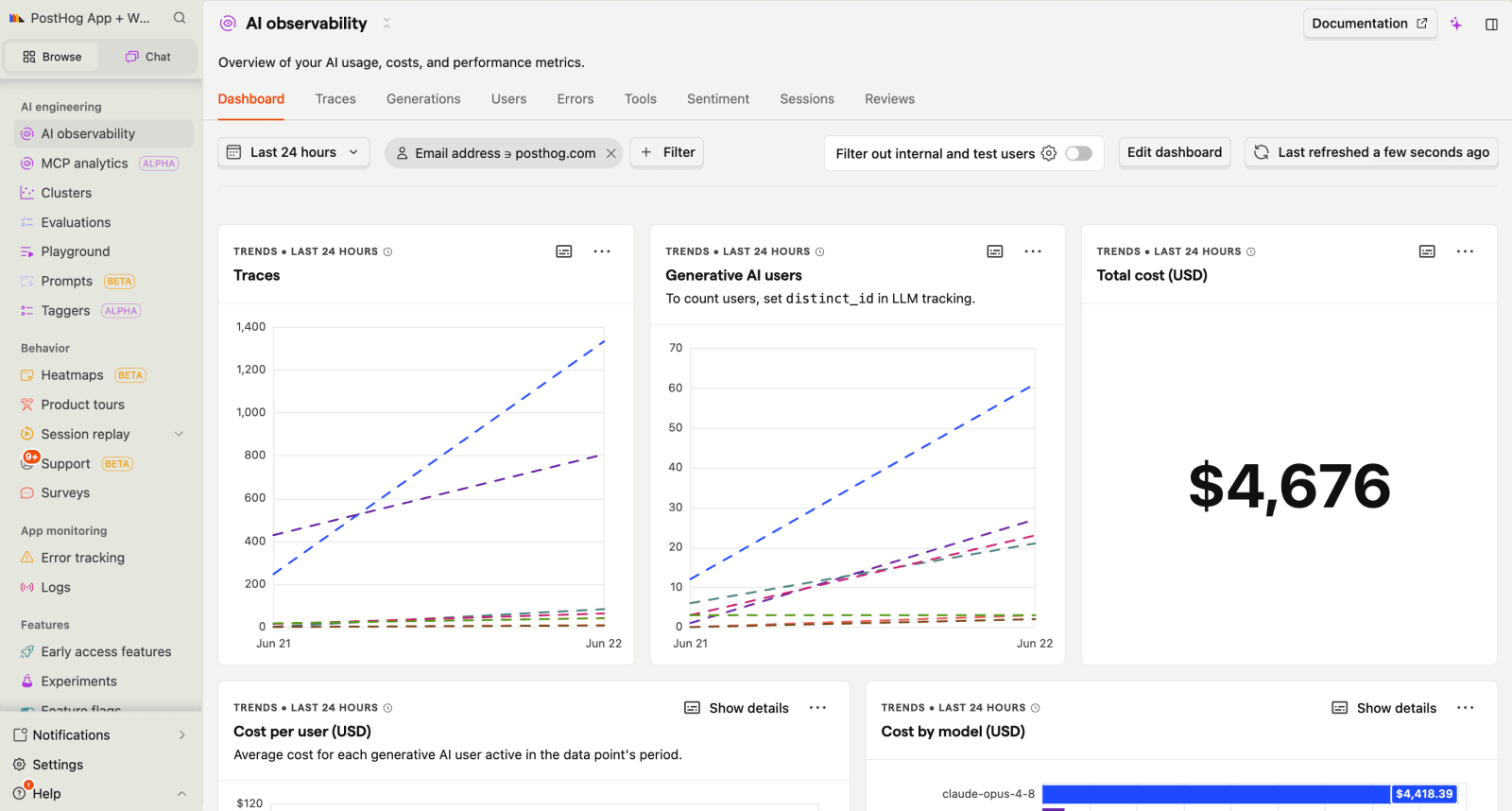
PostHog (that's us 👋) is the leading platform for self-driving products. You can use our Desktop, web, Slack, and MCP products to leverage tools like AI observability, product analytics, session replay, feature flags, experiments, error tracking, logs, and more.
PostHog captures full traces of your LLM calls, so you can follow a request through every prompt, tool call, and model response. For each generation, it tracks token usage, cost, latency, and errors – including per-user cost attribution, so you can see what individual customers cost you, just like Helicone's per-key tracking.
You can also score outputs with LLM-as-a-judge or code-based evals, manage and version prompts without redeploying code, and query trace data with SQL or through the MCP server directly from your editor.
The architectural difference from Helicone is that PostHog instruments via SDK rather than sitting in your request path as a proxy.
That means more setup (the install wizard helps) and no gateway features like caching or rate limiting, but also no proxy between you and your LLM provider and much deeper context on the analysis side. Because traces are stored as regular PostHog events, you can connect AI behavior to what users actually did like whether people who hit a slow generation churned or a new prompt version improved activation.
Key features
Generations: Monitor model performance, token usage, costs, latency, and errors across your AI features from a single view.
Traces: Follow AI workflows from start to finish to understand how requests move through prompts, tools, and model calls.
AI evals: Automatically score model outputs using LLM-as-a-judge or code-based checks to track quality and identify regressions over time.
Prompt management: Create, version, and update prompts without redeploying code. Compare versions and understand how prompt changes affect outputs.
SQL access: Query AI observability data with SQL and analyze it alongside product, user, and business data.
Session replay: Watch recordings of users interacting with AI features and investigate issues alongside the actions that triggered them.
How does PostHog compare to Helicone?
Main differences between PostHog and Helicone
- Helicone uses a proxy-based architecture with gateway features like caching, rate limiting, and multi-provider routing. PostHog is SDK-based with no gateway – migrating means more instrumentation, but nothing sits between you and your LLM provider.
- Helicone focuses on LLM observability. PostHog combines AI observability with product analytics, session replay, feature flags, experiments, and other developer tools.
- PostHog supports LLM-as-a-judge and code-based evals on production generations. Helicone's eval features are basic, and maintenance mode means they won't develop further.
- PostHog is actively developed with frequent releases, while Helicone is in maintenance mode following its acquisition by Mintlify.
Main similarities between PostHog and Helicone
- Both track LLM traces, token usage, costs, and latency across providers like OpenAI and Anthropic.
- Both support cost tracking for AI workloads.
- Both offer prompt management features.
- Both are open source and self-serve with a free tier.
Why do companies use PostHog?
According to reviews on G2 and other review sites, teams tend to choose PostHog for three main reasons:
It replaces multiple tools: Several reviewers mention that PostHog combines analytics, session replay, feature flags, experiments, and other capabilities that would otherwise require multiple separate products.
It helps teams understand user behavior: PostHog connects analytics with session replay, making it easier to see what users did before they dropped off, got stuck, or completed an action.
It's quick to get started with: Reviewers frequently mention easy setup and ease of use, along with the flexibility PostHog gives developers when working with their data.
Bottom line
PostHog is the strongest choice if you want your Helicone migration to be an upgrade, not a lateral move: AI observability connected to product analytics, session replay, experiments, and more in one platform. The SDK migration takes more work than a proxy swap, but you end up with more than you left with.


Install PostHog with one command
Paste this into your terminal and make AI do all the work.

2. Portkey
- Founded: 2023
- Similar to: Helicone, LiteLLM
- Typical users: AI and platform engineers
- Typical customers: Enterprises running AI in production
What is Portkey?
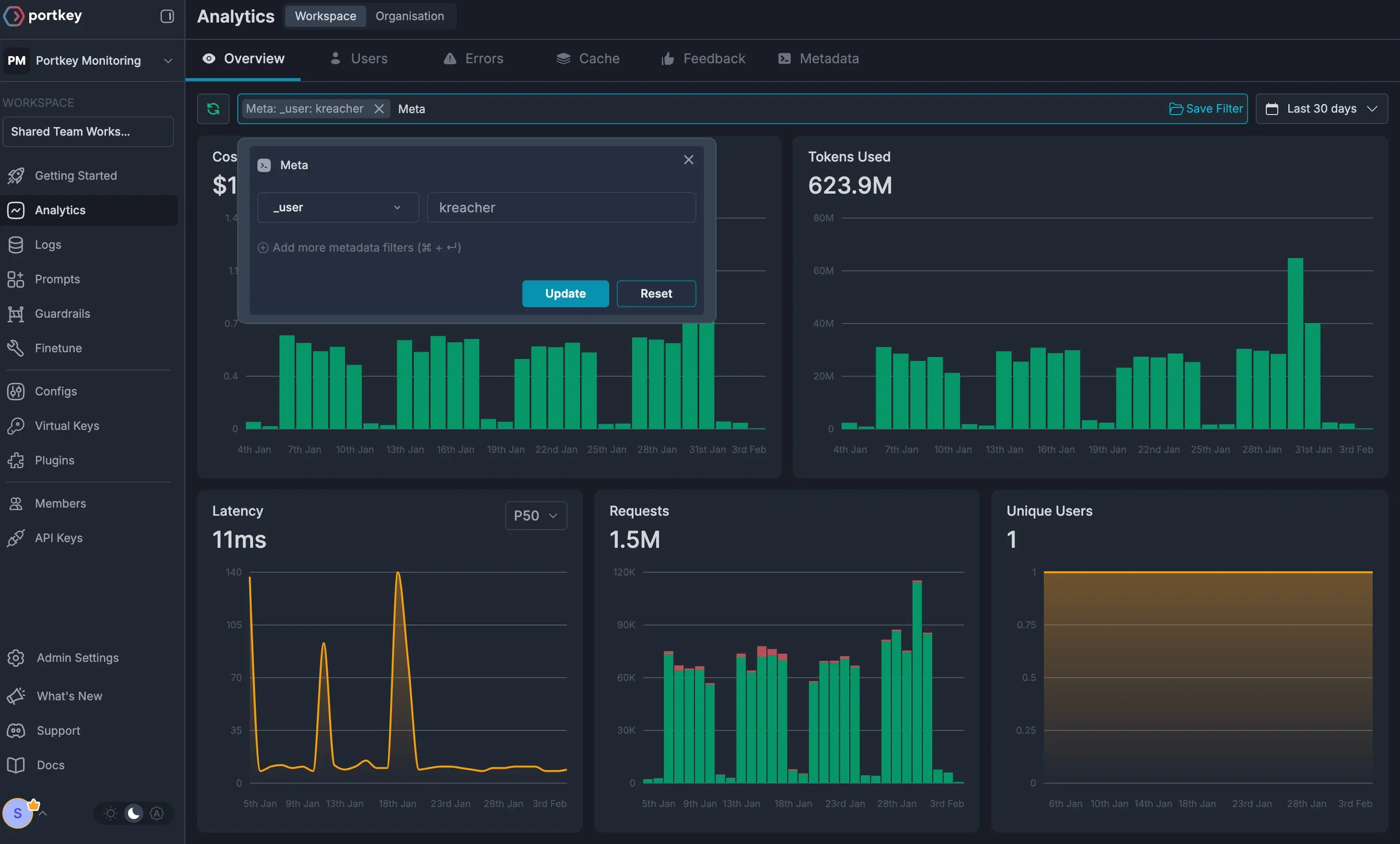
Portkey is an AI gateway and observability platform that helps teams build, manage, and monitor AI applications. It provides a single API for accessing multiple AI models and includes tools for routing, logging, cost tracking, tracing, and reliability. In 2026, it was acquired by Palo Alto Networks.
Portkey is the closest architectural match to Helicone on this list. Like Helicone, it sits between your application and your model providers: a single API for 3,000+ models, with routing, caching, retries, automatic fallbacks, and rate limiting handled at the gateway, plus logging, cost tracking, and tracing on everything that passes through.
For most Helicone users, Portkey is the path of least resistance – migrating between two proxies is closer to swapping an endpoint than re-instrumenting an application.
Beyond the Helicone-style basics, it also layers on features aimed at running AI at organizational scale: guardrails that validate inputs and outputs against safety policies, prompt management across teams and environments, and governance tooling like access controls and audit logs.
Key features
AI gateway: Route requests across multiple AI providers through a single API, with support for caching, retries, fallback, and rate limits.
Observability and tracing: Track requests, latency, costs, errors, and model performance to understand how AI applications behave in production.
Guardrails: Apply safety checks, validation rules, and policies to AI inputs and outputs.
Prompt management: Store, version, and manage prompts across teams and environments.
AI governance: Manage access controls, audit logs, and organizational policies for AI applications.
How does Portkey compare to Helicone?
Main differences between Portkey and Helicone
- Portkey layers enterprise features on top of the gateway: guardrails that validate inputs and outputs, access controls, audit logs, and governance tooling. Helicone stayed lightweight and developer-first.
- Portkey's gateway is open source, but the full platform is not. Helicone is fully open source.
- Both were acquired in 2026, with different trajectories: Helicone went into maintenance mode, while Portkey is being actively integrated into Palo Alto Networks' Prisma AIRS security platform – continued development, but with a roadmap increasingly aimed at enterprise AI security.
Main similarities between Portkey and Helicone
- Both are built around an AI gateway.
- Both bundle gateway features with observability: caching, rate limiting, fallbacks, and multi-provider routing alongside tracing, logging, and cost tracking.
- Both support self-hosting.
Why do companies use Portkey?
Based on reviews on G2, teams choose Portkey for a few reasons:
It's easy to set up: Reviewers describe the integration as quick and the APIs as easy to work with across different models.
The gateway simplifies working with multiple providers: Users highlight how easily it lets them switch between models and providers, with fallback options when needed.
Monitoring and cost tracking are built in: Reviewers point to centralized logs, observability, and usage tracking that make debugging and optimization easier.
Bottom line
Portkey is a good option for teams that want a gateway-based alternative to Helicone. It offers many of the same core capabilities, but its full platform is not open source and it is now part of Palo Alto Networks.
3. Langfuse
- Founded: 2023
- Similar to: LangSmith, Arize Phoenix
- Typical users: AI and ML engineers
- Typical customers: Startups to large enterprises
What is Langfuse?
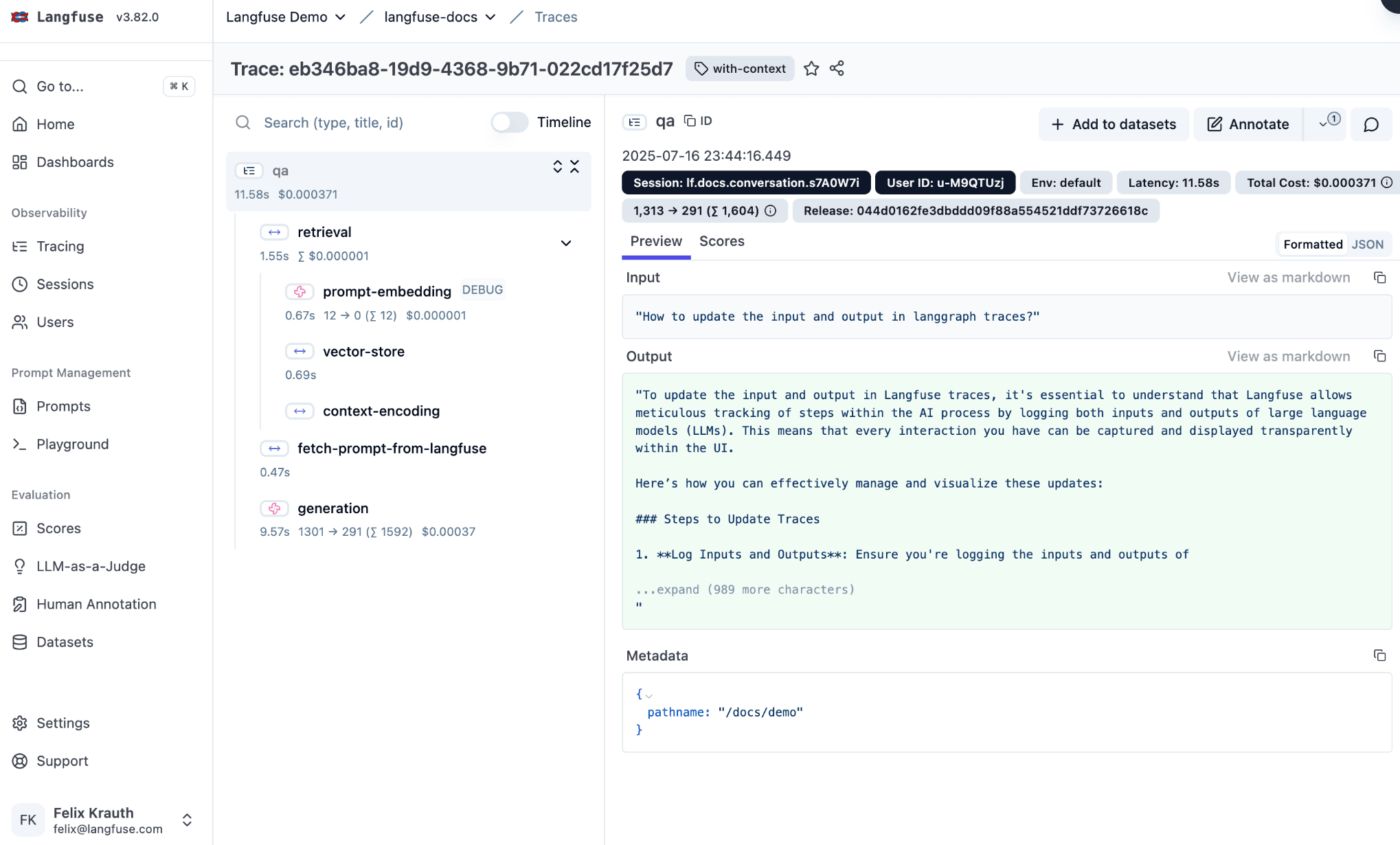
Langfuse is an open-source platform for building, monitoring, and improving LLM applications. It captures detailed traces with spans, observations, and metrics across any framework or provider. Its SDK is built on the official OpenTelemetry client, so token usage, cost tracking, and prompt linking work with any OTel-compatible library out of the box.
On top of tracing, it layers prompt management with one-click rollbacks, evaluations via LLM-as-a-judge, heuristics, or human review, and dashboards for monitoring cost, latency, and quality trends.
The main shift from Helicone is architectural – Langfuse instruments via SDK rather than a proxy, so you gain per-step visibility into multi-step workflows but lose gateway features like caching.
In January 2026, it was acquired by ClickHouse and continues to be developed as an open-source project.
Key features
LLM tracing: Detailed production tracing with spans, observations, and metrics across any framework or provider.
Prompt management: Version control and deployment of prompts with integrated monitoring and one-click rollbacks.
Evaluations: LLM-as-a-judge, heuristic functions, and human review workflows. Run evaluators on production data or during experiments.
OpenTelemetry support: Langfuse SDK v4 is built on top of the official OpenTelemetry client, giving it first-class support for token usage, cost tracking, and prompt linking across any OTel-compatible framework or library.
Analytics dashboards: Monitor cost, latency, and quality trends across your LLM applications with built-in dashboards and automated alerts.
How does Langfuse compare to Helicone?
Main differences between Langfuse and Helicone
- Helicone works as a proxy you route requests through; Langfuse uses an SDK you add to your code, so migrating takes more setup.
- Langfuse can trace each step of a multi-step agent run, while Helicone mainly logs individual requests at the gateway level.
- Langfuse has substantially deeper evaluation workflows: LLM-as-a-judge, heuristic evaluators, human annotation queues, and experiments across datasets. Helicone's eval features are basic.
- Langfuse's cloud pricing is unit-based. Helicone billed per request at the gateway, so teams with complex multi-step traces will see higher relative volumes on Langfuse than they're used to.
Main similarities between Langfuse and Helicone
- Both are built for LLM observability, with tracing and monitoring of LLM requests.
- Both provide cost tracking.
- Both offer prompt management and versioning.
- Both are open source and self-hostable.
Why do companies use Langfuse?
Based on user reviews on Product Hunt and Gartner Peer Insight, teams choose Langfuse for a few reasons:
It's easy to integrate: Reviewers describe the SDK as quick to set up and easy to add to an existing application.
The tracing is detailed: Users point to the depth of its tracing and latency data, and say the visualizations make debugging easier.
It moves fast: Reviewers note that the open-source project ships frequent updates and continues to add new capabilities.
Bottom line
Langfuse is a strong option for teams that want a dedicated LLM observability platform. It requires more setup than Helicone's proxy-based approach, but it remains actively developed and offers a broad set of observability features.
4. LangSmith
- Founded: 2023
- Similar to: Langfuse, Arize Phoenix
- Typical users: AI and ML engineers
- Typical customers: Startups to large enterprises
What is LangSmith?
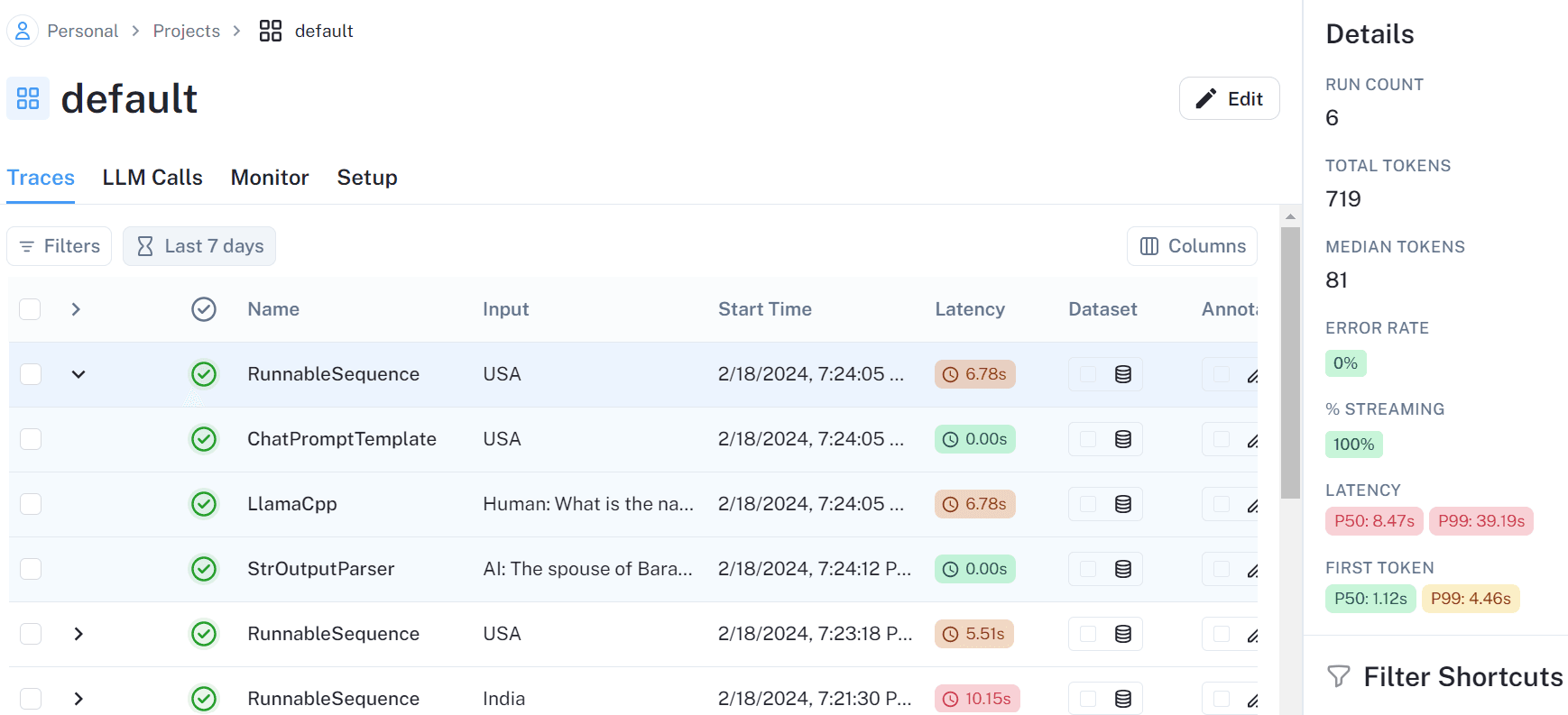
LangSmith is LangChain's platform for building and monitoring LLM applications and AI agents. It offers tracing across every step of a chain or agent run, prompt management with a playground for side-by-side testing, evaluation workflows with datasets, LLM-as-a-judge, and human annotation, and production monitoring with dashboards and alerts.
LangSmith works with or without the LangChain framework, but it delivers its deepest experience inside that ecosystem – zero-config setup, node-by-node state diffs, and native LangGraph agent graph visualization are only available for LangChain and LangGraph applications. If your stack is built on LangGraph, nothing else on this list matches its debugging experience.
Unlike Helicone, LangSmith is closed source, with self-hosting available only on Enterprise plans.
Its pricing is also structured around seats and traces: a free Developer plan covers one seat and 5K traces per month, then the Plus plan runs $39 per seat plus $2.50 per 1K traces, with base traces retained for just 14 days.
Key features
Tracing and observability: Trace requests, inspect application behavior, and debug issues across your LLM applications.
Evaluation: Test and score model outputs to measure quality and catch issues before they reach users.
Prompt management: Create, version, and manage prompts outside your application code.
Datasets and experiments: Run experiments against datasets to compare prompts, models, and application changes.
Monitoring: Track production metrics such as latency, cost, token usage, and error rates with dashboards and alerts.
How does LangSmith compare to Helicone?
Main differences between LangSmith and Helicone
- Helicone is a proxy with gateway features like caching, rate limiting, and multi-provider routing. LangSmith is SDK-based with no gateway layer.
- LangSmith is built by LangChain and works closely with the LangChain ecosystem, while Helicone is independent of any framework.
- LangSmith offers self-hosting only on its Enterprise plan, while Helicone can be self-hosted by any team.
- LangSmith charges $39 per seat on its Plus plan, plus $2.50 per 1K traces with 14-day base retention. Helicone's Pro plan is $79/month flat with unlimited seats and 1-month retention – so a five-person team pays $195/month in LangSmith seats alone before logging a trace.
Main similarities between LangSmith and Helicone
- Both are built for LLM observability, with tracing and monitoring of LLM requests.
- Both provide cost tracking.
- Both offer prompt management with a playground for testing.
- Both provide production monitoring with dashboards and alerts for cost, latency, and errors.
Why do companies use LangSmith?
Based on user reviews on Gartner Peer Insights and Product Hunt, teams choose LangSmith for a few reasons:
It gives clear visibility into model behavior: Reviewers say it helps them understand step by step how an application arrived at a response.
It's especially useful in production: Users highlight debugging, evaluations, and regression testing as projects move beyond early experimentation.
It fits naturally with LangChain: Teams already using LangChain or LangGraph often choose LangSmith because the tools work well together.
Bottom line
LangSmith is a good fit for teams already using LangChain or LangGraph. It covers many of the same use cases as Helicone, but it is closed source and takes a different approach to instrumentation.
5. Arize Phoenix
- Founded: 2023
- Similar to: Langfuse, LangSmith
- Typical users: AI and ML engineers
- Typical customers: Engineering teams that self-host their observability
What is Arize Phoenix?
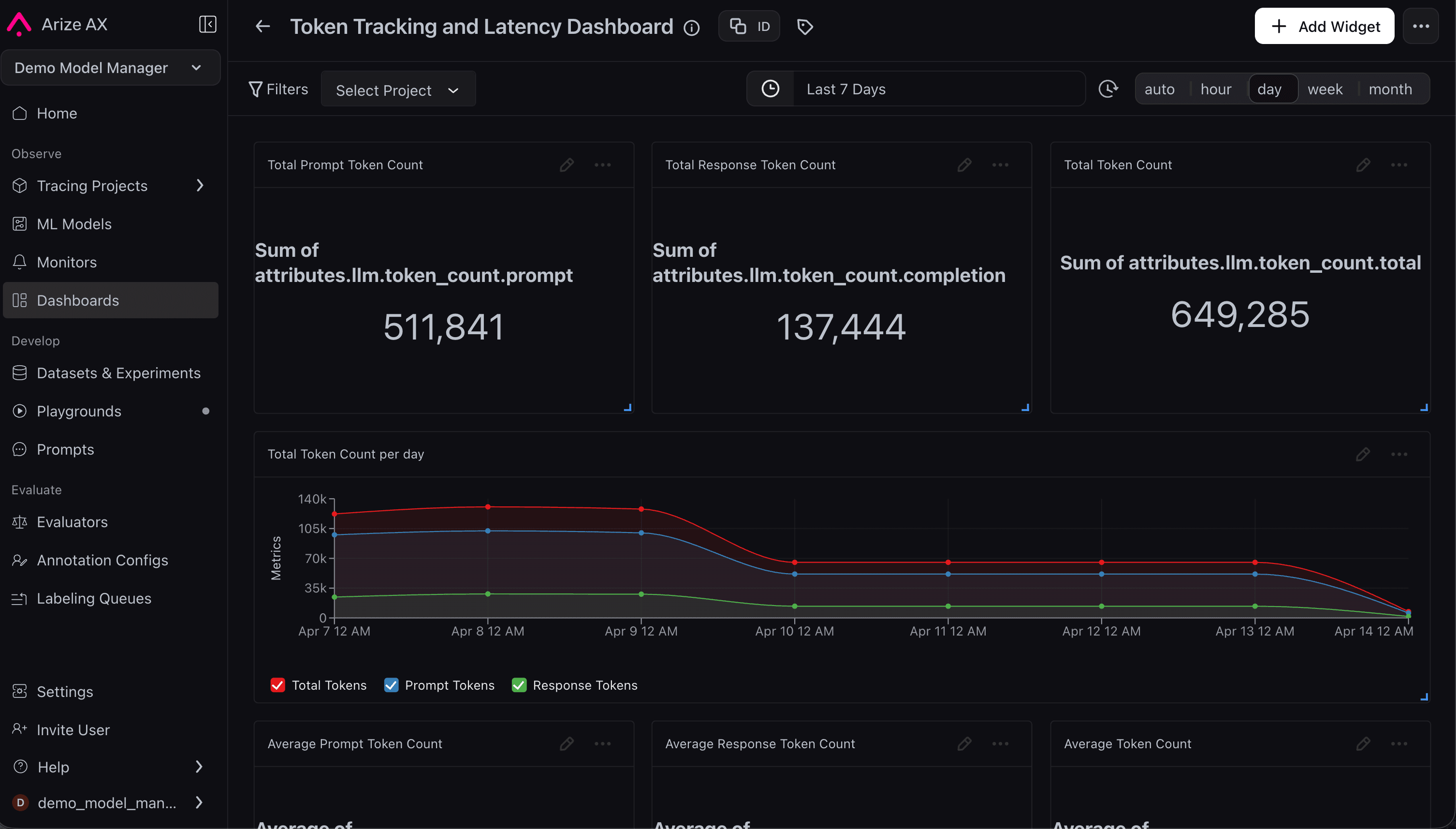
Arize Phoenix is an open-source platform for tracing, evaluating, and improving LLM applications and AI agents. It can be run locally, self-hosted, or used as a hosted cloud service. They were acquired by Dynatrace in August 2026.
Phoenix is one of the most genuinely OpenTelemetry-native tools in the space. It instruments via OpenInference, an OTel-based semantic layer, and works with LangChain, LlamaIndex, OpenAI, DSPy, Haystack, and anything else OTel-compatible. It ships with research-backed evaluators for hallucination, faithfulness, relevance, and toxicity out of the box – including retrieval and RAG evaluation – and runs locally, in a container, or as a hosted cloud service.
For Helicone users, the appeal is data control and standards: Phoenix can run entirely on your infrastructure, and OTel instrumentation means your traces aren't locked into any vendor's format. The tradeoff is the opposite of Helicone's one-line proxy setup: OTel instrumentation is more work upfront in exchange for portability.
When teams need production monitoring at enterprise scale, Arize offers AX as the commercial upgrade path, with no instrumentation changes required.
Key features
Tracing and observability: Trace requests, agent workflows, and tool calls. Use the traces to understand what happened during an execution and debug issues more easily.
Evaluations: Evaluate model outputs and application behavior using scores and automated checks.
Datasets and experiments: Run experiments against datasets to compare prompts, models, and application changes.
RAG and retrieval evaluation: Measure retrieval quality, document relevance, and how well your RAG pipeline supports model responses.
OpenTelemetry and OpenInference support: Use open standards for tracing and observability instead of proprietary instrumentation and trace formats.
How does Arize Phoenix compare to Helicone?
Main differences between Arize Phoenix and Helicone
- Helicone routes requests through its proxy. Phoenix only observes what happens in your application.
- Phoenix is built on open standards (OpenTelemetry and OpenInference), while Helicone relies on its own format.
- Migrating to Phoenix means adding instrumentation to your code, so it takes more setup than Helicone.
- Phoenix ships research-backed evaluators for hallucination, faithfulness, relevance, and toxicity out of the box, plus retrieval and RAG evaluation. Helicone's evals are basic and frozen in maintenance mode.
Main similarities between Arize Phoenix and Helicone
- Both track LLM requests, token usage, costs, and latency across providers and frameworks.
- Both trace multi-step agent workflows, not just single LLM calls – Helicone via Sessions, Phoenix via span-level OTel traces.
- Both can be self-hosted for free and run entirely on your own infrastructure.
Why do companies use Arize Phoenix?
Based on community discussions, teams choose Phoenix for a few reasons:
It's open source and free to self-host: Teams can run Phoenix themselves and keep full control over their observability data.
It's built on open standards: Phoenix uses OpenTelemetry and OpenInference, making it easier to work across frameworks and integrate with other tools.
It's strong on evaluations: Teams use Phoenix to evaluate response quality, retrieval performance, and other aspects of LLM applications.
Bottom line
Arize Phoenix is a good fit for teams that want an open-source observability platform with strong evaluation and RAG capabilities. It doesn't act as a gateway like Helicone, so it's best suited to teams that care more about tracing and evaluation than request routing.
6. Braintrust
- Founded: 2023
- Similar to: LangSmith, Langfuse
- Typical users: AI and product engineers
- Typical customers: Startups and enterprises building AI products
What is Braintrust?
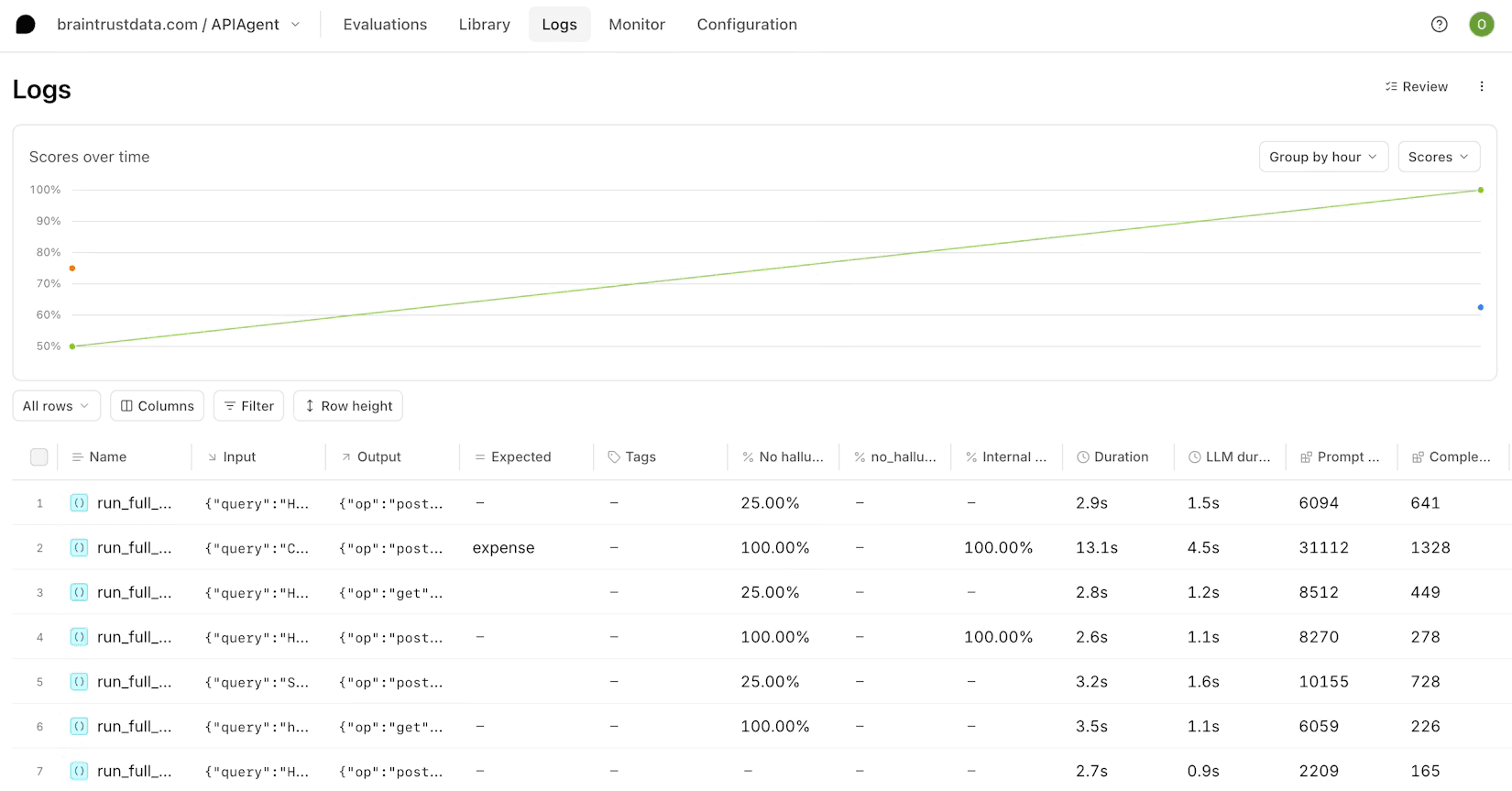
Braintrust is an evaluation-first platform that helps teams measure, monitor, and improve AI applications in production. What sets it apart is how it ties evaluation directly to the development process.
Braintrust captures traces with per-request cost breakdowns, turns production failures into eval datasets with one click, scores outputs with LLM-as-a-judge, code scorers, or human review, and gates releases in CI/CD based on eval scores. Brainstore, its purpose-built database, keeps trace queries fast across millions of spans, and Loop – its AI assistant – generates datasets and scorers from natural language.
For Helicone users, Braintrust is the biggest philosophical leap on this list. Helicone answered "what did my LLM calls cost and do?" Braintrust answers "did this change make my AI better or worse?" – a different question requiring different workflows. It also shares LangSmith's tradeoffs: closed source, with self-hosting on Enterprise plans only.
Key features
Evaluations: Run automated, human, and LLM-based evaluations to measure the quality of AI outputs.
Tracing and observability: Trace AI interactions, tool calls, latency, and costs to understand how your application behaves in production.
Datasets and experiments: Turn production traces into datasets and use them to compare prompts, models, and application changes.
Prompt playground: Test prompts and models side by side and compare outputs before making changes in production.
CI/CD quality gates: Run evaluation suites on code changes and block releases that fail your quality bar.
How does Braintrust compare to Helicone?
Main differences between Braintrust and Helicone
- Braintrust can gate releases in CI/CD, running eval suites on code changes via a GitHub Action and blocking merges that fail a quality threshold. Helicone has no release-quality workflow.
- Helicone includes gateway features – caching, rate limiting, multi-provider routing. Braintrust's AI proxy captures logs and enables caching, but it's a convenience layer for evals, not a production gateway.
- Braintrust is closed source, while Helicone is open source.
- Braintrust's self-hosting is limited to enterprise plans, while Helicone can be self-hosted by any team.
Main similarities between Braintrust and Helicone
- Both trace AI applications, tracking requests, token usage, costs, and latency.
- Both offer a proxy option for capturing logs without SDK instrumentation.
- Both include a prompt playground for comparing prompts and models side by side.
- Both are self-serve with a free tier.
Why do companies use Braintrust?
Based on reviews on G2, teams choose Braintrust for a few reasons:
It brings evaluations, observability, and experimentation into one platform: Reviewers describe it as an all-in-one place for measuring and improving AI applications.
It makes changes easier to evaluate: Users say it helps them compare prompts, models, and pipelines to see whether updates actually improve quality.
It supports fast iteration: Reviewers frequently mention how easy it is to test ideas, collaborate with teammates, and move quickly.
Bottom line
Braintrust is a good fit for teams that want evaluations to play a larger role in how they build and ship AI products. It's closed source and doesn't provide the gateway capabilities that Helicone is known for, but it offers a more evaluation-focused workflow.
Which Helicone alternatives should you choose?
- Want an all-in-one developer platform that connects AI observability with product analytics, feature flags, experiments, session replay, and more? Go with PostHog.
- Want a gateway-based alternative that feels familiar coming from Helicone? Portkey is worth a look.
- Want open-source LLM observability that's still actively developed? Langfuse is a strong choice.
- Already building with LangChain or LangGraph? LangSmith fits naturally into that ecosystem.
- Want open-source observability with strong evaluation and RAG capabilities? Consider Arize Phoenix.
- Need evaluation to play a bigger role in how you develop and ship AI applications? Braintrust is built for that.
Is PostHog right for you?
Here's the (short) sales pitch.
We're biased, obviously, but we think PostHog is the perfect Helicone replacement if:
- You want AI observability connected to the rest of your product data, so you can tie a model's behavior to the user session, feature flag, or funnel it affected.
- You value open source. PostHog's core is MIT licensed with a public roadmap.
- You want to get started without a large upfront commitment. PostHog includes a generous free tier with 100k AI observability events each month.
It's completely free to get started – no credit card required. Our setup wizard handles configuration in minutes, or you can check out our docs to do it yourself.
Install PostHog with one command
Paste this into your terminal and make AI do all the work.
Frequently asked questions
PostHog says it makes your product "self-driving" – what does that mean?
It means PostHog digs through your product data, finds what's worth fixing, and has agents do the work.
It starts with context. A full suite of developer tools – AI Observability, Product Analytics, Session Replay, Feature Flags, Experiments, Error Tracking, Logs, and more – captures everything happening in your product, and a Context Warehouse unifies it into one source agents can read across.
From there, Scouts read across all of it and sort what's worth knowing from what's just noise. What clears the bar becomes a report in your inbox: an agent picks it up, roots out the cause, and opens a PR. You review and merge.
You can steer it from Slack, the web app, the desktop app, or your own editor via the MCP or CLI.
Is Helicone shutting down?
No. Helicone is still available and continues to receive security updates, bug fixes, and support for new models. However, it is now in maintenance mode following its acquisition by Mintlify, and no major new features are planned.
What does Helicone's maintenance mode mean?
Maintenance mode means Helicone will continue running, but active feature development has stopped. The team has said it will continue shipping security updates, bug fixes, performance improvements, and support for new models, but its focus has shifted to Mintlify.
Should I migrate off Helicone now or wait?
There's no need to rush. If Helicone meets your needs today, you can keep using it. But if active development and a long-term roadmap are important to you, it's worth exploring alternatives.
What's the easiest Helicone alternative to migrate to?
Portkey is likely the easiest option for most teams because it uses a similar proxy-based approach. In many cases, migrating involves updating your API endpoint rather than adding new SDK instrumentation throughout your application.
Can PostHog replace Helicone?
Yes, for many teams. PostHog includes AI observability, tracing, evaluations, cost tracking, prompt management, and self-hosting. Unlike Helicone, it also connects AI observability with product analytics, session replay, feature flags, and experiments in the same platform. The tradeoff is that PostHog uses SDK-based instrumentation rather than a proxy, so migration typically involves more setup. Its AI observability tooling is also newer than some dedicated LLM observability platforms.
Is there a free or open-source Helicone alternative?
Yes. PostHog, Langfuse, and Arize Phoenix are open-source alternatives to Helicone. All three offer free ways to get started, whether through self-hosting, free tiers, or both.
The best one depends on what you're looking for: PostHog combines observability with multiple other developer tools, Langfuse is the closest dedicated observability alternative, Phoenix is strong for evaluations and RAG workflows.
What's the difference between a proxy-based and an SDK-based observability tool?
A proxy-based tool sits between your application and the model provider, so you can capture requests and responses by routing traffic through it. An SDK-based tool requires you to add instrumentation to your application code, but it can provide deeper visibility into workflows, tool calls, and application logic.
Helicone and Portkey use a proxy-based approach. PostHog, Langfuse, LangSmith, Arize Phoenix, and Braintrust rely primarily on SDK-based instrumentation.
Will my Helicone data export to a new tool?
Usually, yes. Helicone provides a data export tool that lets you export logs in JSON, JSONL, or CSV format, so your data isn't locked in.
The migration process depends on the tool you're moving to.
Some platforms provide migration resources. For example, Helicone integrates with PostHog to export events for analysis. For other tools, check the platform's migration and import documentation before making the switch.

Subscribe to our newsletter
build mode
Read by 75,000+ founders and builders
We'll share your email with Substack
PostHog is your product's context layer. With a full suite of developer tools – AI observability, product analytics, session replay, feature flags, experiments, error tracking, logs, and more – PostHog ingests and stores all the data agents need to diagnose problems, uncover opportunities, and ship fixes. A data warehouse and CDP tie it all together, unifying that context into one source agents can read across. You can steer it all from Slack, the web app, the desktop (PostHog Desktop), or your own editor via the MCP.