







The best Langfuse alternatives & competitors, compared


Contents
Langfuse is a well-known open-source LLM observability platform. It combines tracing, prompt management, evaluations, and cost tracking to help developers understand how their LLM applications behave in production.
But just like pineapple on pizza isn't for everyone, Langfuse isn't right for every team. Some need deeper evaluation tooling, a better way to understand how AI performance affects the overall product experience, or may just want a cheaper alternative.
In this guide, we'll compare the best Langfuse alternatives and look at where each tool excels, where it falls short, and who it's actually built for.
1. PostHog
- Founded: 2020
- Similar to: Langfuse, Braintrust
- Typical users: Engineers and product teams
- Typical customers: Mid-size B2Bs and startups
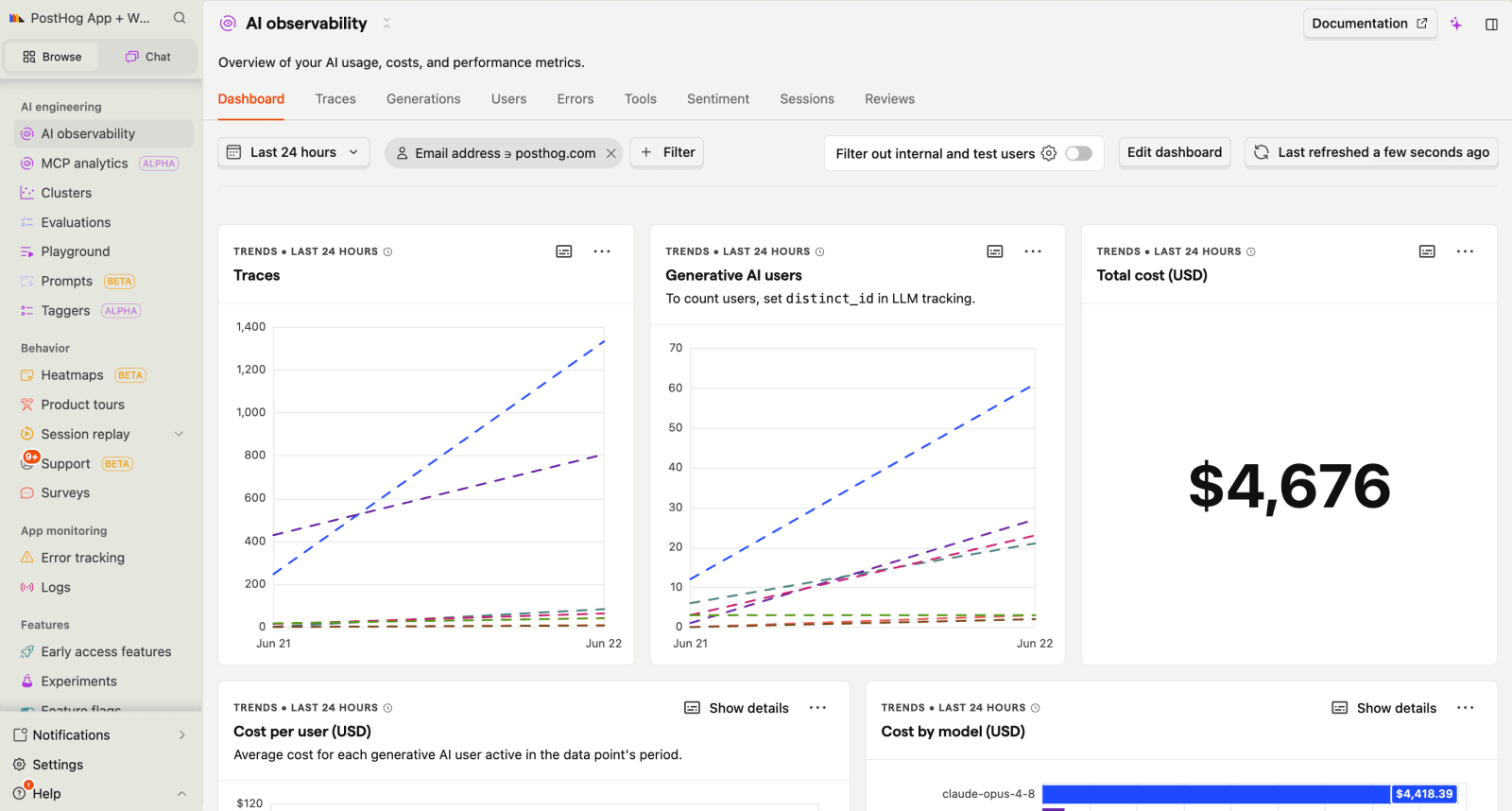
What is PostHog?
PostHog is the leading platform for building self-driving products. You can use our web, Slack, MCP, CLI, and Desktop products to leverage tools like product analytics, session replay, feature flags, experiments, error tracking, AI observability, logs, and more.
PostHog captures full traces of your LLM calls, so you can follow a request through every prompt, tool call, and model response. For each generation, it tracks token usage, cost, latency, and errors, and you can score outputs with LLM-as-a-judge or code-based evals to catch quality regressions over time.
You can query that trace data with SQL or through the MCP server directly from your editor, and manage and version prompts without redeploying code. It supports popular frameworks, including OpenAI, Anthropic, LangChain, xAI, LlamaIndex, and the Vercel AI SDK.
The free tier includes 100K AI observability events per month, with usage-based pricing beyond that.
What sets PostHog apart from Langfuse?
PostHog is the only tool here where AI observability is one piece of a full product stack (analytics, replay, error tracking, flags, experiments, and more) so you can tie an AI change to a real product metric, not just a model metric. Set up takes minutes with the wizard, and agents (in PostHog Desktop and beyond) can act on that context to help make your product self-driving.
PostHog ships new AI observability features fast, including prompt management for versioning and experimenting with prompts without redeploying code, plus sentiment classification and trace summarization that Langfuse has no direct equivalent for.
Key features
- Generations: Monitor model performance, token usage, costs, latency, and errors across your AI features from a single view.
- Traces: Follow AI workflows from start to finish to understand how requests move through prompts, tools, and model calls.
- AI evals: Automatically score model outputs using LLM-as-a-judge or code-based checks to track quality and identify regressions over time.
- Prompt management: Create, version, and update prompts without redeploying code. Compare versions and understand how prompt changes affect outputs.
- SQL access: Query AI observability data with SQL and analyze it alongside product, user, and business data.
- Session replay: Watch recordings of users interacting with AI features and investigate issues alongside the actions that triggered them.
How does PostHog compare to Langfuse?
Main differences between PostHog and Langfuse
- Langfuse includes prompt management with versioning and deployment controls. PostHog's prompt management is newer, covering versioning, labels, configuration, runtime fetching, and A/B testing of prompt versions.
- PostHog adds built-in sentiment classification (currently in beta) and trace summarization on top of raw trace data. Langfuse has no direct, built-in equivalent for either.
- Langfuse provides more detailed agent and multi-step tracing. PostHog supports traces and spans, but its tracing capabilities are less specialized.
- PostHog connects LLM traces to product analytics covering funnels, retention, and feature adoption. Langfuse focuses primarily on LLM observability.
Main similarities between PostHog and Langfuse
- Both capture LLM traces and monitor costs, latency, and errors out of the box.
- Both support multiple framework integrations and work with OpenTelemetry.
- Both offer a free tier and usage-based pricing.
- Both can be self-hosted and are SOC 2 compliant.
Why do companies use PostHog?
According to reviews on G2, companies use PostHog because:
- It replaces multiple tools: PostHog can replace Google Analytics (web and product analytics), Sentry (error monitoring), and standalone AI observability tools. Teams can monitor LLM performance, investigate AI interactions, and analyze product usage from the same dashboard.
- Pricing is transparent and scalable: Reviewers value the usage-based pricing and the generous free tier they can keep using as they grow.
- They get a complete picture of users: Funnels, session replay, A/B testing, surveys, and more sit alongside the analytics, so teams can see behavior end to end.
Bottom line
PostHog is the strongest Langfuse alternative for developers and teams who don't want their LLM data stuck in a silo. PostHog connects them to the rest of your product so you can see why a model change moved a metric and ship the fix from the same place.


Install PostHog with one command
Paste this into your terminal and make AI do all the work.

2. Braintrust
- Founded: 2023
- Similar to: Langfuse, LangSmith
- Typical users: AI engineers and ML engineers
- Typical customers: AI startups, enterprise AI teams, companies building production LLM applications
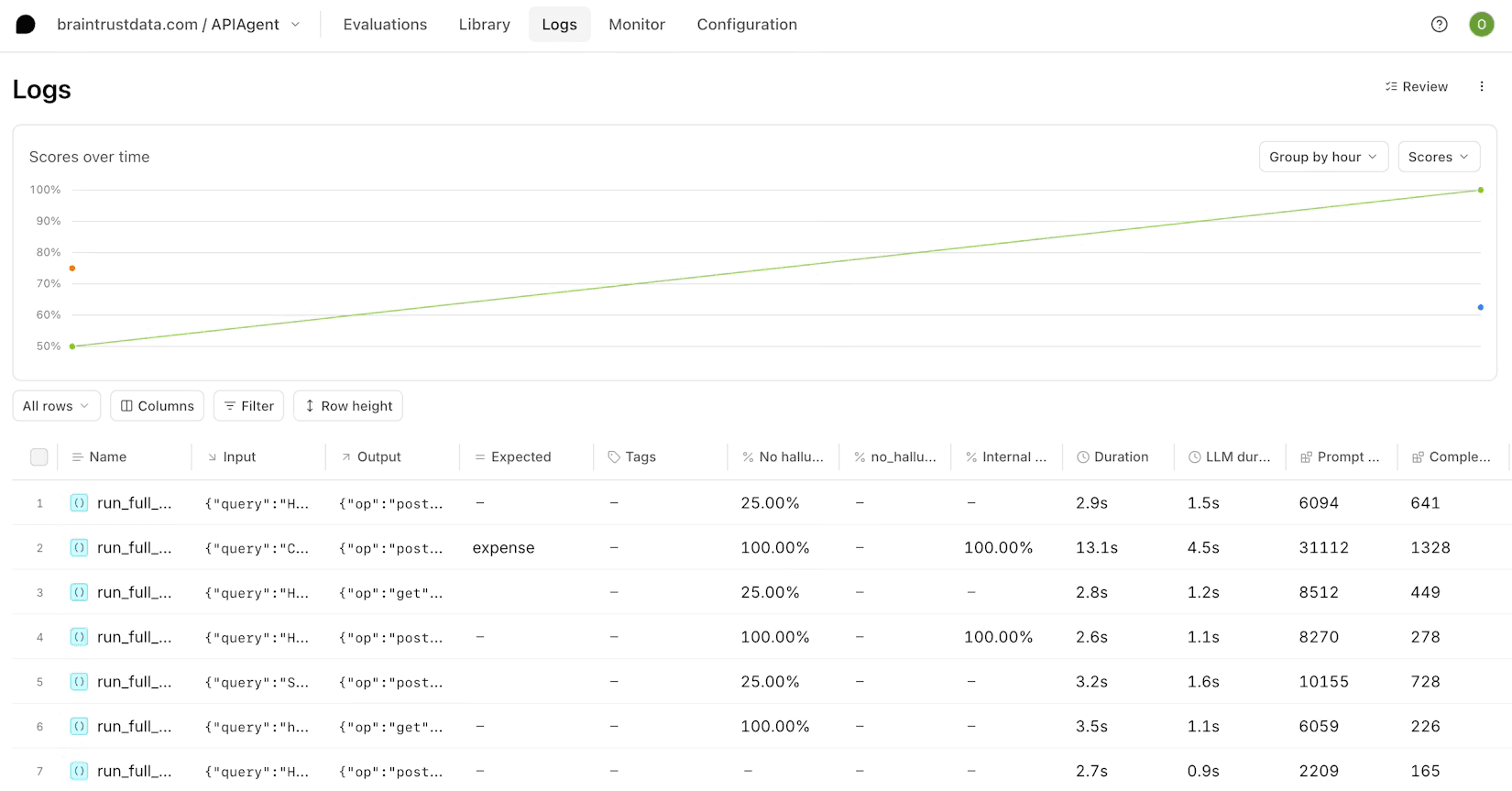
What is Braintrust?
Braintrust is an AI evaluation and observability platform focused on helping teams measure, test, and improve LLM applications. It combines tracing, evaluations, datasets, prompt management, and experimentation in a single platform.
Braintrust is best known for its evaluation tooling. Teams can build datasets, run experiments, compare prompts and models, and track quality over time. The platform also includes observability features for monitoring AI systems in production.
Their Starter plan (~1M spans, 10K scores, unlimited users), and every tier includes unlimited users with no per-seat fees. Pro is a flat $249/month; self-hosting is Enterprise-only.
What sets Braintrust apart?
Evals as a release gate; a native GitHub Action runs your eval suite on every pull request and blocks the merge if quality regresses, so evals become a CI/CD check rather than a dashboard you review after shipping. Braintrust is built around this evaluation-driven workflow, with unlimited users on every tier so reviewers and PMs can weigh in too.
Key features
- Evaluations: Test prompts, models, and application changes against predefined quality criteria.
- Datasets: Create and manage datasets for benchmarking outputs and tracking regressions.
- Tracing: Inspect prompts, model calls, tool usage, and application workflows.
- Experiments: Compare prompts, models, and configurations against evaluation datasets.
How does Braintrust compare to Langfuse?
Main differences between Braintrust and Langfuse
- Braintrust is built around evaluation-driven development, while Langfuse balances observability, prompt management, datasets, and evaluation workflows.
- Braintrust puts experiments, benchmarks, and quality measurement at the center of the product. Langfuse treats evaluations as one part of a broader observability platform.
- Braintrust includes built-in sentiment classifiers and evaluation workflows for measuring output quality. Langfuse focuses more heavily on tracing, prompt management, and workflow observability.
- Langfuse is open source and can be self-hosted, while Braintrust is a proprietary platform.
Main similarities between Braintrust and Langfuse
- Both capture LLM traces and monitor costs, latency, and errors.
- Both support agent and multi-step workflow tracing.
- Both provide evaluations, datasets, and human review workflows.
- Both include prompt management capabilities.
Why do companies use Braintrust?
According to user reviews and community discussions, companies use Braintrust because:
- Evals and experimentation: Teams use Braintrust to evaluate prompts, track improvements, and experiment with changes to LLM applications.
- Prompt management: Braintrust provides a place to store, test, and update prompts as applications evolve.
- Tracing and observability: Teams use Braintrust to debug traces, investigate latency, and monitor LLM applications.
Bottom line
Braintrust is one of the closest Langfuse competitors. Both products cover observability and evaluations well, but Braintrust is more heavily centered on evaluation-driven development, while Langfuse spreads its focus across the broader LLM development workflow.
3. LangSmith
- Founded: 2023
- Similar to: Langfuse, Arize Phoenix
- Typical users: AI engineers and ML engineers
- Typical customers: AI startups, enterprise AI teams, LangChain users
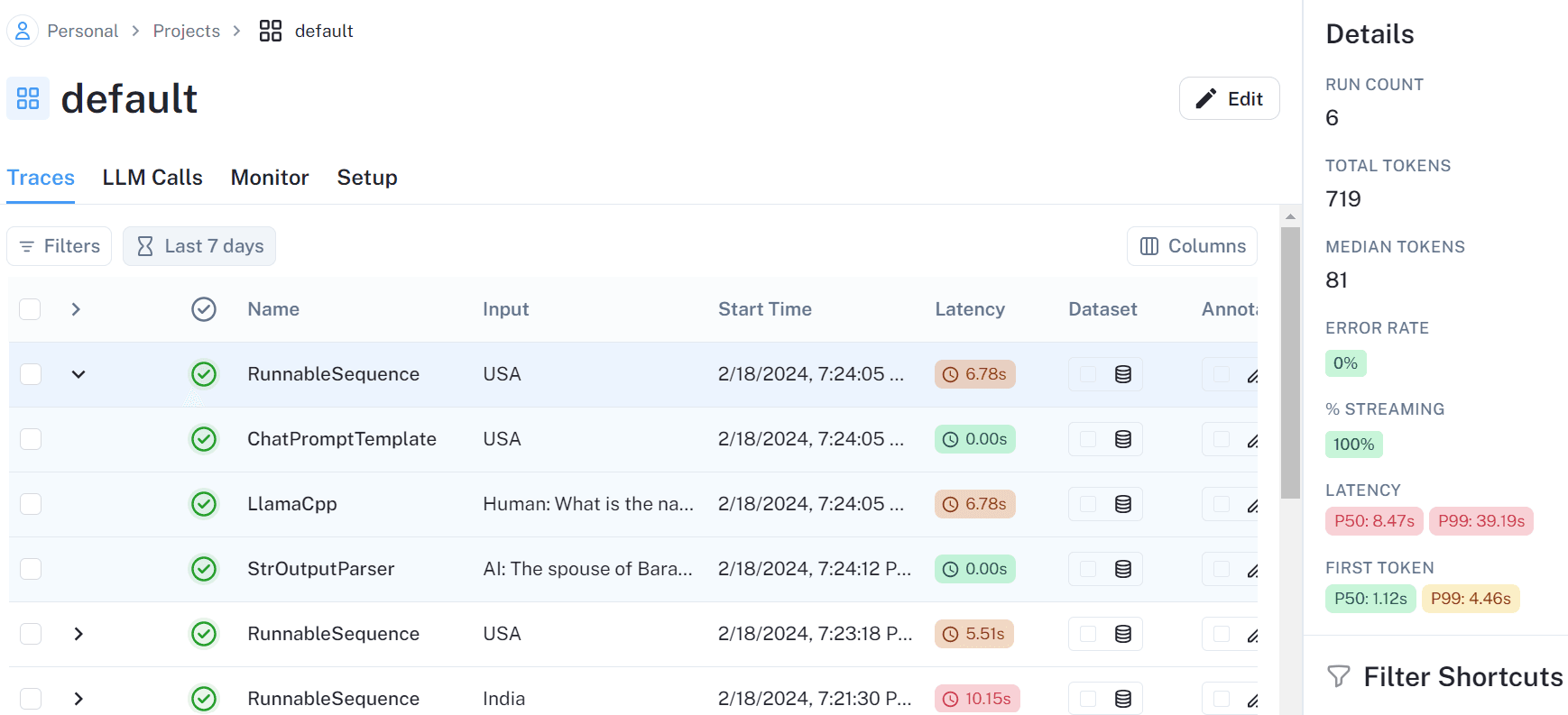
What is LangSmith?
LangSmith is an observability and evaluation platform for LLM applications. It has its deepest, native integration with the LangChain and LangGraph ecosystem, but works with any stack, and provides tracing, debugging, monitoring, prompt management, and evaluation tooling.
LangSmith automatically captures traces from LangChain and LangGraph applications, including agent runs, tool calls, prompts, and model responses. It also includes annotation queues and datasets for testing model performance.
It is self-serve, with a free Developer plan (1 seat, 5K traces/month). The Plus plan is $39 per seat per month for up to 10 seats and 10K traces; Enterprise is custom.
What sets LangSmith apart from Langfuse?
Mainly the native LangChain and LangGraph integration. Agent runs, tool calls, prompts, and model responses are captured automatically with near-zero instrumentation, so there's almost no setup to start debugging or evaluating. This also extends to LangGraph deployment, where you can ship and trace agents in one workflow.
Key features
- Tracing: Follow prompts, model calls, tool invocations, and agent runs through a single trace to debug LLM applications.
- Evaluations: Automatically score model outputs and compare prompts, models, and application versions over time.
- Annotation queues: Review, label, and curate model outputs to support evaluation and quality improvement workflows.
- Datasets: Create and manage datasets for testing prompts, models, and application changes against consistent benchmarks.
How does LangSmith compare to Langfuse?
Main differences between LangSmith and Langfuse
- LangSmith automatically captures traces from LangChain and LangGraph applications. Langfuse supports LangChain but takes a framework-agnostic approach.
- LangSmith uses per-seat pricing at $39 per seat per month on the Plus plan. Langfuse uses usage-based pricing with no per-seat charges.
- LangSmith is a proprietary product. Langfuse is open source under the MIT license.
Main similarities between LangSmith and Langfuse
- Both capture LLM traces and monitor costs, latency, and errors.
- Both support agent and multi-step workflow tracing.
- Both include prompt management capabilities.
- Both provide evaluations, datasets, and human annotation workflows.
Why do companies use LangSmith?
According to reviews on Gartner, companies use LangSmith because:
- It provides detailed traces: LangSmith lets teams inspect prompts, model responses, tool calls, and agent actions step by step, making it easier to understand how AI workflows behave in production.
- It helps debug LLM workflows: Teams use LangSmith to track model behavior, investigate issues, and understand unexpected outputs without manually piecing together logs.
- It includes built-in evaluations: LangSmith combines tracing with evaluation tooling, helping teams monitor output quality and maintain production-ready AI applications.
Bottom line
LangSmith is one of the strongest Langfuse competitors for teams building on LangChain and LangGraph. Native integrations capture traces automatically, so there's less setup to debug and evaluate. If you want an open-source, framework-agnostic observability platform, Langfuse is the stronger choice.
4. Arize Phoenix
- Founded: 2020 (Arize AI)
- Similar to: Langfuse, Braintrust
- Typical users: AI engineers and ML engineers
- Typical customers: Enterprise AI teams, ML platforms, companies building agentic applications
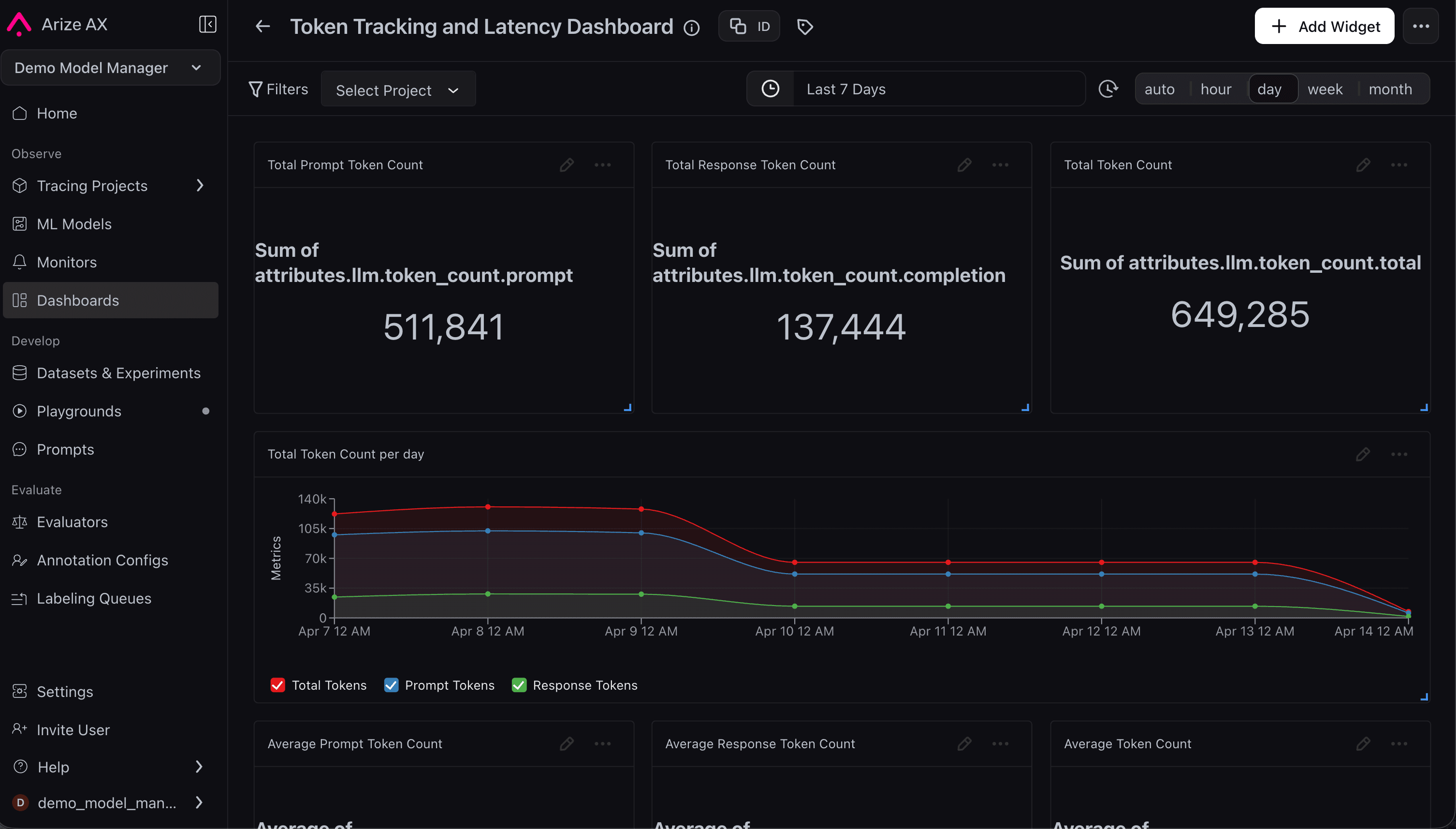
What is Arize Phoenix?
Arize Phoenix is an open-source LLM observability platform focused on tracing, evaluation, and monitoring for AI applications. It's built on OpenTelemetry and OpenInference, so one-line auto-instrumentation captures every prompt, model call, retrieval step, tool call, and agent action as a nested span, and you can attach evaluation scores directly back onto those traces.
It's built for teams running complex AI systems in production. It integrates with frameworks such as LangChain, LlamaIndex, LangGraph, Crew AI, DSPy, and others, and includes evaluation tooling for monitoring quality over time.
Phoenix is free to self-host with no usage caps. The managed version, Arize AX, has a free tier (25K spans/month) and AX Pro at $50/month for 50K spans, billed on span volume rather than seats. The company was acquired by Dynatrace in August 2026, so this may change in the near future though.
What sets Phoenix apart from Langfuse?
Phoenix takes the embeddings from your RAG pipeline, reduces their dimensionality, and clusters them semantically, so you can visually spot outliers and pockets of poor retrieval, then drill into the exact spans behind them. This embedding and cluster visualization (inherited from Arize's ML observability roots) is something Langfuse doesn't do.
Key features
- Tracing: Follow prompts, retrieval steps, model calls, tool invocations, and agent workflows through a single trace.
- Evaluations: Run LLM-based and code-based evaluations to measure quality, correctness, and performance.
- Agent observability: Visualize multi-step agent workflows, tool calls, and reasoning chains.
- OpenTelemetry support: Capture observability data using open standards instead of proprietary instrumentation.
How does Arize Phoenix compare to Langfuse?
Main differences between Arize Phoenix and Langfuse
- Phoenix can visualize and cluster the embeddings from a RAG pipeline to debug retrieval quality and surface drift. Langfuse doesn't offer this capability.
- Langfuse has more mature, production-grade prompt management, with versioning, deployment labels, and caching. Phoenix includes prompt management too, but it's lighter and more development-oriented.
- Arize Phoenix is OpenTelemetry-native, which enables teams to instrument AI applications using open observability standards. Langfuse supports OpenTelemetry, but it is not built around it in the same way.
- Langfuse is MIT-licensed. Phoenix is under the Elastic License 2.0, which is source-available but restricts offering it as a hosted service.
Main similarities between Arize Phoenix and Langfuse
- Both capture LLM traces and monitor costs, latency, and errors.
- Both support agent and multi-step workflow tracing.
- Both provide evaluation capabilities for monitoring model quality.
- Both support OpenTelemetry-based observability workflows.
Why do companies use Arize Phoenix?
According to G2 reviews, companies use Arize Phoenix because:
- Detailed traces and span views: Phoenix makes it easy to inspect traces, spans, sessions, and trace trees, so teams can see exactly what happened at each step of a workflow.
- Experiments and evaluations: Phoenix includes evaluators, human annotations, and both online and offline evaluation workflows, plus datasets and experiments for testing prompts and models against consistent benchmarks.
- Agent and tool-calling analysis: Phoenix captures inputs, outputs, and the full sequence of tool calls and reasoning steps in multi-step agent workflows to review how an agent behaved and pinpoint where things went wrong.
Bottom line
Arize Phoenix is a strong Langfuse alternative for teams that prioritize observability, deep agent tracing, and evaluation workflows. Both tools cover tracing and evaluations well, but Phoenix goes further on OpenTelemetry-native instrumentation and understanding complex agent behavior.
5. Weights & Biases Weave
- Founded: 2024 (Weave)
- Similar to: LangSmith, Arize Phoenix
- Typical users: AI engineers, ML engineers, research teams
- Typical customers: AI startups, enterprise AI teams, ML organizations already using Weights & Biases
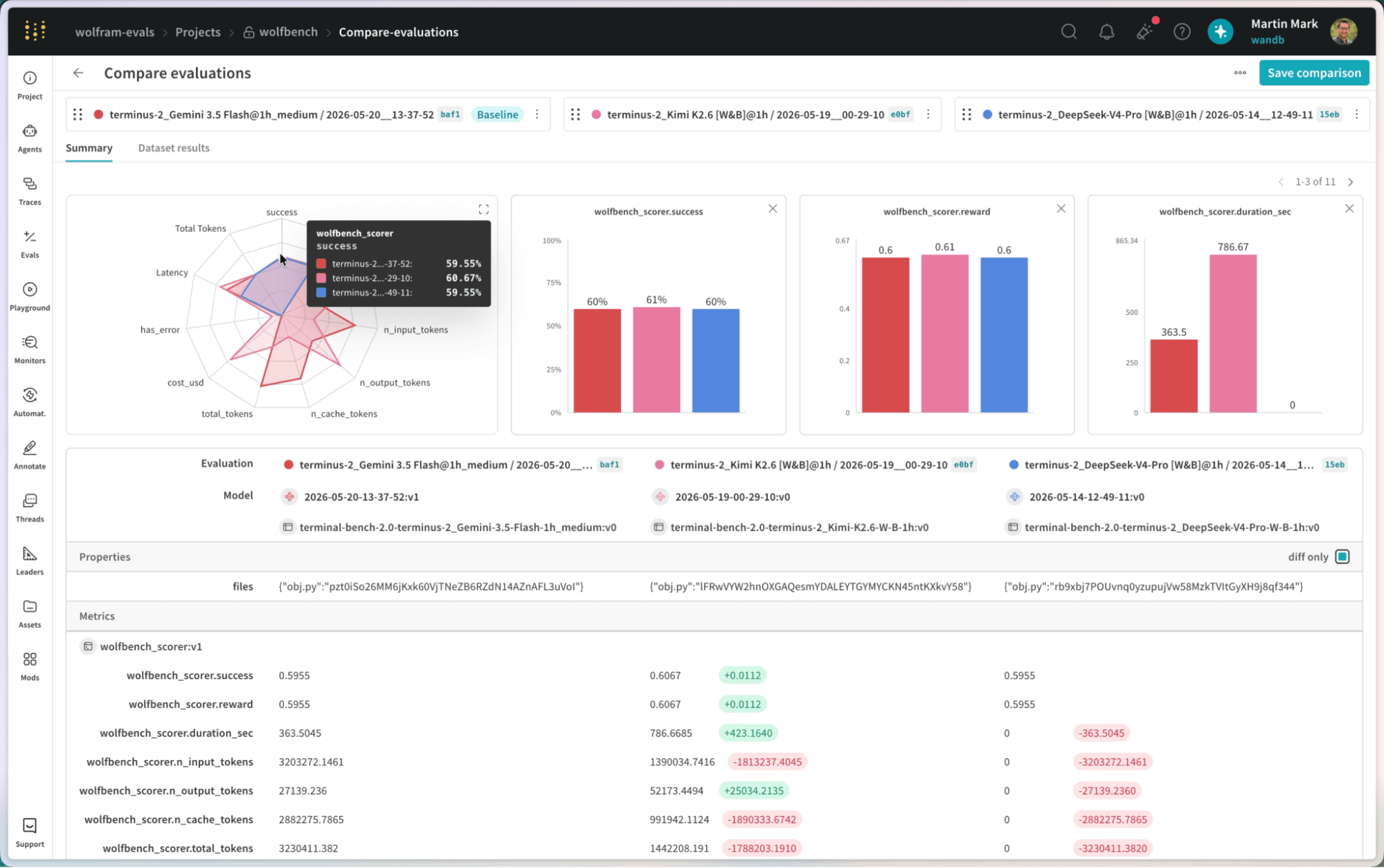
What is Weights & Biases Weave?
Weights & Biases Weave is an observability and evaluation platform for LLM applications. It traces prompts, model calls, tool usage, and agent workflows, with built-in guardrails and monitors to catch quality and safety issues in production.
Weave instruments LLM calls with a single Python or TypeScript decorator, then streams traces, costs, and latency to the W&B platform, which CoreWeave acquired in 2025. Teams use it to score and compare prompt and model versions against evaluation datasets.
Their free tier for small teams includes 1 GB of Weave data ingestion per month. Pro is $50 per seat per month with higher limits; Enterprise is custom.
What sets Weave apart?
It lives inside the full W&B platform, so teams already doing model training, fine-tuning, and experiment tracking get LLM observability in the same place, with one-decorator instrumentation to capture traces and cost. It also ships built-in guardrails and production monitors that flag toxicity, PII, and hallucinations in real time.
Key features
- Tracing: Follow prompts, model calls, tool invocations, and agent workflows through a single trace.
- Evaluations: Score outputs with pre-built, third-party, or custom scorers and compare results side by side across versions.
- Guardrails: Use safety and quality scorers to flag risks such as toxicity, bias, PII, hallucinations, coherence issues, and context-relevance problems.
- Monitors: Track quality and safety metrics over time to catch regressions in production.
How does Weights & Biases Weave compare to Langfuse?
Main differences between Weights & Biases Weave and Langfuse
- Weave includes built-in guardrails and production monitors for real-time safety and quality control. Langfuse handles this by integrating external guardrail libraries and tracing their results, rather than blocking outputs natively.
- Langfuse provides more mature prompt management and annotation workflows.
- Langfuse is open source under the MIT license and free to self-host. Weave's client library is open source, but the platform is proprietary, with self-hosting available only on the Enterprise tier.
Main similarities between Weights & Biases Weave and Langfuse
- Both capture LLM traces and monitor costs, latency, and errors.
- Both support agent and multi-step workflow tracing.
- Both provide evaluations, datasets, and benchmarking workflows.
- Both are part of larger platforms (Langfuse is owned by ClickHouse).
Why do companies use Weights & Biases Weave?
According to user reviews and community discussions, companies use Weights & Biases Weave because:
- They already use the Weights & Biases platform: Weave extends their existing training and experiment-tracking workflows into LLM tracing and evaluation.
- It combines monitoring and evaluations: Teams can trace applications, run evaluations, and manage datasets from one platform.
- It supports agent traceability: Weave provides monitoring, evaluations, datasets, and user feedback workflows for AI applications.
Bottom line
Weights & Biases Weave is a strong Langfuse competitor for teams already invested in the Weights & Biases ecosystem. Observability, evaluations, datasets, and experimentation fit naturally into existing W&B workflows. If you want a dedicated open-source platform focused on LLM engineering, Langfuse is a better choice.
Which Langfuse alternative should you choose?
- Want AI observability connected to product analytics, session replay, feature flags, experiments, and the rest of your product data? PostHog is the strongest choice.
- Already building on LangChain or LangGraph and want the tightest native integration? LangSmith is hard to beat.
- Need open-source observability with strong tracing, prompt management, evaluations, and self-hosting? Langfuse remains one of the best options.
- Want evaluation-driven development with a heavy focus on benchmarks, experiments, and model quality? Braintrust is worth a look.
- Need deep agent tracing, OpenTelemetry-native instrumentation, and strong evaluation tooling? Arize Phoenix is a strong Langfuse alternative.
- Looking for quick implementation, proxy-based monitoring, and built-in caching? Other options not detailed here might be better. Helicone was a great fit, though its maintenance-mode status makes it harder to recommend for new projects. Portkey is the closest actively-developed replacement.
- Already invested in the Weights & Biases ecosystem? Weave lets you add observability and evaluations without introducing another platform.
Is PostHog right for you?
Here's the (short) sales pitch.
We're biased, but we think PostHog is a strong Langfuse replacement if:
- You want to understand both AI performance and user behavior on the same platform.
- You want tools to help you build a better product, not only monitor LLMs (like product analytics, session replay, feature flags, experiments, surveys, and more).
- You value transparency. We're open source and open core.
- You want to try before you buy. We're self-serve with a generous free tier.
It's completely free to get started – no credit card required. Our setup wizard handles configuration in minutes, or you can check out our docs to do it yourself.
Install PostHog with one command
Paste this into your terminal and make AI do all the work.
Frequently asked questions
PostHog says it makes your product "self-driving" – what does that mean?
It means PostHog digs through your product data, finds what's worth fixing, and has agents do the work.
It starts with context. A full suite of developer tools – AI Observability, Product Analytics, Session Replay, Feature Flags, Experiments, Error Tracking, Logs, and more – captures everything happening in your product, and a Context Warehouse unifies it into one source agents can read across.
From there, Scouts read across all of it and sort what's worth knowing from what's just noise. What clears the bar becomes a report in your inbox: an agent picks it up, roots out the cause, and opens a PR. You review and merge.
You can steer it from Slack, the web app, the desktop app, or your own editor via the MCP or CLI.
What is Langfuse used for?
Langfuse is an open-source platform for LLM observability. You use it to trace requests through your AI app, track cost and latency per call, version your prompts, and run evals on model outputs. It's built for engineers debugging and improving LLM features.
Why look for a Langfuse alternative?
Common reasons include wanting AI observability alongside product analytics and session replay, needing tighter LangChain or LangGraph integration, prioritizing evaluations and experimentation, or building agents that require deeper tracing and debugging workflows.
What's the best Langfuse alternative overall?
PostHog is the strongest choice if you want AI observability connected to product analytics and session replay. It's the only tool in this comparison that combines AI observability with product analytics, session replay, feature flags, and other product-development tools. It also has a more generous free tier.
If your priority is prompt management, evaluation workflows, and annotation queues, Langfuse remains the stronger option.
Can PostHog replace Langfuse?
For some teams, yes. PostHog covers tracing, cost tracking, latency monitoring, evaluations, and prompt management. Langfuse is stronger on annotation queues, evaluation datasets, and detailed agent tracing. If your priority is connecting AI performance to user behavior, PostHog is the better fit.
Is there a free or open-source Langfuse alternative?
PostHog and Arize Phoenix are both open source, self-hostable, and free to start. PostHog's free tier includes 100K LLM observability events per month, plus product analytics, session replay, and feature flags. Arize Phoenix is free and open source with no usage limits on the self-hosted version.
For more alternatives, check out our list of cheapest AI observability tools.
What are the best open-source AI observability tools for tracing and debugging?
Langfuse and Arize Phoenix are the strongest open-source alternatives. Langfuse covers tracing, prompt management, and evals, and is fully self-hostable. Arize Phoenix is OpenTelemetry-native and provides deep visibility into agent and multi-step workflows. PostHog is also open source and adds product analytics and session replay on top of tracing.
What's the best Langfuse alternative for small teams or startups?
PostHog is a strong fit. The free tier includes 100K LLM observability events per month, plus product analytics, session replay, feature flags, and experiments, so you get multiple tools in the same platform. If you're building on LangChain, LangSmith offers tight native integration with a free starter plan.
Which Langfuse alternative is best for LangChain?
LangSmith. It's built by the LangChain team, so tracing, debugging, and evaluating LangChain and LangGraph applications is tightly integrated from day one.
Which Langfuse alternative is best for AI evaluations?
Braintrust is one of the strongest options for teams focused on evaluations. It's built around evaluations, benchmarks, and experiments, so measuring model quality and comparing changes is the core workflow rather than an add-on. LangSmith, Arize Phoenix, and Weave also offer strong evaluation tooling.
What other AI observability tools are available?
Beyond the tools in this guide, there are plenty of other options worth exploring. See our roundup of the best AI observability tools for a broader comparison.
What's the difference between LLM observability and traditional observability?
Traditional observability helps you monitor infrastructure, logs, errors, and application performance. LLM observability (also known as AI observability) focuses on prompts, model outputs, token usage, evaluations, tool calls, and agent workflows. Most AI teams need both.

Subscribe to our newsletter
build mode
Read by 75,000+ founders and builders
We'll share your email with Substack
PostHog is your product's context layer. With a full suite of developer tools – AI observability, product analytics, session replay, feature flags, experiments, error tracking, logs, and more – PostHog ingests and stores all the data agents need to diagnose problems, uncover opportunities, and ship fixes. A data warehouse and CDP tie it all together, unifying that context into one source agents can read across. You can steer it all from Slack, the web app, the desktop (PostHog Desktop), or your own editor via the MCP.