







What we learned from our first 400k Replay Vision scans

Contents
In August we launched Replay Vision, our AI layer over Session Replay. It watches session recordings and writes up what it finds, so nobody has to sit through them. We put it to work on PostHog right away. Since then, Replay Vision has watched 400k recordings for us. Nobody was going to watch most of them anyway.
The biggest thing we learned? Replay Vision fixes the watching part, but not the thinking part.
We learned this the annoying way: in our first few weeks, some scanners found real issues and opportunities, while others produced perfectly plausible session summaries that nobody wanted to read. Every scanner that produced useful results shared three things:
- A focused, observable question that could only be answered by watching the recording
- A clear slice of relevant recordings that could actually answer it
- Permission to say "no" or "inconclusive"
How Replay Vision works
A quick introduction for those who are new here. Replay Vision is built around scanners. A scanner is a job you set up to watch recordings.
Each scanner has a query that chooses which recordings to watch, and a prompt that tells it how to judge each one. When a scanner watches a recording, it produces an observation.
Replay Vision has four scanner types, depending on the answer you want:
- A monitor answers a yes-or-no question and can return "inconclusive."
- A classifier applies a label.
- A scorer gives the recording a numerical score.
- A summarizer writes up what happened.
Alongside the answer, an observation carries a short explanation that cites the moments in the recording that support it. (A summarizer folds this into the summary itself.) The explanation is how you check the scanner's work.
A scanner only sees one recording at a time, so it cannot compare a session with recordings it has never seen. That job belongs to a Digest, which summarizes recent observations from one scanner, or a Scout, an agent that compares observations with the rest of your product data and reports the patterns it finds.
Replay Vision best practices
If you remember nothing else, remember this: your job is to pick and refine the questions you want Replay Vision to answer. It will do the watching. Product judgment remains a human problem, which is fortunate for those of us employed to provide it. Here's how to do that.
1. Each scanner should answer one specific question
When people build their first Replay Vision scanner, they tend to try the same thing: one scanner that "watches everything" and "catches everything interesting" (ask us how we know). It sounds reasonable, but it asks the model to decide both what happened and what matters to you and your product. It can do the first part just fine, but the second is still your job.
Here's a real example. We noticed people trying to investigate errors in Error Tracking, getting frustrated, and eventually going, "F*** it, I'll have PostHog AI try this instead." We set up a scanner to find those moments and show us where the product stopped helping.
The question was specific: what was the person trying to do before they "escaped" to AI, and what should we improve?
The scanner we built is a classifier called "[Error Tracking] Escape to AI assistant" and it works like this:
| Component | What it does |
|---|---|
| Recording query | Selects sessions that contain both an Error Tracking issue view and a PostHog AI conversation. Without that query, the scanner would waste most of its time watching routine investigations where nobody needed help. |
| Prompt | Asks what the person was trying to do, where the UI stopped helping, and what job they handed to PostHog AI. |
| Labels | Tag the recording using the preset list or a free-form label when the scanner finds something unpredicted. Examples: explaining an error spike, separating third-party noise from failures worth fixing, or deciding what to fix next. |
| Short explanation | Tells you what the scanner saw and why it chose that label. For example, the person opened PostHog AI after the issue view gave them no obvious way to separate third-party noise from the spike they were investigating. |
A scanner works better when its prompt uses the product's real names, states, and workflows. PostHog AI can inspect the context already in PostHog and add it to the prompt, while a coding agent can use the PostHog MCP server to pull product and workflow context directly from the codebase.
2. Aim your scanner at the right recordings
The query is how you aim your scanner. If you get it wrong, the output will likely make you go "meh," right before you spend four hours watching recordings yourself. The best prompt in the world is mostly worthless if it sees the wrong recordings.
Another scanner we use watches people use Session Replay and looks for ways we could improve the product. We call these opportunity miners. Bug scanners are the obvious first move, and we run plenty of them, but the same setup works for upside. This one's query ignores brief visits, which waste credits and add clutter, and only selects sessions where someone had deep engagement with the product. In this case, we trigger a scan when someone filters the recording list, inspects events, saves a recording, or exports one.
The prompt asks one question: did this session reveal a concrete opportunity to make Session Replay more capable? A "yes" needs visible evidence, an unmet job or repeated workaround, and a small product change we could test. It also prompts the scanner to consider alternative explanations, since not every detour is a feature request in disguise.
The rest of PostHog can aim the scanner, too. Use the event, URL, cohort, experiment exposure, survey response, or minimum duration that gives the session meaning. Some of our favorite remixes include:
- Experiments: a scanner classifies each post-exposure recording to help understand how behavior differs between arms
- Funnels: a scanner helps tease out what makes someone convert vs drop off
- Surveys: a scanner checks behavior right before a survey response is submitted
3. Make the scanner prove every "yes"
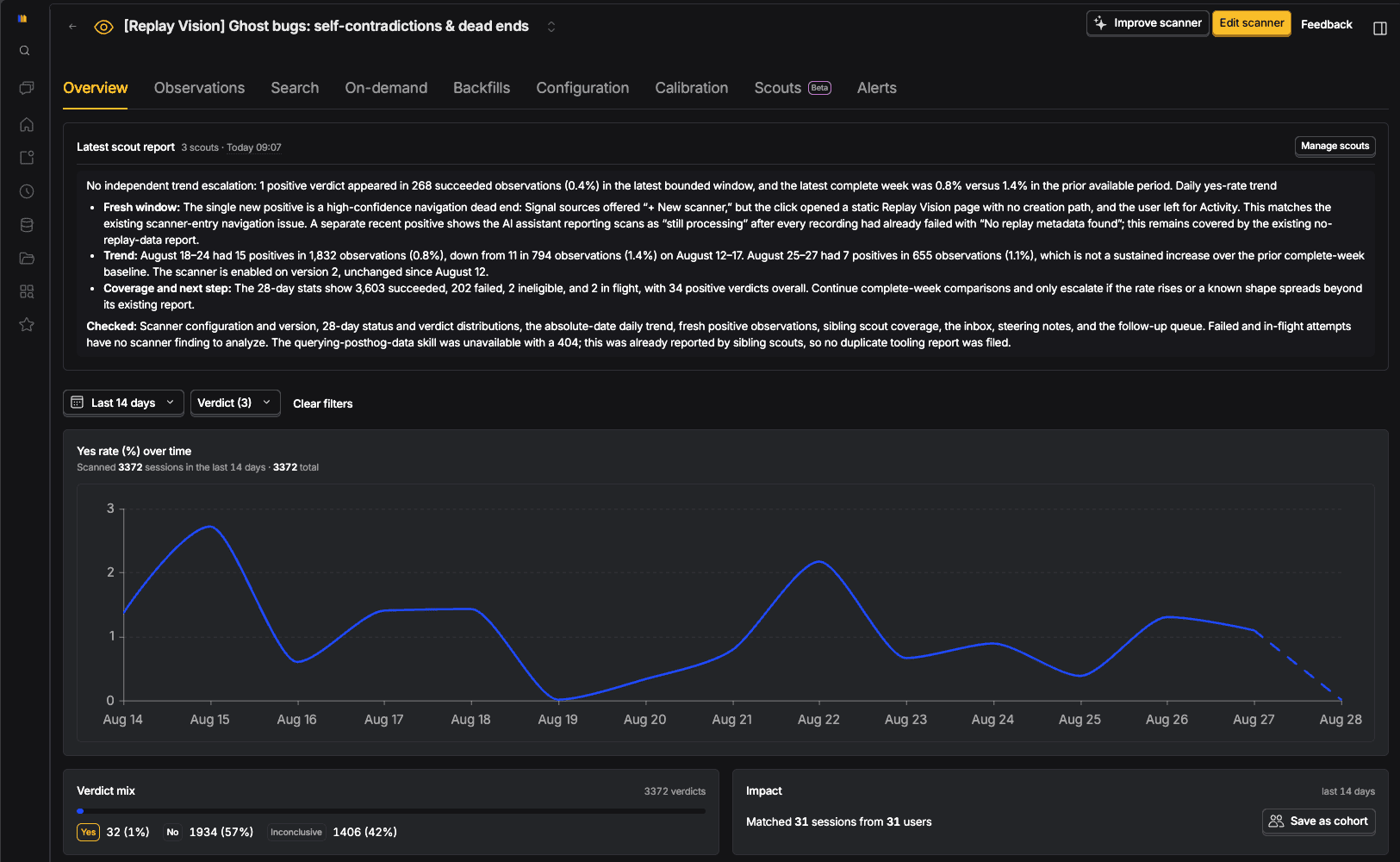
We also have a ghost-bug scanner. It watches people use Replay Vision (yes, we love using Replay Vision to improve Replay Vision). It's a monitor, so it asks one yes-or-no question of each recording: did the product contradict itself, or trap someone in a task it invited them to start?
The scanner only says "yes" when the recording shows both halves of the contradiction. Scanners that judge this strictly catch real problems. In one recording, a user reached the scan conditions step while creating a scanner. Beside "Filter out internal and test users," the product showed a gear icon. The gear did exactly what it promised when clicked: it opened project settings.
It also pulled the user out of the scanner wizard.
A normal event stream could show a settings visit followed by an abandoned wizard, but no error fired because, technically, the product worked exactly as we built it. The recording showed the actual failure: the product told the user to click a control that removed them from the task it wanted them to finish.
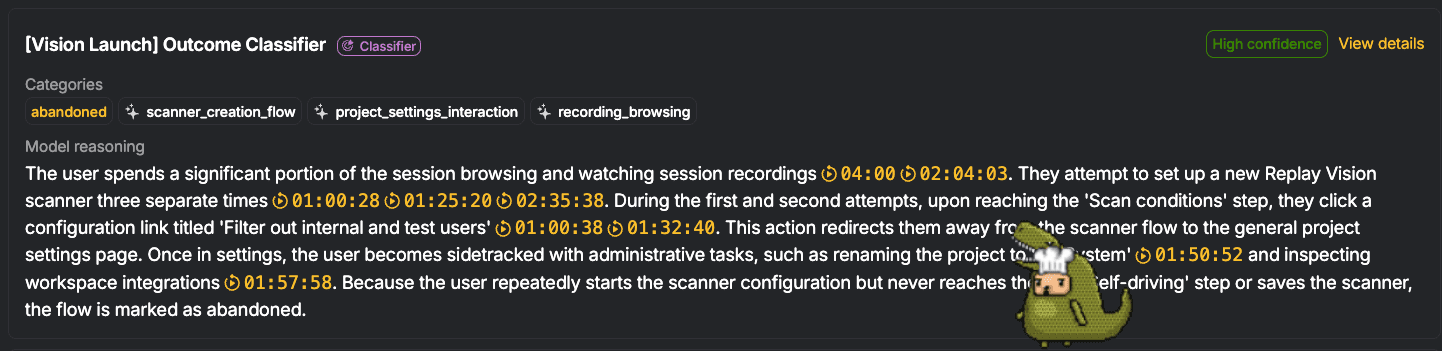
Once we could see both halves, the fix was fairly obvious: keep the setting inside the wizard instead of sending the user away. PostHog AI later opened a PR with that fix.
If an ordinary error accurately explains what happened, the answer is "no." If the recording misses either half, the answer is "inconclusive." The recording has to prove the claim, not merely make it sound plausible.
This sounds conservative and gasp boring. Good. Most sessions should not become findings, and a scanner that is never allowed to be boring will eventually make things up.
"Inconclusive" is a feature. It keeps the "yes" pile small enough for a person to inspect, which matters because selectivity is not the same as accuracy. Every observation links back to its recording, so when the scanner cites a contradiction, we can jump to the cited moments and watch both halves.
A scanner saying "Idk" is way better than making something up.
4. Run it on a small batch before you trust it
Create the scanner, then use the bulk scan action to run it against a small batch of recent recordings. Read the observations beside their source recordings and look for overclaims, missed proof, weak labels, or instructions that seemed obvious until the model interpreted them literally.
Here's one from the scanners we run on posthog.com. We built a summarizer to catch visitors who gave up on the site and reached for search, the AI chat, or the "talk to a human" form. Before enabling it, we ran it on a batch of recent sessions and read every observation. 9 of the first 15 had escaped to the human form, according to the model.
In the recordings, 9 people opened the form, typed nothing, and closed it. The model had invented their question from the pages around it, because the prompt asked what the visitor was looking for. One added rule fixed it: a form opened and closed with nothing typed is not an escape, and the scanner says so.
The same pass taught us to watch the clips, not just read the text. A text-only review of our dead-end monitor called its "can't close this modal" findings solid. Watching the recordings said otherwise, so that scanner went back to calibration.
Use the Calibration tab as a review queue. Rate each result, and add a sentence when the scanner got the premise wrong. PostHog AI can recommend and test changes against that feedback, but it will not apply them until you choose.
Don't try to perfect the prompt before you run it. The first batch will tell you how the scanner actually performs.
5. Pick the model by the cost of a wrong answer
The model changes both quality and cost. Replay Vision prices each model in credits per observation, and one credit is $0.01. Pick the model by asking what a wrong answer would cost you.
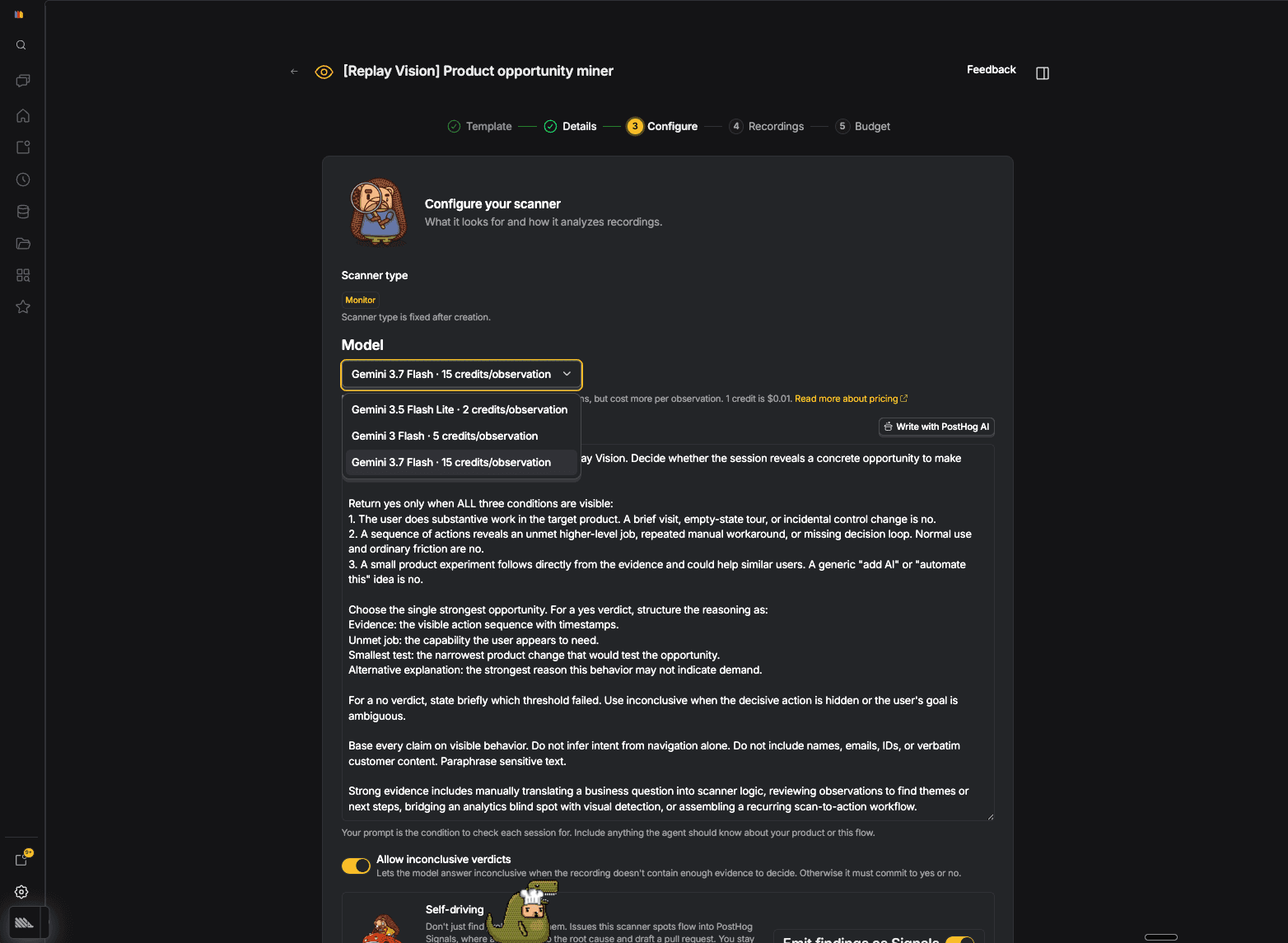
Use the cheapest model for high-volume jobs where you care about the distribution, not any single observation. Our broken-render classifier tags recordings as nothing_broken, media_failed, clipped_layout, or horizontal_overflow. One wrong label nudges a trend instead of opening a ticket.
Step up a tier when the job combines a fixed rubric with some judgment. An experiment classifier fits well here. It can label each post-exposure recording as smooth, hesitation, confusion, error_or_dead_end, or inconclusive, then a Scout or a different agent can compare the pattern across variants.
Save the priciest model for jobs where someone may act on a single observation, because a plausible wrong answer wastes their time. If the observations are close but not quite right, tighten the prompt before you move up. A sharper instruction is often cheaper than a bigger model.
Prompts for you to steal
Use these prompts to create Replay Vision scanners with a coding agent connected to the PostHog MCP. The agent should inspect your project and create the scanner.
Map the use cases people bring to a product
Compare behavior across experiment variants
Find product improvement ideas
Find self-contradictions and dead ends
Review sessions before low-NPS responses
Watch the first sessions from high-ICP signups
Ask a coding agent to design scanners
PostHog is your product's context layer. With a full suite of developer tools – AI observability, product analytics, session replay, feature flags, experiments, error tracking, logs, and more – PostHog ingests and stores all the data agents need to diagnose problems, uncover opportunities, and ship fixes. A data warehouse and CDP tie it all together, unifying that context into one source agents can read across. You can steer it all from Slack, the web app, the desktop (PostHog Desktop), or your own editor via the MCP.