








PostHog MCP
A product analyst that lives in your editor. Ask anything.
With the PostHog MCP, your agents become PostHog geniuses. Instead of manually searching for insights, data, or trends in the PostHog user interface, just ask your agent to use the PostHog MCP. Works with Cursor, Codex, Claude Code, Windsurf, VS Code, and others.


A few PostHog MCP customers.
(Yes they actually use us, no it's not just some random engineer who tried us out 2+ years ago.)
Install the MCP with the Wizard
PostHog Wizard is an agentic CLI tool that installs and configures the PostHog MCP for you. The Wizard analyzes your codebase and automagically sets up the right tools, custom events, and dashboards for your product. All it takes is one line:
Talk to me, baby
Once you connect to the PostHog MCP server, see how Hogpilled your agent has become. For example:
- "Why did sign-ups drop 12% last Tuesday?"
- "Build me a funnel from landing page to paid conversion, broken down by marketing source."
- "Show me warning and error logs from the last 24 hours, excluding debug noise."
- "Create a feature flag called new-checkout-flow rolled out to 20% of users on the pro plan."
The agent pulls from your real events, builds the insight, and explains what it found. You stay in your IDE or CLI. No context switching, no dashboard archaeology.
- Works with Claude, Cursor, Windsurf, and any MCP-compatible client
- HogQL (our SQL) and the UI insight builder are there when you need them
- Full audit log of every query run on your data, by humans or agents
If you use any of the following PostHog products, you're going to love our MCP.
See your product's performance
The PostHog MCP server gives your AI coding agent direct access to PostHog analytics. Query trends, funnels, retention, and custom HogQL – all from your code editor.
With the PostHog MCP, you can:
- Check feature performance before making code changes – "How many users are using the new search feature this week?"
- Pull conversion rates into your workflow – "What's the funnel conversion from signup to first project?"
- Investigate metric changes – "Did the login success rate change after last Tuesday's deploy?"
- Build insights on demand – "Create a trend showing daily active users broken down by plan. Then, create a report."
Triage issues, fix automatically
No more grep. No more searching through stack traces. No more comparing customer profiles to your logs.
Instead, query your data warehouse tables, clickstream event data, errors, and more to answer tough questions using your actual data – events, warehouse tables, errors, recordings – in one place.
With the PostHog MCP, you can:
- Prioritize errors by any metric – "Which errors impact user sign-ups the most?"
- Get front-end context while investigating logs and errors – "Show recordings from enterprise users in the last 24 hours."
- Let PostHog surface errors that matter most – "What services are logging errors? Search for error logs from the payments service."
Ship, measure, iterate
You've found the problem. Now ship the fix behind a flag, measured, and A/B tested. Just ask your agent to do it.
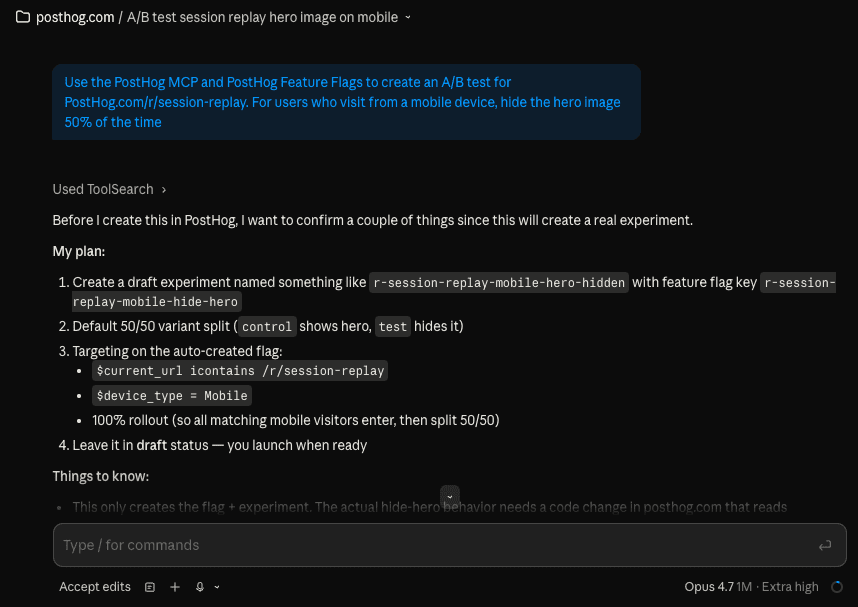
With the PostHog MCP, you can:
- Create flags while building features – "Create a flag called new-search rolled out to 10% of users" as part of your development workflow.
- Set up A/B tests in plain English – "Create an A/B test for the new checkout flow with a 70/30 split. Use purchase_completed as the goal metric."
- Get updates on experiments – "Is the dark-mode-test Experiment statistically significant yet?"
Use for free
PostHog is cheap. There's a generous free tier, no per-seat fees, and pricing is usage-based and published. More than 90% of companies use PostHog for free.
Here's the kicker: using the PostHog MCP doesn't cost extra.
TL;DR 💸
- No credit card required to start
- PostHog MCP is included (no enterprise plan required)
- Set billing limits to avoid surprise charges
- See our pricing page for more up-to-date details
That's it! You're ready to start integrating.