







Sidebar dashboard in the VS Code extension
Contents
The extension adds a PostHog panel to the VS Code sidebar (activity bar), giving you a dashboard-like interface with tabs for feature flags, experiments, analytics, and code-level event analysis.
Flags tab
The Flags tab lists all feature flags in your connected PostHog project. From here you can:
- Search for flags by name or key
- Filter by status (enabled, disabled, etc.)
- Toggle flags on or off directly
- Edit rollout percentages and variant configurations
- Quick actions — copy flag key, open in PostHog, show detail panel
This is a convenient way to manage flags without context-switching to the PostHog web interface. For more on flag management features, see flag management.

Experiments tab
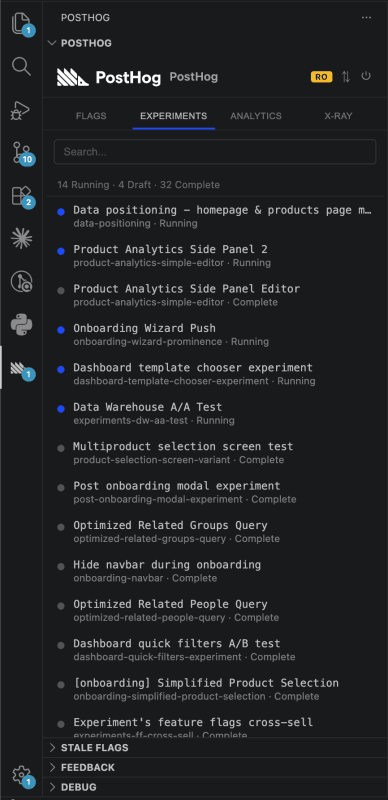
The Experiments tab shows all experiments in your project with:
- Status indicators — draft, running, or complete
- Results summary — significance level, winning variant
- Click on any experiment to open its detail panel or jump to PostHog in your browser
Analytics tab
The Analytics tab displays your saved insights from PostHog. Browse through your team's charts and metrics without leaving the editor. Insights auto-refresh periodically to show current data.
X-ray tab
The X-ray tab provides a deep look at the currently open file. It finds every capture() call in the file and shows 14-day event trends for each one.
This is useful for:
- Understanding which events in a file are actively firing
- Spotting events that have stopped firing (potential bugs or dead code)
- Seeing relative volume between events in the same file
The X-ray tab updates automatically as you switch between files.

Stale flags tree view
At the bottom of the sidebar, the stale flags tree view shows feature flags in your codebase that may be ready for cleanup. Flags are grouped by staleness reason:
- Fully rolled out — at 100% for all users
- Inactive — not evaluated recently
- Experiment complete — linked experiment has concluded
- Not in PostHog — flag key exists in code but not in the project
Click on any flag to navigate to its location in the code. For the full cleanup workflow, see stale flag cleanup.