





PostHog Slack app
Contents
The PostHog Slack app is in beta. Commands, scopes, and behavior are still moving – expect some rough edges and reach out in Discord if something looks off.
@PostHog brings PostHog into any Slack channel, thread, or DM. Mention the bot with a question about your product data and it answers in-thread using the PostHog MCP. You can also send the bot a direct message – no mention needed – for a private one-on-one conversation.
Mention @PostHog with a fix, an edit, or a feature idea and it plans the work in a sandboxed environment, edits files, runs your checks, and opens a draft PR. The PR links back to the Slack thread it came from, so reviewers can find the original context. It's the same agent that powers PostHog AI and PostHog Desktop, summoned to where your team already chats.
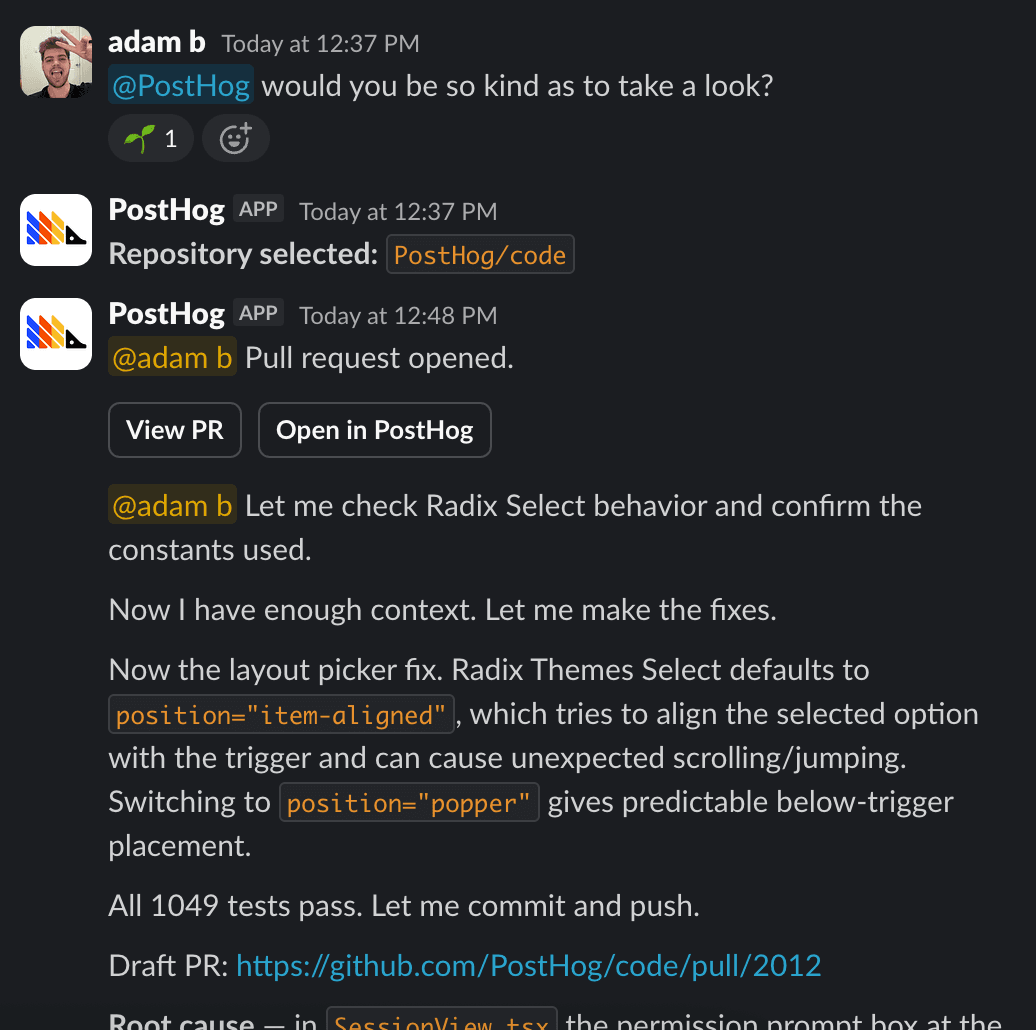
Before you can mention the bot you'll need to connect the integrations. You'll need to connect:
- A Slack workspace connection for each project
- A personal GitHub connection for each teammate who wants to ship PRs.
Start a task
Mention the bot with what you want done:
You can ask for things that mix code and product data because PostHog Desktop has your PostHog project wired up, so feature flags, experiments, events, and live metrics are all in the agent's context:
If you have a single repo connected, the task runs against it immediately. If you have several, the bot opens a repo picker in-thread. Pick one and the task starts. The picker times out after 15 minutes; after that, re-mention the bot to try again.
Once the agent finishes, it posts a final summary of its work to the thread. Every reply from the bot includes a footer with links to the run on web and desktop, the model used (plus the reasoning effort, when one is set), and a Configure link that opens the App Home tab.
Follow-ups in a thread
Reply in the thread to send a follow-up to the running agent. Anything you say while the run is active is forwarded as a new message in the same conversation, so you can steer mid-run ("actually, skip the test files") or answer a question the agent asked.
Once the agent finishes, you can reply to it by sending a new message in the thread with @PostHog to continue the existing conversation.
Anyone in the thread can send follow-ups. Each message is forwarded to the running agent as a new turn in the same conversation, so teammates can steer the run together, drop in extra context, or answer a question the agent asked.
Follow-ups are properly multiplayer: each turn runs under the identity of whoever sent it. The agent switches to the sender's own GitHub and PostHog integrations before the turn runs, so commits and PRs land under the name of the person who actually asked for them – not the person who started the thread.
If a teammate sends a follow-up without a personal GitHub connection, the agent can't fetch, push, or open PRs on their turn. It replies with a link to connect GitHub, and the rest of the conversation carries on as normal.
Reply without tagging the bot
Once a task is running in a thread, the bot can also pick up replies that don't mention @PostHog. Whether it does is up to whoever started the thread – set your preference in the App Home tab under Thread follow-ups:
| Option | What happens |
|---|---|
| Leave them alone (default) | Untagged replies are ignored – mention @PostHog to reach the agent |
| Ask them first | If the bot thinks a reply is meant for it, it asks first with a prompt only the replier can see |
| Pick them up automatically | If the bot thinks a reply is meant for it, it answers without asking |
The setting applies to every reply in threads you started, including your own. The bot is deliberately conservative about what counts as "meant for it" – teammates talking to each other are left alone.
DM the bot
You don't need a channel to talk to the bot – open a DM with PostHog and message it directly. Everything that works in a channel mention works in a DM: data questions, coding tasks, follow-ups, and attachments. It's a good place for quick tasks (or embarrassing questions) you'd rather not spam a channel with.
Group DMs work too – start one with the bot and your teammates as members. What you can't do is mention the bot in an existing DM it isn't part of: it can't see or join those conversations.
In a DM, drop the mention from commands: project <id> instead of @PostHog project <id>.
Pick a model
Tasks run on Claude Opus 5 by default. To use a different model, just ask for it as part of your message:
Any model available in PostHog Desktop works, and you can request a reasoning effort the same way ("do this with max effort"). To change your default, set a personal preference in the App Home tab under AI model, or set a project- or user-level default in PostHog under Settings → Environment → Task agents. The task agent defaults apply everywhere: Slack, the task composer, and PostHog Desktop.
The precedence is: model named in the message → your personal Slack preference → your PostHog My default model → the Project default model → the built-in default.
You can also switch models mid-run from a follow-up message, with one constraint: the runtime (Claude or Codex) is fixed once an agent starts, so moving to a model from the other family requires starting a new thread. For example, you can go from Opus to Fable mid-run, but not from a Claude model to a Codex one. Each reply's footer shows the model and reasoning effort actually used.
Attachments, files, and canvases
Attach files to your message and the agent reads them: images (PNG, JPG, GIF, WebP), PDFs, and plain-text files like logs, markdown, CSV, JSON, and YAML. Up to five attachments per message, 10 MB each.
The agent can produce artifacts of its own too – uploading files back to the thread, or creating a Slack canvas when the output is a longer document.
The App Home tab
Open the PostHog app's Home tab in Slack (or click Configure in the footer of any bot reply) to manage your setup in one place:
- Workspace activity – tasks, PRs opened and merged, merge rate, and most active teammates. Visible to Slack workspace admins and owners only.
- Project routing – your personal default project, plus the workspace-wide default (editable by Slack admins).
- AI model – your personal model and reasoning effort preference.
- Thread follow-ups – how the bot treats untagged replies in threads you started.
- Linked accounts – your PostHog account link and personal GitHub connections.
- Tasks – the tasks you've started from Slack, filterable by repo and status, with links to the thread, web, and desktop.
See Slack tasks in PostHog Desktop
Tasks you kick off from Slack show up in PostHog Desktop alongside the ones you started in the app. They're marked with a Slack icon (instead of the usual chat bubble) so you can tell where each task came from at a glance. Open one to read the full conversation, take over locally, or keep steering the run from your desktop.
Emoji cues
The bot reacts to your @PostHog message as it works through your request, so you can scan a busy channel and see what's still in flight without opening every thread:
| Emoji | What it means |
|---|---|
🔍 :mag: | Picking which repo to run the task against |
👀 :eyes: | Forwarding a follow-up to the running agent, or resuming a previous run |
🦔 :hedgehog: | The agent finished and posted its reply in the thread |
❌ :x: | Something went wrong |
Link unfurling
When you paste a PostHog insight or dashboard URL in a channel the bot is invited to, Slack shows a rich preview with the title, type, and description. Unfurling respects PostHog access permissions. Only teammates with at least viewer access on the item will see the preview. See Slack link unfurling for details.
Related
- Setup – connect Slack and personal GitHub
- Commands – full command reference and limitations
- Pricing – how Slack app usage bills
- PostHog Slack app overview – the product page
- PostHog Desktop – the desktop app for longer-running, multi-repo agent work
- Slack integration in PostHog – subscriptions, link unfurl, generic Slack setup
- Slack as a Data Pipeline destination – send event-driven messages